WB DIGITAL BASE Hybrid APK: Wear OS 5 Analog-Digital Features, 10 Colors & Health Tracking
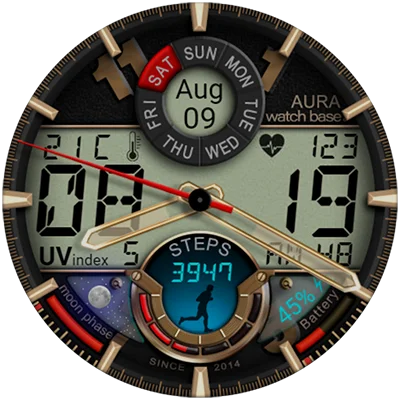
In the world of smartwatch customization, finding a watch face that perfectly balances analog elegance with digital precision can transform your daily wrist experience. The WB DIGITAL BASE Hybrid watch face has emerged as a standout choice for Wear OS 5 users seeking a feature-rich, visually striking timepiece that delivers essential information at a glance. With its bold aesthetic, 10 vibrant color options, and comprehensive data displays ranging from moon phases to UV index readings, this hybrid watch face represents the cutting edge of smartwatch personalization. Whether you’re a fitness enthusiast tracking steps and heart rate or simply appreciate having weather and calendar information instantly available, this guide will show you everything you need to maximize your experience with this modern watch face.
Table of Contents
What Makes WB DIGITAL BASE Hybrid Unique?
The WB DIGITAL BASE Hybrid distinguishes itself in the crowded Wear OS watch face market through its thoughtful fusion of classic analog aesthetics and modern digital functionality. Developed by WatchBase, a renowned creator in the smartwatch customization community, this watch face exemplifies what “hybrid” truly means—delivering the best of both timekeeping traditions without compromise.
The Hybrid Advantage: Analog Meets Digital
Traditional analog watch faces offer timeless elegance but can lack immediate readability for precise time-checking. Pure digital designs provide instant clarity but sometimes feel clinical or lack personality. The hybrid approach bridges this gap, giving you:
| Feature Category | Analog Elements | Digital Elements |
|---|---|---|
| Time Display | Classic analog hands | Digital hour/minute readout |
| Seconds Tracking | Sweeping analog indicator | Digital seconds counter |
| Visual Appeal | Traditional watch aesthetic | Modern, bold typography |
| Readability | Gestural time reading | Instant precision |
This dual-mode presentation means you can appreciate the sophistication of analog watch design while never sacrificing the instant precision that digital displays provide—perfect for situations ranging from casual glances to precise timing needs.
Core Features That Deliver Value
The WB DIGITAL BASE Hybrid packs an impressive array of features into its carefully designed interface:
Essential Time Information:
- Dual analog and digital time display
- Dual seconds indicators (analog sweep and digital count)
- AM/PM indicator for 12-hour format clarity
- Month, date, and day of the week display
Health & Fitness Tracking:
- Real-time heart rate monitoring
- Daily steps tracker with progress visualization
- Integration with Wear OS health sensors
Environmental Intelligence:
- Current temperature with automatic unit conversion
- UV index for sun exposure awareness
- Moon phases indicator for astronomy enthusiasts
Practical Elements:
- Battery level indicator
- Always-On Display (AOD) support
- 10 customizable color skins for personalization
For smartwatch users building a comprehensive watch face collection, the hybrid design philosophy pairs beautifully with other versatile options. The MD335 Hybrid watch face offers a complementary aesthetic approach, providing variety while maintaining the analog-digital fusion that makes hybrid designs so appealing.
Critical Compatibility Information: Wear OS 5 Requirement
Before diving deeper into features and customization, understanding the compatibility requirements for WB DIGITAL BASE Hybrid is absolutely essential to avoid disappointment.
Wear OS 5 Exclusive Design
This watch face is compatible only with devices running Wear OS 5 and higher. This represents the latest generation of Google’s smartwatch operating system, which means not all Wear OS devices will support this watch face.
Compatible Devices Include:
- Samsung Galaxy Watch 7 and Watch 7 Ultra
- Google Pixel Watch 3 (when updated to Wear OS 5)
- Other smartwatches receiving Wear OS 5 updates
Incompatible Devices:
- Samsung Galaxy Watch 4, 5, and 6 (currently on Wear OS 4)
- Google Pixel Watch 1 and 2 (unless updated to Wear OS 5)
- Older Wear OS devices on version 4 or earlier
Why the Wear OS 5 Requirement Matters
The decision to build exclusively for Wear OS 5 allows the WatchBase team to leverage the latest API capabilities, enhanced graphics rendering, and improved battery optimization techniques. This forward-looking approach ensures:
- Better Performance: Optimized for newest hardware and software
- Enhanced Features: Access to latest Wear OS sensor and complication APIs
- Future-Proofing: Built for the platform’s evolution rather than legacy support
- Visual Quality: Takes advantage of improved rendering capabilities
While this limits immediate compatibility, it positions the watch face as a premium choice for users with cutting-edge smartwatch hardware. Before purchasing, verify your device’s Wear OS version in Settings > System > About to confirm compatibility.
Installation Guide: Getting Started with WB DIGITAL BASE Hybrid
Installing the WB DIGITAL BASE Hybrid is straightforward, though understanding the process helps avoid common pitfalls that occasionally frustrate new users.
Standard Installation Process
- Purchase and Download: Get the watch face from the Google Play Store on your smartphone
- Companion App Installation: A phone companion app installs automatically to facilitate the process
- Synchronization: The watch face syncs to your paired Wear OS 5 smartwatch
- Activation: Long-press your current watch face, swipe to find WB DIGITAL BASE Hybrid
- Customization: Tap “Customize” to personalize colors and settings
Troubleshooting Installation Issues
Even seamless processes occasionally encounter hiccups. Here are solutions to the most common installation challenges:
Can’t Find the Watch Face After Installation:
- Long-press your current watch face on the watch itself
- Swipe left through available watch faces
- If not visible, tap the “+” icon at the end to add watch faces
- Look for WB DIGITAL BASE Hybrid in the complete list
Watch Face Shows “Purchase” Despite Already Buying:
- This is a common Google Play synchronization issue
- You will NOT be charged twice—it’s verifying your existing purchase
- Wait a few minutes for sync to complete
- Restart your watch if the issue persists
Installation Stuck or Not Progressing:
- Check Bluetooth connection between phone and watch
- Ensure both devices have adequate battery (20%+ recommended)
- Try installing from a browser logged into your Google Play account
- Visit WatchBase installation guides: https://watchbase.store/static/ai/
Companion App Issues:
- When you tap “Install” in the phone app, check your watch screen
- A confirmation dialog should appear on the watch
- Tap “Install” again on the watch and wait for completion
- Allow up to 5 minutes for larger watch faces to fully install
For users exploring multiple watch face options, the MD242 Hybrid watch face provides an alternative installation experience through similar processes, making it easy to build a diverse collection of hybrid designs for different occasions.
Deep Dive: Feature Breakdown and Practical Uses
Understanding how to leverage each feature of the WB DIGITAL BASE Hybrid transforms it from merely attractive to genuinely useful in daily life.
Time Display Optimization
The dual time presentation serves different purposes throughout your day:
Analog Time Display:
- Provides quick gestural time awareness (“quarter past,” “half hour”)
- Offers traditional watch aesthetics for formal or professional settings
- Allows peripheral vision time checking without focused attention
- Creates visual balance and design appeal
Digital Time Display:
- Delivers precise minute-by-minute accuracy instantly
- Essential for timing tasks, meetings, or transportation schedules
- More readable in low-light conditions or during movement
- Reduces cognitive load when exact time matters
Strategic Usage Tips:
- During meetings or presentations, rely on analog for subtle time monitoring
- For workout timing or cooking, focus on digital precision
- In social settings, appreciate analog aesthetics while having digital backup
- At night, the digital display provides clearer readability
Seconds Indicators: Dual Precision
Both analog and digital seconds displays might seem redundant, but each serves distinct purposes:
Analog Seconds:
- Smooth sweeping motion feels more natural and less distracting
- Provides continuous time flow visualization
- Better for timing durations gestually (60-second intervals)
- Lower cognitive load for peripheral awareness
Digital Seconds:
- Exact second-by-second precision
- Essential for scientific timing or photography
- Clear countdowns for intervals or timers
- Instant readability without interpretation
Health Tracking Integration
The WB DIGITAL BASE Hybrid incorporates essential health metrics directly into the watch face:
Heart Rate Display:
- Real-time BPM (beats per minute) monitoring
- Useful for resting heart rate checks
- Quick fitness level assessment during activity
- No need to open separate health apps
Steps Tracker:
- Visual progress toward daily step goals
- Motivation through constant visibility
- Integration with Wear OS fitness tracking
- Encourages movement throughout the day
Practical Health Monitoring Tips:
- Check morning resting heart rate consistency
- Monitor step progress during work hours to prompt movement breaks
- Use heart rate info during exercise to maintain target zones
- Track recovery by observing heart rate trends throughout day
For fitness-focused users seeking additional health visualization options, the MD339 Digital watch face emphasizes fitness metrics with complementary display strategies, perfect for alternating between styles based on workout versus casual wear.
Environmental Awareness Features
The environmental data displays extend the watch face’s utility beyond basic timekeeping:
Temperature Display:
- Current local temperature at a glance
- Automatic unit conversion (Celsius/Fahrenheit) based on device settings
- Helps with daily clothing decisions
- No manual configuration required
UV Index Indicator:
- Sun exposure risk assessment
- Critical for outdoor activity planning
- Skin protection awareness
- Particularly valuable for health-conscious users
Moon Phases:
- Current lunar phase visualization
- Useful for astronomy enthusiasts
- Gardening and fishing planning (for traditional lunar calendar followers)
- Adds unique aesthetic and informational element
Environmental Data Strategy:
- Check temperature and UV before morning runs or outdoor activities
- Plan sun protection (sunscreen, hat) based on UV readings
- Use weather data to inform wardrobe choices
- Appreciate moon phases for photography or nature observation
Battery and System Information
The integrated battery indicator serves both functional and strategic purposes:
Battery Level Display:
- Constant charge awareness prevents unexpected shutdowns
- Helps establish charging routine patterns
- Visual reminder when battery drops to critical levels
- No need to dig through settings menus
Battery Management Tips:
- Charge when battery reaches 20-30% for optimal battery health
- Use AOD mode strategically to balance visibility with power conservation
- Monitor battery drain patterns to identify power-hungry apps
- Adjust watch face refresh rates if experiencing excessive drain
Customization: 10 Color Skins for Every Style
One of the standout features of the WB DIGITAL BASE Hybrid is its 10 vibrant color skin options, allowing you to match the watch face to your mood, outfit, or occasion.
Color Customization Strategy
How to Access Color Options:
- Long-press the watch face on your watch
- Tap “Customize” when the option appears
- Navigate to color/skin selection
- Preview each option in real-time
- Select your preferred color scheme
Color Selection Guide:
Professional/Formal Settings:
- Choose neutral colors: black, gray, navy, or classic white
- Subtle accents maintain sophistication
- Avoid overly bright or neon options
- Consider traditional watch colors for business contexts
Athletic/Fitness Activities:
- Bright, high-visibility colors: electric blue, vibrant green, orange
- Enhanced readability during movement
- Motivational color psychology (energetic colors boost performance)
- Contrast optimization for outdoor visibility
Casual/Weekend Wear:
- Personal preference rules
- Match favorite outfit colors
- Seasonal color coordination (warm tones in autumn, cool in summer)
- Express personality through bold choices
Evening/Social Events:
- Elegant colors: deep blue, burgundy, dark green
- Reduced brightness for less distraction
- Sophisticated palette matching formal attire
- Subtle presence without drawing excessive attention
Rotation Strategy for Color Variety
Rather than settling on one color permanently, consider rotating through options:
- Monday Blues: Start week with energizing blue tones
- Midweek Motivation: Switch to vibrant colors Wednesday/Thursday
- Friday Freedom: Embrace bolder, more playful options
- Weekend Variety: Match weekend activities and casual style
- Special Occasions: Select appropriate formal or festive colors
This rotation prevents monotony while maximizing your investment in the watch face’s customization features. The variety keeps your watch feeling fresh and engaging rather than becoming invisible through familiarity.
Always-On Display (AOD): Balancing Visibility and Battery Life
The WB DIGITAL BASE Hybrid supports Always-On Display mode, a critical feature for smartwatch usability that requires strategic management.
Understanding AOD Benefits
Constant Time Visibility:
- No wrist gestures required to check time
- Functions like traditional watch with permanent display
- Reduces awkward wrist-raising in meetings or social situations
- Maintains smartwatch utility throughout the day
Information Persistence:
- Key data remains visible: date, battery, basic time
- Reduces interaction frequency, extending overall battery life
- Provides ambient awareness without active engagement
- Professional appearance with always-visible watch face
AOD Battery Management
Power Consumption Factors:
- AOD uses simplified, dimmed version of full watch face
- OLED displays (most modern smartwatches) minimize AOD power drain
- Dark color skins consume less power in AOD mode
- Selective information display balances utility with efficiency
Optimization Strategies:
- Enable AOD for workdays when constant visibility matters
- Disable during weekends or extended periods away from charger
- Choose darker color skins when prioritizing battery life
- Balance AOD with appropriate screen brightness settings
AOD vs. Gesture Activation Decision Guide:
Use AOD When:
- In professional settings requiring subtle time checks
- During activities where hand movements are restricted
- When battery life isn’t a concern (daily charging routine established)
- You value traditional watch-like constant display
Use Gesture Activation When:
- Maximizing battery life for extended use
- In dark environments where constant glow is distracting
- Your smartwatch doesn’t have efficient AOD implementation
- You prefer minimizing display-on time
For users interested in exploring various AOD implementations across different watch faces, the MD326 3D Modern Watch Face offers distinctive AOD styling that complements the hybrid approach with three-dimensional visual elements.
Advanced Tips: Maximizing Your WB DIGITAL BASE Hybrid Experience
Beyond basic setup and customization, strategic usage patterns elevate the WB DIGITAL BASE Hybrid from good to exceptional.
Context-Based Configuration
Morning Routine Setup:
- Enable full brightness for outdoor visibility during commute
- Prioritize weather information (temperature, UV) for clothing decisions
- Check heart rate as baseline health indicator
- Use steps tracker to set daily movement intentions
Workday Configuration:
- Moderate brightness to balance visibility with battery conservation
- Professional color scheme (black, navy, gray)
- AOD enabled for meeting-friendly time checks
- Minimize distractions by focusing on essential data only
Evening/Night Setup:
- Reduce brightness significantly (3-4 out of 10)
- Enable AOD for bedside clock functionality
- Consider darker color skins to reduce blue light
- Check battery to determine charging needs
Workout Mode:
- Maximum brightness for outdoor activity visibility
- Bright, energizing colors for motivation
- Heart rate and steps prominently visible
- Quick-glance information prioritization
Data Interpretation Skills
Heart Rate Context:
- Resting heart rate: 60-100 BPM normal for adults
- Lower resting rates often indicate better fitness
- Sudden elevated resting rates may signal overtraining or illness
- Use morning resting rate as health baseline
UV Index Understanding:
- 0-2: Low risk, minimal protection needed
- 3-5: Moderate risk, use sunscreen
- 6-7: High risk, seek shade during peak sun
- 8-10: Very high risk, take precautions
- 11+: Extreme risk, avoid sun exposure
Steps Tracking Strategy:
- 10,000 steps daily remains common goal
- Focus on consistency over absolute numbers
- Use steps as movement reminder, not obsession
- Recognize that step count is one health metric among many
Troubleshooting and Optimization
Watch Face Performance Issues:
- If experiencing lag, restart your watch
- Ensure Wear OS system is updated to latest version
- Check for watch face updates from WatchBase
- Consider reducing AOD complexity if battery drains rapidly
Complication Data Not Updating:
- Verify weather app permissions in watch settings
- Check internet connectivity (Wi-Fi or phone Bluetooth connection)
- Manually refresh weather/health apps
- Restart watch to reset sensor connections
Display Visibility Problems:
- Adjust brightness in watch quick settings
- Enable “Boost brightness” for outdoor visibility
- Clean watch screen—smudges significantly reduce readability
- Consider color skin with higher contrast in problematic lighting
The WatchBase Community: Support and Resources
The WB DIGITAL BASE Hybrid comes from WatchBase, a prolific developer with strong community engagement and support infrastructure.
Official Support Channels
Direct Resources:
- Installation Guide: https://watchbase.store/static/ai/
- Post-Installation Support: https://watchbase.store/static/ai/ai.html
- Email support through Google Play developer contact
- Comprehensive FAQ documentation
Community Engagement:
- Facebook Group: General watch face discussions with 50,000+ members
- Facebook Page: Official updates, new releases, tutorials
- Instagram: Visual showcases, user features, design previews
- YouTube: Video tutorials, reviews, installation walkthroughs
- TikTok: Quick tips, style inspiration, trend content
Learning from the Community
Active community participation provides several benefits:
Troubleshooting Support: Users share solutions to common installation or functionality issues before official support channels respond.
Customization Inspiration: See how other users configure colors, pair with watch bands, or create themed setups for different occasions.
New Release Previews: Get early information about upcoming watch faces and features from WatchBase’s extensive portfolio.
Design Feedback: Developers actively solicit user input on features, colors, and improvements for future releases.
For users building comprehensive watch face collections, exploring WatchBase’s broader portfolio through community recommendations often leads to discovering complementary designs. The MD327 Digital Watch Face represents another popular option from the same design community, offering a pure digital alternative to the hybrid approach when you want variety in your rotation.
Comparing Hybrid Watch Faces: How WB DIGITAL BASE Stacks Up
The smartwatch market offers numerous hybrid watch face options. Understanding how the WB DIGITAL BASE Hybrid compares helps validate your choice or identify alternatives if it doesn’t perfectly match your needs.
Competitive Advantages
Comprehensive Feature Set: Few hybrid watch faces match the breadth of information—moon phases, UV index, dual seconds indicators—packed into WB DIGITAL BASE’s design.
Color Customization: The 10 distinct color skins provide more variety than most competitors offering 3-5 options.
Wear OS 5 Optimization: Purpose-built for the latest platform version ensures smooth performance and future compatibility.
Active Developer Support: WatchBase’s strong community presence and regular updates demonstrate long-term commitment.
Value Proposition: Competitive pricing relative to feature density and customization options.
Alternative Considerations
If You Prefer More Traditional Analog: Some users find pure analog with minimal digital elements more aesthetically pleasing for formal occasions.
If You Need Wear OS 4 Compatibility: Current limitation to Wear OS 5 excludes many excellent smartwatches still receiving updates.
If You Want Extreme Minimalism: The information-dense design might feel cluttered compared to minimalist watch faces with fewer complications.
If Battery Life is Paramount: Simpler watch faces with fewer animated or updating elements typically consume less power.
Building Your Watch Face Collection
Rather than seeking one perfect watch face, many enthusiasts build collections for different contexts:
Daily Driver: WB DIGITAL BASE Hybrid for comprehensive information access Formal Occasions: Pure analog face with minimal complications Fitness Focus: Sport-oriented face emphasizing health metrics Minimalist Moments: Simple, clean design for distraction-free periods Special Themes: Seasonal or hobby-specific designs for variety
This approach maximizes your smartwatch’s potential while preventing aesthetic fatigue from seeing the same design daily.
Pricing, Value, and Purchase Considerations
Understanding the value proposition of the WB DIGITAL BASE Hybrid helps determine if it’s the right investment for your smartwatch customization needs.
Cost-Benefit Analysis
Initial Investment: Watch faces typically range from $0.99 to $3.99, with WB DIGITAL BASE positioned competitively within this range.
What You’re Getting:
- Professionally designed hybrid interface
- 10 customizable color skins (effectively 10 watch faces in one)
- Comprehensive data complications (health, weather, calendar)
- AOD support for constant visibility
- Ongoing updates and support
- Access to WatchBase community resources
Long-Term Value:
- One-time purchase, no subscriptions or recurring fees
- Updates often add features at no additional cost
- Tied to Google account, works across compatible devices
- Regular use (checking watch dozens of times daily) compounds value
Value Comparison:
- Premium analog watches: $100-$1000+ for aesthetic appeal
- Fitness smartwatch subscriptions: $10-20/month for health features
- Multiple standalone apps for weather, fitness, astronomy: $5-30 total
- WB DIGITAL BASE Hybrid: Single modest purchase providing all features
Return on Investment
Consider that you interact with your watch face every time you check the time—easily 50-100 times daily for most users. Over months and years, this compounds into thousands of interactions, making even a $3 watch face investment translate to fractions of a cent per use.
Final Verdict: Is WB DIGITAL BASE Hybrid Right for You?
The WB DIGITAL BASE Hybrid excels as a feature-rich, visually appealing watch face for Wear OS 5 users who value information density, customization flexibility, and the unique appeal of hybrid analog-digital design.
Ideal For:
- Wear OS 5 device owners (Samsung Galaxy Watch 7, Pixel Watch 3, etc.)
- Users wanting comprehensive information at a glance
- People who appreciate both analog aesthetics and digital precision
- Fitness and health monitoring enthusiasts
- Anyone seeking customizable color options for different occasions
- Smartwatch users building diverse watch face collections
Less Ideal For:
- Wear OS 4 or earlier device owners (not compatible)
- Extreme minimalists preferring simple time-only displays
- Users overwhelmed by information-dense interfaces
- Those seeking ultra-long battery life (simpler faces consume less power)
- People who never customize or change settings
If you own a Wear OS 5 compatible device and identify with the ideal user profile, the WB DIGITAL BASE Hybrid represents an excellent investment that will enhance your daily smartwatch experience through thoughtful design, practical features, and aesthetic flexibility.
Frequently Asked Questions
Is WB DIGITAL BASE Hybrid compatible with my Samsung Galaxy Watch or Google Pixel Watch?
The WB DIGITAL BASE Hybrid watch face requires Wear OS 5 or higher, which currently limits compatibility. It works with Samsung Galaxy Watch 7, Galaxy Watch 7 Ultra, and potentially Google Pixel Watch 3 (when updated to Wear OS 5). However, it is NOT compatible with Samsung Galaxy Watch 4, 5, or 6, or Google Pixel Watch 1 or 2, as these devices currently run Wear OS 4 or earlier. Before purchasing, check your device’s Wear OS version by going to Settings > System > About on your watch. If you see “Wear OS 5.0” or higher, you’re good to go. If you’re running Wear OS 4.x or earlier, this watch face won’t work on your device. This limitation exists because WatchBase built the face specifically for Wear OS 5’s enhanced capabilities, ensuring optimal performance and access to the latest features.
Does the temperature display automatically switch between Celsius and Fahrenheit?
Yes, the WB DIGITAL BASE Hybrid watch face automatically adjusts temperature units to match your watch or phone settings—no manual configuration required. The watch face reads your device’s regional settings and displays temperature in Celsius or Fahrenheit accordingly. If you want to change the temperature unit, you don’t need to adjust anything in the watch face itself; simply change your device’s regional settings. On most Wear OS watches, go to Settings > System > Language & input > Language, and select your preferred region. The watch face will automatically detect this change and update the temperature display format. This automatic adaptation ensures the watch face always shows temperature in units you’re familiar with, whether you’re traveling internationally or simply prefer one system over another.
What should I do if I can’t find the watch face after purchasing and installing it?
This is one of the most common issues with Wear OS watch faces, and it’s typically a discovery problem rather than an installation failure. After purchasing from the Google Play Store and waiting for the watch face to sync to your watch (which can take a few minutes), follow these steps: On your watch, long-press your current watch face, which will show your installed watch faces. Swipe left through all available faces—WB DIGITAL BASE Hybrid should appear in this list. If you don’t see it after swiping through all faces, tap the “+” icon at the very end of the watch face carousel. This opens the complete list of installed watch faces on your device. Look for WB DIGITAL BASE Hybrid in this list and select it. If it still doesn’t appear, try restarting your watch or reinstalling from your phone’s companion app. Sometimes Google Play sync delays cause temporary visibility issues, but the watch face is installed—you just need to wait a few minutes or restart to refresh the list. You can also try installing from a web browser logged into your Google Play account for an alternative installation method.
Transform your smartwatch experience with the WB DIGITAL BASE Hybrid—where classic analog elegance meets modern digital precision in a feature-packed, customizable Wear OS 5 watch face. Download it today and discover why thousands of users consider it their go-to choice for comprehensive information display and sophisticated wrist aesthetics.
📥 Download WB DIGITAL BASE Hybrid APK Latest Version (Premium Unlocked)
Note: This version is safe. You can scan it yourself via VirusTotal.