MD335 Hybrid Watch Face APK: Customize Wear OS Smartwatch
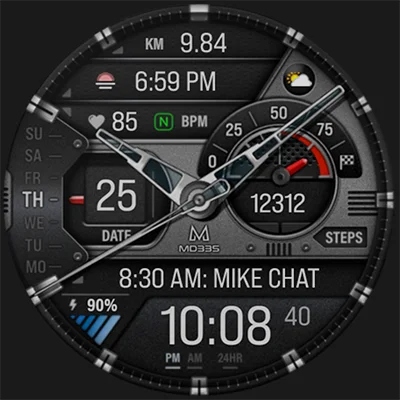
The MD335 Hybrid watch face represents a perfect fusion of classic analog aesthetics and modern digital functionality, offering smartwatch users an exceptional customization experience. This innovative timepiece brings together the timeless appeal of traditional watch design with cutting-edge Wear OS features, creating a versatile solution for users who demand both style and functionality from their wearable devices.
Table of Contents
What Makes MD335 Hybrid Watch Face Stand Out?
The MD335 Hybrid watch face distinguishes itself in the crowded smartwatch customization market through its unique hybrid design philosophy. Unlike purely digital or analog alternatives, this watch face offers users the flexibility to toggle between classic analog hands and modern digital displays, adapting to different preferences and situations throughout the day.
Key Features Overview
| Feature | Description | Benefit |
|---|---|---|
| Hybrid Design | Combines analog and digital elements | Best of both worlds aesthetics |
| Hideable Hands | Toggle analog hands on/off | Clean digital view when needed |
| Custom Complications | 3 customizable data slots | Personalized information display |
| App Shortcuts | 4 preset + 1 customizable | Quick access to essential apps |
| Dual AOD Modes | Minimal and full always-on display | Battery optimization options |
| Theme Flexibility | Dark/light mode switching | Matches any style preference |
Installation and Compatibility
The MD335 Hybrid watch face supports all Wear OS devices with API Level 33+ (Wear OS 4 and later versions), including:
- Samsung Galaxy Watch 4, 5, 6, 7, 8, and Ultra
- Google Pixel Watch series
- Other compatible Wear OS smartwatches
Installation Process
- Download from the Google Play Store
- Sync with your smartwatch
- Access through watch face selection menu
- Customize according to your preferences
Pro Tip: Samsung Galaxy Watch users experiencing loading issues in the Samsung Wearable app should customize directly on the watch by tapping and holding the screen, then selecting “Customize.”
Comprehensive Customization Options
Visual Customization
The MD335 Hybrid watch face offers extensive personalization capabilities:
Color Schemes
- Time Display Colors: Adjust hour, minute, and second hand colors
- Battery Level Indicators: Custom colors for charge status
- Goal Progress Rings: Personalized fitness tracking colors
- Marker Customization: Change hour markers and accent colors
- General Theme Colors: Overall watch face color harmony
Design Elements
- Changeable Hands: Multiple analog hand styles
- Theme Modes: Switch between dark and light themes
- 12/24 Hour Format: Automatically syncs with phone settings
- Date and Day Display: Multiple layout options
Functional Customization
Preset App Shortcuts
The watch face includes four convenient preset shortcuts:
- Calendar: Quick access to daily schedule
- Battery: Monitor power levels across devices
- Heart Rate Monitor: Instant health measurements
- Alarm Settings: Easy timer and alarm management
Smart Complications System
Three customizable complication slots allow you to display:
| Health Data | Environmental | Productivity |
|---|---|---|
| Steps & Goals | Weather Conditions | World Clock |
| Calories Burned | Barometer Readings | Timer Functions |
| Distance Walked | UV Index | Stopwatch |
| Heart Rate Zones | Rain Probability | Calendar Events |
Another great alternative is MD326 3D Modern Watch Face, perfect for users who want a dynamic and futuristic look on their smartwatch.
Advanced Features and Functionality
Always-On Display (AOD) Options
The MD335 Hybrid watch face provides two AOD modes to balance visibility with battery conservation:
- Minimal AOD: Essential time information only
- Full AOD: Complete data display in low-power mode
Health and Fitness Integration
This smartwatch face excels in fitness tracking integration:
- Real-time Heart Rate: Continuous monitoring with interval tracking
- Step Counter: Daily progress with customizable goals
- Activity Rings: Visual progress indicators
- Health Data Synchronization: Seamless integration with fitness apps
User Experience and Performance
Navigation and Interface
The MD335 Hybrid watch face prioritizes user-friendly interaction:
- Intuitive Touch Controls: Easy access to all features
- Quick Customization: Touch and hold for instant settings
- Responsive Design: Smooth transitions and animations
- Accessibility Features: Clear visibility in various lighting conditions
Battery Optimization
Smart power management features include:
- Adaptive brightness control
- Efficient AOD implementation
- Optimized complication refresh rates
- Background process management
Troubleshooting and Support
Common Issues and Solutions
| Issue | Solution |
|---|---|
| Watch face not loading | Restart watch and resync |
| Complications not updating | Check app permissions |
| Customization not saving | Use on-watch customization |
| Samsung app loading problems | Customize directly on watch |
Getting Help
For technical support and troubleshooting:
- Email Support: [email protected]
- Installation Guide: Available at matteodinimd.com
- Community Support: Join the developer’s social channels
Comparison with Similar Watch Faces
While exploring watch face options, you might also consider the MD242 Hybrid watch face, which offers a different aesthetic approach to the hybrid concept, providing additional variety for users seeking sophisticated timepiece designs.
Tips for Maximum Customization
Design Best Practices
- Color Coordination: Choose complementary colors for visual harmony
- Complication Selection: Pick data most relevant to your daily routine
- Theme Consistency: Match watch face theme with your outfit preferences
- Battery Balance: Use minimal AOD for extended wear
- Shortcut Optimization: Configure shortcuts for frequently used apps
Advanced Customization Strategies
- Seasonal Themes: Adjust colors for different seasons
- Activity-Based Setup: Different configurations for work vs. workout
- Time Zone Management: Utilize world clock complications for travel
- Health Monitoring: Optimize complications for fitness goals
Future Updates and Development
The MD335 Hybrid watch face continues to evolve with regular updates addressing:
- Enhanced compatibility with new Wear OS versions
- Additional customization options
- Performance optimizations
- New complication support
Frequently Asked Questions
FAQ 1: Is the MD335 Hybrid watch face compatible with my smartwatch?
The MD335 Hybrid watch face is compatible with all Wear OS devices running API Level 33+ (Wear OS 4 and later). This includes Samsung Galaxy Watch 4-8 series, Galaxy Watch Ultra, Google Pixel Watch, and other modern Wear OS smartwatches. Check your device’s Wear OS version in settings to confirm compatibility.
FAQ 2: Why can’t I customize the MD335 watch face through the Samsung Wearable app?
Samsung Galaxy Watch users often experience loading issues when trying to customize complex watch faces like the MD335 Hybrid watch face through the Samsung Wearable app. This is a known Samsung app limitation, not a problem with the watch face itself. The recommended solution is to customize the watch face directly on your watch by tapping and holding the screen, then selecting “Customize.”
FAQ 3: What complications can I add to the MD335 Hybrid watch face?
The MD335 Hybrid watch face features three customizable complication slots that can display various data types including weather information, health metrics (steps, calories, heart rate), productivity tools (world clock, timer), and environmental data (barometer, UV index). Note that some complications may require additional apps to be installed on your watch, and these external apps are not controlled by the watch face developer.
Conclusion
The MD335 Hybrid watch face successfully bridges the gap between traditional timepiece elegance and modern smartwatch functionality. Its extensive customization options, robust feature set, and intuitive design make it an excellent choice for users seeking a versatile and sophisticated watch face experience.
Whether you’re a fitness enthusiast tracking daily goals, a busy professional needing quick app access, or someone who simply appreciates beautiful watch design, the MD335 Hybrid watch face delivers a comprehensive solution that adapts to your lifestyle and preferences.
With its combination of aesthetic flexibility, functional depth, and ongoing developer support, this watch face represents exceptional value in the competitive smartwatch customization market. The hybrid approach ensures you never have to choose between classic style and modern convenience – you can enjoy both in one elegant package.
📥 Download MD335 Hybrid watch face APK Latest Version (Premium Unlocked)
Note: This version is safe. You can scan it yourself via VirusTotal.