Paper of Time – Watch Face APK: Lined Notebook Style, 30 Colors & Wear OS Productivity
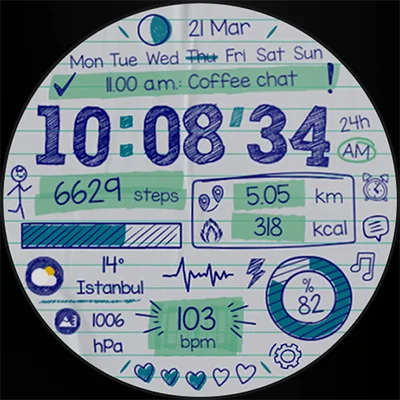
Remember the feeling of writing on lined notebook paper during your school days? That distinctive texture, the organized lines, the sense of purpose each page held? Paper of Time – Watch Face brilliantly captures that nostalgic essence and brings it to your Wear OS smartwatch. This innovative timepiece transforms your wrist into a canvas of meaningful minutes, where every glance at the time evokes memories while keeping you connected to modern functionality. If you’re seeking a watch face that combines vintage aesthetics with contemporary features, the Paper of Time – Watch Face delivers an experience that’s both comforting and refreshingly unique.
Table of Contents
What Makes Paper of Time – Watch Face Special?
Paper of Time – Watch Face is far more than just another digital timepiece for your smartwatch. Developed by EK Watch Faces™, this thoughtfully designed watch face reimagines how we perceive time by presenting it on a virtual paper surface that mimics the beloved lined notebooks we all remember. The tagline “Shape time with paper, live meaningful minutes!” perfectly encapsulates its philosophy—time becomes tangible, almost tactile, as if you could reach out and write your own story on your wrist.
Since its launch in March 2024, this watch face has garnered impressive attention from the Wear OS community, earning a solid 4.50 out of 5 stars based on user ratings. The design strikes a perfect balance between minimalist elegance and practical functionality, making it suitable for professionals, students, creatives, and anyone who appreciates thoughtful design.
Comprehensive Features That Define Excellence
Extensive Customization Options
One of the standout aspects of Paper of Time – Watch Face is its remarkable customization flexibility:
| Feature Category | Available Options |
|---|---|
| Color Variants | 30 different color schemes |
| Paper Patterns | 10 unique pattern designs |
| Time Format | 12-hour or 24-hour display |
| Distance Units | Automatic km/miles selection |
| Display Mode | Always-On Display supported |
Another stylish watch face to try is Digital Tree v2 watch face APK, which grows a digital tree based on your step count.
With 30 color variants, you can match your watch face to your mood, outfit, or occasion. Whether you prefer subtle pastels for professional settings or vibrant hues for casual wear, there’s a color scheme that speaks to your personal style. The 10 paper pattern variants add another layer of personalization, allowing you to choose everything from classic ruled lines to more artistic interpretations.
Health and Fitness Tracking
Paper of Time – Watch Face doesn’t compromise on functionality for aesthetics. It includes comprehensive health tracking complications:
- Step Counter: Monitor your daily activity progress at a glance
- Calorie Tracking: Keep tabs on your energy expenditure
- Heart Rate Monitoring: Real-time pulse data right on your watch face
- Battery Status: Never be caught off guard by a dying watch
These metrics integrate seamlessly into the paper-inspired design without cluttering the interface or detracting from the overall aesthetic appeal.
Productivity and Lifestyle Features
Beyond fitness tracking, this watch face enhances your daily productivity:
- Next Event Display: Stay ahead of your schedule with upcoming calendar events
- Calendar Integration: Quick access to date information
- 2 Custom Complications: Add your most-used apps or data points
- Live Moon Phases: Track lunar cycles for photography, fishing, or astronomical interest
Quick Access Shortcuts
Paper of Time – Watch Face includes convenient shortcuts to essential functions:
- Alarms: Set and manage alarms without opening separate apps
- SMS Access: Check messages quickly
- Music Player Controls: Manage your audio playback directly from the watch face
- Settings Shortcuts: Adjust watch configurations efficiently
Technical Specifications and Compatibility
Device Requirements
Paper of Time – Watch Face is built specifically for modern Wear OS smartwatches with the following requirements:
- Operating System: Wear OS with API 33 or higher
- Compatible Devices: Samsung Galaxy Watch (4, 5, 6, 7), Google Pixel Watch, Fossil Gen 6, and other modern Wear OS watches
- Permissions Required: Sensors and complication data permissions for full functionality
It’s crucial to note that this watch face requires API 33+, meaning it’s designed for the latest generation of Wear OS devices. This ensures optimal performance and access to the newest platform features.
Installation Process
Getting started with Paper of Time – Watch Face is straightforward, though it requires a few steps:
- Ensure Connection: Verify your smartwatch is properly connected to your phone
- Download via Phone App: Open the app on your phone and tap “DOWNLOAD TO THE WATCH”
- Follow Watch Instructions: Complete the installation process on your watch display
- Wait for Installation: Allow a few minutes for the watch face to fully install
- Select Your New Face: Choose Paper of Time from your watch face selector
- Grant Permissions: Manually enable sensors and complication data permissions for full functionality
Pro Tip: If you encounter a payment loop issue, don’t panic. You’ll only be charged once. Simply wait 5 minutes or restart your watch and try again—this is typically just a synchronization delay with Google servers.
Alternatively, you can install the watch face from a web browser on your PC for a smoother experience.
The Psychology Behind Paper-Inspired Design
Why does a paper-themed watch face resonate so deeply with users? The answer lies in our psychological connection to physical writing materials. Paper represents:
- Nostalgia: Memories of school days, handwritten notes, and personal journals
- Organization: The structured lines suggest order and intentionality
- Authenticity: In a digital world, paper feels genuine and grounded
- Creativity: Blank pages represent possibility and potential
Paper of Time – Watch Face taps into these emotional connections while delivering modern smartwatch functionality. It’s this unique blend that sets it apart from countless generic digital or analog watch faces.
Exploring More Creative Watch Face Options
While Paper of Time – Watch Face offers exceptional nostalgic charm, the world of Wear OS customization is vast and exciting. If you appreciate unique, themed watch faces, you might also enjoy exploring these complementary options:
For those who love retro technology aesthetics, Fallout Pip-Boy Watch Face delivers post-apocalyptic gaming charm directly to your wrist. Inspired by the iconic Fallout game series, it transforms your smartwatch into a functional Pip-Boy device with impressive attention to detail and immersive design elements.
For cyberpunk enthusiasts seeking edgy, neon-infused designs, Cyberpunk Watch Face brings dystopian future vibes to your Wear OS device. With glowing elements and high-tech aesthetics, it’s perfect for those who want their watch to make a bold statement.
Optimizing Your Paper of Time Experience
To get the maximum value from Paper of Time – Watch Face, consider these optimization strategies:
Customization Best Practices
- Match Your Environment: Use lighter colors for daytime and darker variants for evening wear
- Prioritize Your Complications: Place your most-checked data in the prominent complication slots
- Experiment with Patterns: Try different paper patterns weekly to keep the experience fresh
- Consider Battery Impact: If battery life is crucial, adjust Always-On Display settings accordingly
Permission Management
For Paper of Time – Watch Face to function optimally, you must manually enable:
- Sensor Permissions: Allows access to heart rate, step counter, and other health data
- Complication Data Permissions: Enables calendar events, weather, and third-party app integrations
Without these permissions, some features will display placeholder data instead of real-time information.
Real-World Use Cases
Paper of Time – Watch Face excels in various lifestyle scenarios:
Professional Settings
The understated elegance of the paper design makes it suitable for business environments. Choose subtle color schemes like charcoal gray or navy blue, and you have a watch face that’s both functional and appropriately professional.
Creative Environments
Writers, designers, and artists appreciate the metaphorical connection between blank paper and creative potential. It’s a subtle daily reminder of the creative possibilities each day holds.
Academic Life
Students find the nostalgic paper theme particularly resonant, connecting their smartwatch to their study materials in a visually cohesive way.
Casual Daily Wear
The approachable, warm aesthetic makes it perfect for everyday use. It’s distinctive without being flashy, interesting without being distracting.
Performance and Battery Considerations
Paper of Time – Watch Face is optimized for performance on API 33+ devices, ensuring smooth operation without significant battery drain. However, like all feature-rich watch faces, it does consume more power than minimalist alternatives. The Always-On Display feature, while convenient, will impact battery life more significantly than disabling it.
Most users report that the watch face strikes a good balance between functionality and power consumption, typically achieving a full day of use with moderate Always-On Display usage.
Community and Developer Support
EK Watch Faces™ maintains an active presence across multiple platforms:
- Website: ekwatchfaces.com
- Instagram: @ekwatchfaces
- Facebook: /ekwatchfaces
- Twitter: @ekwatchfaces
- Pinterest: /ekwatchfaces
- YouTube: Regular updates and tutorials
This multi-platform approach ensures users can get support, discover new designs, and stay informed about updates and new releases.
Value Proposition and Pricing
Paper of Time – Watch Face is available for download on the Google Play Store, offering excellent value for its feature set. The combination of 30 color variants, 10 paper patterns, comprehensive health tracking, and thoughtful design elements makes it a worthwhile investment for anyone seeking to personalize their Wear OS experience.
The one-time purchase model means no recurring subscriptions or in-app purchases—you pay once and enjoy unlimited customization forever.
Common Troubleshooting Tips
If you encounter issues with Paper of Time – Watch Face, try these solutions:
- Payment Loop: Wait 5 minutes or restart your watch; you’ll only be charged once
- Missing Data: Verify you’ve granted all required permissions in watch settings
- Installation Failure: Try installing from a PC web browser instead of the phone app
- Sync Issues: Ensure your watch and phone are properly connected via Bluetooth
- Complications Not Working: Check that companion apps (calendar, fitness tracker) have proper permissions
Remember that Play Store-related issues are beyond the developer’s control and typically resolve with patience or alternative installation methods.
The Future of Themed Watch Faces
Paper of Time – Watch Face represents an exciting trend in smartwatch customization—designs that evoke emotional responses and create meaningful connections rather than simply displaying information. As Wear OS continues evolving, expect more creative, themed watch faces that transform functional devices into personal expressions of style and personality.
Final Thoughts
Paper of Time – Watch Face succeeds in creating something truly special: a digital timepiece that feels analog, modern functionality wrapped in nostalgic packaging, and a smartwatch face that makes you smile each time you check the time. It proves that technology doesn’t have to feel cold and impersonal—sometimes the best innovations are those that connect us to our memories while moving us forward.
Whether you’re drawn to the nostalgic paper aesthetic, impressed by the comprehensive feature set, or simply looking for a watch face that stands out from the crowd, Paper of Time delivers on all fronts. It transforms the simple act of checking the time into a moment of reflection, reminding us that every minute is meaningful and worth noting.
Download Paper of Time – Watch Face today and rediscover the joy of watching time unfold on a canvas that feels both familiar and wonderfully fresh. Your smartwatch deserves to be as unique as you are, and Paper of Time makes that personalization effortless and beautiful.
For a different look, check out HMKWatch Analog 264 APK, offering analog designs with extensive color and hand style options.
Frequently Asked Questions
Q: Is Paper of Time – Watch Face compatible with my smartwatch?
A: Paper of Time – Watch Face is designed exclusively for Wear OS devices running API 33 or higher. This includes Samsung Galaxy Watch 4 and newer models, Google Pixel Watch (all generations), and other modern Wear OS smartwatches released in recent years. It is NOT compatible with Apple Watch, Fitbit devices, or older Wear OS watches running API versions below 33. Before purchasing, verify your device’s API level in the system settings to ensure compatibility.
Q: How do I enable all features on Paper of Time – Watch Face?
A: To unlock full functionality of Paper of Time – Watch Face, you must manually grant specific permissions after installation. Navigate to your watch’s Settings > Apps > Paper of Time – Watch Face > Permissions, and enable both “Sensors” (for heart rate, step counter) and “Complication Data” (for calendar events, weather, third-party apps). Without these permissions, some features will display placeholder information instead of real-time data. Additionally, ensure companion apps like your calendar and fitness tracker have proper permissions to share data with watch faces.
Q: Why am I stuck in a payment loop when installing Paper of Time – Watch Face?
A: The payment loop issue is a known synchronization problem between Wear OS devices and Google Play Store servers, not a fault of the watch face itself. You will only be charged ONCE, even if prompted to pay multiple times. To resolve this issue, wait approximately 5 minutes for the servers to sync, or restart your smartwatch and attempt the installation again. Alternatively, try installing the watch face from a web browser on your PC by visiting the Google Play Store website and selecting “Install on another device.” This method often bypasses mobile app synchronization issues. The developer has no control over Play Store functionality, so patience is key when encountering this temporary glitch.
📥 Download Paper of Time – Watch Face APK Latest Version (Premium Unlocked)
Note: This version is safe. You can scan it yourself via VirusTotal.

![[KNA002] SHINE APK: Hybrid Wear OS Watch Face with 8 Complications & Color](https://media.apkvr.com/wp-content/uploads/2025/10/KNA002-SHINE.webp "[KNA002] SHINE APK: Hybrid Wear OS Watch Face with 8 Complications & Color 5")