HMKWatch Analog 264 APK: Premium Hybrid Watch Face, Complications & Custom Themes
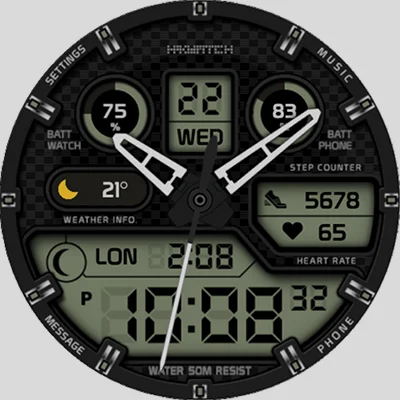
If you’re looking to elevate your smartwatch game, HMKWatch Analog 264 might just be the perfect solution. This feature-rich watch face combines classic analog aesthetics with modern digital functionality, creating a unique hybrid experience that stands out in the crowded Wear OS marketplace. Whether you’re a fitness enthusiast tracking your daily steps or a style-conscious individual wanting to personalize your wrist game, HMKWatch Analog 264 delivers on all fronts.
Table of Contents
What Makes HMKWatch Analog 264 Special?
HMKWatch Analog 264 is a customizable analog watch face designed specifically for Wear OS devices, offering an impressive blend of traditional watch design with smart technology features. What sets this watch face apart is its ability to display comprehensive information without sacrificing visual appeal—a challenge many watch face designers struggle with.
The beauty of HMKWatch Analog 264 lies in its versatility. Users particularly appreciate how it combines analog hands with old-school digital LCDs while displaying steps, heart rate, weather with icons, moon phases, and calendar information all on one face. This comprehensive approach means you won’t need to constantly switch between different watch faces to access the information you need throughout your day.
Another stylish watch face to try is MD242 Hybrid watch face, offering modern hybrid designs with interactive complications.
Key Features That Make a Difference
Time Display Options
One of the standout features of HMKWatch Analog 264 is its flexibility in time presentation:
- Dual Time Format: Switch seamlessly between 12-hour and 24-hour time modes depending on your preference
- 7 Hand Styles: Choose from seven different analog hand designs to match your aesthetic
- Digital Mode: For those moments when you prefer a digital readout
- 10 Second Hand Styles: Customize even the smallest details of your watch face
Advanced Complications and Shortcuts
The watch face supports up to 4 custom complications and includes preset shortcuts for essential functions like Settings, Battery status, Calendar, Music player, Steps, Heart rate, World clock, Messages, Alarm, and Phone. This means quick access to the information and apps you use most frequently, all from your watch face.
The complication support is particularly robust, allowing you to tailor the watch face to your specific needs. Whether you’re monitoring your fitness metrics, keeping track of appointments, or controlling your music, everything is just a tap away.
Personalization Options
HMKWatch Analog 264 truly shines when it comes to customization:
| Customization Feature | Options Available |
|---|---|
| Color Themes | 30 different themes |
| Background Colors | 10 color options |
| Hand Styles | 7 unique designs |
| Second Hand Styles | 10 variations |
| AOD Mode | Toggle On/Off |
With 30 color themes and 10 background colors, you can create thousands of unique combinations to match your outfit, mood, or personal style. This level of customization ensures that your smartwatch never looks boring or generic.
Moon Phase Display
The watch face includes an 8-step moon phase complication, perfect for astronomy enthusiasts, photographers planning night shoots, or anyone who appreciates this classic watch complication. This traditional feature adds a touch of sophistication while providing practical information.
For a different style, check out PER23 Digital Watch Face APK, which provides dynamic digital designs and interactive animations.
Installation and Setup Made Easy
Getting started with HMKWatch Analog 264 is straightforward, though there are some important steps to ensure proper installation:
- Device Selection: Make sure your watch is selected before pressing the payment button by clicking the small black triangle next to it
- Alternative Installation: You can use Chrome or Samsung browser on your PC or smartphone to install it on your watch remotely
- Finding Your Watch Face: After installation, press and hold the watch screen, turn to the rightmost position, press ‘Add watchface,’ and find it in your installed watchface list
Additional Apps for Enhanced Functionality
To unlock the full potential of HMKWatch Analog 264, consider installing these companion apps:
- Phone Battery Complication (Free): Monitor your smartphone’s battery directly from your wrist
- Complications Suite – Wear OS (Free): Add more data points and functionality
- Heart Rate Complication (Paid): Enhanced heart rate monitoring
- Health Services Complications (Paid): Comprehensive health data integration
These additional apps expand the already impressive feature set, making HMKWatch Analog 264 even more powerful and informative.
Exploring Similar Watch Face Options
While HMKWatch Analog 264 offers exceptional functionality, you might also want to explore other customization options for your smartwatch. If you enjoy personalizing your device’s appearance, check out these related apps:
For comprehensive watch face customization beyond what pre-made designs offer, KWGT Kustom Widget Maker provides powerful tools to create your own unique widgets and watch faces from scratch. This app gives you complete control over every design element.
For those who prefer modern, data-rich displays, MD327 Digital Watch Face offers a contemporary digital aesthetic with excellent information density and customization options that complement HMKWatch Analog 264’s hybrid approach.
Battery Performance Considerations
While the watch face functions fantastically, some users report it may consume more battery than simpler designs. This is understandable given the comprehensive amount of information displayed and the various complications running simultaneously. However, the trade-off between functionality and battery life is often worth it for users who value having all their essential information accessible at a glance.
To optimize battery performance:
- Disable AOD (Always-On Display) mode when not needed
- Reduce the number of active complications
- Choose simpler hand styles that require less rendering
- Limit background animations if available
Who Should Use HMKWatch Analog 264?
This watch face is ideal for:
- Fitness Enthusiasts: Track steps, heart rate, and health metrics without switching screens
- Productivity Focused Users: Quick access to calendar, messages, and phone functions
- Style Conscious Individuals: Extensive customization ensures your watch matches your personal aesthetic
- Information Seekers: Display weather, moon phases, and multiple time zones simultaneously
- Wear OS Device Owners: Specifically optimized for Galaxy Watch and other Wear OS smartwatches
Technical Compatibility
Important Note: HMKWatch Analog 264 does not support square watches and is designed exclusively for Wear OS devices. Before purchasing, ensure your smartwatch runs Wear OS and has a round display. The watch face works particularly well with Galaxy Watch 4 and newer models.
Getting the Most Value
At its core, HMKWatch Analog 264 represents excellent value for smartwatch owners who want more than a basic time display. The combination of analog elegance and digital functionality creates a unique user experience that few other watch faces can match. The extensive customization options mean you’re not just buying one watch face—you’re getting potentially hundreds of different looks and configurations.
The developer, HMKWatch, maintains an active presence on Instagram (@hmkwatch) and provides support via email ([email protected]), ensuring users can get help when needed and stay updated on new features and updates.
Installation Resources
You can download HMKWatch Analog 264 directly from the Google Play Store. The listing provides comprehensive information about features, compatibility, and user reviews that can help you make an informed decision.
Final Thoughts
HMKWatch Analog 264 successfully bridges the gap between traditional analog watch aesthetics and modern smartwatch functionality. Its impressive array of complications, extensive customization options, and thoughtful design make it a standout choice for Wear OS users who demand both form and function from their smartwatch experience.
Whether you’re tracking fitness goals, staying connected with notifications, or simply want a beautiful watch face that reflects your personal style, HMKWatch Analog 264 delivers a comprehensive solution. The initial setup might require a few extra steps to unlock its full potential, but the end result is a highly personalized, information-rich display that truly transforms your smartwatch into an indispensable daily companion.
For those who appreciate the classic elegance of analog timepieces but refuse to sacrifice the convenience of smart technology, HMKWatch Analog 264 offers the best of both worlds. It’s more than just a watch face—it’s a statement of personal style and a testament to what modern smartwatch customization can achieve.
Frequently Asked Questions
Q: Is HMKWatch Analog 264 compatible with all smartwatches?
A: No, HMKWatch Analog 264 is specifically designed for Wear OS devices with round displays. It does not support square watches or other operating systems like Apple watchOS or Fitbit OS. The watch face works particularly well with Samsung Galaxy Watch 4 and newer models, as well as other circular Wear OS smartwatches.
Q: Do I need to pay for additional apps to use all features of HMKWatch Analog 264?
A: The watch face itself includes all core features, but to unlock certain advanced complications like phone battery status and enhanced health metrics, you’ll need to install companion apps. Some of these are free (Phone Battery Complication, Complications Suite), while others are paid options (Heart Rate Complication, Health Services Complications). However, the watch face functions perfectly well without these additional apps.
Q: How can I improve battery life while using HMKWatch Analog 264?
A: To optimize battery performance with HMKWatch Analog 264, consider disabling the Always-On Display (AOD) mode when not needed, reducing the number of active complications, and choosing simpler visual elements. Since the watch face displays considerable information simultaneously, it may consume more battery than minimalist designs, but these adjustments can help balance functionality with battery longevity.
📥 Download HMKWatch Analog 264 APK Latest Version (Premium Unlocked)
Note: This version is safe. You can scan it yourself via VirusTotal.