Fallout Pip-Boy Watch Face APK: Transform Your Smartwatch Into a Wasteland Survivor’s Device
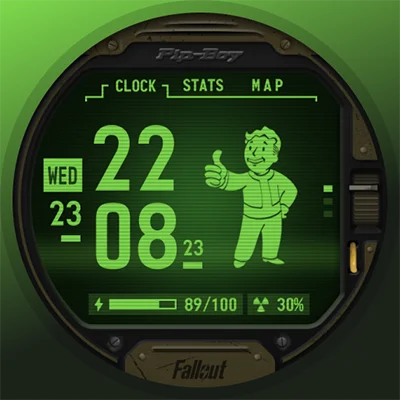
If you’re a fan of the post-apocalyptic Fallout universe, there’s no better way to showcase your love for the franchise than wearing a piece of the wasteland on your wrist. The Fallout Pip-Boy Watch Face brings the iconic Personal Information Processor (Pip-Boy) interface from Bethesda’s legendary game series directly to your Wear OS smartwatch. This official watch face, developed by Facer Studios, transforms your everyday wearable into an interactive vault dweller’s companion, complete with authentic animations, sounds, and the unmistakable retro-futuristic aesthetic that makes the Pip-Boy one of gaming’s most recognizable devices.
Whether you’re a vault dweller exploring the Commonwealth, a New Vegas gambler, or simply someone who appreciates the unique blend of 1950s retrofuturism and post-nuclear survival aesthetics, this watch face delivers an immersive experience that goes far beyond simple timekeeping. The Fallout Pip-Boy Watch Face isn’t just another themed interface—it’s a fully interactive experience that captures the essence of what makes the Pip-Boy such an enduring icon in video game history.
Table of Contents
What Makes the Fallout Pip-Boy Watch Face Special?
The Pip-Boy has been a central element of the Fallout franchise since the original game launched in 1997. These wrist-mounted computers serve as the player’s interface for managing inventory, tracking quests, monitoring health statistics, and navigating the radioactive wasteland. The Fallout Pip-Boy Watch Face recreates this experience with remarkable attention to detail, offering features that bring the game’s interface to life on your smartwatch.
Interactive Tabs: Just Like the Real Thing
One of the standout features that sets this watch face apart from typical static designs is its interactive tab system. The interface includes three distinct screens that you can navigate through by tapping:
| Tab | Function | What It Displays |
|---|---|---|
| CLOCK | Time & Date | Primary time display with the signature Pip-Boy green screen aesthetic |
| STATS | Health Data | Real-time biometric information including heart rate and activity data |
| MAP | Location Info | Your current location, weather conditions, and environmental data |
This multi-screen approach mirrors the actual Pip-Boy interface from the games, where players flip between different sections to access various types of information. The tactile interaction adds a layer of engagement that makes checking the time feel like part of the Fallout experience.
Animated Vault Boy: Your Personal Mascot
No Pip-Boy interface would be complete without Vault Boy, the cheerful mascot of Vault-Tec who appears throughout the Fallout series. The watch face features an animated Vault Boy that brings personality and movement to your display. These animations aren’t just decorative—they react to your activity and help convey information in the playful, retro style that defines the franchise’s visual language.
Vault Boy’s presence adds character to every glance at your wrist, reminding you that you’re not just checking a regular smartwatch—you’re monitoring a sophisticated piece of pre-war technology salvaged from the ruins of civilization.
Authentic Sound Effects
Immersion extends beyond visual design. When you switch between tabs, the watch face plays authentic sound effects that recreate the clicking, beeping, and mechanical sounds of the Pip-Boy interface. These audio cues enhance the feeling that you’re actually operating a real Pip-Boy device rather than a modern smartwatch.
For Fallout fans, these sounds trigger instant recognition and nostalgia. They’re subtle enough not to be intrusive but present enough to make every interaction feel special. You can adjust or disable these sounds based on your preference and environment.
Comprehensive Data Display: More Than Just Time
The Fallout Pip-Boy Watch Face goes well beyond basic timekeeping by integrating various data points that provide useful information throughout your day. This data-rich approach aligns perfectly with the Pip-Boy’s role in the games as a comprehensive personal information device.
Essential Information at a Glance
The watch face displays multiple types of information simultaneously:
- Date Display: Always know what day it is in the wasteland (or the real world)
- Battery Level: Monitor your watch’s power with a Pip-Boy-styled battery indicator
- Health Data: Track heart rate, steps, and other biometric information
- Location Services: See your current location using GPS integration
- Weather Conditions: Check temperature and humidity levels
- UV Radiation Levels: Real-time UV data displayed as “radiation levels” for authentic wasteland immersion
This last feature deserves special mention—displaying UV index as radiation levels is a clever touch that maintains the post-apocalyptic theme while providing genuinely useful health information. High UV days become “high radiation zones,” adding a playful layer of thematic consistency.
Health and Fitness Tracking
For fitness enthusiasts who also happen to be Fallout fans, the STATS tab becomes particularly valuable. By integrating with your smartwatch’s biometric sensors, the watch face transforms your health metrics into wasteland survival statistics. Your heart rate becomes a vital sign to monitor, your step count tracks your exploration progress, and your activity levels measure your readiness for wasteland adventures.
This gamification of fitness data can actually make health tracking more engaging, especially for people who struggle with motivation to stay active. When checking your stats feels like playing Fallout, you’re more likely to pay attention to the information and take action based on what you see.
Compatibility and Technical Requirements
Before downloading the Fallout Pip-Boy Watch Face, it’s important to understand the compatibility requirements and technical considerations. This watch face is designed specifically for Wear OS smartwatches and requires certain permissions to function fully.
Supported Devices
The watch face works with various Wear OS smartwatches, including:
- Samsung Galaxy Watch 4, 5, and 6 series
- Fossil Gen 6 and newer
- TicWatch Pro series
- Montblanc Summit watches
- And most other Wear OS devices
Important Note: If you own a Galaxy Watch 7, Galaxy Watch Ultra, or Pixel Watch 3, Facer Studios recommends downloading the Pip-Boy SE (Special Edition) version instead, which is specifically optimized for these newer devices with improved battery efficiency.
Required Permissions
To unlock the full functionality of the watch face, you’ll need to grant several permissions through your watch settings:
- Location Services: Enables the MAP tab to display your current location and provide weather data
- Body Sensors: Allows access to heart rate monitors and other biometric sensors for the STATS tab
- Internet Access: Required for real-time weather updates and UV radiation data
Some users initially find the permission setup process slightly complicated, but taking the time to configure everything properly ensures you get the complete Pip-Boy experience. The watch face simply can’t access location or health data without these permissions, which would significantly limit its functionality.
For those interested in other customizable watch face options with comprehensive data displays, you might also enjoy Digital Watchface Weather 3D, which offers a different aesthetic approach to weather integration on smartwatches.
Installation Process and Setup
Getting your Fallout Pip-Boy Watch Face up and running involves a few steps, primarily because it operates through the Facer app ecosystem. While some users wish for a more streamlined installation process, the setup is straightforward once you understand the workflow.
Step-by-Step Installation
- Purchase from Google Play Store: Download the watch face from the official Google Play listing
- Install Facer App: If you don’t already have it, you’ll need to install the Facer companion app on both your phone and watch
- Sync Your Device: Open the Facer app and ensure your smartwatch is connected
- Apply the Watch Face: Navigate to your purchased watch faces in Facer and select the Pip-Boy design
- Configure Permissions: Go to your watch settings and grant the necessary permissions for location and sensors
- Customize Options: Adjust any available settings to personalize your experience
Understanding the Facer Ecosystem
The requirement to use the Facer platform is worth explaining. Facer is one of the world’s largest watch face platforms, hosting hundreds of thousands of custom designs for various smartwatch brands. By operating through Facer, the Fallout Pip-Boy Watch Face can offer more sophisticated features and easier updates than standalone watch faces.
However, this does mean you’ll need to have the Facer app installed and running. Some users consider this an extra layer of complexity, while others appreciate having all their custom watch faces organized in one place. The Facer app itself is free, though it offers premium subscription options for access to their full library of designs.
Battery Life Considerations
One of the most common concerns with animated, feature-rich watch faces is their impact on battery life. The Fallout Pip-Boy Watch Face, with its animations, interactive tabs, and multiple data streams, does consume more power than simpler, static watch face designs.
Real-World Battery Performance
Based on user reports and reviews, here’s what to expect:
Average Battery Impact:
- Expect approximately 20-30% more battery consumption compared to minimal watch faces
- Most users can still achieve a full day of use (14-18 hours) with moderate interaction
- Heavy users who frequently interact with the tabs and keep the screen on longer may see more significant drain
Battery Optimization Tips:
- Reduce screen brightness when possible
- Minimize unnecessary tab switching
- Consider disabling always-on display mode if battery life becomes problematic
- Close other battery-intensive apps running in the background
- For newer devices, use the Pip-Boy SE version, which is specifically optimized for better battery efficiency
The trade-off between aesthetic appeal and battery life is personal. Many Fallout fans find that the immersive experience justifies the extra charging frequency, while practical users might save the watch face for special occasions or weekends when battery constraints are less critical.
Customization Options and Personalization
While the Fallout Pip-Boy Watch Face maintains a consistent aesthetic true to the source material, there are some customization options that allow users to tailor the experience to their preferences.
Available Customization Features
- Sound Toggle: Enable or disable the tab-switching sound effects
- Brightness Adjustments: Modify the green glow intensity to match your preference and lighting conditions
- Complication Selection: Some watch face elements can be customized to display different data types
- Notification Settings: Configure how notifications appear alongside the Pip-Boy interface
The level of customization is somewhat limited compared to some other watch faces, but this is intentional—maintaining the authentic Pip-Boy aesthetic requires adhering to the established visual design from the games. Too much customization could dilute the iconic look that makes the watch face special in the first place.
For those seeking more extensive customization in their smartwatch experience, Everything Widgets offers a different approach with highly modular widget design capabilities.
User Experience and Community Feedback
The Fallout Pip-Boy Watch Face has garnered significant attention from both the Fallout fan community and smartwatch enthusiasts. User reviews provide valuable insights into the strengths and potential limitations of this themed watch face.
What Users Love
Authentic Recreation: Fans consistently praise how accurately the watch face captures the look and feel of the in-game Pip-Boy interface. The attention to detail resonates strongly with franchise enthusiasts.
Interactive Elements: The ability to tap between different tabs adds engagement that keeps the watch face interesting long after installation. It’s not just something you look at—it’s something you interact with.
Conversation Starter: Multiple users report receiving compliments and questions about their watch face from fellow Fallout fans and curious observers. Wearing your fandom proudly creates opportunities to connect with like-minded individuals.
Quality Animations: The Vault Boy animations and smooth transitions between screens demonstrate professional-quality development that justifies the watch face’s premium pricing.
Common Concerns
Facer Requirement: The need to install and use the Facer app remains a sticking point for some users who prefer standalone watch faces. Some feel this adds unnecessary complexity to the experience.
Loading Times: A few users report occasional delays when the watch wakes from sleep mode, particularly if it hasn’t been used for a while. The watch face may take a moment to fully load all its animated elements.
Gesture Navigation Limitations: Some reviewers note that hand gestures don’t switch between the clock, stats, and map tabs as smoothly as they’d like. Instead, gestures may open system apps rather than navigating within the watch face interface.
Battery Consumption: While generally acceptable, the increased power draw compared to simpler watch faces is a consideration for users who need maximum battery longevity.
Comparing to Other Themed Watch Faces
The smartwatch customization market includes numerous themed watch faces inspired by games, movies, and pop culture franchises. How does the Fallout Pip-Boy Watch Face stack up against alternatives?
Fallout-Specific Options
Within the Fallout watch face category, you’ll find several options:
Pip-Boy SE (Special Edition): This optimized version for newer devices trades some features for better battery efficiency. It’s recommended for Galaxy Watch 7, Watch Ultra, and Pixel Watch 3 owners.
Pip-Boy S.P.E.C.I.A.L.: Another official Fallout watch face that focuses on the game’s character attribute system, displaying animated perks that change with each screen activation.
Third-Party Pip-Boy Designs: Various unofficial Pip-Boy-inspired watch faces exist on platforms like Facer and WatchMaker, often free but lacking the official licensing and polish of the Facer Studios version.
Gaming-Themed Alternatives
For fans of retro gaming aesthetics who want to explore other options, several alternatives offer similar nostalgia-driven experiences:
The TMNT – Cowabunga SE Watch Face provides another licensed property with retro styling, offering a different nostalgic gaming experience. Meanwhile, the Cyberpunk Watch Face delivers futuristic aesthetics for those who prefer a different flavor of dystopian technology.
For Star Trek fans, the TREK: Total Interface watch face offers a science fiction alternative with its own iconic interface design that similarly transforms your smartwatch into a piece of fictional technology.
Practical Daily Use Scenarios
Beyond the novelty factor, the Fallout Pip-Boy Watch Face serves practical purposes in everyday life. Understanding when and how to best use this themed interface helps maximize your satisfaction with the purchase.
Ideal Use Cases
Gaming Sessions: Wearing the Pip-Boy watch face while playing Fallout games creates a meta-experience that extends immersion beyond your screen. It’s a small touch that enhances the overall gaming atmosphere.
Conventions and Events: At gaming conventions, cosplay events, or fan gatherings, the watch face becomes part of your ensemble. It’s perfect for completing a Fallout-themed costume or simply signaling your fandom to fellow attendees.
Casual Daily Wear: For dedicated Fallout fans, there’s no reason to reserve the watch face for special occasions. The functional data display makes it practical for everyday use while showcasing your interests.
Fitness Tracking: The STATS tab’s health data integration means you can track workouts and daily activity while maintaining the themed aesthetic. Your morning jog becomes a wasteland exploration mission.
When to Consider Alternatives
There are situations where switching to a different watch face might be more appropriate:
- Formal Settings: Professional meetings or formal events might call for more conservative watch face choices
- Battery-Critical Days: Long days away from chargers might necessitate switching to a more efficient design
- Outdoor Visibility: Bright sunlight can make the green-tinted display harder to read than high-contrast alternatives
- Variety: Even devoted fans sometimes want visual variety in their daily tech experience
The beauty of smartwatches is the ability to switch between watch faces based on context, mood, and practical requirements. Having the Fallout Pip-Boy Watch Face in your collection gives you a beloved option to rotate into your daily lineup.
The Value Proposition: Is It Worth the Purchase?
The Fallout Pip-Boy Watch Face is a paid application, which raises the question every potential buyer asks: is it worth the money? Let’s examine the value from different perspectives.
What You’re Paying For
Unlike free watch faces, this official licensed product includes:
- Official Licensing: Supporting legitimate use of Bethesda’s Fallout intellectual property
- Professional Development: Quality animations, smooth interactions, and regular updates
- Comprehensive Features: Multiple data integrations and interactive elements
- Ongoing Support: Access to Facer Studios’ customer support for troubleshooting
- Future Updates: Potential improvements and new features as the watch face is maintained
Target Audience Considerations
Definitely Worth It For:
- Die-hard Fallout fans who want to express their fandom daily
- Collectors of gaming memorabilia and themed accessories
- Smartwatch enthusiasts who appreciate detailed, interactive watch faces
- Users who value quality, official licensed products over free alternatives
Might Want to Consider Alternatives:
- Casual fans who aren’t deeply invested in the franchise
- Budget-conscious users who prioritize free options
- People seeking maximum battery efficiency above all else
- Users uncomfortable with the Facer app requirement
The pricing positions this as a premium watch face rather than an impulse purchase. For true Fallout enthusiasts, the cost represents reasonable compensation for professional development of an officially licensed product. For casual interest, free alternatives might suffice.
Troubleshooting Common Issues
Even well-designed watch faces can encounter occasional problems. Here are solutions to the most commonly reported issues with the Fallout Pip-Boy Watch Face.
Permission-Related Problems
Issue: Watch face displays “Permission Required” messages or missing data
Solution: Navigate to your smartwatch’s Settings → Apps → Fallout Pip-Boy Watch Face → Permissions, and ensure Location and Body Sensors are enabled. You may need to grant these permissions directly on the watch rather than through your phone.
Loading and Performance Issues
Issue: Watch face loads slowly or appears laggy when waking the device
Solution: Try these steps in order:
- Restart your smartwatch to clear temporary memory
- Ensure the Facer app is updated to the latest version
- Check that your watch has adequate storage space available
- Consider whether other background apps are consuming resources
Tab Interaction Problems
Issue: Taps on tabs don’t switch screens or open unexpected apps
Solution: Ensure you’re tapping directly on the tab labels (CLOCK, STATS, MAP) rather than nearby areas. Some users find that tapping with slightly more deliberate pressure improves responsiveness. If problems persist, verify that the watch face is properly installed through the Facer app.
Battery Drain Concerns
Issue: Watch battery depletes faster than expected
Solution:
- Reduce screen brightness to a comfortable minimum
- Shorten screen-on duration in your watch settings
- Disable always-on display mode if enabled
- Check whether other recently installed apps might be contributing to battery drain
- For newer Galaxy or Pixel watches, switch to the battery-optimized Pip-Boy SE version
Syncing and Update Issues
Issue: Watch face doesn’t appear after purchase or fails to update
Solution: Verify that both your phone’s Facer app and your watch’s Facer app are logged into the same account. Check your Google Play purchase history to confirm the transaction completed. If problems persist, contact Facer support at [email protected] rather than leaving a negative review—their team is responsive to technical issues.
The Future of Themed Watch Faces
The success of officially licensed watch faces like the Fallout Pip-Boy Watch Face points toward interesting trends in the smartwatch customization market. As wearable technology becomes more ubiquitous, the demand for personalized, themed interfaces continues to grow.
Emerging Trends
Licensed Properties: More game developers, movie studios, and entertainment franchises are recognizing the value of official watch face partnerships. Expect to see continued expansion of high-quality, licensed designs.
Interactive Elements: The Pip-Boy’s multi-tab interface represents a move away from static watch faces toward more interactive experiences that engage users beyond simple time-checking.
Cross-Platform Integration: Future developments might include deeper integration with games themselves, potentially unlocking in-game rewards or displaying actual game statistics on your wrist.
Community Engagement: Platforms like Facer are building communities around watch face creation and sharing, fostering both amateur and professional design.
For users who appreciate retro-futuristic design aesthetics, alternatives like the Secret Service Watch Face offer different takes on vintage-inspired interfaces that might complement your collection.
Making Your Decision
Choosing whether to purchase the Fallout Pip-Boy Watch Face ultimately depends on your personal connection to the Fallout franchise, your smartwatch usage patterns, and your appreciation for detailed themed interfaces.
Final Recommendation
Highly Recommended For: Fallout fans who regularly wear a compatible Wear OS smartwatch and want to showcase their love for the franchise with a quality, interactive watch face that serves practical purposes while delivering nostalgic enjoyment.
Worth Considering If: You’re a casual Fallout fan with a compatible device, you appreciate gaming-themed accessories, or you’re building a collection of premium watch faces and want to include iconic gaming properties.
Probably Skip If: You’ve never played Fallout, you prioritize maximum battery life above aesthetics, you prefer free options, or you’re uncomfortable with requiring the Facer app.
The watch face delivers on its promise of bringing the Pip-Boy experience to your wrist. The animations are authentic, the interactive elements add engagement, and the data integration makes it practical for daily use. While it has some minor limitations and technical requirements, most Fallout fans find these manageable compared to the joy of wearing a piece of their favorite game universe.
Conclusion
The Fallout Pip-Boy Watch Face successfully translates one of gaming’s most iconic interfaces into a functional, engaging smartwatch experience. By combining authentic aesthetics with practical data displays, interactive navigation, and attention to detail, Facer Studios has created a watch face that feels less like a simple theme and more like a miniature version of the actual Pip-Boy device.
For Fallout fans, this watch face represents an opportunity to carry a piece of the wasteland with them throughout their daily lives. Every glance at your wrist becomes a small moment of connection to the post-apocalyptic world you’ve explored in countless hours of gameplay. The animated Vault Boy, the satisfying click of switching tabs, and the familiar green glow of the Pip-Boy interface all contribute to an experience that goes beyond basic timekeeping.
While the watch face isn’t perfect—battery consumption is higher than minimal designs, the Facer requirement adds complexity, and some interaction refinements would improve the experience—these limitations are relatively minor for the target audience. The combination of official licensing, professional development, and genuine respect for the source material results in a product that justifies its premium positioning in the watch face market.
Whether you’re a vault dweller preparing for your next expedition into the Commonwealth, a New Vegas courier checking your Pip-Boy before heading to the Strip, or a Capital Wasteland wanderer tracking radiation levels in real-time, the Fallout Pip-Boy Watch Face transforms your smartwatch into an authentic piece of Fallout technology. Download it from the Google Play Store and start your wasteland adventure today.
Frequently Asked Questions (FAQs)
Q: Will the Fallout Pip-Boy Watch Face work on my Samsung Galaxy Watch?
Yes, the watch face is compatible with Samsung Galaxy Watch 4, 5, and 6 series devices running Wear OS. However, if you own the newer Galaxy Watch 7 or Galaxy Watch Ultra, Facer Studios recommends downloading the Pip-Boy SE (Special Edition) version instead, which is specifically optimized for these newer devices with improved battery efficiency and performance. Make sure your watch is running a recent version of Wear OS and that you have the Facer app installed on both your phone and watch.
Q: How much does the Fallout Pip-Boy Watch Face drain my smartwatch battery?
The watch face consumes more battery than simple, static designs due to its animations, interactive tabs, and multiple data streams. Most users report approximately 20-30% more battery consumption compared to minimal watch faces, but you should still achieve a full day of normal use (14-18 hours). Battery drain can be minimized by reducing screen brightness, limiting screen-on time, and avoiding excessive tab switching. For maximum battery optimization on newer devices, consider the Pip-Boy SE version, which is specifically designed for improved power efficiency.
Q: Do I need the Facer app to use this watch face?
Yes, the Fallout Pip-Boy Watch Face operates through the Facer platform, so you’ll need to install the free Facer app on both your smartphone and smartwatch. While some users wish for a more direct installation process, the Facer ecosystem enables more sophisticated features, easier updates, and better customization options than standalone watch faces. After purchasing from Google Play, you’ll apply the watch face through the Facer app. This requirement is consistent with many premium, feature-rich watch faces.
Q: Can I customize the colors or layout of the Pip-Boy interface?
Customization options are somewhat limited to preserve the authentic Pip-Boy aesthetic from the Fallout games. You can enable or disable sound effects, adjust brightness levels, and configure some data display elements. However, the signature green color scheme and overall layout remain consistent with the source material—this is intentional to maintain the iconic look that makes the watch face recognizable to Fallout fans. The limited customization ensures every user’s Pip-Boy looks like it came straight from the Vault.
Q: What’s the difference between the regular Pip-Boy Watch Face and the Pip-Boy SE version?
The Pip-Boy SE (Special Edition) is specifically optimized for newer Wear OS devices including Galaxy Watch 7, Galaxy Watch Ultra, and Pixel Watch 3. The SE version focuses on battery optimization and performance improvements for these newer watches, though it may include slightly fewer features than the original version to achieve better efficiency. If you own one of these newer devices, Facer Studios recommends choosing the SE version. For older Wear OS watches, the original Fallout Pip-Boy Watch Face remains the recommended choice with its full feature set.
📥 Download Fallout Pip-Boy Watch Face APK Latest Version (Premium Unlocked)
Note: This version is safe. You can scan it yourself via VirusTotal.