MD339 Digital Watch Face APK: Premium Wear OS Customization
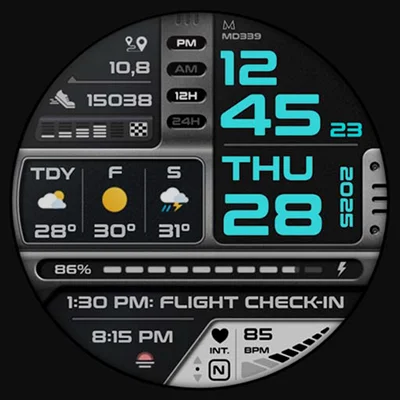
Looking to transform your smartwatch into a personalized digital dashboard? The MD339 Digital watch face represents the cutting edge of Wear OS customization, offering a sophisticated blend of functionality, aesthetics, and modern design principles. Whether you’re tracking fitness metrics, monitoring weather conditions, or simply want a beautifully crafted timepiece on your wrist, this comprehensive guide will help you unlock every feature of this premium watch face.
In the ever-evolving world of Wear OS accessories, the MD339 Digital watch face stands out as a testament to what’s possible when advanced technology meets thoughtful design. Developed by the renowned Matteo Dini MD® Watch Faces team, this latest creation adheres to Google’s newest watch face format requirements while delivering an exceptional user experience across compatible devices.
Table of Contents
Understanding MD339 Digital Watch Face
What Makes It Special?
The MD339 Digital watch face isn’t just another timepiece for your smartwatch—it’s a comprehensive information hub designed to give you quick access to the data that matters most. Built specifically for the latest Wear OS 5 platform and devices with API Level 34+, this watch face leverages cutting-edge capabilities to deliver smooth performance and extensive customization options.
Core Specifications:
| Feature | Details |
|---|---|
| Compatibility | Wear OS 5+ (API Level 34+) |
| Supported Devices | Samsung Galaxy Watch 4-8, Ultra, Pixel Watch, and newer models |
| Format Type | Digital display with customizable elements |
| Time Display | 12/24-hour format (syncs with phone settings) |
| Weather Integration | Built-in provider with daily/hourly forecasts |
| Shortcuts | 6 preset + 1 customizable |
| Complications | 3 fully customizable slots |
Key Features That Define Excellence
Information at a Glance:
- Time Display: Large, readable digital format with automatic 12/24-hour switching
- Date Components: Full date display including day, month, and year
- Health Monitoring: Real-time heart rate tracking with customizable intervals
- Fitness Tracking: Step counter with daily goal visualization
- Power Management: Battery meter with customizable color indicators
- Weather Data: Current conditions with optional daily or hourly forecasts
Customization Capabilities:
- Independent color control for time, date, and complications
- Adjustable fonts for complication text
- Customizable battery indicator colors
- Heart rate LCD color modifications
- Light and dark theme options
- Always-On Display (AOD) with minimal and full modes
For those exploring digital watch face options, the MD241 Digital watch face offers a complementary design philosophy with different aesthetic approaches, making it worth comparing both styles to find your perfect match.
Installation and Setup Process
Getting Started with MD339
Step 1: Compatibility Check
Before installation, ensure your device meets the requirements:
Compatible Devices: ✓ Samsung Galaxy Watch 4, 5, 6, 7, 8 ✓ Samsung Galaxy Watch Ultra ✓ Google Pixel Watch (all generations) ✓ Any Wear OS device running API Level 34+ (Wear OS 5+)
Important Note: Older Galaxy Watch 4 and 5 models may experience customization issues due to hardware limitations. The developer recommends newer models for optimal performance.
Step 2: Installation
- Visit the Google Play Store
- Search for “MD339 Digital watch face” or use the direct link
- Tap “Install” to download to your watch
- Wait for installation to complete (typically 30-60 seconds)
- The watch face will appear in your collection
Step 3: Activation
- Long-press your current watch face
- Swipe through available faces to locate MD339
- Tap to select and activate
- The face will immediately apply to your watch
Initial Configuration
Accessing Customization Menu:
Method 1: On Watch
- Display the MD339 watch face
- Touch and hold the screen for 2 seconds
- Tap the “Customize” button that appears
- Navigate through customization categories
Method 2: Via Phone App (Recommended for Galaxy Watches)
- Open the Galaxy Wearable app on your phone
- Navigate to “Watch faces”
- Select MD339 from your collection
- Tap “Customize” at the bottom
- Make adjustments through the phone interface
Pro Tip: Due to a known bug in the Wearable app, users of watches running Wear OS 5 or older devices (Galaxy Watch 4-5) may experience better results customizing through the phone app rather than directly on the watch.
Deep Dive into Customization Options
Visual Customization
Color Personalization:
The MD339 Digital watch face offers granular control over virtually every visual element:
Time Display Customization:
- Primary color selection for hour digits
- Secondary color for minute digits
- Optional accent colors for separators
- Brightness adjustment for always-on display
- Font weight variations (where applicable)
Date and Information Colors:
- Independent date text color
- Day-of-week color customization
- Year display color selection
- Complication text font colors
- Secondary information element colors
System Indicator Colors:
- Battery meter fill color
- Battery meter background color
- Heart rate display LCD color
- Step counter progress color
- Weather icon tinting options
Theme Selection:
Choose between two primary theme modes:
- Light Theme:
- Bright backgrounds
- Dark text for contrast
- Optimal for daytime outdoor visibility
- Battery-efficient on LCD displays
- Dark Theme:
- Dark backgrounds
- Light text elements
- Ideal for nighttime use
- Battery-saving on OLED screens
- Reduced eye strain in low light
Functional Customization
App Shortcuts Configuration:
The watch face includes 7 total shortcut zones:
6 Preset Shortcuts:
- Phone dialer
- Messages
- Weather app (Samsung Weather on Galaxy watches)
- Health/Fitness app
- Calendar
- Music player
1 Customizable Shortcut:
- Choose any installed app
- Quick access to frequently used tools
- One-tap launching from watch face
- Customizable positioning
Setting Up Custom Shortcuts:
- Enter customization mode
- Navigate to “Shortcuts” section
- Tap the customizable slot
- Select from list of installed apps
- Confirm selection
Those interested in exploring different digital aesthetics should check out MD242 Hybrid watch face, which combines digital and analog elements for a unique hybrid approach to timekeeping.
Complications System
Understanding Complications:
Complications are modular data displays that show information from various sources. MD339 offers 3 customizable complication slots.
Available Complication Types:
| Category | Examples | Use Cases |
|---|---|---|
| Health & Fitness | Calories burned, distance walked, active minutes | Fitness tracking |
| Weather Data | Barometer, UV index, chance of rain, humidity | Outdoor activities |
| World Time | Additional time zones, dual time | International travel |
| System Info | Storage, connectivity status, notifications | Device management |
| Third-Party Apps | Bitcoin price, stock tickers, custom data | Specialized needs |
Configuring Complications:
- Enter customization mode
- Tap on complication slot (left, center, or right)
- Select data source from available options
- Choose specific data point (e.g., “Calories” from Health app)
- Confirm and preview
Installing Additional Complications:
Not all complication types are available by default. To access advanced data:
- Visit Play Store on your watch
- Search for complication provider apps
- Popular options include:
- Fit Complications (fitness data)
- World Clock & Weather (geographic data)
- Crypto complications (cryptocurrency prices)
- Custom complications (user-defined data)
- Install desired apps
- Return to MD339 customization to select new sources
Weather Features and Configuration
Advanced Weather Integration
One of MD339’s standout features is its sophisticated weather system, utilizing your watch’s built-in weather provider.
Weather Display Options:
Option 1: Daily Forecasts
- Shows next 2 days of weather predictions
- Temperature highs and lows
- Weather condition icons
- Precipitation probability
Option 2: Hourly Forecasts
- +6 hour forecast view
- +12 hour forecast view
- More granular temperature predictions
- Immediate weather changes visible
Configuring Weather Display:
- Open customization menu
- Navigate to “Weather” section
- Select between “Daily” or “Hourly” mode
- Choose hour increment for hourly mode (+6h or +12h)
- Save preferences
Temperature Units:
Temperature display automatically syncs with your phone’s regional settings:
- Celsius for metric regions
- Fahrenheit for imperial regions
- No manual override needed
Weather Provider Limitations:
Known Issue: Daily weather forecasts may not display data between 00:00 and 07:00 due to a provider bug. This affects both Samsung and Google weather services and cannot be fixed by the watch face developer.
Workaround: Switch to hourly forecast mode during early morning hours to maintain weather visibility.
Device-Specific Behavior:
- Galaxy Watches: Weather shortcut opens Samsung Weather app
- Pixel Watch & Others: Weather shortcut may not function, but forecasts display normally on the watch face
For users who prefer hybrid digital-analog designs, the MD307 Digital watch face provides another excellent option within the MD watch face collection, featuring similar customization depth with different visual presentation.
Always-On Display (AOD) Optimization
Power-Efficient Time Display
The Always-On Display feature keeps essential information visible even when your wrist is down, balancing readability with battery conservation.
AOD Mode Options:
Minimal Mode:
- Time display only
- Monochrome rendering
- Minimal power consumption
- Maximum battery preservation
- Best for extended wear
Full Mode:
- All complications visible
- Reduced brightness
- Essential data maintained
- Moderate battery usage
- Comprehensive information access
Configuring AOD:
- Enter watch face customization
- Select “Always-On Display” section
- Toggle between Minimal and Full modes
- Adjust brightness for AOD state (if available)
- Save configuration
Battery Impact Comparison:
| AOD Mode | Battery Impact | Information Displayed |
|---|---|---|
| Disabled | Lowest drain | Screen completely off when inactive |
| Minimal | Low drain | Time only, monochrome |
| Full | Moderate drain | All elements, reduced brightness |
Optimization Tips:
✓ Use Minimal mode for workdays requiring all-day battery ✓ Switch to Full mode for events where glanceable data is priority ✓ Disable AOD entirely during sleep for maximum overnight preservation ✓ Test both modes to find your ideal balance ✓ Consider that OLED screens handle dark AOD themes more efficiently
Performance and Compatibility Insights
Device-Specific Considerations
Samsung Galaxy Watch Users:
Galaxy Watch 6, 7, 8, Ultra:
- Full feature support
- Smooth customization experience
- No known limitations
- Optimal performance
Galaxy Watch 4 & 5:
- May experience customization glitches
- Hardware limitations affect advanced features
- Phone-based customization recommended over on-watch
- Core functionality remains stable
- Developer recommends newer models for best experience
Pixel Watch Users:
- Full compatibility with all generations
- Smooth performance on Wear OS 5
- Weather shortcut limitation (forecasts still display)
- No reported customization issues
- Excellent battery optimization
Other Wear OS Devices:
Any device running API Level 34+ (Wear OS 5) should function properly, though specific brand implementations may vary.
Performance Optimization
Ensuring Smooth Operation:
- Keep Wear OS Updated:
- Install latest system updates
- Update companion apps on phone
- Restart watch after major updates
- Manage Complications Wisely:
- Use only necessary complications
- Avoid redundant data displays
- Disable unused complication apps
- Limit background refresh rates
- Weather Configuration:
- Choose appropriate forecast mode for your needs
- Don’t constantly switch between modes
- Allow weather provider time to sync
- Regular Maintenance:
- Clear watch cache periodically
- Restart watch weekly
- Update watch face when new versions release
- Monitor battery usage patterns
For those seeking additional digital options, MD327 Digital Watch Face offers yet another variation in the MD collection, each with unique design elements worth exploring.
Troubleshooting Common Issues
Customization Problems
Issue: Cannot Access Customization Menu
Solutions:
- Ensure you’re long-pressing (not tapping) the watch face
- Try customizing through phone app instead of on-watch
- Restart your watch and try again
- Clear Wearable app cache on phone
- Reinstall watch face if problem persists
Issue: Customization Screen Turns Black (Galaxy Watch 4-5)
Solutions:
- This is a known compatibility issue with older hardware
- Use phone app exclusively for customization
- Avoid on-watch customization on these models
- Press power button to restore display
- Contact [email protected] for assistance
Issue: Changes Don’t Apply
Solutions:
- Wait 5-10 seconds after making changes
- Exit and re-enter customization mode
- Restart watch to force changes
- Ensure watch face is actually selected (not just previewed)
- Try making changes one at a time rather than bulk adjustments
Weather Display Issues
Issue: Weather Not Displaying
Solutions:
- Check watch location permissions
- Verify internet connectivity (Wi-Fi or cellular)
- Allow weather provider time to sync (up to 15 minutes)
- Switch between daily/hourly modes to force refresh
- Ensure watch location services are enabled
Issue: Missing Weather Data at Night (00:00-07:00)
Explanation: This is a known provider bug affecting all watch faces using system weather data. Samsung and Google are aware of the issue.
Workaround: Switch to hourly forecast mode during this timeframe.
Issue: Temperature Unit Incorrect
Solutions:
- Check phone’s regional settings (not watch settings)
- Temperature syncs with phone locale
- Change phone region to update temperature unit
- Wait for watch to sync after phone changes
- Restart both devices to force sync
Battery Drain Concerns
Issue: Excessive Battery Usage
Diagnostic Steps:
- Check if AOD is set to Full mode (switch to Minimal)
- Verify how many complications are active
- Check weather update frequency
- Review background app activity
- Compare battery usage with other watch faces
Optimization Actions:
- Reduce number of active complications
- Switch to Minimal AOD mode
- Disable weather if not needed
- Use dark theme on OLED displays
- Limit interactive features
- Restart watch to clear memory
Comparing MD339 to Other Premium Watch Faces
Market Position
MD339 vs. Alternatives:
| Feature | MD339 | Typical Premium Faces | Stock Faces |
|---|---|---|---|
| Customization Depth | Extensive | Moderate | Limited |
| Weather Integration | Advanced (daily/hourly) | Basic | Simple |
| Complications | 3 customizable | 2-4 average | 1-2 typical |
| App Shortcuts | 7 total | 3-5 typical | 2-3 average |
| AOD Options | Minimal + Full | Usually one mode | Basic |
| Color Customization | Individual elements | Theme-based | None |
| Update Frequency | Active development | Varies | Rarely |
Why Choose MD339:
✓ Follows latest Google Play watch face format ✓ Professional developer with proven track record ✓ Active support and updates ✓ Extensive customization without complexity ✓ Efficient performance on new hardware ✓ Sophisticated yet readable design ✓ Comprehensive feature set in single face
When to Consider Alternatives:
✗ Using older Galaxy Watch 4-5 (compatibility issues) ✗ Prefer analog or hybrid displays ✗ Need basic, simple watch faces with no customization ✗ Want completely free options (MD339 is premium) ✗ Require specific brand-exclusive features
Another excellent digital option worth considering is MD326 3D Modern Watch Face, which adds dimensional visual effects for those seeking more dramatic aesthetics.
Getting Support and Updates
Developer Communication
Matteo Dini MD® Watch Faces maintains active support channels:
Contact Information:
- Email Support: [email protected]
- Response Time: Typically within 24-48 hours
- Issue Types: Technical problems, refund requests, feature questions
Newsletter Subscription:
- Stay updated on new watch face releases
- Exclusive promotions and discounts
- Early access to beta features
- Sign up: http://eepurl.com/hlRcvf
Update Policy
What to Expect:
- Bug Fixes: Rapid patches for reported issues
- Compatibility Updates: Adjustments for new Wear OS versions
- Feature Additions: Periodic enhancements based on user feedback
- Performance Improvements: Ongoing optimization
- Google Play Compliance: Updates to meet platform requirements
Checking for Updates:
- Open Play Store on watch
- Navigate to “My Apps”
- Check for MD339 updates
- Install when available
- Restart watch after major updates
Reporting Issues:
When contacting support, include:
- Watch model and Wear OS version
- Specific problem description
- Screenshots (if applicable)
- Steps you’ve already tried
- Whether issue occurs on watch or phone app
Community and Resources
Finding Inspiration:
- Browse user reviews on Play Store for setup ideas
- Join Wear OS communities on Reddit (r/WearOS)
- Follow MD Watch Faces social media for examples
- Screenshot and share your customizations
- Exchange configuration tips with other users
Learning Resources:
- Play Store description provides comprehensive feature list
- Video tutorials available on YouTube
- Wear OS customization guides cover general principles
- Smart watch review sites often feature MD faces
- User-generated content showcases possibilities
Maximizing Your MD339 Experience
Best Practices for Daily Use
Morning Routine:
- Check battery level on wake
- Glance at weather forecast for day planning
- Review step goal and health metrics
- Quick access to calendar via shortcut
- Adjust brightness if moving between indoor/outdoor
Workout Integration:
- Configure complications to show active calories
- Monitor heart rate directly from face
- Track steps toward daily goal
- Quick access to fitness app via shortcut
- Post-workout, review total distance walked
Evening Optimization:
- Switch to dark theme for reduced eye strain
- Enable minimal AOD mode for overnight battery preservation
- Check next day’s weather forecast
- Review daily step achievement
- Set watch to Do Not Disturb mode
Weekend Configuration:
- Add leisure app shortcuts (music, podcasts)
- Switch to less data-heavy complications
- Enable hourly weather for outdoor activities
- Customize colors for personal enjoyment
- Experiment with different themes
Advanced User Tips
Power User Strategies:
- Create Configuration Profiles:
- Screenshot your favorite setups
- Quick reference for recreating configurations
- Different setups for work, exercise, weekend
- Note color codes for consistency
- Complication Rotation:
- Change complications based on context
- Work days: calendar, emails, tasks
- Gym days: heart rate, calories, distance
- Travel: world clock, barometer, UV index
- Weekend: minimal complications for clean look
- Shortcut Optimization:
- Place most-used apps in easiest-to-tap positions
- Consider your natural thumb reach
- Adjust based on usage analytics
- Remove shortcuts to rarely-used apps
- Battery Life Mastery:
- Test different AOD modes to find sweet spot
- Disable unnecessary complications
- Use dark theme on OLED displays
- Switch to hourly weather only when needed
- Enable theater mode during meetings/movies
- Aesthetic Coordination:
- Match watch face colors to watch band
- Coordinate with phone wallpaper and theme
- Seasonal color schemes (autumn oranges, winter blues)
- Professional colors for work, vibrant for leisure
- Photograph your favorite combinations
The Future of MD Watch Faces
What’s Next
Based on the developer’s track record and community feedback:
Anticipated Developments:
- Enhanced complications support as Wear OS evolves
- Additional weather visualization options
- More granular color customization
- Improved compatibility with older devices
- New shortcut customization options
- Advanced AOD personalization
- Performance optimizations for battery life
Wear OS Platform Evolution:
As Google continues developing Wear OS:
- Newer API levels will bring new capabilities
- MD339’s format compliance ensures longevity
- Updates will leverage platform improvements
- Continued optimization for new watch models
- Enhanced integration with Google services
Community Influence:
The MD Watch Faces team actively incorporates user feedback:
- Feature requests considered for updates
- Bug reports prioritized
- Customization options expanded based on demand
- User experience refined through real-world usage
- Compatibility issues addressed promptly
Conclusion: Is MD339 Right for You?
The MD339 Digital watch face represents a mature, feature-rich solution for Wear OS users seeking comprehensive customization without unnecessary complexity. Its adherence to the latest Google Play requirements ensures compatibility with future platform updates, while its extensive personalization options satisfy even the most particular users.
Ideal For: ✓ Samsung Galaxy Watch 6, 7, 8, or Ultra owners ✓ Google Pixel Watch users (all generations) ✓ Users prioritizing information density and readability ✓ Those who enjoy personalizing every visual element ✓ Fitness enthusiasts tracking multiple health metrics ✓ Weather-conscious individuals needing forecast flexibility ✓ Power users wanting comprehensive app shortcut access
Consider Alternatives If: ✗ You own an older Galaxy Watch 4 or 5 (compatibility concerns) ✗ You prefer analog or hybrid watch face designs ✗ You want completely free options without premium features ✗ You rarely customize and prefer simple defaults ✗ Your device doesn’t support Wear OS 5 (API Level 34+)
For those who appreciate the MD339 approach, remember to explore the MD332 Digital watch face as well, which offers similar customization philosophy with alternative layout designs.
Ready to transform your smartwatch into a personalized information hub? Download MD339 Digital watch face from Google Play and experience the perfect blend of form and function. With its sophisticated customization options, comprehensive data display, and professional design, MD339 delivers premium value for discerning Wear OS users.
Frequently Asked Questions About MD339 Digital Watch Face
Q: Will MD339 Digital watch face work on my Samsung Galaxy Watch 4 or Watch 5?
The MD339 watch face is technically compatible with Galaxy Watch 4 and 5, but these older models may experience customization issues due to hardware limitations and less recent software. Users report problems including customization screens turning black, difficulty applying changes, and interface responsiveness issues. The developer recommends using the phone app (Galaxy Wearable) for customization instead of on-watch adjustments. If you already own these watch models and encounter problems, contacting [email protected] is recommended. For the best experience, Galaxy Watch 6 or newer models are ideal.
Q: How do I fix weather not displaying on my watch face?
Weather display issues typically stem from a few common causes. First, ensure your watch has location permissions enabled and internet connectivity (Wi-Fi or cellular). The watch needs these to access weather data from the built-in provider. Allow 10-15 minutes for initial sync after installation. If weather still doesn’t appear, try switching between daily and hourly forecast modes in the customization menu to force a refresh. Note that daily forecasts may not show data between midnight and 7 AM due to a provider bug—switch to hourly mode during these hours as a workaround.
Q: Can I use complications from third-party apps with MD339?
Yes, MD339 supports complications from both built-in sources and third-party apps. The watch face includes 3 customizable complication slots that can display data from any compatible complication provider. For advanced data like cryptocurrency prices, stock tickers, or specialized fitness metrics, you’ll need to install additional complication provider apps from the Play Store. Popular options include Fit Complications for fitness data, various world clock apps, and financial tracking complications. Once installed, these sources will appear in the complication selection menu during customization.
Q: Does the MD339 watch face drain battery faster than stock faces?
Battery consumption depends heavily on your configuration choices. The watch face itself is efficiently coded, but certain features impact battery life more than others. Using Full AOD mode consumes more power than Minimal mode or disabling AOD entirely. Active complications that update frequently (like real-time stock prices) drain more battery than static displays. Weather features require periodic internet connectivity, which affects battery. The developer has optimized the face for efficiency, and most users report battery life comparable to or better than many premium alternatives, especially when using recommended settings (Minimal AOD, selective complications, dark theme on OLED displays).
Q: How do I get support if I’m experiencing technical problems with MD339?
For technical support, contact the developer directly at [email protected]. Include specific details about your issue: watch model, Wear OS version, exact problem description, and steps you’ve already attempted. The support team typically responds within 24-48 hours and can provide personalized troubleshooting steps. Common issues like customization problems on older Galaxy watches often have known workarounds. The developer actively addresses reported bugs and provides guidance for device-specific concerns. You can also check the Play Store reviews section where the developer frequently responds to user questions and concerns.
📥 Download MD339 Digital watch face APK Latest Version (Premium Unlocked)
Note: This version is safe. You can scan it yourself via VirusTotal.