Chester Flower dream APK: A Beautiful Floral Watch Face for Wear OS Smartwatches
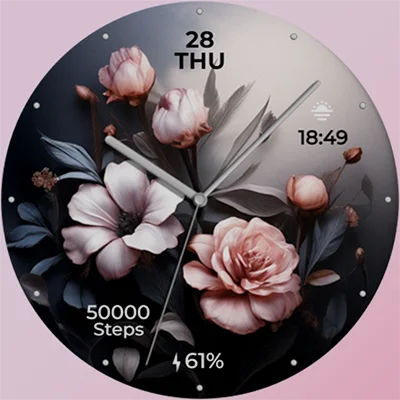
When it comes to personalizing your smartwatch, few design choices evoke the same sense of natural beauty and tranquility as floral watch faces. Chester Flower dream stands out as an elegant, nature-inspired option for Wear OS users who want to transform their wrist technology into a canvas of botanical artistry. Developed by CHESTER WATCH FACES, this premium watch face combines stunning floral aesthetics with practical functionality, offering customizable settings and comprehensive information displays that cater to both aesthetic preferences and everyday utility needs.
Whether you’re searching for a watch face that captures the essence of spring gardens, brings a touch of nature to your daily routine, or simply want a visually appealing alternative to standard digital designs, Chester Flower dream delivers a compelling blend of form and function. In this comprehensive guide, we’ll explore everything you need to know about this floral-themed watch face, from its features and customization options to installation tips and user experiences.
Table of Contents
What Makes Chester Flower dream Special?
The Chester Flower dream watch face distinguishes itself through its artistic interpretation of floral design combined with thoughtful functionality. Unlike basic watch faces that prioritize simplicity over style, this design embraces the beauty of nature while maintaining all the essential information displays modern smartwatch users expect.
Core Features and Functionality
Chester Flower dream offers a comprehensive suite of features designed to enhance your smartwatch experience:
| Feature | Description | Benefits |
|---|---|---|
| Date & Day Display | Shows current date and day of the week | Never miss appointments or important dates |
| Battery Indicator | Real-time watch battery status | Monitor power levels at a glance |
| Complications Support | Multiple slots for customizable information | Display your most-used apps and data |
| Multilingual Support | Available in multiple languages | Accessible to international users |
| Tap Zones | Interactive areas on the watch face | Quick access to specific functions |
| Color Customization | 10 style colors for hands and background | Personalize to match your style |
| Index Styles | 2 different index display options | Choose your preferred time markers |
| AOD Support | 2 Always-On Display styles | Battery-efficient screen-off appearance |
The combination of aesthetic appeal and practical functionality makes Chester Flower dream suitable for various occasions, from casual everyday wear to more formal settings where you want your smartwatch to complement your overall appearance.
Design Philosophy: Where Nature Meets Technology
The design philosophy behind Chester Flower dream centers on bringing the calming, rejuvenating essence of flowers to the digital realm. In our increasingly technology-driven lives, having a touch of nature on our wrists serves as a gentle reminder of the natural world’s beauty. The floral motifs aren’t just decorative—they’re designed to create a sense of peace and connection to nature every time you check the time.
This approach resonates particularly well with users who appreciate biophilic design principles, which suggest that incorporating natural elements into our daily environments enhances well-being and reduces stress. Your smartwatch becomes more than a time-telling device; it transforms into a miniature garden that accompanies you throughout your day.
Compatibility and Device Requirements
Before purchasing Chester Flower dream, understanding device compatibility ensures you’ll have a smooth installation and optimal performance experience. This watch face is specifically designed for Wear OS devices meeting certain technical specifications.
Supported Devices
Chester Flower dream is compatible with all Wear OS API 30+ devices, including:
- Google Pixel Watch (all generations)
- Samsung Galaxy Watch 6 and Watch 6 Classic
- Samsung Galaxy Watch 5 and Watch 5 Pro
- Samsung Galaxy Watch 4 and Watch 4 Classic
- Fossil Gen 6 smartwatches
- TicWatch Pro series (3 and newer)
- Montblanc Summit watches
- Other Wear OS 3.0+ devices
Important Limitation: The watch face is not suitable for rectangular watches. It’s optimized for circular watch displays, which is the most common form factor for Wear OS smartwatches. If you have a square or rectangular watch, the design elements may not align properly or display as intended.
Technical Requirements
To ensure optimal performance, your device should meet these requirements:
- Wear OS version 3.0 or higher (API level 30+)
- Sufficient storage space for watch face installation
- Active Google Play Store connection for initial download
- Compatible circular watch display
For users interested in exploring other nature-themed options, the Floral Luxury Botanical Face offers an alternative approach to botanical smartwatch design with its own unique artistic interpretation.
Detailed Feature Breakdown
Let’s dive deeper into each feature that makes Chester Flower dream a compelling choice for your Wear OS smartwatch.
Customization Options: Making It Your Own
One of the standout aspects of Chester Flower dream is its extensive customization capabilities. The watch face offers 10 distinct color styles for both the hands and background elements, allowing you to:
- Match your watch face to different outfits
- Adjust colors based on seasonal preferences
- Create different looks for various occasions
- Set appropriate contrast levels for different lighting conditions
The 2 index styles provide flexibility in how time markers appear on your watch face. Some users prefer traditional hour markers, while others favor a cleaner look with minimal indicators. This choice lets you balance between classic watchmaking aesthetics and modern minimalism.
Complications: Your Information Hub
Complications are one of the most powerful features in modern smartwatch faces, and Chester Flower dream implements them effectively. These customizable slots allow you to display information from various apps and services directly on your watch face, including:
Health & Fitness Data:
- Step count for daily activity tracking
- Heart rate monitoring
- Calorie burn information
- Active minutes or workout duration
Productivity Tools:
- Next calendar appointment
- Weather conditions and temperature
- Battery percentage (both watch and phone)
- Unread message or notification counts
Navigation & Location:
- Current location or address
- Sunrise and sunset times
- Moon phase information
The ability to customize complications transforms your watch face from a simple time display into a comprehensive information dashboard tailored to your specific needs and lifestyle.
Always-On Display (AOD): Battery Efficiency Meets Functionality
The 2 AOD styles available in Chester Flower dream represent thoughtful design choices that balance visibility with battery conservation. When your watch enters sleep mode, the AOD maintains essential information visibility without consuming excessive power.
The simplified AOD designs typically feature:
- Reduced color palette or monochrome display
- Essential time information prominently displayed
- Critical complications visible at a glance
- Optimized pixel usage for OLED/AMOLED battery efficiency
This feature is particularly valuable for users who frequently glance at their watch throughout the day without wanting to perform full wake gestures or screen taps.
Interactive Tap Zones: Quick Access to Functions
The tap zones (also called “pressure zones” in some descriptions) add an interactive element to the watch face. These designated areas respond to taps, allowing you to:
- Launch specific applications instantly
- Toggle between different information displays
- Access watch settings or functions
- Open workout tracking or health monitoring features
This interactive functionality transforms your watch face from a passive display into an active control surface, streamlining your smartwatch interaction and reducing the number of swipes needed to access frequently used features.
Installation Guide: Getting Started with Chester Flower dream
Installing Chester Flower dream on your Wear OS smartwatch is straightforward, though some users have reported occasional challenges. Here’s a comprehensive guide to ensure smooth installation.
Step-by-Step Installation Process
- Purchase from Google Play Store
- Visit the Chester Flower dream page on Google Play
- Complete the purchase (approximately $1.99)
- Ensure you’re logged into the same Google account on both phone and watch
- Automatic Installation
- After purchase, the watch face should automatically begin downloading to your watch
- Check your watch’s notification area for installation progress
- Some devices may require manual approval to install third-party watch faces
- Manual Installation (If Needed)
- Open the Google Play Store app directly on your smartwatch
- Navigate to “My Apps” or “Library”
- Find Chester Flower dream in your purchased apps
- Select “Install” to manually trigger the download
- Applying the Watch Face
- Long-press on your current watch face
- Swipe through available watch faces to find Chester Flower dream
- Tap to select and apply
- Customization Setup
- Tap on the watch face or use the customization option
- Select your preferred color scheme
- Choose index style
- Configure complications for your desired information displays
- Set up tap zones according to your preferences
Troubleshooting Installation Issues
Some users have reported difficulties with installation, particularly regarding repeated purchase prompts or sync issues between phone and watch. If you encounter problems:
For Repeated Purchase Requests:
- Verify the purchase in your Google Play order history
- Ensure both devices use the same Google account
- Try restarting both your phone and watch
- Clear the Play Store cache on both devices
- Contact CHESTER WATCH FACES support at [email protected]
For Sync Delays:
- Wait 15-30 minutes for cloud synchronization
- Check your internet connection on both devices
- Manually refresh the Play Store on your watch
- Reboot your watch to trigger sync processes
The CHESTER WATCH FACES team maintains detailed installation instructions on their website at https://chesterwf.com/installation-instructions/ for additional troubleshooting guidance.
For those exploring various watch face installation processes, similar steps apply to other popular options like Simple Floral Watch Face, which offers comparable botanical aesthetics with its own unique installation considerations.
User Experience and Community Feedback
Understanding real-world user experiences provides valuable context for anyone considering Chester Flower dream. The watch face has garnered mixed reviews, with both passionate supporters and users who’ve encountered challenges.
What Users Appreciate
Aesthetic Appeal: The most consistently praised aspect is the watch face’s visual beauty. Users who love floral designs find the artistic interpretation captures nature’s elegance while remaining readable and functional.
Customization Flexibility: Many reviewers appreciate the ability to modify colors and styles, allowing them to adapt the watch face to different preferences and occasions without purchasing multiple watch faces.
Information Display: Users who prioritize functionality alongside aesthetics value the comprehensive information available through complications and the various data points displayed on the face.
Common Concerns and Criticisms
Battery Consumption: Several users report that Chester Flower dream drains battery faster than simpler, static watch faces. This is a common trade-off with visually rich, feature-laden watch faces. The developer suggests rebooting the watch after installation to resolve potential battery optimization issues.
Installation Challenges: Some users experience difficulties with the installation process, particularly involving repeated purchase requests or sync problems between phone and watch. These issues appear to be related to Google Play’s watch face distribution system rather than specific problems with Chester Flower dream itself.
Device Connectivity Issues: In rare cases, users report watch connectivity problems after installation. While the developer questions whether the watch face directly causes these issues, some users have experienced phone connection problems coinciding with the watch face installation.
Performance Optimization Tips
Based on user feedback and developer responses, here are strategies to optimize your Chester Flower dream experience:
- After Initial Installation: Reboot your watch completely to ensure proper system integration
- Battery Management: If experiencing excessive battery drain, try:
- Reducing screen brightness
- Disabling AOD temporarily to isolate the issue
- Limiting the number of active complications
- Checking for background apps consuming resources
- Regular Updates: Keep your Wear OS system and the watch face updated to benefit from bug fixes and optimizations
- Connection Issues: If experiencing connectivity problems, try using your watch face on default settings first, then gradually add customizations
Comparing Chester Flower dream to Alternatives
The floral watch face category on Wear OS includes numerous options, each with distinct artistic approaches and feature sets. How does Chester Flower dream compare to alternatives?
Within the Chester Collection
CHESTER WATCH FACES produces an extensive catalog of designs. Their portfolio includes everything from minimalist LCD styles to information-dense layouts. Chester Flower dream represents their artistic, nature-inspired line, contrasting with their more technical or business-oriented offerings.
Users who appreciate Chester Flower dream might also enjoy other floral options from the same developer, which maintain the quality and customization approach while offering different aesthetic interpretations.
Broader Floral Watch Face Market
The Wear OS ecosystem offers numerous floral-themed watch faces with varying approaches:
Animated Options: Some floral watch faces feature animated petals, flowing water, or changing seasonal elements. The Sakura Animated watch face, for example, brings cherry blossom themes to life with subtle animations.
Seasonal Collections: Watch faces like Seasonal Nature – Wear OS offer rotating designs that change with seasons, providing variety without requiring multiple purchases.
Minimalist Floral: For users who prefer simpler designs, minimalist floral watch faces focus on single flower elements with clean backgrounds and straightforward information displays.
Luxury Botanical: Premium options emphasize artistic quality and sophisticated color palettes, positioning themselves as digital jewelry rather than purely functional interfaces.
Price-to-Feature Comparison
At approximately $1.99, Chester Flower dream positions itself in the mid-range pricing tier for premium watch faces. Consider this value proposition:
What You Get:
- Professional artistic design
- 10 color customization options
- 2 index styles
- Comprehensive complication support
- 2 AOD designs
- Regular updates and developer support
- Multilingual interface
Comparable Alternatives:
- Free floral watch faces often lack customization and quality polish
- Premium options ($2.99-$4.99) may offer animations or seasonal variations
- Watch face subscription services provide unlimited access but at ongoing cost
The pricing reflects a one-time purchase for a polished, customizable design rather than a subscription model or free-with-limitations approach.
Seasonal Versatility: Year-Round Appeal
While Chester Flower dream features floral motifs commonly associated with spring and summer, its design versatility allows for year-round wear. The customization options enable users to adapt the aesthetic across seasons:
Spring & Summer Usage
The watch face naturally excels during warmer months when:
- Floral themes align with blooming gardens
- Lighter, brighter aesthetics match seasonal fashion
- Outdoor activities pair well with nature-inspired designs
- The overall mood matches the vibrant, growing season
Fall & Winter Adaptation
With thoughtful color selection, Chester Flower dream remains appropriate for cooler months:
- Select deeper, warmer color palettes (burgundy, gold, amber)
- Choose darker background options for winter settings
- The evergreen concept of natural beauty transcends seasons
- Floral elements can represent indoor gardens and winter greenhouses
This seasonal adaptability means you’re not investing in a watch face with limited temporal appeal—it’s a year-round option that evolves with your preferences.
For users specifically seeking autumn aesthetics, options like Autumn Floral provide season-specific design choices that complement fall wardrobes and environmental themes.
Technical Performance and System Integration
Beyond aesthetics, Chester Flower dream‘s technical performance impacts daily usability. Understanding how it integrates with Wear OS helps set appropriate expectations.
Resource Utilization
Like most feature-rich watch faces, Chester Flower dream requires more system resources than minimal designs:
Memory Footprint: The watch face maintains graphical assets, complication data, and customization settings in active memory, which is typical for visually detailed designs.
Processing Demands: Real-time complication updates, tap zone responsiveness, and smooth AOD transitions require periodic CPU cycles, though modern Wear OS devices handle these demands efficiently.
Battery Impact: User reports vary, but expect 10-20% additional battery consumption compared to the simplest stock watch faces. This impact is comparable to other premium, feature-rich watch faces.
Wear OS Integration
Chester Flower dream leverages standard Wear OS APIs for:
- Complication Framework: Uses the official complication system for data integration
- Ambient Mode: Implements proper AOD protocols for battery-efficient always-on display
- Touch Input: Responds to standard Wear OS touch gestures and tap zones
- System Theming: Respects user-selected system themes where applicable
This standards-compliant approach ensures compatibility across the wide range of Wear OS devices and reduces the likelihood of conflicts with system updates.
Maximizing Your Chester Flower dream Experience
Getting the most from Chester Flower dream involves more than simply installing it. Here are strategies to optimize your experience:
Strategic Complication Selection
Rather than filling every complication slot, consider which information you actually need at a glance:
Essential Daily Information:
- Weather (if you spend time outdoors)
- Calendar (next appointment reminder)
- Battery level (for heavy smartwatch users)
Fitness-Focused Setup:
- Step counter
- Heart rate
- Active minutes or calorie burn
Productivity Configuration:
- Unread messages
- Task list or reminders
- Phone battery (if often separated from your phone)
The key is avoiding information overload—too many complications create visual clutter and make the watch face harder to read at a glance.
Color Scheme Selection Strategies
The 10 available color options allow for significant personalization:
Matching Your Style:
- Consider your typical wardrobe colors
- Select contrasting colors for better visibility
- Choose complementary tones for aesthetic harmony
Situational Adaptation:
- Bright, high-contrast colors for outdoor visibility
- Softer, muted tones for formal settings
- Bold, vibrant options for casual wear
Time-Based Adjustment:
- Lighter colors for daytime use
- Darker schemes for evening wear
- Seasonal color rotation for visual variety
Tap Zone Configuration
Maximize the utility of interactive tap zones by assigning them to your most-used functions:
Common Useful Assignments:
- Launch fitness tracking app
- Open weather forecast
- Start workout routine
- Access music controls
- View calendar agenda
Strategic tap zone usage reduces the number of button presses and screen swipes needed to access key functions, streamlining your smartwatch interaction.
The CHESTER WATCH FACES Brand Philosophy
Understanding the developer behind Chester Flower dream provides context for the product’s design choices and support approach. CHESTER WATCH FACES has established themselves as a prolific watch face developer in the Wear OS ecosystem.
Developer Track Record
The CHESTER WATCH FACES portfolio includes dozens of watch face designs spanning multiple aesthetic categories:
- Information-dense LCD and digital designs
- Classic analog interpretations
- Themed faces (space, nature, seasonal)
- Business and professional options
- Artistic and decorative choices
This diverse catalog demonstrates versatility and understanding of different user preferences, from data-focused professionals to style-conscious fashion enthusiasts.
Support and Community Engagement
The developer maintains active communication channels:
- Email Support: [email protected] for technical assistance
- Telegram Channel: Regular updates on new releases and promotions
- Instagram Presence: Visual showcases of watch face designs
- Website Resources: Installation guides and troubleshooting documentation
This multi-channel support approach shows commitment to customer satisfaction beyond the initial purchase transaction.
Update Philosophy
CHESTER WATCH FACES regularly updates their products to:
- Ensure compatibility with new Wear OS versions
- Address user-reported bugs and issues
- Optimize performance and battery efficiency
- Occasionally add new features or customization options
This ongoing maintenance means your purchase isn’t a static product—it evolves with platform changes and user feedback.
For users who appreciate comprehensive watch face collections from established developers, exploring options like Paper of Time – Watch Face provides insight into different artistic approaches within the premium watch face market.
Privacy and Data Considerations
Modern smartwatch faces often request various permissions to provide full functionality. Understanding what Chester Flower dream requires helps you make informed decisions about data sharing.
Permission Requirements
Based on standard watch face functionality, Chester Flower dream likely requests:
Location Services: For weather complications and location-based information displays
Health/Fitness Data: To populate health-related complications like step count and heart rate
Internet Access: For real-time data updates in complications (weather, calendar sync)
Device Information: Standard access to battery level, time, date, and system settings
These permissions are standard for feature-rich watch faces and align with typical Wear OS requirements for complication-driven designs.
Data Privacy Practices
As a watch face rather than a standalone app, Chester Flower dream operates within Wear OS’s security framework:
- Data is processed locally on your device
- Complications pull information from your existing apps and services
- No independent data collection separate from Wear OS systems
- No advertising or tracking beyond standard Google Play analytics
Always review the privacy policy and permissions during installation to understand exactly what data access you’re granting.
Making Your Decision: Is Chester Flower dream Right for You?
After exploring features, performance, and user experiences, you can make an informed decision about whether Chester Flower dream suits your needs.
Ideal For:
Nature Lovers: If you appreciate botanical beauty and want to carry a piece of nature’s elegance on your wrist, the floral design will resonate with your aesthetic preferences.
Customization Enthusiasts: The 10 color options and various display settings appeal to users who like personalizing their tech devices.
Balance Seekers: Users who want both visual appeal and functional information displays will appreciate the combination of artistry and utility.
Wear OS Veterans: Those comfortable with Wear OS and familiar with watch face installation processes will navigate setup smoothly.
Consider Alternatives If:
Battery Priority: If maximum battery life is your primary concern, simpler watch faces with fewer features consume less power.
Minimalist Preferences: Users who prefer clean, unadorned designs might find floral motifs too decorative.
Budget Constraints: Free alternatives exist, though they typically offer fewer customization options and less polish.
Technical Simplicity: Those who want plug-and-play simplicity without any installation challenges might prefer stock watch faces.
Conclusion: Natural Beauty Meets Smart Technology
Chester Flower dream successfully bridges the gap between natural aesthetic appeal and modern smartwatch functionality. By combining elegant floral artistry with comprehensive information displays and extensive customization options, it offers Wear OS users an opportunity to personalize their wearable technology in ways that reflect their appreciation for nature’s beauty.
While no product is without limitations—some users report battery concerns and installation challenges—the overall package delivers substantial value for its price point. The watch face transforms your smartwatch from a mere utilitarian device into a canvas that showcases botanical elegance alongside practical daily information.
For those who resonate with nature-inspired design, appreciate customization flexibility, and want their technology to reflect personal aesthetic preferences, Chester Flower dream represents a worthwhile investment in smartwatch personalization. The one-time purchase provides ongoing access to a polished, professionally designed watch face that brings the calming beauty of flowers to every glance at your wrist.
Whether you’re checking the time during a morning commute, monitoring fitness progress during a workout, or simply admiring the artistry during a quiet moment, Chester Flower dream delivers a blend of form and function that enhances the smartwatch experience. Download it from the Google Play Store and bring a garden to your wrist today.
For continued exploration of premium watch face options, staying connected with CHESTER WATCH FACES through their Telegram channel (https://t.me/ChesterWF) provides access to promotions, new releases, and special offers that expand your collection of beautifully designed timepiece interfaces.
Frequently Asked Questions (FAQs)
Q: Will Chester Flower dream significantly drain my smartwatch battery?
Some users report increased battery consumption with Chester Flower dream compared to simpler watch faces, typically around 10-20% more drain. This is normal for feature-rich, visually detailed watch faces. To optimize battery life, the developer recommends rebooting your watch after initial installation, which often resolves excessive drain issues. You can also reduce battery impact by lowering screen brightness, disabling always-on display when not needed, and limiting the number of active complications pulling live data.
Q: What should I do if the watch face keeps asking me to purchase it again after I’ve already paid?
Installation issues occasionally occur with Wear OS watch faces due to Google Play synchronization delays. First, verify the purchase appears in your Google Play order history. Ensure both your phone and watch use the same Google account. Try waiting 15-30 minutes for cloud sync, then restart both devices. If problems persist, clear the Play Store cache on both devices. For ongoing issues, contact CHESTER WATCH FACES support at [email protected] with your order confirmation—they’re responsive to technical support requests.
Q: Can I use Chester Flower dream on rectangular smartwatches like the Oppo Watch?
No, Chester Flower dream is specifically designed for circular watch displays and is not suitable for rectangular watches. The watch face’s layout, complications, and design elements are optimized for round screens. Installing it on a rectangular watch would result in improper alignment, cut-off design elements, and poor visual presentation. If you have a rectangular watch, look for watch faces specifically tagged as compatible with rectangular displays.
Q: How do I customize the colors and complications on Chester Flower dream?
To customize your watch face, long-press on the active watch face until you enter customization mode, then tap the settings icon (gear) that appears. You’ll access options for selecting one of 10 color schemes for hands and backgrounds, choosing between 2 index styles, and configuring complications. To change complications, tap on individual complication slots and select which data source you want displayed in each position. The watch face also includes tap zones that can be configured for quick access to apps and functions through the customization menu.
Q: Is Chester Flower dream compatible with my Samsung Galaxy Watch 6?
Yes, Chester Flower dream is fully compatible with Samsung Galaxy Watch 6 and Watch 6 Classic, as well as Galaxy Watch 5 and Watch 4 series. The watch face supports all Wear OS API 30+ devices, which includes modern Samsung Galaxy Watches running Wear OS 3.0 or higher. It’s also compatible with Google Pixel Watch, Fossil Gen 6, TicWatch Pro series, and most other circular Wear OS smartwatches. Just ensure your device is running a recent version of Wear OS for optimal performance.
📥 Download Chester Flower dream APK Latest Version (Premium Unlocked)
Note: This version is safe. You can scan it yourself via VirusTotal.