Simple Floral Watch Face APK: Elegant Wear OS Floral
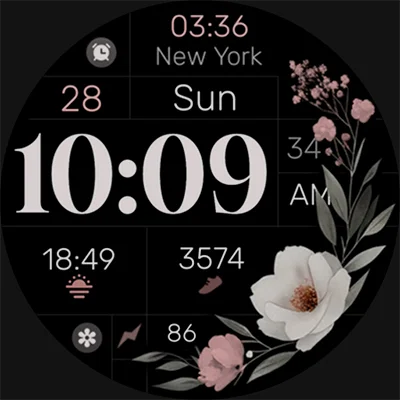
In the world of smartwatch customization, finding the perfect balance between aesthetic beauty and practical functionality can be challenging. Simple Floral Watch Face emerges as an exceptional solution for Wear OS users seeking to transform their smartwatch experience with elegant botanical design elements. This thoughtfully crafted timepiece brings nature’s beauty to your wrist while maintaining the essential information you need throughout your day. Whether you’re looking to personalize your Google Pixel Watch, Samsung Galaxy Watch, or any compatible Wear OS device, Simple Floral Watch Face delivers a sophisticated blend of minimalist design and advanced customization features that perfectly complement modern lifestyle demands.
Table of Contents
The Art of Botanical Elegance in Digital Timepieces
Simple Floral Watch Face represents more than just a visual upgrade—it’s a carefully designed digital experience that brings natural beauty to modern technology. Digital watch face designed for Wear OS. This minimal, elegant and modern watch face is perfect for those who value both aesthetics and functionality. The design philosophy centers on creating a harmonious balance between organic floral elements and clean digital functionality.
Design Philosophy and Aesthetic Principles
The beauty of this botanical-inspired watch face lies in its understated elegance. Rather than overwhelming the display with excessive detail, the design employs subtle floral motifs that complement rather than compete with essential time and data elements.
Core Design Elements:
| Visual Component | Design Approach | User Benefit |
|---|---|---|
| Floral Motifs | Subtle botanical accents | Natural aesthetic without distraction |
| Color Palette | Customizable gentle tones | Personal expression and readability |
| Typography | Clean digital font | Clear time visibility |
| Layout | Minimalist arrangement | Optimal information hierarchy |
| Spacing | Generous white space | Reduced visual clutter |
For a different style, check out MD307 Digital Watch Face, which provides minimalistic aesthetics and interactive fitness tracking.
Comprehensive Feature Set for Modern Users
Essential Information Display
Key Features: Day and Date, Changeable colors, Quick access to 2 of your favorite apps with app shortcuts, Stay up-to-date with 3 customizable complications, Battery indicator, AOD Mode This comprehensive feature set ensures that users have access to all critical information without sacrificing the watch face’s elegant appearance.
Primary Features Breakdown:
- Day and Date Display: Always-visible calendar information
- Customizable Color Schemes: Personalized aesthetic matching
- App Shortcuts: Direct access to two frequently used applications
- Smart Complications: Three configurable data widgets
- Battery Monitoring: Real-time power level indication
- AOD Support: Always-on display functionality
Advanced Customization Capabilities
The true strength of Simple Floral Watch Face lies in its extensive customization options. To customize the colors, simply touch and hold the display, then tap on the Customize button and find the color option in the customization menu. This intuitive customization process allows users to create truly personalized experiences.
Customization Options Include:
- Color Theme Selection: Multiple palette options for different moods and styles
- Complication Configuration: Choose from weather, fitness data, calendar events, and more
- App Shortcut Assignment: Set quick access to most-used applications
- Information Priority: Adjust which elements are most prominently displayed
Technical Excellence and Compatibility
Cutting-Edge Watch Face Format
Simple Floral – Built with Watch Face Format This technical foundation ensures optimal performance and compatibility with the latest Wear OS developments. The Watch Face Format is required for watch faces to be installed on devices with Wear OS 5 or later pre-installed and for all new watch faces published on Google Play. Starting in January 2026, the Watch Face Format will be required for watch faces to be installed on all Wear OS devices.
Device Compatibility Matrix
Compatible with all Wear OS devices API 33+ including Google Pixel Watch, Samsung Galaxy Watch7, 6, 5 and more.
| Device Category | Specific Models | Compatibility Status |
|---|---|---|
| Google Devices | Pixel Watch, Pixel Watch 2, Pixel Watch 3 | Full compatibility |
| Samsung Galaxy | Watch 7, Watch 6, Watch 5, Watch 4 | Optimized experience |
| Fossil Gen | Gen 6, Gen 5 (with updates) | Standard compatibility |
| TicWatch | Pro 5, Pro 3, E3 | Supported with API 33+ |
| Other Brands | Mobvoi, Suunto, Garmin Wear OS | Device-dependent |
Technical Limitations and Considerations
Not Suitable for Rectangular Watches This limitation is important for users to understand, as the floral design elements are optimized for circular displays commonly found in most modern smartwatches.
Always-On Display and Battery Optimization
Smart AOD Implementation
Yes, it supports both ambient mode and always-on display mode. The always-on display feature represents a crucial balance between functionality and battery conservation.
AOD Optimization Features:
- Reduced Color Palette: Simplified colors in ambient mode to save power
- Minimized Animations: Static display elements during AOD
- Essential Information Only: Core time and date visibility maintained
- AMOLED Optimization: Samsung recommends a design that uses no more than 15% of the available pixels in always-on states
Battery Life Considerations
Smart battery management ensures that aesthetic beauty doesn’t come at the expense of device longevity. The watch face implements several power-saving strategies:
- Ambient Mode Efficiency: Reduced visual complexity during inactive periods
- Selective Element Display: Only essential information shown in low-power mode
- Optimized Refresh Rates: Intelligent update scheduling for complications
- OLED-Friendly Design: True black backgrounds for maximum power savings
Complications and Smart Integrations
Understanding Watch Face Complications
You can pick watch faces that have more info in the background or shortcuts to other apps. To choose the info or apps, change the complications (sections of the screen). Complications transform the watch face from a simple timepiece into a comprehensive information hub.
Available Complication Types:
| Complication Category | Data Sources | Practical Applications |
|---|---|---|
| Health & Fitness | Step count, heart rate, calories | Daily activity monitoring |
| Weather | Current conditions, forecast | Outfit planning, activity decisions |
| Calendar | Next appointment, event reminders | Schedule management |
| Battery | Power level, charging status | Device maintenance awareness |
| Communication | Unread messages, missed calls | Social connectivity |
App Integration and Shortcuts
The two customizable app shortcuts provide immediate access to frequently used applications. Popular shortcut choices include:
- Fitness Apps: Google Fit, Samsung Health, Strava
- Communication: Messages, WhatsApp, Telegram
- Productivity: Google Pay, Calculator, Timer
- Entertainment: Spotify, YouTube Music, Podcast apps
Installation and Setup Process
Step-by-Step Installation Guide
Installation Guide: https://www.monkeysdream.com/install-watch-face-wear-os The installation process is straightforward but requires proper setup for optimal experience.
Installation Steps:
- Download from Play Store: Install on both phone and watch
- Sync Process: Allow time for watch face to appear on device
- Activation: To customize your watch face, simply touch and hold the display, then tap on the Customize button.
- Initial Configuration: Set preferred colors, complications, and shortcuts
- Fine-tuning: Adjust settings based on daily usage patterns
Troubleshooting Common Issues
- Sync Delays: Watch faces may take several minutes to appear
- Customization Access: Ensure Wear OS is updated to latest version
- Battery Impact: Monitor initial battery usage as system optimizes
- Complication Errors: Verify that data source apps are properly installed
Comparison with Alternative Watch Faces
Market Position and Competitive Advantages
In the crowded smartwatch customization market, Simple Floral Watch Face distinguishes itself through thoughtful design and reliable functionality. The botanical theme appeals to users seeking nature-inspired aesthetics without sacrificing modern smartwatch capabilities.
Competitive Advantages:
- Unique Aesthetic: Botanical design theme stands out from geometric alternatives
- Modern Technology: Built with latest Watch Face Format for future compatibility
- Balanced Features: Comprehensive functionality without overwhelming complexity
- Developer Support: Need help? Reach out at [email protected]
For users interested in exploring additional watch face options, alternatives like Cyberpunk Watch Face offer dramatically different aesthetic approaches, showcasing the diverse customization possibilities available for Wear OS devices.
Future-Proofing and Updates
Ongoing Development Commitment
Stay Updated with New Releases: Newsletter: https://monkeysdream.com/newsletter, Website: https://monkeysdream.com, Instagram: https://www.instagram.com/monkeysdreamofficial The developer’s commitment to ongoing communication suggests continued support and potential feature updates.
Wear OS Evolution Compatibility
Starting in January 2026, the Watch Face Format will be required for watch faces to be installed on all Wear OS devices The use of modern Watch Face Format ensures long-term compatibility as Wear OS continues evolving.
User Experience and Practical Applications
Daily Usage Scenarios
Simple Floral Watch Face excels in various daily situations:
Professional Environment:
- Subtle design appropriate for business settings
- Essential information visibility during meetings
- Professional color schemes available
Casual Lifestyle:
- Botanical aesthetic complements outdoor activities
- Quick app access for fitness and entertainment
- Customizable complications for personal interests
Special Occasions:
- Elegant appearance suitable for formal events
- Color customization to match outfit choices
- Minimal distraction from social interactions
Download and Transform Your Smartwatch Experience
Ready to bring natural elegance to your Wear OS device? Download Simple Floral Watch Face from the Google Play Store and discover how botanical beauty can enhance your daily smartwatch interaction. Whether you’re using a Google Pixel Watch, Samsung Galaxy Watch, or any compatible Wear OS device, this thoughtfully designed watch face provides the perfect balance of aesthetic appeal and practical functionality.
The combination of modern technology, elegant design, and comprehensive customization options makes Simple Floral Watch Face an excellent choice for users seeking to personalize their smartwatch experience while maintaining professional functionality and visual appeal.
Frequently Asked Questions
1. What devices are compatible with Simple Floral Watch Face, and are there any limitations I should know about?
Simple Floral Watch Face offers broad compatibility across the Wear OS ecosystem. Compatible with all Wear OS devices API 33+ including Google Pixel Watch, Samsung Galaxy Watch7, 6, 5 and more. This includes popular devices like Google Pixel Watch series, Samsung Galaxy Watch 4, 5, 6, and 7, as well as Fossil Gen 6, TicWatch Pro series, and other Wear OS devices running API 33 or higher. However, there’s one important limitation: Not Suitable for Rectangular Watches. The floral design elements are specifically optimized for circular displays, which represent the majority of modern smartwatches. If you have a rectangular or square smartwatch, this particular watch face may not display correctly or provide the intended aesthetic experience.
2. How do I customize the colors and complications on Simple Floral Watch Face?
Customizing your Simple Floral Watch Face is designed to be intuitive and user-friendly. To customize your watch face, simply touch and hold the display, then tap on the Customize button. To customize the colors, simply touch and hold the display, then tap on the Customize button and find the color option in the customization menu. From the customization menu, you can access various personalization options including color themes, complication settings, and app shortcuts. The watch face supports three customizable complications where you can display information like weather, fitness data, calendar events, battery status, or other relevant information from compatible apps. You can also set up quick access to two of your favorite apps through the app shortcuts feature, making it easy to launch frequently used applications directly from your watch face.
3. Does Simple Floral Watch Face support always-on display, and how does it affect battery life?
Yes, Simple Floral Watch Face fully supports advanced display modes for optimal user experience. Yes, it supports both ambient mode and always-on display mode. AOD Mode is included as one of the key features. The always-on display (AOD) functionality allows you to see the time and essential information even when your watch is in sleep mode, without needing to raise your wrist or tap the screen. To optimize battery life during AOD mode, the watch face uses a simplified display with reduced colors and static elements, following best practices for AMOLED displays. Samsung recommends a design that uses no more than 15% of the available pixels in always-on states, and Simple Floral Watch Face is designed with these efficiency guidelines in mind. While AOD does consume more battery than standard ambient mode, the optimization ensures minimal impact on your device’s overall battery life while maintaining functionality and aesthetic appeal.
Another popular watch face to try is MD241 Digital Watch Face, offering sleek modern designs and easy customization for Android smartwatches.
📥 Download Simple Floral Watch Face MOD APK Latest Version (Premium Unlocked)
Note: This version is safe. You can scan it yourself via VirusTotal.