MD332 Digital watch face APK: Wear OS 4 Customizable
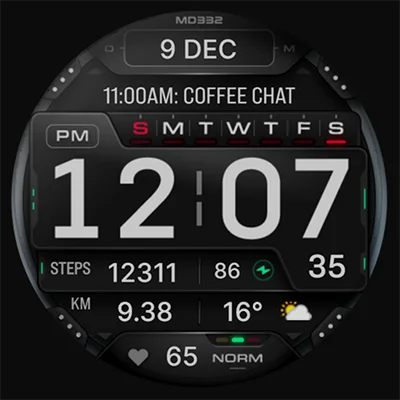
In the crowded landscape of Wear OS watch faces, finding one that perfectly balances bold aesthetics, practical functionality, and extensive customization can feel like searching for a needle in a haystack. Enter the MD332 Digital watch face—a stunning timepiece design that transforms your smartwatch into a personalized information hub with eye-catching large numerals and comprehensive data displays. Whether you’re tracking fitness goals, monitoring weather conditions, or simply want quick access to your favorite apps, this watch face delivers the perfect combination of form and function that modern smartwatch users demand.
Table of Contents
What Makes MD332 Digital Watch Face Stand Out?
The MD332 Digital watch face represents the latest evolution in smartwatch customization, built specifically for Wear OS 4 and later versions. Developed by Matteo Dini, a renowned designer in the watch face community, this timepiece brings professional-grade aesthetics to your wrist with a focus on readability and instant information access.
Core Features at a Glance
What sets this digital watch face apart from thousands of competitors is its thoughtful combination of features designed for real-world use:
| Feature Category | Capabilities | User Benefit |
|---|---|---|
| Display Options | Big numbers, minimal/full AOD | Maximum readability in any lighting |
| Time Formats | 12/24hr auto-detection | Adapts to your phone settings automatically |
| Shortcuts | 3 preset + 4 customizable | Quick access to frequently used apps |
| Complications | 4 customizable data slots | Display health, weather, and more |
| Color Customization | Time, date, seconds, background | Match any style or mood |
| Battery Display | Integrated battery indicator | Never get caught with a dead watch |
| Health Tracking | Heart rate with intervals | Monitor wellness at a glance |
The emphasis on large, bold numbers makes the MD332 Digital watch face particularly appealing for users who value instant readability without squinting or raising their wrist awkwardly. Whether you’re mid-workout, driving, or in a meeting, checking the time becomes effortless.
Compatibility and Installation: What You Need to Know
Before diving into customization, understanding compatibility ensures a smooth experience with your new watch face.
Device Compatibility
The MD332 Digital watch face supports all Wear OS devices running API Level 33 or higher, which translates to Wear OS 4 and subsequent versions. Compatible devices include:
- Samsung Galaxy Watch 4, 5, 6, 7, and 8
- Samsung Galaxy Watch Ultra
- Google Pixel Watch (all generations)
- Other Wear OS 4+ smartwatches
This broad compatibility means whether you’re sporting Samsung’s latest flagship or Google’s Pixel Watch, you’ll enjoy the full feature set without compromise.
Installation Process Made Simple
Getting the watch face on your wrist is straightforward. Download it from the Google Play Store and it will sync automatically to your paired smartwatch. Here’s the streamlined process:
- Download: Install from Google Play on your smartphone
- Sync: Wait for automatic synchronization to your watch
- Select: Long-press your current watch face and swipe to find MD332
- Customize: Tap “Customize” to personalize colors and complications
Important Note for Galaxy Watch Users: Samsung’s Wearable app editor sometimes struggles to load complex watch faces like MD332. This isn’t a flaw in the watch face itself but rather a limitation of Samsung’s companion app. The developer recommends customizing directly on your watch by tapping and holding the screen, then selecting “Customize.” This method works flawlessly and gives you immediate visual feedback on your changes.
For users who enjoy variety in their watch face collection, exploring similar designs can enhance your rotation. The MD327 Digital Watch Face offers a comparable aesthetic with slight variations in layout, giving you options for different occasions or moods.
Deep Dive: Customization Options That Matter
The true power of the MD332 Digital watch face lies in its extensive customization capabilities. Let’s explore how to tailor every aspect to your preferences.
Preset App Shortcuts: Instant Access Where It Counts
The watch face includes three intelligently chosen preset shortcuts that cover the most common smartwatch interactions:
- Calendar: Jump straight to your schedule without navigating menus
- Battery: Check detailed battery statistics and usage
- Heart Rate Measurement: Initiate manual heart rate tracking instantly
These presets eliminate multiple taps and swipes, getting you to critical functions in a single touch. This efficiency becomes especially valuable during workouts when fumbling with menus isn’t practical.
Four Customizable Shortcuts: Your Watch, Your Way
Beyond the presets, four additional shortcut positions let you add your most-used apps. Consider these strategic configurations based on common user profiles:
Fitness Enthusiast Setup:
- Workout tracker
- Music control
- Water intake tracker
- Timer
Productivity Professional Setup:
- Email notifications
- Task manager
- Voice recorder
- Calculator
Lifestyle Balanced Setup:
- Weather app
- Messaging
- Music streaming
- Camera remote
The flexibility here means your watch face evolves with your needs. Change them seasonally, for specific activities, or whenever your priorities shift.
Complications: Turning Data Into Actionable Insights
Complications represent the smartwatch industry’s term for data displays beyond basic time-telling. The MD332 Digital watch face provides four complication slots where you can surface information that matters to you:
Health & Fitness Complications:
- Steps taken
- Calories burned
- Distance walked
- Active minutes
- Heart rate zones
Environmental Complications:
- Current weather
- Temperature
- UV index
- Chance of rain
- Barometric pressure
Productivity Complications:
- Next calendar event
- Unread notifications
- Battery percentage
- World clock
Important Technical Note: Complications are external data sources, not built into the watch face itself. To access certain metrics like advanced weather data or specific fitness tracking, you may need to install companion apps that provide those complications. The watch face acts as a display canvas for data generated by other apps on your watch.
If you’re building a comprehensive watch face collection, the MD335 Hybrid watch face combines analog and digital elements for situations where you want a more traditional appearance while maintaining modern data displays.
Color Customization: Matching Your Personal Aesthetic
Visual customization extends far beyond mere gimmickry—it affects readability, battery efficiency (especially on OLED displays), and personal satisfaction with your device.
Customizable Color Elements
The MD332 Digital watch face allows independent color adjustment for:
- Time Display: The primary focus deserves your favorite color
- Date Information: Subtle contrast or bold matching—your choice
- Seconds Counter: High-visibility option for timing activities
- Background: From pure black (battery-saving) to vibrant hues
- General UI Elements: Icons, indicators, and accent colors
Color Strategy for Different Scenarios
Battery Conservation Mode:
- Pure black background
- Single bright color (white, red, or green) for time
- Minimal complications
- Simplified AOD
High Visibility Mode:
- High-contrast combinations (white on black, yellow on black)
- Bold accent colors for complications
- Full AOD for constant visibility
Aesthetic Coordination Mode:
- Match your watch band colors
- Coordinate with daily outfit
- Seasonal color palettes
- Brand color consistency for professionals
The psychological impact of color shouldn’t be underestimated. Studies in color psychology suggest that certain hues promote focus (blue), energy (red), or calm (green). Choose colors that support your daily objectives.
Always-On Display: Minimal vs. Full Modes
The AOD (Always-On Display) feature ensures you can check the time without waking your watch, preserving battery while maintaining functionality.
Minimal AOD Mode
The minimal AOD strips away all but essential elements:
- Basic time display
- Date information
- Critical battery indicator
This mode maximizes battery life by limiting pixels illuminated on OLED screens. It’s ideal for long days when charging isn’t convenient or during extended activities like hiking or traveling.
Full AOD Mode
The full AOD maintains most visual elements visible at all times:
- Complete time display with seconds
- All active complications
- Shortcuts remain visible
- Color elements (dimmed)
While consuming more battery, full AOD provides constant access to your customized information without any wrist gestures or taps. Perfect for desk work, meetings, or situations where checking your watch should be subtle and instantaneous.
For users who appreciate variety in AOD styles, the MD339 Digital watch face offers alternative AOD layouts that might complement different usage patterns or aesthetic preferences.
Optimizing Watch Face Performance
Even the best-designed watch face requires optimization to deliver peak performance throughout your day.
Battery Life Optimization Strategies
Display Settings:
- Use minimal AOD when battery conservation is priority
- Choose darker color schemes (black backgrounds save OLED battery)
- Reduce screen brightness when indoors
- Limit complications to only essential data
Complication Management:
- Fewer active complications = less background data refresh
- Disable complications that update constantly (like real-time weather radar)
- Use static complications (date, day of week) instead of dynamic ones when possible
Refresh Rate Considerations:
- Seconds display constantly updates—disable if not needed
- Heart rate intervals refresh frequently—toggle off when not training
- Weather complications typically update every 30-60 minutes
Troubleshooting Common Issues
Watch Face Not Syncing:
- Ensure Bluetooth connection is active
- Restart both phone and watch
- Reinstall from Google Play
- Check for Wear OS system updates
Customization Not Saving:
- Customize directly on watch rather than through phone app (especially for Samsung Galaxy Watch users)
- Allow full permissions for watch face app
- Ensure adequate storage space on watch
Complications Showing No Data:
- Verify the source app is installed on your watch
- Grant necessary permissions to complication provider apps
- Some complications require initial setup in their parent apps
- Check that the complication type matches the slot (some slots only accept specific data types)
Missing Features:
- Confirm your watch runs Wear OS 4 or later (API Level 33+)
- Some features vary by manufacturer implementation
- Check developer’s website for device-specific notes
Building Your Complete Watch Face Collection
While the MD332 Digital watch face offers remarkable versatility, rotating between multiple watch faces for different occasions or activities enhances your smartwatch experience.
Complementary Watch Face Recommendations
For Formal Occasions: When digital displays feel too casual, the MD326 3D Modern Watch Face provides sophisticated analog aesthetics with modern complications, perfect for business settings or formal events.
For Activity Tracking: The MD242 Hybrid watch face combines analog charm with digital precision, offering enhanced fitness tracking displays that complement workout-focused usage while maintaining style versatility.
For Seasonal Variety: During specific times of year, specialized faces add festive touches. While MD332 works year-round, having seasonal alternatives keeps your watch feeling fresh and connected to the calendar.
Creating Watch Face Profiles
Many Wear OS users create mental “profiles” for their watch faces:
Weekday Professional Profile:
- Conservative colors (blacks, grays, deep blues)
- Calendar and email complications prominent
- Minimal distractions
- Quick access to productivity apps
Weekend Warrior Profile:
- Vibrant colors matching athletic gear
- Fitness complications (steps, heart rate, calories)
- Music control shortcuts
- Timer and stopwatch access
Evening/Social Profile:
- Aesthetic focus over data density
- Minimal complications
- Elegant color schemes
- Camera remote and messaging shortcuts
The MD332’s extensive customization makes it adaptable to any profile, but having purpose-built alternatives provides instant context switching without complex reconfiguration.
The Developer Behind the Design
Understanding who creates your watch face adds context and confidence to your purchase. Matteo Dini has established himself as a prominent figure in the Wear OS watch face community, with a portfolio of highly-rated designs that prioritize both aesthetics and functionality.
Community Engagement and Support
The developer maintains active communication channels including:
- Newsletter: Stay updated on new releases and promotions
- Facebook: Community discussions and preview access
- Instagram: Visual showcases and user feature highlights
- Telegram: Direct support and troubleshooting assistance
- Website: Comprehensive installation guides and FAQs
This level of engagement means you’re not just buying a watch face—you’re joining a community of users with access to ongoing support, updates, and improvements. The developer’s commitment to addressing issues (like the Samsung Wearable app editor limitation) demonstrates dedication to user experience beyond initial sale.
Making the Most of Your Investment
The MD332 Digital watch face represents a modest investment that transforms your daily smartwatch interaction. Here’s how to maximize its value:
Daily Usage Tips
Morning Routine: Configure complications to show weather, calendar events, and fitness goals to start your day informed.
Work Hours: Minimize distractions by reducing complications to essentials—time, date, next meeting—and use neutral colors that don’t draw excessive attention during meetings.
Exercise Sessions: Switch to high-contrast colors, enable seconds display for interval training, and prioritize heart rate and fitness complications.
Evening Wind-Down: Dim colors, minimal AOD, and focus on communication shortcuts for staying connected without being tethered to your phone.
Long-Term Satisfaction
The key to long-term satisfaction with any watch face is periodic refreshment. Every few weeks, experiment with:
- New color combinations
- Different complication configurations
- Alternative shortcut assignments
- AOD mode switches
This prevents the staleness that comes from unchanging displays while leveraging the full customization potential you’ve purchased.
Technical Specifications and Requirements
For specification-minded users, here’s everything you need to know:
System Requirements:
- Wear OS 4.0 or higher (API Level 33+)
- Compatible smartwatch with proper sensor support
- Active Google Play account
- Bluetooth connection for initial sync
Supported Data Types:
- Time: 12/24-hour automatic detection
- Date: Multiple format options
- Battery: Percentage and icon
- Heart Rate: Current BPM and historical intervals
- Steps, distance, calories (via complications)
- Weather data (via complications)
- Calendar events (via complications)
Customization Options:
- 5+ color customization zones
- 7 total shortcuts (3 preset, 4 custom)
- 4 complication slots
- 2 AOD modes
- Multiple background options
Update Frequency:
- Regular updates addressing compatibility and features
- Community-driven improvement requests
- Seasonal enhancements and variants
Price, Value, and Competitive Positioning
In the watch face market, pricing ranges from free ad-supported options to premium designs costing several dollars. The MD332 Digital watch face positions itself in the accessible premium segment—offering professional-grade features and extensive customization at a price point that represents excellent value for the depth of functionality provided.
Value Comparison
Versus Free Watch Faces:
- Superior customization depth
- Professional design aesthetic
- Active developer support
- No advertisements or upsells
- Regular updates and compatibility maintenance
Versus Premium Watch Faces:
- Comparable feature set at lower cost
- Equal or superior readability
- Similar complication support
- Competitive color customization
Return on Investment
Consider that you check your watch dozens of times daily. A watch face you genuinely enjoy and that displays information you actually use improves every one of those interactions. Over weeks and months, this compounds into significant quality-of-life enhancement for minimal investment.
Final Verdict: Is MD332 Digital Watch Face Right for You?
The MD332 Digital watch face excels in scenarios where bold, instantly readable time display meets comprehensive information access. It’s particularly well-suited for:
Ideal User Profiles:
- Fitness enthusiasts tracking multiple health metrics
- Professionals balancing productivity and wellness
- Users who value customization and personalization
- Anyone prioritizing readability over decorative elements
- Smartwatch owners seeking to maximize device utility
Less Ideal For:
- Users preferring purely analog designs (though MD offers hybrid alternatives)
- Those with Wear OS 3 or earlier devices (compatibility limitation)
- Minimalists wanting only time with no complications
- Users who never customize beyond defaults
If you identify with the ideal profiles and your device meets the technical requirements, the MD332 represents a solid investment in daily smartwatch satisfaction. The combination of bold aesthetics, practical functionality, and extensive customization creates a watch face that genuinely enhances your smartwatch experience rather than simply occupying screen space.
Frequently Asked Questions
Does MD332 Digital watch face work with Samsung Galaxy Watch 4, 5, 6, 7, or 8?
Yes, the MD332 Digital watch face is fully compatible with all Samsung Galaxy Watch models running Wear OS 4 or later, including the Galaxy Watch 4, 5, 6, 7, 8, and the Galaxy Watch Ultra. However, Samsung users should note an important customization tip: the Samsung Wearable companion app on your phone sometimes has difficulty loading complex watch faces in its editor. This is not a problem with the watch face itself but rather a limitation of Samsung’s app. The recommended solution is to customize the watch face directly on your watch by tapping and holding the screen, then selecting “Customize.” This method works perfectly and gives you immediate visual feedback as you adjust colors, complications, and shortcuts.
What complications can I add to MD332 Digital watch face, and do I need additional apps?
The MD332 Digital watch face provides four customizable complication slots where you can display a wide variety of data including weather (temperature, conditions, UV index, chance of rain), health metrics (steps, calories burned, distance walked, heart rate), productivity information (calendar events, battery status, world clock), and much more. However, it’s important to understand that complications are external data sources—the watch face displays information provided by other apps on your watch. While basic complications like battery, date, and heart rate work with standard Wear OS features, more specialized data (like detailed weather, barometric pressure, or advanced fitness metrics) requires installing companion apps that provide those specific complications. The watch face acts as a customizable canvas for displaying this data, but doesn’t generate the data itself.
How do I maximize battery life while using MD332 Digital watch face?
Battery optimization for the MD332 Digital watch face involves several strategic adjustments. First, use the minimal AOD (Always-On Display) mode rather than full AOD—this significantly reduces pixels illuminated when your watch isn’t actively in use. Second, choose darker color schemes, particularly pure black backgrounds, which save substantial battery on OLED smartwatch displays by turning off pixels completely. Third, limit the number of active complications, especially those that update frequently like real-time weather or constantly refreshing fitness metrics. Fourth, disable the seconds display unless you specifically need it, as continuous updates consume more power than static displays. Finally, consider reducing screen brightness when indoors or in low-activity situations. With these optimizations, you can enjoy the MD332’s features while maintaining all-day battery life even on intensive usage days.
Transform your smartwatch into a personalized information powerhouse with the MD332 Digital watch face—where bold design meets practical functionality for the modern Wear OS user. Download it today and experience the difference that thoughtful design and extensive customization bring to every glance at your wrist.
📥 Download MD332 Digital watch face APK Latest Version (Premium Unlocked)
Note: This version is safe. You can scan it yourself via VirusTotal.