MD242 Hybrid Watch Face APK: Premium Wear OS Customization
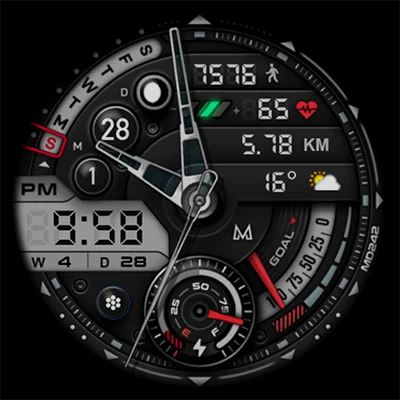
In the world of smartwatch personalization, finding the perfect balance between aesthetics and functionality can be challenging. The MD242 Hybrid watch face stands out as a sophisticated solution for Wear OS users seeking a premium, highly customizable timepiece display that combines classic analog charm with modern digital information. Created by renowned developer Matteo Dini MD, this MD242 Hybrid watch face delivers an elegant, information-rich experience that transforms your smartwatch into a truly personal device. Whether you own a Samsung Galaxy Watch, Pixel Watch, or other Wear OS device, this comprehensive guide will help you unlock the full potential of this stunning watch face design.
In this detailed exploration, we’ll cover everything from installation and customization options to troubleshooting tips and design philosophy, ensuring you get the most from your MD242 Hybrid watch face experience.
Table of Contents
What Is the MD242 Hybrid Watch Face?
The MD242 Hybrid watch face represents a sophisticated blend of traditional analog watch aesthetics with digital smartwatch functionality. As a premium Wear OS watch face, it’s designed specifically for modern smartwatches running Wear OS 4 and later versions (API Level 33+), including popular models like the Samsung Galaxy Watch 4, 5, 6, 7, 8, Galaxy Watch Ultra, and Google Pixel Watch series.
Key Design Philosophy
The “hybrid” designation refers to the watch face’s unique combination of:
- Analog Elements: Classic watch hands and circular design language
- Digital Displays: LCD-style numeric readouts for precise information
- Smart Complications: Modern data points like heart rate, steps, and customizable metrics
- Traditional Craftsmanship: Attention to detail reminiscent of luxury timepieces
This fusion creates a watch face that appeals to both traditional watch enthusiasts and tech-savvy smartwatch users who refuse to compromise on either form or function.
Comprehensive Feature Breakdown
Core Information Display
The MD242 Hybrid watch face packs an impressive array of information elements:
| Feature | Description | Customization Options |
|---|---|---|
| Time Display | Digital LCD-style 12/24hr | Syncs with phone settings, color customizable |
| Date | Current date display | Multiple format options, changeable colors |
| Battery Indicator | Dial-style battery meter | Replaceable with complication, color options |
| Heart Rate | Real-time BPM with intervals | Always-on monitoring, visual ring display |
| Steps Counter | Daily step tracking | Syncs with Health app, progress ring |
| Step Goals | Target achievement visual | Automatically synced with your fitness app |
Advanced Metrics and Complications
Beyond basic information, the MD242 Hybrid watch face offers sophisticated data tracking:
Specialized Data Points:
- Week of Year: Track which week of the year you’re in
- Day of Year: Running count of days (1-365/366)
- Moon Phase: Current lunar phase display
- 3 Customizable Complications: Configure with any available data
These complications can display diverse information including weather conditions, barometric pressure, next calendar appointment, distance walked, sunrise/sunset times, time zones, and much more. The flexibility allows you to tailor the watch face to your specific needs and interests.
App Shortcuts and Quick Access
Efficiency meets elegance with built-in shortcuts:
3 Preset App Shortcuts:
- Calendar: Instant access to your schedule
- Battery: Quick view of power management
- Measure HR: Direct heart rate measurement
2 Customizable Shortcuts: Assign your most-used apps for one-tap access directly from the watch face, eliminating navigation through menus.
For users who appreciate customizable watch faces with robust complication systems, the MD307 Digital watch face offers a fully digital alternative with similarly comprehensive data displays and customization options.
Installation and Compatibility
Supported Devices
The MD242 Hybrid watch face supports a wide range of Wear OS devices:
Samsung Galaxy Watch Series:
- Galaxy Watch 4, 4 Classic
- Galaxy Watch 5, 5 Pro
- Galaxy Watch 6, 6 Classic
- Galaxy Watch 7
- Galaxy Watch 8
- Galaxy Watch Ultra
Google Pixel Watch:
- Pixel Watch (1st generation)
- Pixel Watch 2
- Pixel Watch 3
Other Wear OS Devices:
- OnePlus Watch (with Wear OS)
- Mobvoi TicWatch Pro series (Wear OS 4+)
- Fossil Gen 6 and newer
- Other Wear OS 4+ compatible devices
System Requirements:
- Wear OS 4 or later (API Level 33+)
- Compatible Health/Fitness app for step tracking
- Sufficient storage space for watch face installation
Installation Process
Getting started with the MD242 Hybrid watch face is straightforward:
Step 1: Purchase and Download Visit the Google Play Store listing and purchase the watch face.
Step 2: Install to Watch The watch face automatically installs to your paired Wear OS device through the companion app on your phone.
Step 3: Activate the Watch Face On your watch, tap and hold the current watch face, swipe through your collection, and select MD242 Hybrid.
Step 4: Begin Customization Tap and hold the screen again, then select “Customize” to access all personalization options.
Important Note for Galaxy Watch Users
Samsung Galaxy Watch users should be aware of a known limitation with the Samsung Wearable app. The watch face editor within the app frequently fails to load complex watch faces like MD242 Hybrid. This is a Samsung app limitation, not an issue with the watch face itself.
Recommended Workaround: Customize the watch face directly on your watch by tapping and holding the screen, then selecting “Customize.” This bypasses the problematic Samsung Wearable app editor and provides full access to all customization features.
The developer maintains a comprehensive installation and troubleshooting guide at https://www.matteodinimd.com/watchface-installation/ for users experiencing difficulties.
Customization Deep Dive
Color Customization Options
One of the MD242 Hybrid watch face’s greatest strengths is its extensive color customization system:
Adjustable Color Elements:
- LCD Display Colors: Change the digital time and numeric displays
- Watch Hands: Customize hour, minute, and second hand colors
- Date Display: Adjust date text and background colors
- Rings: Modify progress ring colors for steps, heart rate, battery
- General Theme Colors: Overall color scheme adjustments
- Always-On Display Colors: Separate color scheme for AOD mode
Brightness Controls: The watch face includes brightness adjustment capabilities, allowing you to dim the LCD elements for a more subtle appearance or increase brightness for maximum visibility in bright conditions. Many users report that dimming the LCD brightness creates an exceptionally elegant, understated look that rivals luxury watch aesthetics.
Complication Configuration
The three customizable complication slots offer remarkable flexibility:
Available Complication Types:
- Weather conditions and temperature
- Next calendar event details
- Timer and stopwatch
- Alarm information
- World clock/secondary time zone
- Workout statistics
- Sunrise and sunset times
- Barometric pressure
- Altitude
- UV index
- Humidity levels
Note: Some complications require third-party apps installed on your watch. For example, advanced weather data might require a weather complication provider app.
Always-On Display (AOD) Support
The MD242 Hybrid watch face fully supports Wear OS’s Always-On Display feature with optimized designs:
- Battery-Efficient AOD: Simplified display that conserves power while remaining visible
- Customizable AOD Colors: Independent color scheme for ambient mode
- Information Preservation: Critical information remains visible even in AOD mode
- Smooth Transitions: Seamless switching between active and ambient displays
If you’re exploring different hybrid-style watch faces, the MD335 Hybrid watch face provides an alternative design approach with different layout configurations and visual elements worth comparing.
Design Aesthetics and Visual Appeal
The Hybrid Design Language
The MD242 Hybrid watch face exemplifies a design philosophy that honors traditional watchmaking while embracing digital capabilities:
Analog Heritage:
- Classic watch hands provide familiar time-reading methods
- Circular arrangement follows established chronograph layouts
- Subdials echo complications found on luxury timepieces
- Proportional balance creates visual harmony
Digital Enhancement:
- LCD-style displays offer precise, at-a-glance information
- Progress rings provide intuitive visual feedback
- Color-coding enables quick information parsing
- Modern typography ensures readability
Creating Your Perfect Look
Minimalist Configuration: For those preferring understated elegance:
- Use monochromatic color schemes (blacks, whites, grays)
- Dim LCD brightness for subtle information display
- Select essential complications only
- Choose thin watch hand styles
Bold Statement Configuration: For users wanting maximum impact:
- Contrast bright LCD colors with dark backgrounds
- Use vivid accent colors for progress rings
- Enable all complications for information density
- Choose thick, prominent watch hands
Professional Configuration: For business environments:
- Classic color combinations (navy, silver, gold)
- Moderate brightness levels
- Business-relevant complications (calendar, weather)
- Clean, uncluttered appearance
Performance and Battery Considerations
Battery Life Expectations
Smartwatch battery life represents a common concern with feature-rich watch faces. Here’s what to expect:
Typical Battery Performance:
- Most users report 1.5-3 days of battery life
- Always-On Display significantly impacts battery duration
- Frequent heart rate monitoring reduces battery life
- Screen-on time directly correlates with power consumption
Device-Specific Considerations: Some devices, particularly the OnePlus Watch running Wear OS 5, may experience shorter battery life with third-party watch faces due to manufacturer-specific optimizations and restrictions. This reflects the device’s software implementation rather than watch face efficiency.
The developer acknowledges that 2+ days of battery life on a feature-rich smartwatch with Always-On Display represents reasonable performance for modern Wear OS devices, particularly when using complex watch faces with multiple active complications.
Battery Optimization Tips
Extend Battery Life:
- Disable Always-On Display when not needed
- Reduce heart rate monitoring frequency
- Limit the number of active complications
- Lower screen brightness
- Use simpler watch faces overnight
- Close background apps consuming resources
Battery Meter Issue: Some users report that customizing the watch face can cause the built-in battery meter to display 100% constantly. This is a known bug that resolves after restarting the watch. Notably, this issue only affects the built-in battery meter, not the battery complication option, and doesn’t occur with other developers’ watch faces, suggesting it’s specific to this watch face’s battery implementation.
If battery life is a critical concern, exploring other watch face options from the Matteo Dini MD collection might provide alternatives with different feature sets and power requirements. The MD327 Digital Watch Face offers a streamlined digital-only interface that may consume less power while maintaining aesthetic appeal.
User Experience and Practical Applications
Real-World User Feedback
The MD242 Hybrid watch face maintains a solid 4.0-star rating with over 1,100 reviews, indicating strong user satisfaction:
Positive User Experiences:
- “Functional and stunning” design praised for clean, classy aesthetic
- Exceptional customization options allow true personalization
- Information density appreciated by data-focused users
- Quality build and attention to detail rivals premium watch faces
Common Criticisms:
- Battery drain concerns on certain devices
- Battery meter bug requiring watch restart
- Samsung Wearable app editor compatibility issues
- Learning curve for accessing all customization features
Ideal User Profiles
Perfect For:
- Fitness Enthusiasts: Comprehensive activity tracking with steps, heart rate, and goals
- Information Seekers: Multiple complications provide at-a-glance data
- Design Lovers: Aesthetic customization enables personal expression
- Professional Users: Clean, sophisticated appearance suitable for business settings
- Watch Collectors: Hybrid design appeals to traditional watch appreciation
Consider Alternatives If:
- Battery life is absolute top priority
- You prefer ultra-minimalist displays
- You rarely use complications or additional data
- You want animated or interactive watch face elements
Troubleshooting Common Issues
Samsung Wearable App Editor Problems
Problem: Watch face editor fails to load in Samsung Wearable app.
Solution: This is a known Samsung app limitation with complex watch faces. Customize directly on your watch:
- Tap and hold the watch face on your watch
- Select “Customize” option
- Swipe through customization categories
- Make desired changes
- Tap checkmark to confirm
Battery Meter Displaying Incorrectly
Problem: After customizing, battery meter shows 100% constantly.
Solution:
- Restart your watch (power off and on)
- Battery meter should return to accurate readings
- Consider using the battery complication instead of built-in meter
- Check for watch face updates that may address this bug
Complications Not Displaying Data
Problem: Selected complications show no data or display errors.
Solution:
- Verify the required provider app is installed on your watch
- Check app permissions for the complication provider
- Force-close and reopen the complication provider app
- Re-select the complication in customization menu
- Restart watch if problem persists
Watch Face Not Appearing After Installation
Problem: Purchased watch face doesn’t show in available faces.
Solution:
- Ensure watch and phone are connected via Bluetooth
- Open Play Store on watch and check download status
- Restart both watch and phone
- Manually sync apps from phone’s watch companion app
- Re-download from Play Store if necessary
For comprehensive troubleshooting, visit the developer’s dedicated guide at https://www.matteodinimd.com/watchface-installation/
Comparing MD242 to Other Premium Watch Faces
Within the MD Collection
Matteo Dini MD offers several watch face designs, each with unique characteristics:
MD242 Hybrid vs. Digital Alternatives: The hybrid approach combines analog and digital elements, offering traditional appeal with modern functionality. Users who prefer fully digital displays might explore the MD339 Digital watch face, which provides comprehensive information in a purely digital format with different visual organization.
Design Variety: The MD collection spans various styles from ultra-modern to classically inspired. The MD241 Digital watch face represents another option within the family, each offering distinct visual personalities while maintaining the collection’s quality standards.
Against Other Premium Hybrid Faces
MD242 Strengths:
- Extensive customization options exceed many competitors
- Clean, sophisticated aesthetic appeals to broad audience
- Robust complication system provides information flexibility
- Regular developer support and updates
- Reasonable pricing for feature set offered
Competitive Considerations:
- Some alternative faces offer better battery optimization
- Certain competitors provide animated elements
- Other developers may have faster bug resolution
- Alternative designs might suit specific aesthetic preferences
The Developer Behind the Design
Matteo Dini MD Watch Faces
Matteo Dini MD has established a reputation for creating high-quality, thoughtfully designed Wear OS watch faces. The developer demonstrates:
Commitment to Quality:
- Attention to aesthetic detail
- Comprehensive feature implementation
- Regular updates and improvements
- Responsive customer support
User Engagement:
- Newsletter for updates and promotions (http://eepurl.com/hlRcvf)
- Dedicated troubleshooting resources
- Active response to user feedback
- Transparent communication about known issues
Portfolio Approach: Rather than releasing numerous low-quality faces, the MD collection focuses on well-executed designs with distinct personalities, each worthy of consideration for different user preferences and needs.
Maximizing Your MD242 Experience
Customization Workflow
Step 1: Assess Your Needs
- List the information you check most frequently
- Consider your typical daily activities
- Identify aesthetic preferences (minimalist, bold, professional)
- Determine priority features (fitness tracking, weather, calendar)
Step 2: Start with Presets
- Activate the watch face with default settings
- Use it for a day to understand the layout
- Note which elements you use and which you ignore
- Identify information gaps or redundancies
Step 3: Customize Methodically
- Begin with color scheme selection
- Adjust brightness to your preference
- Configure complications based on your needs
- Customize shortcuts for frequent apps
- Fine-tune colors for readability and aesthetics
Step 4: Test and Iterate
- Use your customized face for several days
- Note any visibility issues in different lighting
- Assess battery impact
- Adjust as needed based on real-world use
Seasonal and Situational Adjustments
Create Multiple Configurations:
- Work Configuration: Professional colors, business-relevant complications
- Fitness Configuration: Emphasized health metrics, workout shortcuts
- Weekend Configuration: Relaxed colors, entertainment-focused complications
- Sleep Configuration: Minimal display, essential information only
Save screenshots of your favorite configurations for easy recreation when switching between modes.
Future Outlook and Updates
Ongoing Development
The MD242 Hybrid watch face continues to receive updates addressing:
- Bug fixes (including the battery meter issue)
- Compatibility improvements for new Wear OS versions
- Performance optimizations for better battery life
- Feature additions based on user feedback
- Enhanced customization options
Staying Updated
Best Practices:
- Enable automatic updates in Play Store for seamless improvements
- Subscribe to the developer’s newsletter for update notifications
- Check the Play Store listing periodically for changelog information
- Join Wear OS communities to learn about new features from other users
Value Proposition Analysis
Cost-Benefit Considerations
When evaluating whether the MD242 Hybrid watch face justifies its purchase:
Value Factors:
- One-time purchase provides permanent access
- Extensive customization options rival paid design services
- Information density reduces need for multiple apps
- Aesthetic quality comparable to significantly more expensive alternatives
- Regular updates improve value over time
Investment Perspective: Consider the watch face as enhancing your smartwatch investment. A device costing hundreds of dollars deserves a quality display that both looks beautiful and functions optimally. The MD242’s combination of form and function makes it a worthwhile personalization investment for users who wear their smartwatch daily.
Conclusion: Elevating Your Smartwatch Experience
The MD242 Hybrid watch face represents an excellent choice for Wear OS users seeking sophisticated customization that respects both traditional watch aesthetics and modern smartwatch capabilities. Its extensive feature set—including three customizable complications, five app shortcuts, comprehensive health tracking, and remarkable color customization—provides the tools to create a truly personalized timepiece display.
While considerations like battery life and occasional bugs exist, the watch face’s strengths significantly outweigh these limitations for most users. The clean, classy design that users consistently praise, combined with functional information density, creates a watch face that remains engaging and useful over extended periods rather than feeling like a novelty that quickly loses appeal.
For those who appreciate the marriage of analog elegance with digital functionality, who value customization depth, and who want their smartwatch to reflect their personal style, the MD242 Hybrid watch face delivers exceptional value. The developer’s commitment to quality, responsive support, and ongoing improvements further reinforces this watch face as a premium option in the Wear OS ecosystem.
Ready to transform your smartwatch into a personalized timepiece that reflects your style and meets your information needs? Download the MD242 Hybrid watch face from Google Play Store and discover why thousands of users have made it their go-to choice for combining timeless design with cutting-edge functionality. Your perfect watch face configuration awaits—it’s time to make your smartwatch truly yours.
Frequently Asked Questions About MD242 Hybrid Watch Face
Is the MD242 Hybrid watch face compatible with my Samsung Galaxy Watch?
Yes, the MD242 Hybrid watch face supports all Samsung Galaxy Watch models running Wear OS 4 or later (API Level 33+). This includes the Galaxy Watch 4, 5, 6, 7, 8 series, and the Galaxy Watch Ultra. However, Samsung Galaxy Watch users should note that the watch face editor in the Samsung Wearable app often fails to load complex watch faces like MD242. This is a Samsung app limitation, not a watch face issue. The recommended workaround is to customize the watch face directly on your watch by tapping and holding the screen and selecting “Customize.” This bypasses the problematic Samsung Wearable app and provides full access to all customization features.
How do I fix the battery meter showing 100% all the time?
If you experience the battery meter displaying 100% constantly after customizing the watch face, this is a known bug that can be easily resolved by restarting your watch (power it off completely and then turn it back on). After the restart, the battery meter should return to displaying accurate readings. This issue only affects the built-in battery meter, not the battery complication option. If you continue experiencing this problem, consider using the battery complication instead of the built-in meter, or check for watch face updates that may address this bug. Users report this doesn’t happen with other developers’ watch faces, suggesting it’s specific to MD242’s battery implementation.
What kind of battery life can I expect with the MD242 Hybrid watch face?
Battery life varies depending on your specific device, settings, and usage patterns, but most users can expect 1.5-3 days of battery life with the MD242 Hybrid watch face. Factors that significantly impact battery duration include Always-On Display usage, heart rate monitoring frequency, number of active complications, and screen brightness settings. Some devices like the OnePlus Watch running Wear OS 5 may experience shorter battery life due to manufacturer-specific optimizations and restrictions with third-party watch faces. The developer notes that 2+ days of battery life on a smartwatch with Always-On Display represents reasonable performance for feature-rich Wear OS devices. To extend battery life, consider disabling Always-On Display, reducing heart rate monitoring frequency, limiting active complications, and lowering screen brightness.
Can I customize the complications on this watch face?
Yes, the MD242 Hybrid watch face offers three fully customizable complication slots where you can display any data you prefer. Available options include weather conditions, barometric pressure, next calendar appointment, distance walked, sunrise/sunset times, time zones, altitude, humidity, UV index, and many more. The flexibility allows you to tailor the watch face to your specific needs and interests. To customize complications, tap and hold the watch face, select “Customize,” and navigate to the complications section. Some complications may require additional third-party complication provider apps installed on your watch to function properly. The watch face also includes three preset app shortcuts (Calendar, Battery, Measure HR) and two customizable shortcut slots for one-tap access to your most-used applications.
How do I change the colors on the MD242 Hybrid watch face?
The MD242 Hybrid watch face offers extensive color customization options accessible directly on your watch. To change colors, tap and hold the watch face screen, then select “Customize.” You can adjust colors for multiple elements including LCD display colors (digital time and numeric displays), watch hands (hour, minute, second), date display, progress rings (steps, heart rate, battery), and general theme colors. You can also set separate color schemes for Always-On Display mode and adjust overall brightness levels. Many users report that dimming the LCD brightness creates an elegant, subtle aesthetic. Navigate through the customization categories by swiping left or right, make your desired color selections, and tap the checkmark to confirm your changes. The extensive color options allow you to create anything from minimalist monochromatic designs to bold, vibrant statements.
📥 Download MD242 Hybrid watch face APK Latest Version (Premium Unlocked)
Note: This version is safe. You can scan it yourself via VirusTotal.