S4U Frost – classic watch face APK: Wear OS 4+ Analog, 3 Complications
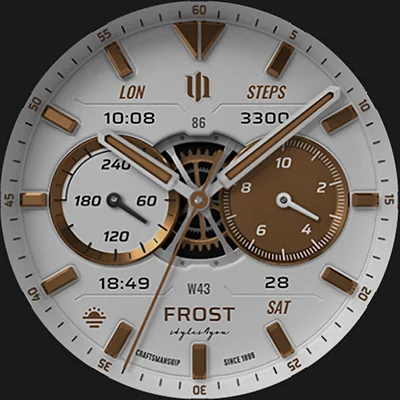
Your smartwatch is more than just a technology device—it’s a statement piece that reflects your personal style and sophistication. The S4U Frost – classic watch face brings refined elegance to your Wear OS device, combining traditional watchmaking aesthetics with modern smartwatch functionality. This beautifully designed analog watch face features a crisp white dial with realistic details that transform your digital timepiece into a stunning analog classic while maintaining full access to your essential smart features and customizations.
Table of Contents
Whether you own a Samsung Galaxy Watch, Google Pixel Watch, or another Wear OS device, S4U Frost – classic watch face offers the perfect blend of form and function. From customizable complications to multiple color schemes and always-on display options, this watch face delivers personalization that matches any outfit, occasion, or mood.
Why S4U Frost – Classic Watch Face Stands Out
In the crowded marketplace of smartwatch faces, S4U Frost – classic watch face distinguishes itself through meticulous attention to detail and authentic analog aesthetics. Unlike generic digital displays or overly futuristic designs, this watch face embraces timeless elegance that never goes out of style.
The realistic analog dial captures the essence of traditional luxury watches while seamlessly integrating modern smartwatch capabilities. Every element—from the precision-crafted hands to the sophisticated index markers—has been designed to replicate the look and feel of premium mechanical timepieces.
Key Features at a Glance
| Feature Category | Capabilities |
|---|---|
| Visual Design | Realistic white analog dial with premium finishing |
| Customization | 10 color options for hands, indices, and backgrounds |
| Complications | 3 custom data complications plus 4 app shortcuts |
| Display Modes | 3 different Always-On Display (AOD) layouts |
| Compatibility | Wear OS 4+ devices including Galaxy Watch and Pixel Watch |
Realistic Analog Design That Impresses
The cornerstone of S4U Frost – classic watch face is its stunningly realistic analog presentation. This isn’t a simplified digital representation—it’s a carefully crafted design that mimics the depth, texture, and sophistication of high-end mechanical watches.
Premium Aesthetic Elements
Detailed Hands: The watch hands feature realistic shadows and finishing that create depth and dimension on your smartwatch screen. The hour and minute hands are clearly differentiated through size and shape, ensuring instant readability at any glance.
Sophisticated Indices: Choose between multiple index mark styles, each designed to complement different aesthetic preferences. Whether you prefer classic Roman numerals, minimalist markers, or traditional hour indices, the options maintain the watch face’s refined character.
Layered Dial Design: The inner dial showcases multiple layers creating visual depth. This multi-dimensional approach replicates the construction of luxury watches where various dial levels create complexity and interest.
Authentic Color Palette: The white base dial provides a clean, versatile foundation that works with any outfit or occasion. The crisp white background evokes classic dress watches worn by professionals and style-conscious individuals worldwide.
For smartwatch enthusiasts who appreciate sophisticated design, much like those who enjoy premium interfaces in apps like DADAM109: Pro Data Watch Face or The Aristocrat Watch face, the S4U Frost delivers comparable elegance with unique styling.
Extensive Customization Options
While S4U Frost – classic watch face presents a cohesive, polished look out of the box, its true power lies in comprehensive customization capabilities that let you personalize every aspect of the display.
Color Customization
With 10 distinct color options available across multiple design elements, you can create countless unique variations:
Main Hands Color: Choose from 10 colors to match your style—classic silver and gold tones, modern blues and greens, or bold reds and oranges.
Index Colors: Customize the hour markers independently, creating contrast between hands and indices or maintaining monochromatic harmony.
Inner Dial Background: Select from 10 background color options for the inner dial region, adding subtle character or bold personality.
Secondary Complication Color: Ensure your data displays integrate seamlessly with your chosen color scheme by customizing complication text colors.
This level of color control means S4U Frost – classic watch face adapts to your wardrobe, mood, or preferences without ever feeling repetitive or limiting.
Layout and Style Options
Beyond colors, structural design elements offer additional personalization:
Inner Dial Layout: Choose from 4 different inner dial configurations, each presenting complications and analog displays differently.
Index Marks: Select between 2 index mark styles to match your preference for minimalism or traditional detailing.
Background Options: Toggle between 2 background styles, adjusting the overall visual weight and presence of the watch face.
Logo Display: Select from 4 logo options, including the ability to hide branding entirely for a clean, unobstructed dial.
Gear Elements: Choose from 3 gear display options, adding mechanical character or maintaining a smooth, simplified aesthetic.
Simple Customization Process
Accessing these customization options follows the standard Wear OS procedure:
- Press and hold your finger at the center of the watch display
- Press the customization button when it appears
- Swipe left or right to navigate between customizable elements
- Swipe up or down to cycle through available options for each element
This intuitive process means you can experiment with different combinations quickly, finding the perfect configuration without complex menus or frustrating navigation.
Smart Complications and Shortcuts
Modern smartwatches excel at delivering information at a glance, and S4U Frost – classic watch face maximizes this capability through thoughtfully integrated complications and shortcuts.
Three Custom Complications
The watch face includes three customizable complication slots that display user-defined data. These complications integrate elegantly into the analog design without disrupting the classic aesthetic:
Analog Steps Display: Track your daily movement with a dedicated analog steps indicator that visualizes progress toward your fitness goals.
Analog Heart Rate: Monitor your heart rate through a subtle analog display that keeps health data accessible without dominating the watch face.
Battery Level: Keep tabs on remaining battery life with an integrated battery complication that ensures you’re never caught with a dead smartwatch.
Beyond these dedicated analog displays, the three custom complications can show virtually any data supported by Wear OS:
- Calendar events and appointments
- Weather conditions and forecasts
- Activity and exercise metrics
- Messages and notification counts
- Timer and stopwatch functions
- Custom app data from third-party applications
Four App Shortcuts
In addition to data complications, S4U Frost – classic watch face provides four customizable app shortcuts. These shortcuts offer instant access to your most-used applications and widgets:
- Launch fitness tracking apps before workouts
- Open music controls for quick playback management
- Access timer or alarm apps instantly
- Jump directly to frequently used productivity tools
This combination of complications and shortcuts transforms your watch face from a passive display into an active productivity and information hub.
Configuring Complications and Shortcuts
Setting up complications and shortcuts follows a straightforward process:
- Press and hold the watch display
- Push the customize button
- Swipe right to left until you reach “complications”
- Tap on highlighted areas (4 shortcuts and 3 complications)
- Select desired apps, data sources, or functions
- Confirm your selections
This flexibility ensures S4U Frost – classic watch face adapts to your unique needs rather than forcing you into predetermined configurations.
Always-On Display Excellence
Battery life remains a primary concern for smartwatch users, yet the convenience of always-visible time is undeniably valuable. S4U Frost – classic watch face addresses this balance through three distinct Always-On Display (AOD) layouts.
AOD Design Philosophy
The AOD modes intelligently simplify the watch face design to conserve battery while maintaining readability:
Reduced Complexity: AOD layouts remove non-essential visual elements, focusing on core timekeeping and critical information.
Optimized Contrast: The designs maximize contrast to ensure legibility in various lighting conditions without excessive brightness.
No White Background: Importantly, AOD modes eliminate the white background to minimize battery drain, as lit pixels consume power on OLED displays.
Three AOD Layouts
The three available AOD layouts provide options for different preferences and scenarios:
Minimalist Layout: Displays time with minimal additional information—ideal for maximum battery conservation.
Balanced Layout: Includes time plus select complications, maintaining moderate information access with reasonable battery impact.
Information-Rich Layout: Shows time alongside multiple complications for users prioritizing data accessibility over battery longevity.
AOD Considerations
When using AOD features with S4U Frost – classic watch face, keep these factors in mind:
- AOD will reduce overall battery life compared to screen-off modes
- Some smartwatches automatically dim AOD based on ambient light
- Battery impact varies by device and individual smartwatch settings
- You can disable AOD entirely if battery life is your primary concern
For users who also appreciate other feature-rich watch faces like MD241 Digital watch face or MD327 Digital Watch Face, the AOD customization options in S4U Frost provide similar flexibility in managing the always-on experience.
Wear OS Compatibility and Device Support
S4U Frost – classic watch face is designed specifically for Wear OS 4 or higher (API 33+), ensuring optimal performance on modern smartwatches while leveraging the latest platform capabilities.
Compatible Devices
The watch face works seamlessly with:
Samsung Galaxy Watch Series:
- Galaxy Watch 4
- Galaxy Watch 5
- Galaxy Watch 6
- Galaxy Watch 7
- Galaxy Watch 7 Ultra
- Galaxy Watch 8
Google Pixel Watch Series:
- Pixel Watch 1
- Pixel Watch 2
- Pixel Watch 3
Other Wear OS 4+ Smartwatches: Various manufacturers producing Wear OS 4 compatible devices
Installation Support
If you encounter installation or downloading issues despite having a compatible smartwatch:
- Open the companion app provided with your purchase
- Navigate to the Install/Issues section
- Follow the troubleshooting steps provided
- Contact support at [email protected] if problems persist
This proactive support approach ensures users can successfully install and enjoy the watch face regardless of occasional platform quirks or device-specific considerations.
Why Wear OS 4+ Requirement?
The minimum requirement of Wear OS 4 enables S4U Frost – classic watch face to leverage:
- Enhanced complication APIs for richer data displays
- Improved rendering performance for smooth animations
- Better battery optimization features
- Advanced customization capabilities
- More reliable always-on display functionality
While this excludes older Wear OS devices, it ensures the watch face delivers the intended premium experience without compromise.
Real-World Usage Scenarios
Professional Environments
S4U Frost – classic watch face excels in business settings where traditional professionalism matters:
- Meetings and presentations where a refined appearance is expected
- Client interactions requiring polished, sophisticated aesthetics
- Professional networking events where details matter
- Corporate environments with dress code expectations
The classic white analog design reads as sophisticated and appropriate in virtually any professional context, unlike overtly digital or gaming-inspired watch faces that might seem out of place.
Formal Occasions
When dressing up for special events, your smartwatch should complement rather than clash:
- Weddings and formal celebrations
- Fine dining experiences
- Theater, opera, or cultural events
- Anniversary dinners and romantic occasions
The elegant analog design ensures your smartwatch enhances your formal attire rather than appearing as a technological afterthought.
Everyday Versatility
Beyond special occasions, S4U Frost – classic watch face proves equally at home in daily life:
- Casual social gatherings where you want to look put-together
- Weekend activities that don’t require athletic watch faces
- Shopping, errands, and general daily tasks
- Relaxed dining and entertainment
This versatility means you can set S4U Frost – classic watch face as your primary display without constantly switching between different faces for different contexts.
Fitness and Health Tracking
While elegant in appearance, the watch face doesn’t sacrifice fitness functionality:
- Analog steps display keeps movement goals visible
- Heart rate complications maintain health awareness
- Integration with fitness apps via shortcuts
- Glanceable data without disrupting the classic aesthetic
For smartwatch users who balance style with fitness tracking, perhaps also using specialized apps for health monitoring similar to T-Life or wellness tracking, S4U Frost maintains both priorities effectively.
Maximizing Your S4U Frost Experience
Customization Recommendations
For Professional Use:
- Select silver or gold hands for traditional elegance
- Choose subtle index colors that don’t distract
- Set complications to calendar and weather
- Use minimalist AOD to conserve battery during workdays
For Casual Style:
- Experiment with blue or green hand colors for modern flair
- Mix contrasting index and hand colors for visual interest
- Include fitness complications to stay motivated
- Use information-rich AOD for maximum data access
For Formal Events:
- Stick to classic silver hands with matching indices
- Minimize visible complications for clean aesthetics
- Hide logo elements for purist simplicity
- Enable AOD to avoid activating screen with wrist raises
Battery Life Optimization
To maximize battery performance with S4U Frost – classic watch face:
- Disable AOD When Unnecessary: If you’re active and frequently checking time, AOD adds minimal value while consuming battery.
- Reduce Complication Refresh Rates: Some complications update frequently—configure them for less frequent updates if immediate data isn’t critical.
- Adjust Screen Brightness: Lower brightness settings dramatically improve battery life, especially indoors.
- Limit App Shortcuts: While convenient, unused shortcuts connected to active apps can drain resources—only configure shortcuts you actually use.
- Choose Dark Inner Dial Backgrounds: Darker backgrounds consume less power on OLED displays compared to bright colors.
Maintaining Fresh Aesthetics
Even with a favorite watch face, occasional changes prevent visual fatigue:
- Rotate between different color schemes weekly or monthly
- Adjust complications based on current priorities (fitness focus, work deadlines, travel)
- Switch AOD layouts based on battery needs
- Experiment with index styles to rediscover the watch face
These minor adjustments keep S4U Frost – classic watch face feeling fresh without requiring complete watch face changes.
The S4U Watches Ecosystem
S4U Frost – classic watch face represents just one option within the broader S4U Watches collection. The developer, Matze (Styles4You), continuously creates new watch faces for Wear OS enthusiasts seeking quality designs.
Exploring More S4U Designs
If you appreciate S4U Frost, explore the developer’s portfolio at s4u-watches.com, where you’ll find:
- Additional classic analog designs
- Modern digital interpretations
- Hybrid faces combining analog and digital elements
- Seasonal and themed variations
- Sport-focused designs
Much like enthusiasts who collect multiple watch face options including Cyberpunk Watch Face for tech-forward aesthetics or Simple Floral Watch Face for nature-inspired designs, having variety in your watch face collection ensures you always have the perfect match for any occasion.
Community and Support
The S4U Watches community provides valuable resources:
Social Media Presence:
- Instagram (@matze_styles4you): Visual previews of new designs
- Facebook (styles4you): Community discussions and announcements
- YouTube (styles4you-watches): Video tutorials and showcases
- X/Twitter (@MStyles4you): Updates and quick tips
Direct Support: Email support at [email protected] ensures personalized assistance with technical issues, customization questions, or feature requests.
User Reviews: The Google Play Store reviews offer insights from fellow users, including customization inspiration, compatibility experiences, and practical usage tips.
Value Proposition and Purchasing
S4U Frost – classic watch face represents a one-time purchase that permanently enhances your smartwatch experience. Unlike subscription-based watch face services, this single investment grants lifetime access to the design and all future updates.
What You’re Buying
The purchase includes:
- Complete access to all customization options
- All three AOD layouts without restrictions
- Full complication and shortcut functionality
- Future updates and improvements
- Developer support via email
Cost Comparison
Compared to purchasing a traditional luxury watch strap or accessory (often $50-200+), a premium watch face offering similar aesthetic transformation costs a fraction of the price while providing more versatility through digital customization.
Refund and Support Policy
If S4U Frost – classic watch face doesn’t meet expectations, contact the developer directly. The responsive support team addresses concerns and technical issues promptly, ensuring customer satisfaction.
Installation and Getting Started
Purchase and Download Process
- Visit the Google Play Store listing
- Review compatibility with your specific device
- Complete the purchase transaction
- Download and install on your Wear OS smartwatch
- Select S4U Frost from your watch face options
Initial Configuration
Upon first use:
- Select S4U Frost – classic watch face from your available watch faces
- Explore the default configuration
- Long-press to access customization
- Experiment with different colors and layouts
- Configure complications and shortcuts for your needs
- Select your preferred AOD layout
- Adjust settings based on initial impressions
Troubleshooting Common Issues
Watch Face Not Appearing:
- Ensure download completed successfully
- Restart your smartwatch
- Check Wear OS app on paired phone
- Use companion app troubleshooting tools
Complications Not Updating:
- Verify app permissions for data sources
- Check that complication apps are installed and active
- Refresh complications by reconfiguring them
Battery Draining Quickly:
- Disable AOD temporarily to identify impact
- Reduce complication update frequency
- Lower screen brightness
- Check for other battery-intensive apps
Conclusion: Timeless Style Meets Smart Functionality
S4U Frost – classic watch face masterfully bridges the gap between traditional watchmaking elegance and contemporary smartwatch capability. Its realistic analog design satisfies aesthetic preferences for classic timepieces while comprehensive customization ensures the watch face adapts to your personal style, professional requirements, and daily information needs.
Whether you’re wearing your Galaxy Watch to an important business meeting, checking fitness progress during a workout, or simply going about your daily routine, this watch face delivers appropriate sophistication with practical functionality. The combination of beautiful design, extensive personalization, smart complications, and efficient always-on display options creates a complete package that enhances your Wear OS experience.
For smartwatch users who refuse to choose between looking good and staying connected, S4U Frost – classic watch face offers the best of both worlds. Transform your smartwatch into a sophisticated timepiece that commands respect while maintaining full access to the information and applications that make wearable technology indispensable.
Frequently Asked Questions About S4U Frost – Classic Watch Face
Will S4U Frost work on my Samsung Galaxy Watch 3 or older Wear OS devices?
Unfortunately, S4U Frost – classic watch face requires Wear OS 4 or higher (API 33+), which means it’s not compatible with Samsung Galaxy Watch 3 or other older smartwatches running earlier Wear OS versions. The watch face is designed to leverage features and performance capabilities only available in Wear OS 4+, ensuring optimal functionality, smooth animations, and advanced complication support. Compatible devices include Samsung Galaxy Watch 4 and newer (5, 6, 7, 7 Ultra, 8), Google Pixel Watch 1-3, and other smartwatches that have been updated to Wear OS 4. If you’re unsure about your device’s Wear OS version, check your smartwatch settings under “About” or “System” to confirm compatibility before purchasing.
How much does S4U Frost drain my smartwatch battery compared to simpler watch faces?
Battery consumption with S4U Frost – classic watch face depends primarily on your configuration choices, particularly whether you enable the Always-On Display (AOD) feature. With AOD disabled, the watch face consumes battery similarly to most standard analog watch faces—minimal impact beyond normal smartwatch operation. With AOD enabled, you’ll experience additional battery drain, though the three available AOD layouts are optimized to minimize this impact by eliminating the white background (which would significantly increase power consumption on OLED displays) and reducing visual complexity. Most users report that with AOD enabled, they can still achieve a full day of normal use, though exact battery performance varies by device model, usage patterns, screen brightness settings, and active complications. For maximum battery life, disable AOD, reduce screen brightness, and limit frequently-updating complications while still enjoying the beautiful analog design.
Can I customize the watch face differently for different outfits or occasions?
Yes, S4U Frost – classic watch face offers extensive customization with 10 color options across multiple elements (hands, indices, inner dial background), 4 inner dial layouts, 2 index mark styles, 2 background options, 4 logo displays, and 3 gear element choices. However, you cannot save multiple preset configurations—each time you want to change the appearance, you’ll need to manually adjust the settings through the customization menu. The process is straightforward (long-press the watch face, tap customize, swipe to navigate elements, swipe up/down to change options), so switching between configurations takes only a minute or two once you know your preferred combinations. Many users develop a few favorite configurations—perhaps a professional silver-and-gold setup for work, a bold blue configuration for casual wear, and a minimalist setup for formal occasions—and become quick at switching between them as needed throughout the week.
📥 Download S4U Frost – classic watch face APK Latest Version (Premium Unlocked)
Note: This version is safe. You can scan it yourself via VirusTotal.