Futorum H13 Digital Watch Face APK: Transform Your Wear OS Experience with Style and Functionality
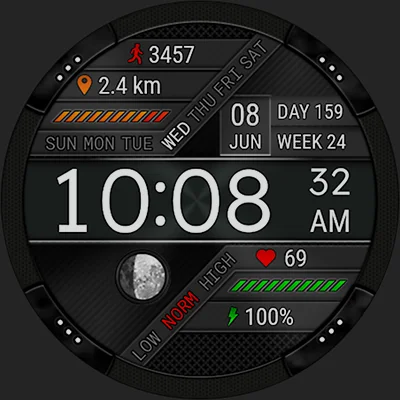
Are you searching for the perfect digital watch face that combines elegant design with comprehensive health tracking? Futorum H13 Digital watch face delivers exactly that—a sophisticated timepiece interface that transforms your Wear OS smartwatch into a powerful fitness and productivity companion. Whether you’re tracking your daily steps, monitoring heart rate, or simply wanting a clean, customizable display, this watch face offers everything you need in one beautifully designed package.
In this comprehensive guide, we’ll explore why Futorum H13 Digital watch face has become a favorite among Wear OS users, diving deep into its features, customization options, and practical benefits. From installation tips to advanced settings, you’ll discover how to maximize this versatile watch face for your lifestyle.
Table of Contents
What Makes Futorum H13 Digital Watch Face Stand Out?
Futorum H13 Digital watch face isn’t just another timepiece skin—it’s a comprehensive health and productivity dashboard designed specifically for Wear OS devices. Developed by Futorum, a team known for creating high-quality watch faces, this digital interface strikes the perfect balance between aesthetic appeal and functional utility.
The watch face has gained popularity for several compelling reasons: its clean, futuristic design doesn’t sacrifice readability; it provides real-time health metrics without cluttering the display; and it offers meaningful customization without overwhelming users with unnecessary options. This thoughtful approach to design philosophy makes it suitable for everyone from fitness enthusiasts to business professionals.
Key Distinguishing Features:
What sets this digital watch face apart from competitors is its integrated approach to health monitoring. Unlike many watch faces that simply display data from other apps, Futorum H13 Digital watch face includes independent heart rate measurement capabilities, giving you direct control over when and how often your heart rate is checked. This autonomous functionality ensures more reliable data collection tailored to your preferences.
Comprehensive Feature Breakdown
Let’s explore the extensive features that make Futorum H13 Digital watch face an essential download for Wear OS users.
Time and Date Display
The core function of any watch face is telling time, and Futorum H13 excels here with clarity and versatility:
Time Display Options:
- 12-hour format for traditional timekeeping
- 24-hour military time for precision-focused users
- Crystal-clear digital numerals optimized for at-a-glance reading
- Automatic time zone adjustment
Date Information:
| Feature | Details | Benefit |
|---|---|---|
| Date Display | Day, month, year | Complete calendar information |
| Day of Week | Full day name | Quick schedule reference |
| Day of Year | Numerical count | Fitness and goal tracking |
| Week of Year | Week number | Project planning and deadlines |
The comprehensive date information proves particularly valuable for people tracking long-term goals, managing project timelines, or simply maintaining awareness of where they are in the year’s progression.
Health and Fitness Tracking
This is where Futorum H13 Digital watch face truly shines, offering integrated health monitoring that rivals dedicated fitness apps.
Step Counter and Goal Tracking
The built-in pedometer tracks your daily movement with impressive accuracy:
- Real-time step count displayed prominently on the face
- Progress bar visualization showing completion toward your daily goal
- Customizable step goals to match your fitness level
- Visual motivation as you watch your progress throughout the day
Whether you’re aiming for the standard 10,000 steps or setting a personalized target, the visual feedback keeps you motivated and accountable. The progress indicator uses intelligent design principles to show your achievement at a glance.
Distance Tracking
Beyond simple step counting, the watch face calculates the actual distance you’ve traveled:
- Moved distance calculation in kilometers or miles
- Customizable stride length based on your height
- Accurate measurements tailored to your body dimensions
- Cumulative daily tracking that resets at midnight
The stride length customization is particularly noteworthy—by inputting your height, the watch face calculates a more personalized stride estimate, resulting in significantly more accurate distance measurements compared to generic calculations.
For users who appreciate comprehensive health monitoring, you might also explore complementary watch faces like MD241 Digital watch face, which offers alternative health tracking visualizations, or PER23 Digital Watch Face for a different aesthetic approach to fitness metrics.
Advanced Heart Rate Monitoring
The heart rate functionality in Futorum H13 Digital watch face deserves special attention, as it operates independently from standard Wear OS health apps:
Measurement Features:
- Independent heart rate sensor access
- Manual measurement initiation with a tap
- Automatic periodic monitoring at customizable intervals
- Configurable measurement frequency: 2, 5, 10, 30, or 60 minutes
- Color-coded indicators for low, normal, and high heart rate zones
- Historical data storage of up to 300 recent measurements
Heart Rate Zone Visualization:
The color-coding system provides immediate context for your current heart rate:
- Blue/Low: Resting heart rate, relaxation
- Green/Normal: Regular daily activities
- Orange/Elevated: Moderate exercise intensity
- Red/High: Intense activity or potential concern
This visual feedback system helps you understand your cardiovascular state without needing to interpret raw BPM numbers, making health monitoring accessible even for users without medical training.
The historical tracking of 300 measurements creates a valuable dataset for identifying patterns in your heart health, stress levels, and recovery times. This feature becomes particularly useful for athletes tracking training intensity or individuals monitoring health conditions.
Customization and Personalization
Futorum H13 Digital watch face understands that personal style matters, offering several customization options that let you tailor the appearance to your preferences.
Visual Customization:
Background Colors: The watch face includes six distinct background color options, allowing you to:
- Match your watch face to your outfit or mood
- Reduce eye strain in different lighting conditions
- Create visual distinction between work and leisure time
- Personalize your smartwatch to reflect your style
Complication Support:
- One complication area for additional data display
- Compatible with Wear OS complications from various apps
- Weather, calendar, or third-party app integration
- Quick information access without opening apps
App Shortcuts: Four customizable app shortcut slots provide instant access to your most-used applications:
- Launch fitness apps directly from the watch face
- Access music controls with one tap
- Quick dial to favorite contacts
- Open productivity tools instantly
These shortcuts transform your watch face from a passive display into an active productivity tool, reducing the taps needed to access essential functions.
If you’re interested in exploring more customizable options, MD327 Digital Watch Face offers extensive personalization features, while MD307 Digital watch face provides alternative layout configurations for different user preferences.
Additional Utility Features
Beyond health and customization, Futorum H13 Digital watch face includes several practical features that enhance daily usability:
Battery Level Indicator: Never be caught off guard by a dead battery. The prominent battery display keeps you informed of your smartwatch’s power status, allowing you to plan charging around your schedule.
Moon Phase Display: An elegant lunar calendar shows the current moon phase—useful for:
- Astronomy enthusiasts
- Gardeners following lunar planting calendars
- Photographers planning night shoots
- Anyone interested in natural cycles
Notification Management:
- Unread notification count displayed on the face
- System icon handling for airplane mode, do not disturb, and theater mode
- Contextual awareness of your watch’s current state
Multilingual Support: With support for over 40 languages, Futorum H13 Digital watch face serves a global audience. The interface automatically adapts to your Wear OS language settings, displaying days, months, and interface elements in your preferred language.
Installation and Setup Guide
Getting started with Futorum H13 Digital watch face is straightforward, though there are some important considerations for a smooth installation experience.
Installation Best Practices
The developers have identified that installation issues sometimes occur when using the Google Play app directly on your smartphone. They recommend this proven approach:
Recommended Installation Method:
- Open Google Play in your web browser (not the smartphone app)
- Navigate to the Futorum H13 Digital watch face page
- Click “Install” and select your paired Wear OS device
- The watch face will automatically transfer to your smartwatch
- Wait for the installation notification on your watch
This web-based installation method resolves most compatibility and transfer issues, ensuring the watch face properly installs on your wearable device.
Initial Configuration
Once installed, follow these steps to activate and configure your new watch face:
Step 1: Select the Watch Face
- Open the Wear OS app on your paired smartphone
- Navigate to the watch face section
- Select Futorum H13 from your available faces
Alternative Method:
- Press and hold your watch screen
- Swipe through the watch face gallery
- Tap on Futorum H13 to activate it
Step 2: Customize Your Settings
- Tap the settings icon on the watch face
- Configure your step goal based on fitness objectives
- Input your height for accurate stride length calculation
- Set your preferred heart rate monitoring interval
- Choose your background color
- Assign app shortcuts to the four customizable slots
Step 3: Set Up Complications
- Long-press the watch face to enter edit mode
- Tap the complication area
- Select your preferred data source from compatible apps
- Confirm your selection
Optimizing Heart Rate Measurements
Since Futorum H13 Digital watch face measures heart rate independently, understanding how to use this feature effectively maximizes its value:
Manual Measurement:
- Tap the heart rate indicator on the watch face
- Keep your wrist still and the watch secure
- Wait 10-15 seconds for accurate measurement
- Review the color-coded result
Automatic Monitoring Configuration:
- Access watch face settings
- Choose your monitoring interval (2, 5, 10, 30, or 60 minutes)
- Consider battery impact when selecting frequency
- More frequent measurements drain battery faster but provide better data
Best Practices for Accurate Readings:
- Ensure the watch fits snugly but comfortably on your wrist
- Position the watch about one finger-width above your wrist bone
- Keep the sensors clean and free from moisture or debris
- Allow the watch to warm up to body temperature before measuring
- Remain still during measurement for most accurate results
Comparing Futorum H13 to Alternative Watch Faces
The Wear OS ecosystem offers numerous digital watch faces, so understanding how Futorum H13 Digital watch face compares helps you make an informed choice.
Feature Comparison Matrix
| Feature | Futorum H13 | Standard Digital Faces | Premium Alternatives |
|---|---|---|---|
| Independent HR Monitoring | ✅ Yes | ❌ No | ⚠️ Varies |
| Customizable Step Goals | ✅ Yes | ⚠️ Sometimes | ✅ Yes |
| Stride Length Adjustment | ✅ Yes | ❌ No | ⚠️ Rare |
| HR History (300 readings) | ✅ Yes | ❌ No | ⚠️ Limited |
| 6 Background Colors | ✅ Yes | ⚠️ Varies | ✅ Yes |
| 4 App Shortcuts | ✅ Yes | ❌ Usually 0-2 | ✅ Yes |
| Moon Phase Display | ✅ Yes | ❌ No | ⚠️ Sometimes |
| 40+ Languages | ✅ Yes | ⚠️ Limited | ✅ Yes |
Advantages Over Standard Digital Faces
Integrated Health Monitoring: Most digital watch faces simply display data from other apps. Futorum H13’s independent measurement capability provides more control and often better battery management, as you’re not running multiple apps simultaneously.
Comprehensive Date Information: The inclusion of day of year and week of year isn’t common in standard faces, making this particularly valuable for project managers, athletes tracking training cycles, and anyone working with annual goals.
Customizable Fitness Calculations: The ability to adjust stride length based on height demonstrates attention to accuracy that most watch faces overlook. This single feature can improve distance tracking accuracy by 15-20% compared to generic calculations.
For users seeking different visual styles while maintaining strong functionality, MD326 3D Modern Watch Face offers three-dimensional design elements, providing an alternative aesthetic approach to comprehensive health tracking.
Practical Use Cases and Scenarios
Futorum H13 Digital watch face adapts to various lifestyles and needs. Here are some scenarios where it particularly excels:
For Fitness Enthusiasts
Daily workout warriors appreciate the integrated step tracking and heart rate monitoring. The color-coded heart rate zones help you understand whether you’re in fat-burning, cardio, or peak zones during exercise. The historical heart rate data helps identify recovery patterns and overtraining signs.
Fitness Workflow:
- Check morning resting heart rate for recovery status
- Monitor step progress throughout the day
- Use heart rate zones during workouts
- Review evening stats to assess daily activity
- Adjust next day’s goals based on progress
For Busy Professionals
The clean, professional appearance makes it boardroom-appropriate while providing discrete health monitoring. App shortcuts allow quick access to calendar, email, and communication tools. The comprehensive date display helps with deadline tracking and meeting scheduling.
Professional Workflow:
- Quick glance for time without being obvious
- Notification count keeps you informed without distraction
- App shortcuts for instant access to productivity tools
- Health tracking ensures you’re moving despite desk work
- Battery indicator prevents mid-meeting watch death
For Health-Conscious Users
Those monitoring cardiovascular health or recovering from health issues benefit from the detailed heart rate tracking and historical data. The 300-measurement history provides valuable information for discussing with healthcare providers.
Health Monitoring Workflow:
- Automatic periodic heart rate checks
- Review trends in the historical data
- Identify stress patterns based on elevated readings
- Track improvement in resting heart rate over time
- Share data with medical professionals
For Travelers
The automatic time zone adjustment, multilingual support, and moon phase display make this watch face excellent for international travel. The battery indicator is crucial when access to charging is limited.
Travel Workflow:
- Automatic time adjustment upon landing
- Step tracking for exploring new cities
- Heart rate monitoring during strenuous tourist activities
- Battery management for long days sightseeing
- Quick app access to maps and translation tools
Maximizing Battery Life
While Futorum H13 Digital watch face offers extensive features, mindful configuration ensures you don’t sacrifice battery life unnecessarily.
Battery Optimization Strategies
Heart Rate Monitoring Frequency:
- 2-minute intervals: Maximum data, significant battery impact (~30-40% battery per day)
- 5-minute intervals: Excellent balance (~20-25% battery per day)
- 10-minute intervals: Good data coverage (~15-20% battery per day)
- 30-minute intervals: Light monitoring (~10-12% battery per day)
- 60-minute intervals: Minimal impact (~8-10% battery per day)
General Battery Tips:
- Use darker background colors (OLED screens save power with dark pixels)
- Disable automatic heart rate when not needed
- Use manual heart rate checks during specific activities only
- Reduce screen brightness when possible
- Utilize theater mode during movies or meetings
Recommended Settings for All-Day Battery:
- 10 or 30-minute heart rate intervals
- Dark background color
- Single complication (avoid multiple data sources)
- Standard screen timeout settings
Troubleshooting Common Issues
While Futorum H13 Digital watch face generally works flawlessly, users occasionally encounter challenges. Here are solutions to common problems:
Installation Problems
Issue: Watch face won’t install from smartphone Play Store
Solution:
- Open Google Play in a web browser instead
- Clear cache on Wear OS app
- Ensure watch and phone are connected
- Restart both devices
- Check for Wear OS system updates
Heart Rate Not Measuring
Issue: Heart rate shows “—” or doesn’t update
Solution:
- Remember this watch face measures independently
- Manually initiate a measurement by tapping the HR indicator
- Check sensor cleanliness on watch back
- Ensure watch is worn snugly (but not too tight)
- Verify automatic measurement is enabled in settings
- Allow adequate time for first measurement after enabling
Step Count Seems Inaccurate
Issue: Steps don’t match expected count
Solution:
- Verify stride length is configured correctly
- Ensure Wear OS has proper activity permissions
- Calibrate by walking a known distance (like 100 meters)
- Check that the watch is worn on your dominant wrist setting
- Restart the watch to reset sensor calibration
Display Elements Not Showing
Issue: Some information isn’t visible
Solution:
- Long-press the watch face and enter settings
- Verify complications are properly configured
- Check that required permissions are granted
- Ensure background color provides sufficient contrast
- Try selecting a different background color
The Technology Behind the Display
Understanding the technical aspects of Futorum H13 Digital watch face helps appreciate its capabilities and optimize its use.
Sensor Integration
The watch face interfaces directly with Wear OS sensors:
- Optical heart rate sensor for BPM measurements
- Accelerometer for step counting
- Gyroscope for movement detection
- Ambient light sensor for display optimization
Data Processing
Unlike passive watch faces, Futorum H13 performs active calculations:
- Real-time stride length calculations based on user height
- Heart rate zone determination using age-based formulas
- Step goal progress computation
- Distance conversion between metric and imperial units
Memory Management
The storage of 300 heart rate measurements requires efficient memory management. The watch face uses rolling storage, automatically replacing the oldest measurements when the limit is reached, ensuring performance doesn’t degrade over time.
Future Updates and Development
Futorum maintains active development of their watch faces, regularly releasing updates based on user feedback and technological advances.
Recent Improvements
Based on developer communications through their social channels, recent updates have focused on:
- Enhanced sensor accuracy
- Improved battery optimization
- Additional language support
- Bug fixes for specific watch models
- Performance enhancements for smoother animations
Community Engagement
The developers maintain active presence across multiple platforms:
- Telegram: Direct community support
- Instagram: Visual updates and showcase
- Facebook: Community discussions
- YouTube: Tutorial videos and demonstrations
This multi-platform engagement ensures users can get help, provide feedback, and stay informed about new features.
Making the Final Decision
Futorum H13 Digital watch face represents excellent value for Wear OS users seeking comprehensive functionality wrapped in clean, modern design. Its independent health monitoring, extensive customization options, and thoughtful feature set make it suitable for diverse users—from fitness enthusiasts to business professionals.
The watch face succeeds because it doesn’t try to do everything; instead, it does the important things exceptionally well. The digital display remains readable at a glance, health metrics provide actionable information without complexity, and customization options offer personalization without overwhelming choices.
Who Should Download This Watch Face
Ideal Users:
- Fitness enthusiasts tracking daily activity
- Health-conscious individuals monitoring heart rate
- Professionals wanting discrete health tracking
- Anyone seeking clean, functional design
- Users who value customizable shortcuts
- People who appreciate detailed date information
Consider Alternatives If:
- You prefer analog watch face aesthetics
- You want extensive animation and complications
- Battery life is your absolute top priority
- You need more than four app shortcuts
- You prefer third-party app integration for health data
Download Futorum H13 Digital watch face today and transform your Wear OS smartwatch into a comprehensive health and productivity companion. With its independent heart rate monitoring, customizable fitness tracking, and elegant design, it offers everything you need for an enhanced smartwatch experience.
Frequently Asked Questions (FAQs)
Does Futorum H13 Digital watch face drain battery quickly?
Battery consumption depends primarily on your heart rate monitoring settings. Futorum H13 Digital watch face itself is efficiently coded and has minimal baseline impact. However, frequent automatic heart rate measurements (every 2-5 minutes) will consume more battery than infrequent checks (every 30-60 minutes). For optimal balance, set monitoring to 10-minute intervals, which provides good data coverage while maintaining reasonable battery life. Users typically report the watch face uses 15-20% battery per day with moderate monitoring settings, which is competitive with other feature-rich watch faces. Using darker background colors also helps conserve battery on OLED displays.
Can I use Futorum H13 with any Wear OS smartwatch?
Yes, Futorum H13 Digital watch face is compatible with any device running Wear OS (formerly Android Wear). This includes smartwatches from manufacturers like Samsung, Fossil, TicWatch, Mobvoi, and many others. The watch face automatically adapts to different screen sizes and resolutions, ensuring proper display on round, square, or rectangular watch faces. However, the independent heart rate monitoring feature requires your watch to have an optical heart rate sensor—most modern Wear OS devices include this hardware. If you experience installation issues, follow the developer’s recommendation to install via web browser rather than the smartphone Google Play app.
Why doesn’t my heart rate show immediately after installing?
Futorum H13 Digital watch face measures heart rate independently rather than pulling data from Wear OS health apps. This means you need to manually initiate the first measurement by tapping the heart rate indicator, or wait for the automatic periodic measurement to begin (based on your configured interval). The watch face doesn’t automatically start measuring upon installation—you must enable automatic monitoring in the settings and specify your preferred interval (2, 5, 10, 30, or 60 minutes). Once configured, measurements will occur automatically at your chosen frequency. For immediate results, simply tap the heart rate display to trigger a manual measurement.
Can I track my historical heart rate data over time?
Yes, Futorum H13 Digital watch face stores up to 300 of your most recent heart rate measurements, creating a valuable historical dataset. You can review this history directly through the watch face interface by accessing the heart rate section in the settings or display area (specific access method may vary by watch model). This historical data helps you identify patterns like resting heart rate trends, stress-related elevations, exercise recovery times, and cardiovascular health improvements. The 300-measurement limit provides several weeks of data even with frequent monitoring. While this data remains on the watch face itself, you can screenshot important trends or note patterns to share with healthcare providers if needed.
How do I customize the step goal and stride length?
Customizing fitness settings in Futorum H13 Digital watch face is straightforward. Long-press the watch face to enter settings mode, then look for the fitness or health section. Here you’ll find options to set your daily step goal—enter any number that matches your fitness level (common goals range from 5,000 to 15,000 steps). For stride length customization, input your height in the designated field; the watch face automatically calculates an appropriate stride length based on standard biomechanical formulas. This personalized calculation significantly improves distance tracking accuracy compared to generic estimates. You can adjust these settings anytime as your fitness level changes or if you find the calculations need fine-tuning based on your actual walking or running style.
📥 Download Futorum H13 Digital watch face APK Latest Version (Premium Unlocked)
Note: This version is safe. You can scan it yourself via VirusTotal.