FLW095 Fall Season Time APK: Dynamic Autumn Backgrounds, Fitness Stats & AOD for Wear OS
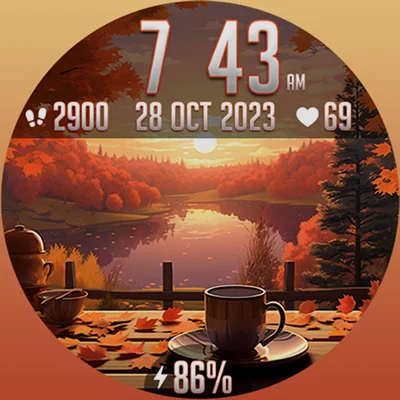
As the leaves begin their spectacular transformation and the air turns crisp, why shouldn’t your smartwatch embrace the beauty of autumn too? FLW095 Fall Season Time is a beautifully crafted watch face for Wear OS that brings the enchanting essence of fall directly to your wrist. This dynamic timepiece doesn’t just display the time—it creates an immersive seasonal experience that changes throughout the day, making every glance at your watch a moment of visual delight.
Table of Contents
What Makes FLW095 Fall Season Time Special?
In a market saturated with generic watch faces, FLW095 Fall Season Time stands out by offering something truly distinctive: a living, breathing celebration of autumn that adapts to the rhythm of your day. This isn’t just another static image on your smartwatch—it’s a carefully designed interface that captures the magic of fall and presents it in a functional, elegant format.
The watch face belongs to the popular seasonal watch face category, where aesthetics meet functionality. What sets it apart is its intelligent time-based background system that automatically transforms your watch display as the day progresses, creating a seamless visual journey from morning through night.
The Dynamic Background Technology
The standout feature of this fall-themed watch face is its time-adaptive background system. Unlike static watch faces that show the same image regardless of when you check your wrist, FLW095 Fall Season Time intelligently shifts its autumn scenery based on four distinct periods:
| Time Period | Visual Theme | Atmospheric Effect |
|---|---|---|
| Morning | Dawn autumn landscape | Soft, warm sunrise tones |
| Noon | Peak daylight fall scenery | Vibrant, saturated colors |
| Evening | Sunset autumn vista | Golden hour warmth |
| Night | Moonlit fall atmosphere | Cool, serene tones |
This dynamic approach ensures that your watch face always feels contextually appropriate, whether you’re catching the sunrise on your morning run or checking notifications during a late-night work session. The seasonal imagery maintains the fall aesthetic while acknowledging the natural progression of light throughout the day.
Essential Features That Enhance Daily Functionality
While the visual appeal of FLW095 Fall Season Time is immediately apparent, the watch face doesn’t sacrifice functionality for beauty. It includes all the essential information you need at a glance:
Time Display Options
The watch face offers flexibility in how you view time with support for both 12-hour and 24-hour digital formats. This adaptability ensures that whether you prefer the traditional AM/PM system or military time, the display accommodates your preference seamlessly. The digital format is rendered in clear, legible typography that stands out against the autumn backgrounds without compromising the aesthetic integrity of the design.
Complete Date Information
Beyond just showing the current time, the watch face displays comprehensive date information including:
- Current month
- Day of the month
- Full year
This complete calendar functionality means you never need to open a separate app to confirm the date—everything you need is right there on your primary watch face.
Health and Fitness Tracking Integration
Modern smartwatch users expect health data at their fingertips, and this autumn watch face delivers:
Heart Rate Monitoring: Your current heart rate is displayed directly on the watch face, pulling real-time data from your watch’s sensor. This constant visibility helps you stay aware of your cardiovascular health throughout the day without requiring additional taps or swipes.
Step Count Display: The integrated step counter shows your daily progress toward your fitness goals. Whether you’re aiming for 10,000 steps or have a custom target, having this metric visible on your primary watch face provides motivation and accountability.
These health metrics are thoughtfully positioned on the display, providing crucial information without cluttering the beautiful fall-themed background. The design balance ensures you get the data you need while still enjoying the seasonal aesthetic.
Battery Management Awareness
One of the most practical features of FLW095 Fall Season Time is the battery percentage indicator. Knowing exactly how much power remains in your smartwatch is essential for planning your day. The percentage display is clear and prominent, eliminating the anxiety of wondering whether your watch will last until bedtime.
This transparency in power management allows you to make informed decisions about when to activate battery-saving modes or charge your device, ensuring you’re never caught with a dead watch at a critical moment.
Shortcut Functionality
The watch face includes integrated shortcuts that provide quick access to frequently used applications. These shortcuts transform your watch face from a passive display into an active command center, reducing the number of swipes and taps needed to access essential functions.
Whether you need to quickly start a workout, check your messages, or control your music, the shortcut system makes your smartwatch more efficient and responsive to your needs.
Design Philosophy: Where Autumn Meets Technology
The artistic direction of FLW095 Fall Season Time reflects a deep appreciation for the fall season’s unique character. The designers have captured the essence of autumn—the warm color palette, the sense of transition, the cozy atmosphere—and translated it into a digital format that feels both nostalgic and contemporary.
Color Psychology of Fall
The watch face leverages the psychological impact of autumn colors:
- Warm Oranges and Reds: Evoke feelings of comfort and energy
- Golden Yellows: Create associations with harvest and abundance
- Deep Browns: Ground the design with earthy stability
- Muted Greens: Provide balance and natural harmony
These colors aren’t just aesthetically pleasing; they’re scientifically proven to affect mood and perception. By surrounding yourself with these fall tones on your wrist, you’re creating a small but meaningful connection to the season, even when you’re indoors or in urban environments far from nature.
The Floral Luxury Botanical Face takes a similar nature-inspired approach with floral themes, demonstrating how botanical watch faces can create emotional connections through organic design elements. Both watch faces understand that the best wearable interfaces tap into our innate appreciation for natural beauty.
Installation and Setup: Getting Started
Setting up FLW095 Fall Season Time on your Wear OS device is straightforward, but there are a few tips to optimize your experience:
Initial Installation Process
- Purchase and Download: Visit the Google Play Store on your smartphone
- Sync to Watch: The watch face will automatically sync to your connected Wear OS device
- Activation: Long-press your current watch face and swipe through options to select FLW095 Fall Season Time
- Customization: Configure your preferences for time format and complication data sources
BOGO Promotion Advantage
The developer offers an attractive Buy One Get One promotion that savvy users should take advantage of:
- Purchase any watch face from their collection
- Send your Google receipt to [email protected]
- Receive a coupon code for a second watch face free
This promotion effectively doubles the value of your purchase, allowing you to build a collection of seasonal watch faces. You might pair FLW095 Fall Season Time with a winter-themed option or a spring design, creating year-round variety for your smartwatch aesthetic.
Optimizing Your Watch Face Experience
To get the maximum enjoyment and functionality from FLW095 Fall Season Time, consider these expert recommendations:
Time Format Selection Strategy
Choose your time format based on your lifestyle:
- 12-hour format: More familiar for casual use, includes clear AM/PM indicators
- 24-hour format: Ideal for international travelers, military personnel, or those who prefer unambiguous time representation
The beauty of this watch face is that you can switch between formats anytime your needs change, without sacrificing the visual design.
Complication Configuration
Take time to set up your health tracking complications properly:
- Ensure heart rate permissions are enabled for accurate monitoring
- Verify that fitness tracking is active for step count accuracy
- Connect to your health app ecosystem for comprehensive data integration
Proper configuration ensures the watch face displays accurate, real-time information rather than placeholder data.
Battery Conservation Balance
While FLW095 Fall Season Time is designed to be power-efficient, the dynamic background changes do require some processing power. To balance aesthetics with battery life:
- Use the watch face as your primary display on days when you can charge overnight
- Switch to a simpler face on days requiring extended battery life
- Monitor how the watch face impacts your specific device’s battery performance
Most modern Wear OS devices handle this watch face efficiently, but understanding your device’s capabilities helps optimize your experience.
For users exploring different seasonal aesthetics, the Simple Floral Watch Face provides another nature-inspired option with potentially different battery characteristics. Testing multiple watch faces helps you find the perfect balance between beauty and practicality for your usage patterns.
Seasonal Watch Faces: A Growing Trend
The popularity of FLW095 Fall Season Time reflects a broader trend in smartwatch customization: seasonal personalization. Users increasingly want their technology to reflect the natural world and the passage of time beyond mere numbers on a screen.
Why Seasonal Themes Resonate
Seasonal watch faces appeal to users for several psychological reasons:
Connection to Nature: In our increasingly digital lives, seasonal imagery provides a touchpoint with the natural world, offering brief moments of visual respite from screens and notifications.
Temporal Awareness: Beyond just showing the date, seasonal themes help users feel more connected to the larger cycles of the year, providing context that purely functional interfaces lack.
Aesthetic Variety: Changing your watch face with the seasons prevents the monotony that comes from staring at the same interface day after day, year after year.
Emotional Resonance: Each season carries its own emotional associations. Fall, in particular, evokes feelings of transition, preparation, and cozy comfort that many users find appealing.
The Fall Season’s Unique Appeal
Autumn holds a special place in seasonal aesthetics. The dramatic color transformations in nature, the comfortable temperatures, and the cultural associations with harvest and preparation make fall imagery particularly popular. FLW095 Fall Season Time taps into this universal appreciation, bringing these positive associations directly to your wrist.
Comparing Watch Face Options
When evaluating FLW095 Fall Season Time against alternatives, consider what matters most in your smartwatch experience:
Static vs. Dynamic Backgrounds
Static Watch Faces:
- ✓ Potentially lower battery consumption
- ✓ Consistent, predictable appearance
- ✗ Less responsive to time of day
- ✗ Can feel monotonous over time
Dynamic Watch Faces (like FLW095):
- ✓ Contextually appropriate visuals throughout the day
- ✓ More engaging and interesting over extended use
- ✓ Creates a living, evolving interface
- ✗ Slightly higher processing requirements
The dynamic approach of this fall watch face represents the future of smartwatch interfaces—displays that feel intelligent and responsive rather than static and unchanging.
Feature Density Considerations
Some watch faces attempt to display every possible data point, creating cluttered interfaces that overwhelm rather than inform. FLW095 Fall Season Time strikes an excellent balance:
- Essential information is immediately visible
- The display remains clean and readable
- Visual hierarchy ensures important data stands out
- Seasonal imagery enhances rather than competes with functionality
This thoughtful design philosophy makes the watch face suitable for both casual glances and longer viewing sessions.
The ReS28 Seasonal Moods & Flowers offers another take on seasonal watch face design, incorporating floral elements that change with the calendar. Exploring multiple seasonal options helps you discover which aesthetic approach resonates most with your personal style.
Wear OS Compatibility and Performance
FLW095 Fall Season Time is designed for Wear OS, Google’s smartwatch platform found on devices from numerous manufacturers including Samsung Galaxy Watch (Wear OS models), Fossil, TicWatch, and many others.
Device Requirements
The watch face functions on all modern Wear OS devices, though the visual experience may vary slightly based on:
- Screen resolution and size
- Display technology (AMOLED vs. LCD)
- Processor capabilities
- Watch model and generation
Generally, watches from the past 3-4 years will provide the best experience with smooth background transitions and responsive complications.
Performance Optimization
The developers have optimized the watch face to balance visual richness with performance:
- Background transitions are smooth but not excessive
- Health data updates at appropriate intervals rather than constantly
- Battery monitoring is efficient and lightweight
- The display refreshes intelligently to conserve power
These optimizations ensure that you enjoy the full autumn aesthetic without sacrificing the practical performance you need from your smartwatch.
Creating Your Seasonal Watch Face Collection
While FLW095 Fall Season Time excels at capturing autumn’s essence, consider building a complete seasonal collection:
Fall (Current): FLW095 Fall Season Time for September through November Winter: A snow-themed or holiday watch face for December through February Spring: Floral or renewal-themed design for March through May Summer: Beach or sunshine-focused face for June through August
Rotating your watch face with the actual seasons creates a more immersive experience and prevents any single design from feeling stale. The BOGO promotion mentioned earlier makes building this collection more affordable.
Practical Use Cases and User Stories
Understanding how different users benefit from FLW095 Fall Season Time can help you envision its role in your own life:
The Outdoor Enthusiast: Uses the time-changing backgrounds as a reminder to catch golden hour photography opportunities during fall hiking trips, while the step counter keeps them motivated on the trail.
The Remote Worker: Appreciates how the dynamic backgrounds provide visual cues about time passage during long work sessions, with the autumn theme creating a cozy, focused atmosphere even indoors.
The Fitness Tracker: Relies on the visible heart rate and step count during autumn training routines, with the seasonal imagery making outdoor workouts feel more connected to the environment.
The Fashion-Conscious User: Coordinates the fall color palette of the watch face with autumn wardrobe choices, creating a cohesive seasonal aesthetic from outfit to accessories.
These diverse use cases demonstrate how a well-designed watch face serves multiple needs simultaneously—functional, aesthetic, and emotional.
Value Proposition and Investment Consideration
When evaluating whether to purchase FLW095 Fall Season Time, consider the cost-benefit analysis:
What You’re Paying For:
- Professional design work and artistic vision
- Dynamic background technology requiring development expertise
- Ongoing compatibility updates and support
- The BOGO promotion value (essentially two watch faces for one price)
What You’re Getting:
- A premium visual experience that elevates your smartwatch
- Functional health and fitness tracking integration
- Time-aware dynamic backgrounds that prevent monotony
- The psychological benefits of seasonal connection
For users who wear their smartwatch daily, investing in a quality watch face that brings genuine enjoyment with each glance represents excellent value. The watch face becomes part of your daily experience, and quality design pays dividends through thousands of views over its lifetime.
Troubleshooting and Common Questions
Users occasionally encounter questions when setting up seasonal watch faces. Here are some common scenarios:
Background Not Changing: Ensure your watch’s time is set correctly, as the dynamic backgrounds rely on accurate time data. Also verify that the watch face is fully updated to the latest version.
Health Data Not Displaying: Check that you’ve granted the watch face necessary permissions to access heart rate sensors and fitness tracking data. These permissions are crucial for the complications to function.
Battery Draining Faster: While the watch face is optimized, the dynamic backgrounds do use more power than completely static designs. If battery life is a concern, use this watch face strategically on days when you can charge, and switch to a simpler face when extended battery life is essential.
Customization Options: Some users expect extensive customization options. This watch face prioritizes a cohesive designer vision over infinite customization, ensuring aesthetic consistency. If you need more customization options, explore other watch faces in the developer’s collection.
Frequently Asked Questions About FLW095 Fall Season Time
Q: Does FLW095 Fall Season Time support Always On Display (AOD) mode?
A: Yes, FLW095 Fall Season Time includes support for Always On Display functionality found on most modern Wear OS devices. When your watch enters AOD mode, the watch face transitions to a simplified version that conserves battery while still displaying essential time and date information. The AOD version maintains the fall aesthetic with reduced brightness and simplified graphics optimized for minimal power consumption. The full dynamic background returns when you wake your watch with a wrist gesture or tap, ensuring you get the complete visual experience when actively viewing your watch while maximizing battery life during inactive periods.
Q: Can I use FLW095 Fall Season Time on non-Wear OS smartwatches like Apple Watch or Fitbit?
A: No, FLW095 Fall Season Time is specifically designed for Wear OS devices and is not compatible with Apple Watch, Fitbit, Garmin, or other proprietary smartwatch platforms. Wear OS is Google’s smartwatch operating system, found on devices from manufacturers including Samsung (Galaxy Watch4 and newer running Wear OS), Fossil, TicWatch, Mobvoi, and many others. If you have an Apple Watch, you would need to look for fall-themed watch faces in Apple’s Watch Face Gallery. Similarly, Fitbit and Garmin have their own watch face ecosystems. Always verify your device runs Wear OS before purchasing to ensure compatibility.
Q: How frequently do the backgrounds change throughout the day on FLW095 Fall Season Time?
A: The watch face features four distinct autumn backgrounds that correspond to different times of day: morning, noon, evening, and night. The transitions happen automatically based on your local time and are designed to align with natural daylight patterns. The morning theme typically displays from sunrise through late morning, noon covers midday hours, evening activates during late afternoon and sunset, and night theme takes over for nighttime hours. The exact transition times may vary slightly based on your geographic location and time zone. These automatic transitions require no manual intervention—the watch face intelligently adjusts throughout your day to provide contextually appropriate seasonal imagery that matches the actual lighting conditions outside.
📥 Download FLW095 Fall Season Time APK Latest Version (Premium Unlocked)
Note: This version is safe. You can scan it yourself via VirusTotal.