Fallout Pip-Boy SE Watch Face APK: The Ultimate Wasteland Companion for Your Smartwatch
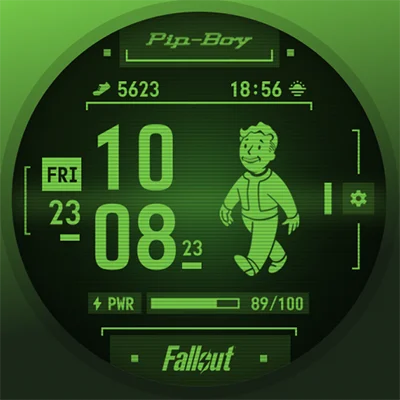
For fans of the iconic Fallout franchise, there’s nothing quite like the thrill of exploring post-apocalyptic wastelands armed with your trusty Pip-Boy. Now, you can bring that immersive gaming experience directly to your wrist with the Fallout Pip-Boy SE Watch Face—a battery-optimized, officially licensed watch face designed specifically for Wear OS devices. Whether you’re tracking your daily steps like they’re XP points or monitoring your heart rate as if radiation exposure is a real concern, this Special Edition timepiece transforms your smartwatch into an authentic vault-dweller’s essential tool.
In this comprehensive guide, we’ll explore everything you need to know about the Fallout Pip-Boy SE Watch Face, from its unique features and customization options to installation tips and performance optimization strategies. Let’s venture into the wasteland of smartwatch customization and discover why this watch face has become a must-have for Fallout enthusiasts and retro-tech lovers alike.
Table of Contents
What Makes the Fallout Pip-Boy SE Watch Face Special?
The Fallout Pip-Boy SE Watch Face represents a carefully optimized version of the beloved Pip-Boy interface, specifically engineered to balance nostalgic design with modern smartwatch efficiency. Developed by Facer Studios in partnership with Bethesda, this Special Edition delivers the iconic retro-futuristic aesthetic that made the Pip-Boy a cultural phenomenon, while addressing battery consumption concerns that plagued earlier versions.
Key Features That Define the Experience
12/24H Digital Clock Display The foundation of any watch face is reliable timekeeping. The Pip-Boy SE offers both 12-hour and 24-hour formats, allowing you to choose the display style that fits your preference. The time is rendered in that classic monochrome CRT-style font that immediately transports you into the Fallout universe.
Animated Vault Boy Reactive to Heart Rate This is where the magic happens. The iconic Vault Boy mascot appears on your watch face and changes his animation based on your current heart rate:
- 0-100 BPM: Vault Boy appears relaxed and calm, showing a resting state
- 101-150 BPM: Moderate activity animations reflect elevated heart rate during exercise
- 151-240 BPM: High-intensity animations indicate peak exertion or cardiovascular stress
The character appears initially for several seconds when you activate the watch screen, providing an engaging visual element that brings personality to your timepiece.
Essential Data at a Glance
- Date Display: Always know what day it is in the wasteland
- Battery Level Indicator: Monitor your watch’s power with a vintage-styled gauge
- Two Customizable Wear OS Complications: Default settings include step counter and sunrise/sunset times, but you can configure these to display weather, calendar events, or other data sources
Visual Customization Options
- Three Frame Styles: Choose between different Pip-Boy chassis designs to match your aesthetic preference
- Four Color Options: While maintaining the retro CRT look, you can select from four color schemes to personalize your display
- Background Variations: Subtle background options enhance the overall visual presentation without compromising the authentic Pip-Boy feel
Similar to other themed watch faces like the TMNT – Cowabunga SE Watch Face and Cyberpunk Watch Face, the Pip-Boy SE successfully translates beloved franchise aesthetics into functional wearable technology.
Device Compatibility: Will It Work on Your Smartwatch?
The Fallout Pip-Boy SE Watch Face was specifically optimized for the latest generation of Wear OS smartwatches, ensuring smooth performance and extended battery life on modern hardware.
Officially Supported Devices
Samsung Galaxy Watch Series
- Galaxy Watch 7 (all variants)
- Galaxy Watch Ultra
- Galaxy Watch 6 and 6 Classic
- Galaxy Watch 5 and 5 Pro
- Galaxy Watch 4 and 4 Classic
Google Pixel Watch
- Pixel Watch 3 (all sizes)
- Pixel Watch 2
- Pixel Watch (1st generation)
Other Wear OS 3+ Devices The watch face should work on any smartwatch running Wear OS 3.0 or higher, including devices from:
- Fossil Gen 6
- TicWatch Pro series
- Mobvoi smartwatches
- OnePlus Watch (Wear OS models)
Important Compatibility Notes
Facer Studios specifically recommends the SE (Special Edition) version for Galaxy Watch 7/Ultra and Pixel Watch 3 users due to optimization improvements. If you own older Wear OS devices or want additional features like interactive tabs and sound effects, consider the original Fallout Pip-Boy Watch Face which offers more functionality at the cost of increased battery consumption.
Installation Process: Getting Your Pip-Boy Operational
Installing the Fallout Pip-Boy SE Watch Face is straightforward, but following best practices ensures a smooth experience and avoids common pitfalls.
Step-by-Step Installation Guide
Step 1: Purchase from Google Play Store Visit the official Fallout Pip-Boy SE Watch Face page on Google Play on your smartphone. The watch face costs $1.99 as a one-time purchase—no subscriptions or hidden fees.
Step 2: Download and Sync After purchase, the watch face will automatically download to your phone and sync to your paired smartwatch. This process typically takes 2-5 minutes depending on your connection speed.
Step 3: Apply the Watch Face On your smartwatch:
- Long press the current watch face to enter selection mode
- Swipe through available faces until you locate the Pip-Boy SE
- Tap to apply it immediately
Step 4: Configure Permissions For full functionality, the watch face needs access to:
- Body sensors: Enables heart rate monitoring and reactive Vault Boy animations
- Location data: Powers location-based complications like sunrise/sunset times
- Activity tracking: Allows step counter and fitness data display
Grant these permissions through your watch’s Settings > Apps > Fallout Pip-Boy SE > Permissions menu.
Step 5: Customize Your Experience Long press the watch face again and select “Customize” to access:
- Frame style selection
- Color scheme options
- Complication configuration
- Display preferences
Troubleshooting Common Installation Issues
Double Purchase Prevention Some users report accidentally purchasing the watch face twice—once through the phone and once through the watch store. To avoid this:
- Always purchase through your smartphone’s Google Play app
- Wait for automatic sync rather than searching the watch store
- Check your purchase history before buying again
Sync Failures If the watch face doesn’t appear on your smartwatch after purchase:
- Ensure Bluetooth connection is active between phone and watch
- Connect both devices to the same Wi-Fi network
- Force sync by opening the Wear OS app on your phone
- Restart both devices if the issue persists
- Contact Facer support at [email protected] if problems continue
Customization Deep Dive: Making It Your Own
While the Fallout Pip-Boy SE Watch Face maintains authentic Pip-Boy aesthetics, it offers meaningful customization options that let you personalize your wasteland experience.
Frame Style Selection
The three available frame styles represent different Pip-Boy models from across the Fallout timeline:
Classic Frame The most screen-accurate representation of the Pip-Boy 3000, featuring the traditional bezel design and button arrangement that appeared in Fallout 3 and New Vegas.
Modern Frame A slightly refined version inspired by the Pip-Boy 3000 Mark IV from Fallout 4, with cleaner lines and improved visibility.
Minimal Frame A streamlined interpretation that reduces border elements to maximize screen real estate for data display—ideal for users who prioritize information over pure aesthetic authenticity.
Color Schemes and Visual Themes
The four color options maintain the retro-futuristic CRT aesthetic while offering variety:
Amber Monochrome The classic warm amber glow reminiscent of vintage computer monitors—perfect for that authentic retro-tech feel.
Green Phosphor The traditional green screen look associated with early computing and military equipment—a fan favorite that screams “wasteland technology.”
Blue Tint A cooler, more modern take that reduces eye strain while maintaining the CRT aesthetic.
White/High Contrast Maximum readability option that sacrifices some atmospheric authenticity for improved visibility in bright sunlight.
Complication Configuration Strategy
The two customizable complications provide valuable opportunities to enhance functionality beyond the default step counter and sunrise/sunset display.
Fitness-Focused Setup
- Heart rate zone indicator (track workout intensity)
- Active calories burned (monitor energy expenditure)
- Great for users who treat daily fitness goals like Fallout quests
Weather and Environment
- Current temperature and conditions
- UV index or air quality
- Perfect for outdoor enthusiasts who want to know environmental conditions at a glance
Productivity Configuration
- Next calendar appointment
- Unread notification count
- Ideal for professionals who need quick access to schedule and communications
Travel and Navigation
- Compass heading
- Secondary time zone
- Useful for frequent travelers or those coordinating across time zones
Much like the customization available in The Aristocrat Watch face or Secret Service Watch Face, strategic complication selection transforms the Pip-Boy SE from a novelty into a genuinely functional daily driver.
Battery Performance: Balancing Style and Stamina
One of the primary improvements in the Special Edition is enhanced battery optimization. However, understanding what impacts battery life helps you maximize your smartwatch’s endurance.
Battery Consumption Factors
Animated Vault Boy The reactive character animations consume the most power. Each time you wake your watch, Vault Boy appears and animates based on your heart rate, requiring processing power and screen illumination.
Always-On Display (AOD) If you enable AOD, the watch face maintains a simplified display even when your wrist is down, continuously consuming battery. The Pip-Boy SE includes an optimized AOD mode that reduces visual complexity while keeping essential information visible.
Complication Refresh Rates Complications that update frequently (weather, stock prices, live sports scores) drain more battery than static displays (date, battery level).
Heart Rate Monitoring Frequency Continuous heart rate tracking required for reactive Vault Boy animations impacts battery more than periodic measurements.
Optimization Strategies
Selective Animation Disable While the watch face doesn’t currently offer a built-in option to disable Vault Boy animations, you can reduce their impact by:
- Limiting wrist raise sensitivity in watch settings
- Using tap-to-wake instead of automatic wake
- Reducing screen-on duration to minimum comfortable time
AOD Management
- Disable AOD when maximum battery life is needed
- Use theater mode during sleep to prevent unnecessary activations
- Consider scheduling AOD to disable during predictable downtime
Complication Selection
- Choose complications with infrequent update intervals
- Avoid weather complications that refresh every 30 minutes
- Stick with static data like date or battery percentage when possible
Expected Battery Life Based on user reports and typical usage patterns:
- Without AOD: 1.5-2 days on most devices
- With AOD: 18-24 hours depending on watch model
- Heavy use (frequent checks, continuous HR monitoring): 12-18 hours
These estimates fall within typical ranges for feature-rich animated watch faces and represent reasonable trade-offs for the visual appeal and interactivity the Pip-Boy SE provides.
User Experience: Real-World Feedback and Reviews
The Fallout Pip-Boy SE Watch Face has accumulated over 100,000 downloads and maintains a 4.4-star rating on Google Play, indicating strong overall satisfaction despite some areas for improvement.
What Users Love
Authentic Fallout Aesthetic Reviewers consistently praise the accurate recreation of the Pip-Boy interface. Many note receiving compliments from fellow Fallout fans who recognize the iconic design immediately.
Reactive Vault Boy Character The heart rate-responsive animations delight users who appreciate the personality this feature brings to their smartwatch. The connection between physical activity and character animation creates an engaging feedback loop.
Improved Battery Performance Compared to the original full-featured Pip-Boy watch face, the SE version’s optimization is widely appreciated. Users report significantly better battery life while retaining core visual elements.
Easy Readability Despite the stylized retro aesthetic, time and date information remain clearly legible in most lighting conditions.
Common Criticisms and Limitations
Limited Complication Options Multiple reviews mention frustration with only two customizable complications. The watch face displays several fixed elements (battery gauge, heart rate, step counter) that cannot be changed or hidden, reducing flexibility for users who might prefer different data.
Animation Control Absent Several users request an option to disable Vault Boy animations entirely for maximum power savings, particularly during workdays when battery preservation is critical.
“Fallout” Branding Some users feel the “Fallout” logo at the bottom of the display breaks immersion, preferring it looked more like an actual Pip-Boy device without modern branding.
Initial Configuration Complexity A subset of users finds the installation and permission setup process more complicated than other watch faces, occasionally leading to double purchases or confusion about required steps.
Developer Responsiveness
Facer Studios demonstrates commitment to customer satisfaction through:
- Active response to reviews with troubleshooting guidance
- Regular updates addressing reported issues
- Direct support available via email at [email protected]
- Willingness to work with users before negative reviews
Comparing Pip-Boy SE with Alternative Themed Watch Faces
Understanding how the Fallout Pip-Boy SE Watch Face stacks up against other franchise-themed and retro-styled options helps determine if it’s the right choice for your wrist.
Pip-Boy SE vs. Original Pip-Boy Watch Face
| Feature | Pip-Boy SE | Original Pip-Boy |
|---|---|---|
| Battery Optimization | High | Moderate |
| Interactive Tabs | No | Yes (CLOCK, STATS, MAP) |
| Sound Effects | No | Yes |
| Price | $1.99 | $1.99 |
| Device Support | Latest Wear OS | Broader compatibility |
| Complications | 2 customizable | Similar |
| Best For | Daily wear, battery life | Maximum features, immersion |
Verdict: Choose SE for practical daily use; choose original for maximum Fallout authenticity and interactive features.
Pip-Boy SE vs. Other Retro-Tech Watch Faces
The Pip-Boy SE isn’t alone in the retro-futuristic watch face category. Consider these alternatives:
Cyberpunk Watch Face Offers a different dystopian future aesthetic with neon colors and high-tech interfaces. Better for users who prefer the Cyberpunk 2077 aesthetic over Fallout’s 1950s-inspired technology.
Generic Retro-Tech Faces Numerous free watch faces offer retro CRT or terminal aesthetics without specific franchise licensing. These provide similar visual styles at no cost but lack the Fallout-specific character and authenticity.
Military/Tactical Themed Faces Options like tactical display faces share the utilitarian aesthetic without the playful post-apocalyptic charm of Vault Boy and Pip-Boy branding.
Value Proposition Analysis
At $1.99, the Pip-Boy SE represents reasonable value considering:
- Official Bethesda licensing ensures authenticity
- Professional development and ongoing support
- Battery-optimized implementation
- Unique reactive character animations
- Broad device compatibility
However, the limited customization and fixed display elements may frustrate users seeking maximum flexibility in data display and complication configuration.
Advanced Tips for Pip-Boy Power Users
Maximize your Fallout Pip-Boy SE Watch Face experience with these expert strategies.
Permission Optimization
Grant only essential permissions for your use case:
Minimal Setup (Maximum Privacy)
- Time and date only (no additional permissions)
- Vault Boy animations won’t be reactive
- Step counter and heart rate won’t display
- Sunrise/sunset times require location access
Balanced Setup (Recommended)
- Body sensors for heart rate and reactive Vault Boy
- Activity tracking for step counter
- Location for sunrise/sunset (one-time is sufficient)
Full Access (Complete Experience)
- All permissions enabled
- Full complication functionality
- Reactive animations based on real-time data
Scheduling and Context-Aware Usage
Work Hours Consider switching to a more professional watch face during formal work hours, then returning to Pip-Boy SE for personal time. This preserves battery for when you most want the immersive experience.
Workout Mode Before exercise, verify heart rate permissions are enabled to fully experience reactive Vault Boy animations that respond to your cardiovascular intensity.
Sleep Mode Enable theater mode or switch to a minimal watch face before bed to prevent unnecessary battery drain from wrist movements during sleep.
Pairing with Fallout-Themed Phone Wallpapers
Complete your post-apocalyptic tech aesthetic by coordinating your watch face with Fallout-themed phone wallpapers, lock screens, and icon packs. This creates a cohesive wasteland wanderer look across all your devices.
Community Engagement
Connect with other Fallout fans and Pip-Boy watch face users through:
- Reddit communities (r/Fallout, r/WearOS, r/GalaxyWatch)
- Facer community forums
- Fallout fan Discord servers
- Social media using hashtags like #PipBoyWatch #FalloutWearOS
Future Updates and Feature Requests
Based on user feedback and community suggestions, here are potential improvements users hope to see in future updates:
Animation Toggle A setting to disable Vault Boy animations would address the most common feature request, allowing users to choose between visual flair and maximum battery conservation.
Expanded Complication Slots Additional customizable complications would significantly enhance flexibility, letting users replace fixed elements like the battery gauge with alternative data sources.
AOD Customization More control over what displays in always-on mode would help users balance information availability with power consumption.
Color Scheme Expansion Additional color options beyond the current four would provide more personalization while maintaining the CRT aesthetic.
Sound Effects Toggle While the SE version doesn’t include sounds (unlike the original), adding optional sound effects that users could enable/disable would enhance immersion for those willing to sacrifice battery life.
Troubleshooting Guide: Common Issues and Solutions
Vault Boy Not Appearing or Not Animating
Possible Causes:
- Body sensor permissions not granted
- Heart rate sensor not functioning
- Watch face not properly installed
Solutions:
- Verify permissions in Watch Settings > Apps > Pip-Boy SE > Permissions
- Test heart rate sensor in native health app
- Restart watch to refresh sensor connections
- Reinstall watch face if problems persist
- Contact Facer support with specific device model and issue description
Complications Showing Incorrect Data
Possible Causes:
- Source apps not installed or updated
- Data sync issues between phone and watch
- Permissions not granted to source apps
Solutions:
- Ensure weather app, calendar app, or other data sources are installed
- Force sync by disconnecting and reconnecting watch
- Check permissions for source apps
- Select alternative complication sources
- Update all apps to latest versions
Excessive Battery Drain
Possible Causes:
- Always-on display enabled with complex animations
- Frequent wrist raises triggering Vault Boy animations
- Background apps consuming resources
- Outdated watch face or system software
Solutions:
- Disable AOD temporarily to test impact
- Reduce wrist raise sensitivity in watch settings
- Close unnecessary background apps
- Update watch face to latest version
- Update Wear OS to latest available version
- Consider factory reset if issues persist across all watch faces
Cannot Access Customization Options
Possible Causes:
- Incorrect long-press technique
- Watch face not properly applied
- System UI issues
Solutions:
- Long-press watch face for 2-3 seconds until menu appears
- Ensure Pip-Boy SE is currently active face
- Restart watch to refresh system UI
- Try accessing via Wear OS app on phone instead
Frequently Asked Questions About Fallout Pip-Boy SE Watch Face
Is the Fallout Pip-Boy SE Watch Face worth buying if I already own the original Pip-Boy watch face?
If you prioritize battery life and use a newer device like Galaxy Watch 7 or Pixel Watch 3, the SE version is absolutely worth it. The optimization improvements result in significantly longer battery life while maintaining the core visual aesthetic and reactive Vault Boy animations. However, if you value the interactive tabs, sound effects, and deeper immersion of the original version and have acceptable battery performance, you might prefer sticking with your current watch face. The SE version sacrifices some features for practical daily wearability, so your decision depends on whether you prefer maximum Fallout authenticity or better battery efficiency.
Why does my Vault Boy animation not change when my heart rate increases during exercise?
The most common cause is insufficient permissions. Navigate to your watch Settings > Apps > Fallout Pip-Boy SE > Permissions and ensure “Body Sensors” is enabled. Additionally, verify your watch’s heart rate sensor is functioning correctly by checking readings in your native health app. Sometimes, the watch needs a few seconds of continuous monitoring to establish an accurate heart rate before triggering the appropriate Vault Boy animation. If you’ve just started exercising, wait 10-15 seconds for your heart rate to be detected and the animation to respond accordingly. If problems persist after granting permissions and waiting, try restarting your watch or reinstalling the watch face.
Can I use the Fallout Pip-Boy SE Watch Face on non-Wear OS devices like Apple Watch or Fitbit?
No, the Pip-Boy SE is exclusively designed for Wear OS smartwatches and is not compatible with Apple WatchOS, Fitbit OS, Tizen (older Samsung watches), or other proprietary operating systems. Facer does offer watch faces for Apple Watch through their iOS app, and there is a separate Pip-Boy design available for Apple Watch users, but it’s a different product purchased through the Apple App Store. If you own a non-Wear OS device, check the Facer platform for your specific operating system to see what Fallout-themed options might be available.
How do I get a refund if I’m unsatisfied with the watch face?
Google Play’s refund policy allows you to request a refund within 2 hours of purchase for an automated refund, or within 48 hours by contacting the developer directly. To request a refund, open the Google Play Store app on your phone, go to Account > Order History, find the Pip-Boy SE purchase, and select “Request Refund.” If you’re outside the automated refund window, contact Facer Studios directly at [email protected] explaining your concerns. While some users report difficulty getting refunds, Facer typically works with customers to resolve issues before denying refund requests, especially if you’re experiencing technical problems rather than simply changing your mind about the aesthetic.
Does the Pip-Boy SE watch face drain battery faster than a standard simple watch face?
Yes, animated and interactive watch faces inherently consume more battery than minimal static designs, but the SE version is specifically optimized to minimize this impact. Compared to simple watch faces showing only time and date, you can expect approximately 10-20% additional battery consumption. However, compared to the original full-featured Pip-Boy watch face with tabs and sounds, the SE version is significantly more efficient. Your actual battery performance depends heavily on your usage patterns—frequent wrist raises, always-on display, and continuous heart rate monitoring will all increase power consumption. Most users report 1.5-2 days of battery life with moderate use, which represents acceptable performance for a feature-rich animated watch face.
Final Verdict: Should You Get the Fallout Pip-Boy SE Watch Face?
The Fallout Pip-Boy SE Watch Face successfully brings the iconic wasteland wrist computer to modern smartwatches with impressive fidelity and practical optimization. For die-hard Fallout fans who want to carry a piece of the franchise everywhere they go, this watch face delivers authentic aesthetics, reactive character animations, and enough customization to make it feel personal.
At $1.99, it represents reasonable value for officially licensed content with ongoing developer support. The battery optimization improvements over the original version make it suitable for daily wear rather than just weekend novelty use. While customization limitations and fixed display elements may frustrate users seeking maximum flexibility, the core experience faithfully recreates the Pip-Boy interface in wearable form.
Get the Pip-Boy SE if you:
- Are a passionate Fallout franchise fan
- Own a Galaxy Watch 7/Ultra or Pixel Watch 3
- Prioritize battery life over maximum features
- Want an authentic retro-futuristic aesthetic
- Enjoy reactive animations that respond to your activity
Consider alternatives if you:
- Need extensive complication customization
- Prefer minimal battery impact above all else
- Want interactive tabs and sound effects (get original Pip-Boy instead)
- Aren’t particularly invested in Fallout franchise aesthetics
- Need more than two customizable complications
Ready to equip your smartwatch for wasteland exploration? Head to the Google Play Store, grab the Fallout Pip-Boy SE Watch Face, and transform your wrist into vault-approved technology. War never changes, but your watch face certainly can.
📥 Download Fallout Pip-Boy SE Watch Face APK Latest Version (Premium Unlocked)
Note: This version is safe. You can scan it yourself via VirusTotal.