Cosmo Phase Watch Face APK: Solar System & Moon Phases for Wear OS
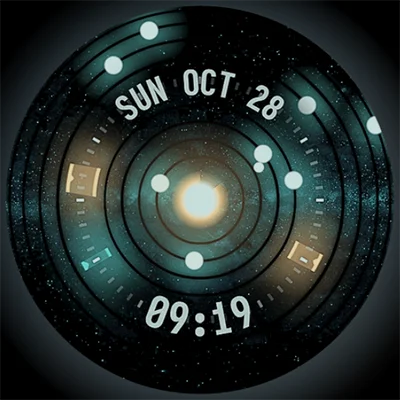
The universe has never been closer to your wrist. Cosmo Phase Watch Face brings the wonder of our solar system directly to your Wear OS smartwatch, combining astronomical accuracy with sleek functionality. This isn’t just another digital timepiece—it’s a working model of planetary motion, complete with moon phases and extensive customization options, all wrapped in a beautiful dark UI that’s as informative as it is mesmerizing. For astronomy enthusiasts, science lovers, and anyone seeking a unique smartwatch experience, the Cosmo Phase Watch Face delivers an extraordinary blend of education and elegance.
Table of Contents
Unlike generic watch faces that simply display time, this handcrafted creation transforms your wrist into an astronomical observatory. Whether you’re checking the time during a morning commute or tracking planetary positions during stargazing sessions, the Cosmo Phase Watch Face offers a sophisticated, space-themed aesthetic that stands out in the crowded smartwatch customization market.
What Makes Cosmo Phase Watch Face Extraordinary?
An Astronomical Wonder on Your Wrist
The Cosmo Phase Watch Face features a working approximate model of our solar system that updates in real-time. This means you’re not just looking at decorative planets—you’re observing actual planetary positions relative to the sun, creating an educational tool that happens to tell time brilliantly.
Core astronomical features:
| Feature | Description |
|---|---|
| Solar system model | Approximate planetary positions updated continuously |
| Moon phases | Accurate lunar cycle representation |
| Dark UI aesthetic | Easy on eyes, battery-efficient for OLED screens |
| Information density | Multiple data points visible at a glance |
| Handcrafted design | Unique, artisan-quality visual experience |
The attention to astronomical detail sets this watch face apart from competitors. While it’s an approximate rather than precise ephemeris, the representation provides genuine educational value while maintaining the primary function of timekeeping.
Extensive Customization Options
One of the standout characteristics of the Cosmo Phase Watch Face is its remarkable flexibility. The developer, RZR Design, understood that personalization drives user satisfaction with wearable technology.
Customization capabilities include:
- 30 color schemes: Match your outfit, mood, or aesthetic preferences
- Customizable overlay: Adjust transparency and visual elements
- Background options: Choose from multiple space-themed backdrops
- 12/24 hour format: Support for international time preferences
- 4 complication slots: Display weather, fitness stats, calendar events, or custom data
- Battery-aware display: Visual changes during low battery, charging, or notifications
This level of customization ensures that no two Cosmo Phase watch faces need to look identical. You can create a minimalist scientific display one day and switch to a vibrant, colorful space theme the next, all within the same app.
Technical Excellence and Compatibility
Wear OS Native Architecture
The Cosmo Phase Watch Face is built as a native, standalone Wear OS application. This architectural choice delivers several advantages over web-based or cross-platform alternatives:
Native app benefits:
- Superior performance: Optimized for Wear OS hardware and software
- Lower battery consumption: Efficient resource utilization
- Responsive interactions: Immediate response to taps and gestures
- AOD (Always-On Display) support: Reduced-power display when inactive
- Deep system integration: Better handling of notifications and system events
Compatible smartwatch brands:
- Samsung Galaxy Watch 4, 5, 6, and 7 series
- Google Pixel Watch and Pixel Watch 2
- Mobvoi TicWatch lineup
- Fossil Gen 5, 6, and Sport models
- Oppo Watch series
- Xiaomi Watch models with Wear OS
- Other Wear OS-compatible devices
For users exploring more astronomical and scientific watch face options, the Star Walk 2 Plus app offers complementary augmented reality stargazing features. While Star Walk 2 Plus helps identify constellations and celestial objects through your phone’s camera, Cosmo Phase Watch Face keeps that cosmic connection on your wrist throughout the day.
Installation Process and User Experience
Installing the Cosmo Phase Watch Face follows a straightforward procedure designed for simplicity:
Step-by-step installation:
- Download to smartphone: Install the companion app from Google Play Store
- Connect your watch: Ensure Wear OS smartwatch pairs with your phone
- Automatic sync: Watch face appears in your wearable’s face library
- Select and activate: Long-press current face, swipe to find Cosmo Phase, tap to apply
- Customize settings: Open companion app to adjust colors, complications, and preferences
- Optional cleanup: Uninstall companion app after configuration (watch face remains functional)
Troubleshooting common issues:
- Can’t press install button: Verify device runs Wear OS (not Tizen or older systems)
- Charged twice: Ensure same Google account on phone and watch
- Features not working: Try setting different watch face then reapply Cosmo Phase
- Permissions issues: Manually grant required permissions on watch settings
The developer provides responsive support via email, typically replying during weekends. This personal touch from an independent creator adds value beyond the initial purchase.
Feature Deep Dive: Understanding the Interface
Information at a Glance
The Cosmo Phase Watch Face packs remarkable information density without feeling cluttered—a difficult balance to achieve in smartwatch design.
Data displayed includes:
- Current time (12 or 24-hour format)
- Date information
- Battery percentage (watch and phone)
- Weather conditions
- Step count
- Heart rate
- Calendar notifications
- Custom complications from third-party apps
The dark UI aesthetic serves multiple purposes: it enhances visibility in various lighting conditions, reduces power consumption on OLED displays (most Wear OS watches), and creates an appropriately space-themed atmosphere for the astronomical content.
The Four Complication System
Complications—small widgets displaying information from various apps—represent crucial functionality in modern watch faces. Cosmo Phase supports four customizable complication slots:
Complication placement options:
| Position | Common Uses |
|---|---|
| Top | Date, weather forecast, moon phase |
| Bottom | Steps, distance, active minutes |
| Left | Calendar events, next alarm |
| Right | Battery level, heart rate, custom app data |
Popular complication sources:
- Google Fit or Samsung Health (fitness metrics)
- Weather apps (current conditions, forecasts)
- Calendar (upcoming appointments)
- Music players (current track, controls)
- Smart home controls (quick actions)
- Task managers (upcoming to-dos)
For users seeking enhanced widget functionality beyond watch face complications, KWGT Kustom Widget Maker provides extensive phone home screen customization. While KWGT works on your phone’s interface and Cosmo Phase adorns your watch, both tools share a philosophy of deep customization and personal expression through thoughtful design.
The Science Behind the Display
Planetary Position Approximation
The Cosmo Phase Watch Face uses simplified orbital mechanics to display planetary positions. While not an astronomical ephemeris precise enough for navigation or professional astronomy, the approximation provides educational value and dynamic visual interest.
How it works:
- Uses averaged orbital periods for each planet
- Calculates approximate angular position from the sun
- Updates positions continuously based on current date/time
- Displays planets in their relative orbital distances
- Shows Earth’s moon with accurate phase calculation
Educational applications:
- Teaching children about solar system structure
- Understanding relative planetary speeds
- Observing moon phase cycles over weeks
- Sparking conversations about astronomy
- Developing spatial awareness of planetary motion
This approach balances computational efficiency (important for battery life) with astronomical authenticity. For precise celestial coordinates, dedicated astronomy apps remain necessary, but Cosmo Phase provides a constantly accessible overview that inspires cosmic curiosity.
Moon Phase Accuracy
The lunar phase display deserves special mention for its accuracy. The moon phase calculation uses established astronomical formulas that track the lunar cycle with precision suitable for everyday observation:
Moon phase applications:
- Planning nighttime outdoor activities
- Photography timing (full moon landscapes)
- Gardening by lunar cycles (traditional practice)
- Tidal awareness for coastal activities
- Simple astronomical education
The moon phase updates automatically and seamlessly, requiring no user input or configuration beyond the initial installation.
Battery Performance and Optimization
Power Consumption Management
Battery life remains a primary concern for smartwatch users. The Cosmo Phase Watch Face addresses this through multiple optimization strategies:
Power-saving features:
- Dark UI reduces OLED pixel power consumption
- Always-On Display (AOD) mode with simplified graphics
- Reduced update frequency during AOD
- Efficient animation rendering
- Minimal background processes
Battery-aware behavior:
| Battery Level | Display Response |
|---|---|
| Above 20% | Full functionality, normal colors |
| 10-20% | Visual indicator of low battery |
| Below 10% | Prominent low battery warning |
| Charging | Animated charging indicator |
User-reported battery life: Most users report that Cosmo Phase consumes comparable or less battery than feature-rich animated watch faces, typically lasting 1-2 days on Galaxy Watch 4/5 or Pixel Watch with typical use patterns (frequent checking, always-on display enabled, multiple complications active).
AOD (Always-On Display) Optimization
The Always-On Display mode represents a critical feature for smartwatch usability. Cosmo Phase provides a thoughtfully designed AOD that maintains visibility while minimizing power consumption:
AOD characteristics:
- Simplified planetary positions (reduced detail)
- Essential information only (time, date, battery)
- Monochrome or reduced color palette
- Lower brightness suitable for ambient conditions
- Instant transition to full display on wrist raise or tap
This dual-mode approach ensures you can glance at your watch anytime without performing a gesture, while preserving battery life throughout the day.
Customization Scenarios and Style Profiles
Color Scheme Strategies
With 30 color schemes available, selecting the right palette can enhance both aesthetics and functionality. Here are strategic approaches:
Daytime professional schemes:
- Cool blues and grays: Professional, subtle, business-appropriate
- Earth tones: Natural, calming, versatile
- Monochrome: Timeless, elegant, readable
Evening and casual schemes:
- Vibrant purples and oranges: Cosmic, eye-catching, fun
- Warm reds and yellows: Energetic, bold, statement-making
- Neon accents: Modern, tech-forward, youthful
Situational adjustments:
- Outdoor activities: High contrast for sunlight readability
- Nighttime: Dimmer reds to preserve night vision
- Special occasions: Match outfit colors or event themes
- Seasons: Cooler tones for summer, warmer for winter
For users who enjoy deep customization and creating unique visual experiences, watch faces like Cyberpunk Watch Face offer similarly extensive theming options with a futuristic aesthetic. Both Cyberpunk Watch Face and Cosmo Phase demonstrate that modern watch face design can be both functional and artistically ambitious.
Creating Your Perfect Setup
Optimizing the Cosmo Phase Watch Face for your lifestyle involves thoughtful complication selection and visual customization:
Fitness enthusiast setup:
- Color: Energetic orange/blue
- Top complication: Current heart rate
- Bottom: Daily step progress
- Left: Calories burned
- Right: Active minutes or workout duration
Productivity-focused setup:
- Color: Professional gray/blue
- Top complication: Next calendar event
- Bottom: Date display
- Left: Unread email count
- Right: Task reminder count
Outdoor adventurer setup:
- Color: Earth tones with high contrast
- Top complication: Weather forecast
- Bottom: Sunrise/sunset times
- Left: Barometer or altitude
- Right: Compass direction
Minimalist setup:
- Color: Pure monochrome or single accent color
- Top complication: Date only
- Bottom: Battery percentage
- Left/Right: Empty or subtle complications
Community Reception and User Feedback
What Users Love
The Cosmo Phase Watch Face receives consistently positive feedback from the Wear OS community, with users praising specific aspects:
Highly regarded features:
- “Really beautiful watch face” – aesthetic appeal widely acknowledged
- Unique solar system visualization sets it apart from generic designs
- Responsive developer support inspires confidence
- Reasonable pricing for handcrafted quality
- Regular updates demonstrating ongoing commitment
- Smooth performance across device types
User testimonials highlight:
- Educational value for children and adults
- Conversation starter at social gatherings
- Satisfying to watch planetary movements over time
- Dark theme perfect for nighttime checking
- Complications integrate seamlessly with design
Constructive Criticism and Limitations
Honest assessment requires acknowledging user suggestions and limitations:
Common feedback points:
- Some complications display text labels that users would prefer as numbers-only
- Learning curve for utilizing all 30 color schemes effectively
- Desire for even more complication slots (5-6 rather than 4)
- Occasional wish for more dramatic animations
- Price point higher than basic watch faces but justified by quality
The developer actively considers feedback for future updates, demonstrating a collaborative relationship with the user community.
Value Proposition and Pricing Analysis
Understanding the Investment
The Cosmo Phase Watch Face represents a premium offering in the watch face market, priced higher than basic alternatives but lower than enterprise-level customization tools.
What you’re paying for:
- Hundreds of development hours by independent creator
- Unique handcrafted design unavailable elsewhere
- Ongoing support and updates
- Regular bug fixes and feature additions
- No subscription fees or recurring costs
- Supporting independent developer rather than large corporation
Price comparison context:
| Option | Cost | Commitment |
|---|---|---|
| Free watch faces | $0 | Often ad-supported or limited |
| Basic premium faces | $0.99-$2.99 | Simple designs, minimal updates |
| Cosmo Phase Watch Face | $4.99 | Premium quality, ongoing support |
| Custom watch face services | $10-50+ | Personalized but not reusable |
The developer’s transparent explanation resonates with many users: “I worked a lot of hours on each watch face and the price also includes the support and the updates… I’ll invest any earning on useful things and to help my family.”
Return on Investment
For daily smartwatch users, the value calculation becomes clear:
Usage scenario:
- Check watch approximately 100 times daily
- Use watch face for 1 year minimum
- Total interactions: 36,500+
- Cost per interaction: $0.000137
Even if the watch face provides just a moment of enjoyment, information, or aesthetic pleasure each time, the cumulative value far exceeds the modest initial investment.
For professionals and students alike, productivity tools help maximize time value. Apps like Microsoft Teams facilitate workplace collaboration, while Cosmo Phase Watch Face ensures efficient time checking with bonus astronomical awareness. Together, they create a cohesive digital ecosystem that supports both professional responsibilities and personal interests.
Comparing Cosmo Phase to Alternative Watch Faces
The Wear OS Watch Face Landscape
Understanding how Cosmo Phase Watch Face fits within the broader ecosystem helps inform purchasing decisions:
Watch face categories:
Generic digital/analog faces:
- Pros: Free, simple, battery-efficient
- Cons: Boring, limited customization, no unique features
- Best for: Users wanting basic functionality only
Branded watch faces (Samsung, Fossil, etc.):
- Pros: Professionally designed, good quality
- Cons: Limited options, sometimes device-specific
- Best for: Users satisfied with manufacturer offerings
Theme-based premium faces (sports, nature, art):
- Pros: Aesthetic variety, usually well-designed
- Cons: Static designs, limited educational value
- Best for: Users wanting specific aesthetic themes
Scientific/educational faces:
- Cosmo Phase Watch Face: Solar system model, moon phases, extensive customization
- Astronomical competitors: Often more technical but less wearable daily
- Best for: Science enthusiasts wanting both form and function
Custom creation tools (Facer, Pujie Black, WatchMaker):
- Pros: Unlimited design possibilities
- Cons: Requires time investment, learning curve, subscription costs
- Best for: Users wanting complete design control
The Cosmo Phase Watch Face occupies a unique position combining educational content with daily wearability and extensive customization without requiring design expertise.
When to Choose Cosmo Phase
Ideal user profiles:
- Astronomy and space enthusiasts
- Science educators and students
- Parents wanting educational tools for children
- Anyone seeking unique, conversation-starting watch face
- Users who appreciate dark, minimalist aesthetics
- Smartwatch customization enthusiasts
- People who value independent developer support
When alternatives might be better:
- Need ultra-minimalist time-only display
- Prefer bright, colorful, cartoon-style designs
- Want sport-specific features (running, cycling metrics)
- Require business-formal, traditional watch appearance
- Need completely free solutions
Advanced Tips and Hidden Features
Maximizing Your Experience
Power users of the Cosmo Phase Watch Face discover these advanced techniques:
Optimization strategies:
- Strategic complication selection: Choose complications that update infrequently to save battery
- Color rotation: Change schemes seasonally to keep experience fresh
- AOD customization: Some color schemes work better in Always-On Display mode
- Permission management: Grant only necessary permissions for optimal privacy
- Backup preferences: Screenshot your favorite configurations for quick restoration
Lesser-known features:
- The watch face reacts to notifications with subtle visual cues
- Battery level influences certain visual elements beyond the obvious indicator
- Charging state triggers unique animations
- Moon phase calculation accounts for your geographic location
- Planetary speeds adjust properly for Earth’s actual orbital period
Integration with Broader Ecosystem
The Cosmo Phase Watch Face works beautifully as part of a coordinated space-themed digital experience:
Complementary apps:
- SkyView® Explore the Universe: AR stargazing app for identifying celestial objects
- Star Walk apps: Constellation guides and night sky maps
- NASA app: Space news, images, mission updates
- Space weather apps: Aurora forecasts, solar activity
- Moon phase calendars: Detailed lunar information
Creating this ecosystem transforms your devices into comprehensive astronomical tools while maintaining practical daily functionality.
The Developer’s Vision and Future Updates
Independent Developer Ethos
RZR Design, the creator behind Cosmo Phase Watch Face, exemplifies the independent developer spirit that makes Android’s ecosystem vibrant:
Developer characteristics:
- Single-person operation (not a corporation)
- Personal investment in quality and support
- Weekend email support despite full-time employment
- Transparent communication about pricing rationale
- Active engagement with user feedback
- Regular updates addressing bugs and requests
- Passion for craft evident in attention to detail
This personal touch creates a relationship between creator and user that’s increasingly rare in app marketplaces dominated by corporate entities.
Ongoing Development Commitment
The developer’s statement offers assurance: “This app is supported and updated to fix bugs and add new features. The overall design won’t change, but it will surely be improved over time!”
Potential future enhancements:
- Additional color schemes (beyond current 30)
- More complication slot options
- Enhanced planetary accuracy
- Asteroid belt visualization
- Dwarf planet inclusion (Pluto and others)
- Satellite tracking (ISS, Starlink)
- Meteor shower notifications
- Eclipse predictions and visualization
While these remain speculative, the developer’s track record suggests continued refinement and feature additions based on user requests and technological advances in Wear OS.
Conclusion: The Universe on Your Wrist
The Cosmo Phase Watch Face represents more than just a timepiece—it’s a daily reminder of humanity’s place in the cosmos, an educational tool, and a beautifully designed interface that makes checking the time genuinely enjoyable. The combination of astronomical accuracy, extensive customization, and thoughtful design creates a watch face that stands out in an oversaturated market.
For the modest investment, you receive a handcrafted, continuously updated watch face from a dedicated independent developer who genuinely cares about the user experience. Whether you’re an astronomy enthusiast, a science educator, a curious learner, or simply someone who appreciates unique, well-designed technology, the Cosmo Phase Watch Face delivers exceptional value.
The 30 color schemes, four customizable complications, and working solar system model ensure that your watch face remains fresh, functional, and fascinating long after installation. The dark UI aesthetic looks stunning on modern OLED smartwatch displays while conserving battery life—a win-win for both form and function.
Download the Cosmo Phase Watch Face today and transform your Wear OS smartwatch into a window to the universe. Every time you check the time, you’ll also connect with the celestial mechanics that govern our solar system, turning mundane time-checking into a moment of cosmic wonder.
The universe awaits on your wrist—are you ready to wear it?
Frequently Asked Questions
Q: Is the planetary positioning in Cosmo Phase Watch Face astronomically accurate enough for serious stargazing or astronomical observation?
A: The Cosmo Phase Watch Face uses an approximate model of the solar system rather than precise ephemeris calculations. While the planetary positions and moon phases are based on real astronomical data and orbital periods, they’re simplified for efficient rendering on smartwatch hardware. The approximation is excellent for educational purposes, understanding planetary motion concepts, and general awareness of where planets are in their orbits. However, for serious astronomical observation, telescope pointing, or precise celestial coordinates, you should use dedicated astronomy apps like SkySafari, Stellarium, or professional ephemeris software. That said, the moon phase tracking is quite accurate and suitable for planning nighttime photography, camping trips, or activities affected by lunar illumination. Think of Cosmo Phase as an astronomical awareness tool and conversation starter rather than a precision scientific instrument—it inspires cosmic curiosity while serving as a beautifully functional watch face for daily wear.
Q: Does Cosmo Phase Watch Face significantly drain my smartwatch battery compared to simpler watch faces?
A: The Cosmo Phase Watch Face is optimized for battery efficiency despite its visual complexity. The developer designed it with power consumption in mind, utilizing several battery-saving strategies. The dark UI primarily displays black pixels, which consume no power on OLED screens (used in most Wear OS devices), significantly reducing energy use compared to bright watch faces. The Always-On Display (AOD) mode further conserves battery by simplifying graphics when the watch is idle. Most users report that Cosmo Phase consumes comparable battery to other feature-rich watch faces, typically achieving 1-2 full days on watches like the Galaxy Watch series or Pixel Watch with always-on display enabled and regular use. Actual battery life depends on your specific device, how many complications you enable, how frequently you check your watch, and other factors like heart rate monitoring frequency. To maximize battery life, you can reduce the number of active complications, choose darker color schemes, and adjust your watch’s general power settings. Overall, Cosmo Phase strikes an excellent balance between visual richness and power efficiency.
Q: After purchasing Cosmo Phase Watch Face, can I use it on multiple Wear OS devices, or do I need to buy it again for each watch?
A: Good news—once you purchase Cosmo Phase Watch Face through the Google Play Store, it’s tied to your Google account, not to a specific device. This means you can install it on any Wear OS smartwatch associated with that same Google account without additional purchases. For example, if you upgrade from a Galaxy Watch 4 to a Galaxy Watch 6, or if you own multiple smartwatches (like a Pixel Watch and a Fossil smartwatch), you can install Cosmo Phase on all of them using the same purchase. The key requirement is using the identical Google account on both your smartphone and smartwatch—this is crucial because the Play Store verifies your purchase through account authentication. If you use different Google accounts on different devices, the system won’t recognize your purchase and will prompt you to pay again. To avoid this, ensure all your Wear OS devices connect to the same Google account you used for the original purchase. This one-time purchase, multiple-device use model represents excellent value, especially if you’re a smartwatch enthusiast who owns or plans to own multiple wearables over time.
📥 Download Cosmo Phase Watch Face APK Latest Version (Premium Unlocked)
Note: This version is safe. You can scan it yourself via VirusTotal.