Oogly Novus Luna APK: Luxury Moonphase, Custom Data & Wear OS Elegance
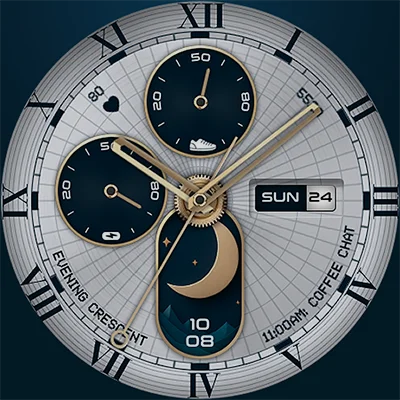
In the vast universe of smartwatch customization, finding a watch face that seamlessly blends luxury aesthetics with practical functionality can feel like searching for a needle in a haystack. Enter Oogly Novus Luna—a sophisticated Wear OS watch face that brings the timeless elegance of traditional horology to your modern smartwatch. With its stunning real-time moonphase display and extensive customization options, Oogly Novus Luna transforms your wrist into a canvas of refined watchmaking artistry while delivering all the smart features you need for daily life.
Table of Contents
Whether you’re a watch enthusiast who appreciates the romance of lunar complications or a tech-savvy individual seeking premium design for your Wear OS device, this watch face delivers on multiple fronts. Let’s explore what makes Oogly Novus Luna a standout choice in the competitive world of smartwatch faces.
The Art of Moonphase Complications
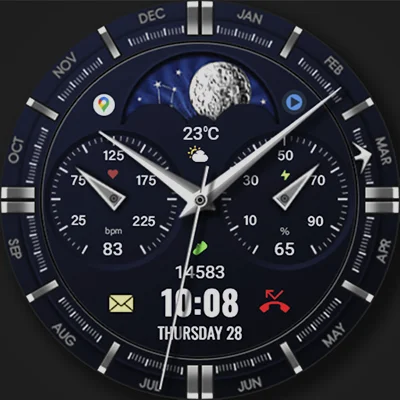
At the heart of Oogly Novus Luna lies its most captivating feature: a real-time moonphase complication. In traditional watchmaking, moonphase displays represent one of the most poetic and technically impressive complications. This watch face brings that centuries-old horological tradition to your digital timepiece, accurately tracking the lunar cycle and displaying the current phase of the moon on your wrist.
Why Moonphase Matters
The moonphase complication serves multiple purposes beyond mere aesthetics:
- Astronomical Connection: Stay connected to natural cycles and celestial movements
- Practical Applications: Useful for fishing, gardening, tide tracking, and outdoor activities
- Luxury Appeal: Moonphase complications are hallmarks of high-end watchmaking
- Conversation Starter: A distinctive feature that sets your watch apart from standard digital displays
- Timeless Elegance: Adds depth and sophistication to your smartwatch interface
The real-time accuracy ensures you’re always viewing the current lunar phase, whether you’re checking a new moon, full moon, or any phase in between. This attention to astronomical detail reflects the developer’s commitment to authentic watchmaking traditions.
Design Philosophy: Where Luxury Meets Technology
Oogly Novus Luna doesn’t just add a moonphase display to a generic watch face—it embodies the entire aesthetic of premium watchmaking. The design draws inspiration from luxury timepieces, offering both minimal classic styling and colorful modern options to suit diverse tastes.
Customization Options That Matter
| Feature | Available Options | Benefit |
|---|---|---|
| Time Format | 12-hour or 24-hour display | Match your regional or personal preference |
| Hour Hand Styles | Multiple design variations | Personalize the watch hands to your aesthetic |
| Ring Styles | Customizable dial rings | Adjust the frame and accents |
| Color Options | Multi-style color palettes | Coordinate with outfits or moods |
| Information Display | Customizable data fields | Show metrics that matter most to you |
| App Shortcuts | Quick access complications | Launch favorite apps directly from watch face |
| AOD Mode | Always-On Display support | Battery-efficient ambient display |
This level of customization ensures that no two Oogly Novus Luna configurations need look identical. Whether you prefer the understated elegance of monochrome minimalism or the bold statement of vibrant colors, the watch face adapts to your vision.
Another great alternative is MD307 Digital Watch Face, offering fully interactive and beautifully crafted digital watch faces to elevate your Android experience.
Technical Excellence and Compatibility
Understanding the technical requirements ensures you can fully enjoy what Oogly Novus Luna offers. The watch face is specifically designed for modern Wear OS devices with API 34 or higher, which includes:
Compatible Devices
- Samsung Galaxy Watch 4, 5, 6, and newer models
- Google Pixel Watch series
- Fossil Gen 6 and compatible smartwatches
- Other Wear OS devices meeting minimum API 34 requirements
This focus on newer Wear OS versions allows the developer to leverage advanced features and optimizations that older systems can’t support, resulting in smoother performance and more sophisticated visual effects.
Performance Optimization
Despite its rich visual design, Oogly Novus Luna maintains efficient performance through:
- Optimized rendering for minimal battery drain
- Smooth animations that don’t lag or stutter
- Battery-friendly Always-On Display mode
- Quick loading times when activating the display
- Stable operation across extended wear periods
Customizable Information Display
Beyond aesthetics, Oogly Novus Luna excels at displaying practical information that enhances your daily routine. The customizable data fields allow you to prioritize the metrics most relevant to your lifestyle:
Essential Data Points
Health Metrics: Display heart rate, step count, or calories burned to track wellness goals throughout the day.
Battery Status: Keep tabs on your smartwatch’s power level to avoid unexpected shutdowns.
Date Display: See current date information formatted according to your preferences.
Weather Information: Check current conditions and temperature without pulling out your phone.
Activity Tracking: Monitor progress toward fitness goals with visible activity rings or counters.
App Shortcuts for Productivity
The inclusion of app shortcut complications transforms your watch face into a productivity hub. Launch frequently used applications instantly:
- Fitness and workout apps
- Music streaming services
- Messaging platforms
- Navigation tools
- Smart home controls
- Timer and stopwatch functions
This feature eliminates the need to navigate through multiple menus, saving time and enhancing the overall user experience.
Luxury Watch Face Aesthetics
What truly distinguishes Oogly Novus Luna from standard smartwatch faces is its commitment to authentic luxury watch design principles. The developers clearly understand traditional horology, incorporating elements that watch enthusiasts recognize and appreciate:
Classic Watchmaking Elements
Hour and Minute Hand Design: The customizable hand styles mirror those found on prestigious mechanical watches, with options ranging from sleek dauphine hands to bold sword hands.
Dial Architecture: The ring styles and dial layouts follow established watchmaking conventions, creating visual depth and dimensionality.
Typography and Numerals: Careful attention to font selection and numeral placement ensures readability while maintaining elegant proportions.
Color Palettes: The multi-style color options draw from classic watch color schemes—think deep blues, warm golds, sophisticated silvers, and timeless blacks.
Moonphase Window: The lunar display integrates seamlessly into the dial, positioned and designed like complications found on mechanical watches costing thousands of dollars.
Expanding Your Watch Face Collection
While Oogly Novus Luna offers incredible versatility through its customization options, many smartwatch enthusiasts enjoy building a collection of watch faces for different occasions and moods. The Wear OS ecosystem provides numerous options to complement your lunar luxury face.
For users who appreciate detailed, data-rich displays alongside elegant design, the MD241 Digital watch face presents a modern alternative with comprehensive information layout. This digital option excels when you need maximum data visibility during workouts or busy workdays, while Oogly Novus Luna shines during evening events or when you want to emphasize style over information density.
For those special occasions demanding maximum sophistication, The Aristocrat Watch face delivers opulent design with intricate detailing and luxury styling. Pairing this with Oogly Novus Luna in your collection ensures you’re prepared for everything from casual daily wear to formal events requiring your most distinguished timepiece presentation. The moonphase complication of Oogly Novus Luna offers unique character, while The Aristocrat provides alternative luxury aesthetics.
Installation and Setup Guide
Getting started with Oogly Novus Luna is straightforward, though there’s one important detail to note about locating the watch face after installation:
Step-by-Step Installation
- Purchase and Download: Visit the Oogly Novus Luna page on Google Play
- Sync to Watch: The watch face will automatically transfer to your paired Wear OS device
- Wait a Few Minutes: Allow time for the watch face to fully install
- Access Watch Face Selector: Long-press your current watch face to open the selection screen
- Scroll to Far Right: Navigate to the end of your watch face list
- Tap “Add Watch Face”: Find Oogly Novus Luna in the additional faces section
- Select and Customize: Choose the watch face and tap the settings icon to personalize
Important Note on Visibility
Unlike some watch faces that appear immediately in your main list, Oogly Novus Luna requires you to manually add it from the extended watch face gallery. This is normal behavior for Wear OS and doesn’t indicate any installation problem. Simply scroll to the far right of your watch face list and tap “add watch face” to locate it.
Maximizing Your Oogly Novus Luna Experience
To get the most from your luxury watch face, consider these optimization strategies:
Style Recommendations
Formal Settings: Choose classic color schemes with minimal complications for elegant simplicity during professional events or formal occasions.
Active Lifestyle: Select high-contrast colors and add fitness-related shortcuts when you need quick access to health data and workout apps.
Casual Daily Wear: Experiment with colorful options and balanced information displays that provide utility without overwhelming the design.
Evening Events: Embrace darker themes with subtle accent colors that showcase the moonphase while remaining sophisticated for nighttime occasions.
Battery Conservation Tips
While Oogly Novus Luna is optimized for efficiency, you can further extend battery life by:
- Utilizing the Always-On Display mode which shows a simplified version when inactive
- Reducing brightness levels when full visibility isn’t necessary
- Limiting the number of active complications to essential information only
- Choosing darker color schemes which consume less power on OLED displays
The Value of Astronomical Complications
In an age where most people check weather apps instead of looking at the sky and use GPS rather than reading stars, the moonphase complication in Oogly Novus Luna represents something deeper than practical utility. It’s a connection to natural rhythms, a nod to centuries of astronomical observation, and a reminder that technology can honor rather than replace traditional wisdom.
The lunar cycle influences:
- Ocean tides and marine life behavior
- Agricultural and gardening practices
- Wildlife activity patterns
- Cultural and religious observances
- Human circadian rhythms and sleep patterns
By incorporating this information into your daily timekeeping, you maintain awareness of celestial patterns that have guided humanity throughout history.
Support and Community
The developers of Oogly Novus Luna demonstrate commitment to customer satisfaction through multiple support channels:
Email Support: Direct communication at [email protected] for technical issues or questions
Telegram Channel: Official community at t.me/ooglywatchface for updates, tips, and user interaction
This accessibility ensures you’re never alone if you encounter setup challenges or want to learn advanced customization techniques from fellow users.
Who Should Choose Oogly Novus Luna?
This watch face appeals to several distinct user profiles:
Watch Enthusiasts: Those who appreciate traditional horology and want to bring mechanical watch aesthetics to their smartwatch.
Luxury Seekers: Users who prioritize premium design and refuse to accept generic, mass-market watch faces.
Astronomy Lovers: Anyone fascinated by celestial movements and lunar cycles who wants this information readily accessible.
Customization Fans: People who enjoy personalizing their devices and creating unique configurations that reflect individual style.
Detail-Oriented Individuals: Users who notice and appreciate thoughtful design choices, quality typography, and authentic aesthetic decisions.
For users who love enhancing their device with unique watch faces, MD326 3D Modern Watch Face is another excellent app to try for modern and stylish designs.
Final Thoughts: Timeless Elegance Meets Modern Technology
Oogly Novus Luna successfully bridges the gap between traditional watchmaking elegance and contemporary smartwatch functionality. Its real-time moonphase display brings astronomical wonder to your wrist, while extensive customization options ensure the face adapts to your personal style and practical needs. The commitment to luxury design principles elevates your Wear OS device from simple notification machine to sophisticated timepiece.
For users seeking more than generic digital displays—those who understand that a watch face is both functional tool and personal statement—Oogly Novus Luna delivers exceptional value. The combination of authentic watchmaking aesthetics, practical smart features, and celestial beauty creates a watch face you’ll genuinely enjoy seeing every time you check the time.
Whether you’re tracking the lunar cycle for practical purposes, appreciating the romance of traditional complications, or simply wanting your smartwatch to reflect refined taste, this watch face offers a compelling solution. Transform your Wear OS device into a luxury timepiece that honors horological traditions while embracing modern technology. Download Oogly Novus Luna today and experience how elegant timekeeping can be.
Frequently Asked Questions About Oogly Novus Luna
1. Why can’t I find Oogly Novus Luna in my watch face list after installation?
This is completely normal and not an indication of any problem. Oogly Novus Luna doesn’t automatically appear in your main watch face list immediately after installation. To locate it, you need to follow these steps: First, wait a few minutes after installation to ensure it fully syncs to your watch. Then, long-press your current active watch face to open the watch face selector. Scroll all the way to the far right of your watch face carousel, and you’ll see an option to “add watch face.” Tap this button, and you’ll find Oogly Novus Luna in the additional faces gallery. This is standard Wear OS behavior for certain watch faces and doesn’t indicate any installation error.
2. What devices are compatible with Oogly Novus Luna?
Oogly Novus Luna is designed specifically for Wear OS devices running API 34 or higher. This includes Samsung Galaxy Watch 4, Galaxy Watch 5, Galaxy Watch 6, and newer Samsung models, as well as Google Pixel Watch series, Fossil Gen 6 smartwatches, and other modern Wear OS devices that meet the minimum API 34 requirement. Unfortunately, older smartwatches running earlier versions of Wear OS may not be compatible due to the advanced features and optimizations that newer systems provide. If you’re unsure whether your device is compatible, check your watch’s software version or look for Wear OS API information in your watch settings.
3. Does the moonphase display show real-time lunar data, and can I customize what information appears on the watch face?
Yes, the moonphase display in Oogly Novus Luna shows real-time, accurate lunar data that automatically updates to reflect the current phase of the moon. This isn’t a static image—it genuinely tracks the lunar cycle, so you’ll always see where the moon is in its monthly progression. Regarding customization, the watch face offers extensive options including customizable hour hand styles, ring styles, multiple color palettes, adjustable time format (12/24 hour), customizable information fields where you can display health metrics or other data, and app shortcuts for quick access to your favorite applications. The Always-On Display (AOD) mode is also customizable, allowing you to balance aesthetics with battery efficiency.
📥 Download Oogly Novus Luna APK Latest Version (Premium Unlocked)
Note: This version is safe. You can scan it yourself via VirusTotal.