Autumn Floral APK: Wear OS Fall Design, AOD, Complications
As the leaves turn golden and the air becomes crisp, it’s the perfect time to refresh your digital accessories to match the season’s aesthetic. The Autumn Floral watch face for Wear OS represents the ideal solution for smartwatch enthusiasts seeking to embrace fall’s natural beauty without sacrificing functionality. This seasonal timepiece combines decorative botanical elements with practical features, transforming your wrist into a fashionable accessory that celebrates nature’s autumn transformation. Whether you’re a collector of themed watch faces or simply looking to add seasonal flair to your device, understanding what Autumn Floral offers is essential.
Table of Contents
What Is the Autumn Floral Watch Face?
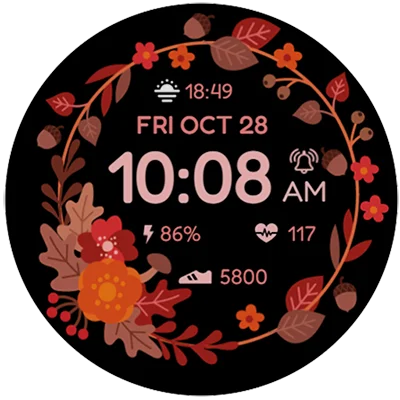
Autumn Floral is a premium digital watch face designed exclusively for Wear OS smartwatches, available for purchase on the Google Play Store. This beautifully crafted timepiece merges aesthetic appeal with practical functionality, featuring intricate floral designs inspired by the fall season. Unlike standard digital displays, Autumn Floral combines accurate timekeeping with decorative elements that celebrate the visual richness of autumn flora.
The watch face is engineered to provide a seamless experience across compatible Wear OS devices, including Samsung Galaxy Watch models, Google Pixel Watch, and other Wear OS-powered smartwatches. The development team prioritized both visual elegance and battery efficiency, ensuring that your device remains powered throughout extended daily wear. This seasonal watch face appeals to users who appreciate the intersection of technology and natural beauty.
Key Features of Autumn Floral Watch Face
The Autumn Floral watch face includes a comprehensive feature set designed for both aesthetic enjoyment and practical utility:
Digital Time Display: The watch face provides clear, easy-to-read digital time in both 12-hour and 24-hour formats, automatically syncing with your device’s system settings for instant accuracy. The typography is carefully selected for maximum legibility even in bright outdoor conditions.
Always-On Display (AOD) Mode: Enjoy continuous time visibility without draining excessive battery power. The always-on display mode features optimized brightness and reduced pixel refreshes, perfect for situations where you need constant access to the time without actively raising your wrist.
Date Functionality: Display the current date directly on your watch face, eliminating the need to navigate through menus for calendar information. This practical feature proves particularly useful for professionals managing busy schedules.
Customizable Color Palettes: Personalize your Autumn Floral experience through adjustable color schemes that complement your personal style. Multiple color options allow you to match your seasonal wardrobe or coordinate with other accessories.
Preset App Shortcuts: Access your most frequently used applications with a single tap. The watch face includes pre-configured shortcuts to essential apps, dramatically improving navigation efficiency and reducing wrist interactions.
Battery Status Indicator: Monitor your smartwatch’s remaining battery percentage directly from the watch face. This transparency ensures you never experience unexpected power depletion during critical moments.
Weather Integration: For enhanced practicality, weather information can be integrated into the display, providing immediate access to current conditions and temperature readings without accessing separate applications.
For additional seasonal watch face options, consider exploring Digital Tree v2 Watch Face, which offers complementary nature-inspired designs for those seeking alternative fall aesthetics.
Installation Guide: Setting Up Autumn Floral on Your Wear OS Watch
Installing Autumn Floral requires following a straightforward process to ensure proper synchronization between your phone and smartwatch:
Prerequisites:
- Compatible Wear OS smartwatch (Samsung Galaxy Watch 4 or newer, Google Pixel Watch, or equivalent)
- Stable Bluetooth connection between phone and smartwatch
- Google Play Store account linked to your watch
- Sufficient storage space on your smartwatch device
Step-by-Step Installation Instructions:
- Download the Application: Visit the official Google Play Store page for Autumn Floral on your smartphone and select your watch device from the installation dropdown menu.
- Initiate Download: Tap the install button and wait for the application to transfer to your paired smartwatch. This synchronization typically takes 2-5 minutes depending on your internet connection speed and watch storage capacity.
- Verify Installation: Once the download completes, you’ll receive a notification on your smartwatch confirming successful installation. If notification doesn’t appear, access your watch’s Play Store application, search “Autumn Floral,” and manually install.
- Activate the Watch Face: Navigate to your home screen, long-press the current display, and swipe through available watch faces until you locate Autumn Floral. Select it to activate the new design.
- Configure Customization Settings: Long-press the Autumn Floral display and tap the customize button to adjust color schemes, app shortcuts, and other preferences according to your needs.
- Grant Necessary Permissions: Allow required permissions through your watch’s settings menu, including access to health data if integrating heart rate monitoring features.
Customization Options and Personalization
Autumn Floral excels in its customization capabilities, offering extensive personalization options:
Color Scheme Adjustment: The watch face provides multiple preset color palettes inspired by autumn foliage. Users can select color combinations ranging from warm oranges and deep reds to golden yellows and burgundy tones. Advanced users can fine-tune individual color elements to create entirely custom combinations matching specific preferences.
App Shortcut Configuration: Customize up to four preset app shortcuts by selecting your most frequently accessed applications. Whether you prefer quick access to fitness tracking, messaging, or payment applications, these shortcuts dramatically streamline daily usage patterns.
Widget Complication Selection: Add valuable information widgets displaying steps, heart rate, weather, calendar events, or other pertinent data. These complications update continuously, providing at-a-glance insights into your activity and health metrics.
Display Brightness Adjustment: Fine-tune screen brightness for specific lighting conditions. Whether in bright sunlight or low-light environments, proper brightness settings ensure optimal visibility and battery efficiency.
For users interested in exploring additional customization through complementary icon packs, Material You Widgets offers coordinated design elements that enhance overall aesthetic cohesion across your smartwatch interface.
Autumn Floral vs. Other Seasonal Watch Faces: Comparative Analysis
To understand Autumn Floral’s unique positioning within the seasonal watch face market, consider this comprehensive comparison:
| Feature | Autumn Floral | Seasonal Competitors |
|---|---|---|
| Digital Display Quality | Excellent | Good to Excellent |
| Color Customization | Extensive | Limited to Moderate |
| Battery Efficiency | Optimized | Variable |
| App Shortcuts | 4 Presets | 2-3 Presets |
| Weather Integration | Available | Optional |
| Always-On Display | Yes | Most Include |
| Complication Support | Comprehensive | Basic |
| Wear OS Compatibility | Universal | Most Devices |
| Price Point | $1.49 | $0.99-$1.99 |
| User Reviews | Generally Positive | Mixed Quality |
Performance and Battery Considerations
One primary concern when selecting premium watch faces involves battery consumption and device performance impact. Autumn Floral addresses these concerns through thoughtful design:
Optimized Power Management: The developers implemented efficient coding practices specifically minimizing battery drain. The always-on display mode uses reduced refresh rates and selective pixel activation, preserving battery life during extended idle periods.
Background Process Efficiency: Autumn Floral minimizes background activity when the watch face isn’t actively displayed. This approach prevents unnecessary processor demands that typically degrade overall device performance.
Thermal Management: The watch face generates minimal heat during operation, preventing processor throttling or temperature-related performance degradation that sometimes affects resource-intensive applications.
Memory Footprint: The application occupies minimal RAM during execution, leaving adequate memory resources for other essential system processes and user applications.
For users seeking enhanced device performance optimization alongside watch face operation, Game Booster 4x Faster Pro can complement your setup by optimizing overall smartwatch performance during simultaneous application usage.
Practical Use Cases and Real-World Applications
Understanding how Autumn Floral enhances daily life illuminates its genuine practical value:
Professional Settings: The elegant floral design and clean digital display make Autumn Floral appropriate for workplace environments. The professional aesthetic pairs beautifully with business attire while maintaining complete functionality.
Fitness and Health Tracking: With heart rate monitoring, step counting, and activity notifications, Autumn Floral supports comprehensive health tracking throughout your day. The customizable complications provide immediate insights into your wellness metrics.
Seasonal Events and Gatherings: Perfect for autumn festivities, harvest celebrations, and fall-themed occasions, Autumn Floral’s aesthetic resonates with seasonal gatherings and social events.
Travel and Navigation: The integrated weather display and customizable app shortcuts make Autumn Floral particularly useful during travel adventures. Quick access to navigation, messaging, and communication apps simplifies on-the-go connectivity.
Fashion and Personal Style: For individuals valuing aesthetic consistency across their digital devices, Autumn Floral seamlessly complements fall wardrobes and seasonal home décor choices.
If you’re interested in coordinating your complete smartwatch experience, S4U RC ONE – Retro Watch Face offers an alternative aesthetic for users seeking different seasonal design sensibilities.
Troubleshooting Common Issues
Despite its generally reliable performance, users sometimes encounter challenges with Autumn Floral installation or operation:
Installation Fails or Stalls
- Verify stable Bluetooth connection between phone and watch
- Ensure sufficient storage space on your smartwatch
- Restart both devices and reattempt installation
- Check Google Play Store account authentication on watch
Watch Face Doesn’t Appear After Installation
- Access your watch’s home screen and long-press to view all available watch faces
- Manually search for Autumn Floral in available selections
- If still unavailable, uninstall and reinstall the application
Colors Display Incorrectly or Fade
- Verify Always-On Display settings aren’t causing color issues
- Adjust brightness settings for improved color accuracy
- Confirm your watch’s display settings aren’t overriding customizations
Notifications or Complications Don’t Update
- Grant necessary permissions through watch settings
- Confirm associated apps have proper watch permissions
- Restart your smartwatch to refresh complication data
Battery Drains Faster Than Expected
- Reduce Always-On Display brightness or disable if necessary
- Minimize active complications to essential selections
- Verify other applications aren’t consuming excessive resources simultaneously
Advanced Tips for Maximum Enjoyment
Experienced watch face users can optimize their Autumn Floral experience through these advanced techniques:
Create Seasonal Workflows: Design specific app shortcut configurations for autumn activities—harvest planning apps, seasonal recipe applications, or weather monitoring tools. Customize shortcuts seasonally to match your changing needs.
Coordinate Across Devices: If you own multiple smartwatches, install Autumn Floral on each device and maintain consistent customization across your entire wearable collection.
Utilize Complication Layering: Strategically position complications to create information hierarchies. Place critical health metrics prominently while positioning secondary information in less-visible locations.
Schedule Brightness Automation: Consider automating brightness adjustments based on time of day, reducing manual adjustments while optimizing battery consumption.
Combine with Themed Applications: Pair Autumn Floral with complementary autumn-themed applications and widgets to create a cohesive seasonal ecosystem across your entire digital environment.
For those seeking to extend seasonal theming throughout their smartwatch ecosystem, S4U Frost – Classic Watch Face provides excellent aesthetic coordination options for transitioning into winter seasons.
Frequently Asked Questions About Autumn Floral
Q1: Is Autumn Floral compatible with all Wear OS smartwatches?
Autumn Floral works with most modern Wear OS smartwatches running API level 30 or higher, including Samsung Galaxy Watch 4 and newer models, Google Pixel Watch, and other contemporary Wear OS devices. However, some older Wear OS devices or those running Tizen OS (Samsung’s proprietary operating system on earlier Galaxy Watch models) may experience compatibility issues. Before purchasing, verify that your specific smartwatch model supports standard Wear OS applications through your device’s specifications or the Google Play Store watch compatibility checker.
Q2: Can I use Autumn Floral as a mobile phone watch face or widget?
Autumn Floral is specifically designed for Wear OS smartwatches and cannot be installed directly as a phone wallpaper or widget on Android smartphones. However, some seasonal watch faces include companion phone applications that provide limited widget functionality on mobile devices. For Autumn Floral specifically, the focus remains exclusively on Wear OS smartwatch devices. If you’re seeking similar autumn botanical aesthetics for your phone, explore dedicated Android launcher applications and wallpaper apps designed for smartphone displays.
Q3: What data privacy and security measures does Autumn Floral implement?
According to official Google Play Store documentation, Autumn Floral does not collect or share personal data with third parties. The application operates entirely on your local smartwatch device without transmitting information to external servers or analytics platforms. This privacy-conscious approach means your personal health metrics, location data, and usage patterns remain completely private and secure. The only data accessed involves system permissions necessary for core functionality—such as reading phone state for call notifications or accessing system time for accurate timekeeping.
Conclusion: Embrace Autumn Beauty on Your Wrist
Autumn Floral represents more than simply another seasonal watch face—it embodies a philosophy that technology should seamlessly integrate natural beauty into our daily lives. By combining sophisticated design elements with practical functionality, this premium watch face demonstrates how thoughtful development creates products that enhance both aesthetics and utility.
Whether you’re transitioning your digital accessories for seasonal change, seeking to personalize your Wear OS smartwatch, or simply appreciating the natural beauty of fall foliage, Autumn Floral delivers exceptional value at its modest price point. The combination of customizable colors, practical features, efficient battery management, and universal compatibility makes this seasonal timepiece an excellent investment for smartwatch enthusiasts.
Download Autumn Floral today from the Google Play Store and experience how this elegant watch face transforms your daily wrist wear. Celebrate the season’s natural splendor while maintaining complete access to the functionality your smartwatch provides. Your autumn aesthetic awaits—at your wrist.
📥 Download Autumn Floral APK Latest Version (Premium Unlocked)
Note: This version is safe. You can scan it yourself via VirusTotal.