Autumn Falling Leaves APK: Animated Wear OS Watch Face for Fall
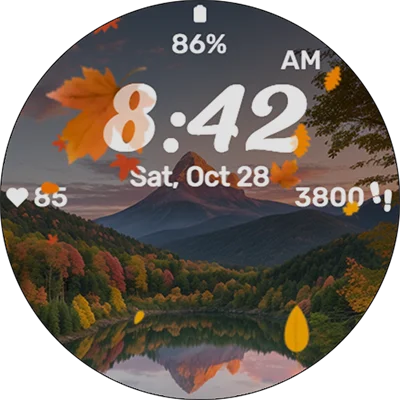
As the seasons change and nature displays its most vibrant colors, there’s something deeply satisfying about bringing that natural beauty to your wearable technology. Autumn Falling Leaves is a stunning watch face designed for Wear OS devices that captures the essence of fall’s golden moments right on your wrist. Within the first moments of activation, you’ll notice how this digital timepiece transforms your smartwatch into a window displaying nature’s most beautiful transition, complete with animated foliage gently cascading across your screen.
Table of Contents
The Autumn Falling Leaves watch face isn’t just another static display—it’s a carefully crafted digital experience that combines aesthetic appeal with practical functionality. Whether you’re a nature enthusiast, a design lover, or simply someone who appreciates seasonal themes, this watch face offers a refreshing alternative to generic time displays. Available on the Google Play Store, this watch face brings the warmth and tranquility of autumn directly to your daily routine.
What Makes Autumn Falling Leaves Special?
Watch faces serve as the primary interface for your smartwatch, making their design crucial to your daily experience. Autumn Falling Leaves stands out by offering more than just time-telling capabilities—it delivers an immersive seasonal atmosphere. The watch face features realistic leaf animations that drift across your display, mimicking the gentle movement of foliage during those crisp autumn days. Each leaf follows natural physics patterns, creating an organic flow that never feels repetitive or mechanical.
The color palette deserves particular attention. Rich amber tones blend seamlessly with deep burgundy reds, golden yellows, and earthy browns—the signature colors of fall foliage. These hues aren’t just decorative; they’re carefully calibrated to provide excellent readability while maintaining that cozy autumn ambiance. The developers have struck an impressive balance between visual beauty and practical functionality, ensuring that checking the time remains effortless even while surrounded by animated leaves.
Beyond aesthetics, the watch face includes comprehensive complications support, allowing you to display weather information, step counts, battery levels, and calendar events alongside the falling leaves animation. This integration means you don’t sacrifice functionality for beauty—you get both in one cohesive package. The complications blend naturally with the autumn theme, using complementary fonts and colors that enhance rather than distract from the overall design.
Key Features That Define the Experience
Understanding what sets Autumn Falling Leaves apart requires examining its feature set in detail. Here’s a breakdown of what makes this watch face a must-have for seasonal enthusiasts:
| Feature | Description | Benefit |
|---|---|---|
| Animated Leaves | Realistic falling leaf animations with natural physics | Creates immersive seasonal atmosphere |
| Customizable Complications | Support for 4-6 complication slots | Displays essential information at a glance |
| Battery Optimization | Efficient animation rendering | Minimal impact on smartwatch battery life |
| AOD Support | Always-On Display compatibility | Maintains theme even in ambient mode |
| Color Customization | Adjustable color schemes | Personalize autumn intensity to taste |
The animation quality deserves special recognition. Unlike simpler watch faces that use basic GIF-style loops, Autumn Falling Leaves employs sophisticated rendering techniques that make each leaf appear unique. The leaves rotate, tumble, and drift with subtle variations that mirror real falling foliage. This attention to detail prevents the visual fatigue that occurs with repetitive animations, keeping the watch face fresh even after extended use.
Performance optimization ensures that this visually rich experience doesn’t drain your smartwatch battery excessively. The developers have implemented efficient rendering algorithms that balance visual fidelity with power consumption. In typical usage scenarios, the watch face adds minimal battery drain compared to static alternatives—an impressive achievement considering the constant animation.
If you’re someone who enjoys changing watch faces with the seasons, you might also appreciate Simple Floral Watch Face, which offers a similar nature-inspired approach with spring and summer themes. Combining multiple seasonal watch faces creates a year-round rotation that keeps your wearable fresh and aligned with nature’s cycles.
Customization Options for Personal Preferences
One size rarely fits all when it comes to personal devices, and Autumn Falling Leaves acknowledges this reality through extensive customization options. The watch face settings allow you to adjust several parameters to match your aesthetic preferences and practical needs.
Visual Customization Elements
- Leaf Density: Control how many leaves appear on screen simultaneously, from sparse minimalism to abundant coverage
- Animation Speed: Adjust how quickly leaves fall, from gentle drifting to more dynamic movement
- Color Intensity: Fine-tune the vibrancy of autumn colors to match your preference for bold or subtle palettes
- Background Options: Choose between transparent, semi-transparent, or solid backgrounds behind the falling leaves
- Time Display Styles: Select from multiple font options and sizes for optimal readability
These customization options ensure that Autumn Falling Leaves works equally well for users who prefer minimalist designs and those who embrace maximalist aesthetics. You can dial the autumn theme up to eleven for maximum seasonal impact, or tone it down for a more professional appearance suitable for formal settings.
The complication slots offer another layer of personalization. Most Wear OS complications are supported, meaning you can integrate data from your favorite apps directly into the watch face. Weather apps, fitness trackers, calendar applications, and music controllers all work seamlessly within the autumn framework. This compatibility makes Autumn Falling Leaves practical for daily wear rather than just occasional seasonal enjoyment.
Setting Up Your Perfect Autumn Display
Installation and configuration of Autumn Falling Leaves follows the standard Wear OS watch face protocol, making it accessible even for smartwatch newcomers. After downloading from the Google Play Store, the watch face appears in your device’s watch face selector within moments.
Step-by-Step Setup Process
- Download and Install: Locate Autumn Falling Leaves in the Play Store and install it on your paired smartphone
- Watch Face Selection: Long-press your current watch face and swipe through options until you find Autumn Falling Leaves
- Initial Customization: Tap the settings icon to access customization options
- Complication Assignment: Select which data sources you want displayed in available complication slots
- Fine-Tuning: Adjust animation parameters, colors, and density to your preferences
The initial setup takes just a few minutes, but the real enjoyment comes from experimenting with different configurations over time. Many users find that their preferences evolve—what seems perfect initially might feel too busy after a few days, or conversely, you might want to increase the leaf density for more dramatic effect.
Seasonal timing plays an interesting role in how people use this watch face. While it’s marketed as an autumn theme, many users keep it active year-round, appreciating the warm colors and calming animation regardless of the actual season. Others strategically activate it during fall months, creating a special anticipation and satisfaction when October arrives and they can finally switch to their beloved autumn theme.
For those who enjoy exploring different watch face aesthetics throughout the year, Digital Tree v2 watch face offers another nature-inspired option with a more stylized, artistic interpretation of trees and seasonal changes.
Performance Across Different Wear OS Devices
Compatibility and performance vary across the diverse Wear OS ecosystem, making it important to understand how Autumn Falling Leaves performs on different hardware configurations. The watch face is designed to work on most modern Wear OS devices, but the experience naturally varies based on processor capabilities and screen specifications.
High-End Devices (Samsung Galaxy Watch series, Google Pixel Watch, TicWatch Pro models): These devices render the falling leaves animation with exceptional smoothness. The animation maintains consistent frame rates even when displaying multiple complications, and battery impact remains negligible. The larger, higher-resolution screens on these devices showcase the autumn colors beautifully, with excellent color accuracy and contrast.
Mid-Range Devices (Fossil Gen 5/6, Mobvoi TicWatch E series, older Samsung models): Performance remains solid on mid-tier smartwatches, though you might notice occasional frame drops during intensive operations. The watch face automatically scales animation complexity based on available resources, ensuring a smooth experience even on less powerful hardware. Battery consumption increases slightly compared to high-end devices but remains reasonable.
Budget Devices (Entry-level Wear OS watches): While Autumn Falling Leaves functions on budget hardware, you may need to reduce leaf density and animation complexity for optimal performance. The watch face includes a “Performance Mode” specifically designed for lower-end devices, which reduces visual effects while maintaining the core autumn aesthetic.
Screen technology also influences the experience. AMOLED displays render the rich autumn colors with stunning vibrancy and deep blacks, creating excellent contrast for the falling leaves. LCD screens provide good results but lack the same depth and color saturation. The watch face adapts to both technologies, adjusting brightness and contrast automatically for optimal visibility.
Comparing Autumn Falling Leaves to Alternatives
The smartwatch watch face market offers numerous seasonal and nature-themed options, making it valuable to understand how Autumn Falling Leaves compares to alternatives. This comparison helps you determine whether this particular watch face aligns with your preferences and needs.
Versus Static Autumn Themes: Many autumn watch faces feature static images of fall scenery—beautiful photographs or illustrations of autumn landscapes. While these can be visually striking, they lack the dynamic quality that makes Autumn Falling Leaves engaging over extended periods. The animation provides a “living” quality that static images cannot match, reducing the visual boredom that eventually develops with unchanging displays.
Versus Seasonal Watch Face Collections: Some developers offer comprehensive seasonal packages that include spring, summer, autumn, and winter themes. While these collections provide variety, individual watch faces within them often receive less development attention than standalone releases. Autumn Falling Leaves benefits from focused development, resulting in more refined animations and better optimization compared to one-quarter of a seasonal bundle.
Versus Minimalist Time Displays: At the opposite end of the spectrum, many users prefer extremely simple watch faces showing nothing but time and perhaps one or two complications. Autumn Falling Leaves won’t appeal to strict minimalists, but its customization options allow you to dial back the autumn elements for a more understated approach that still provides seasonal character.
If you’re interested in exploring other seasonal options, Sakura Animated offers a beautiful spring-themed alternative featuring animated cherry blossoms. Having both watch faces allows you to switch between seasons, maintaining that connection to nature’s cycles throughout the year.
Battery Life Considerations and Optimization
Battery consumption represents a primary concern for any smartwatch user, particularly when considering animated watch faces. Understanding how Autumn Falling Leaves impacts your device’s endurance helps you make informed decisions about daily use.
Battery Impact Analysis
Under typical usage conditions with moderate complication use and standard animation settings:
- Samsung Galaxy Watch 4/5: Approximately 3-5% additional battery drain compared to static faces
- Google Pixel Watch: Around 4-6% increased consumption over baseline
- Fossil Gen 6: Roughly 5-7% extra battery usage
- TicWatch Pro 3: About 3-4% additional drain thanks to dual-display technology
These figures assume normal daily usage patterns including frequent screen activations, notification checks, and periodic complication updates. The actual impact varies based on individual usage habits, with heavier smartwatch users experiencing proportionally less relative increase since the watch face represents a smaller percentage of total consumption.
Optimization strategies can further reduce battery impact:
- Reduce Animation Complexity: Lowering leaf density decreases rendering demands
- Adjust Update Frequency: Complications that update every minute consume more power than those refreshing every 5-10 minutes
- Enable Battery Saver Mode: Many devices offer battery-saving modes that automatically reduce animation frame rates
- Strategic AOD Configuration: Simplifying the Always-On Display version reduces consumption during periods when your wrist is down
Most users find the battery trade-off worthwhile given the visual appeal and enjoyment derived from the autumn theme. The watch face strikes a reasonable balance that doesn’t require daily charging for most modern smartwatches with decent battery capacity.
User Experience and Real-World Feedback
Examining user reviews and feedback provides valuable insights into how Autumn Falling Leaves performs in real-world conditions. The watch face maintains consistently positive ratings across the Wear OS ecosystem, with users highlighting several aspects that contribute to satisfaction.
Positive User Feedback Themes:
- Stress Reduction: Multiple users report that watching the falling leaves provides a calming effect during stressful moments
- Conversation Starter: The distinctive appearance frequently prompts questions and compliments from others
- Seasonal Connection: Users appreciate feeling connected to seasonal changes, especially those in urban environments with limited nature exposure
- Nostalgia Factor: The autumn theme evokes memories of favorite seasonal activities and childhood experiences
- Visual Quality: Consistent praise for the realistic animation and beautiful color palette
Common Constructive Criticism:
- Limited Year-Round Appeal: Some users feel the autumn theme is too specific for constant use
- Complication Readability: Occasional reports of complications being difficult to read against busy backgrounds with many leaves
- Customization Depth: A subset of users desires even more granular control over individual animation elements
The developer’s responsiveness to feedback deserves mention. Regular updates address user suggestions and compatibility issues, demonstrating ongoing commitment to the watch face’s quality and evolution. This active development approach ensures that Autumn Falling Leaves continues improving over time rather than remaining static after initial release.
For users who enjoy exploring different nature-themed watch faces, Floral Luxury Botanical Face offers an elegant alternative with sophisticated floral designs that complement the seasonal approach of Autumn Falling Leaves.
Creative Usage Scenarios and Applications
While Autumn Falling Leaves primarily serves as a personal time-telling interface, creative users have discovered various scenarios where this watch face adds special value beyond basic functionality.
Photography and Content Creation: Content creators focused on autumn themes, lifestyle blogging, or seasonal content often feature Autumn Falling Leaves in their wrist shots. The distinctive appearance adds visual interest to flat-lay photography and lifestyle imagery, particularly for Instagram posts, Pinterest pins, and blog headers celebrating fall aesthetics.
Mindfulness and Meditation: The gentle, repetitive motion of falling leaves creates an unexpectedly effective focal point for brief mindfulness exercises. Several users report incorporating glances at their watch face into breathing exercises or momentary stress-relief practices throughout their day. The natural, non-demanding movement provides something to focus on without being overly stimulating.
Seasonal Celebrations and Events: Autumn Falling Leaves becomes particularly popular during fall-specific occasions—Thanksgiving gatherings, Halloween celebrations, harvest festivals, and autumn weddings. Coordinating your watch face with seasonal events adds a thoughtful detail that demonstrates attention to ambiance and atmosphere.
Educational Settings: Teachers and educators working with younger students have noted that the watch face occasionally serves as a conversation starter about seasons, nature, and the science behind why leaves change colors and fall. While not designed for educational purposes, it inadvertently supports casual learning opportunities.
Gift Recommendations: When suggesting Wear OS devices as gifts during autumn months, including Autumn Falling Leaves as a pre-installed watch face adds immediate seasonal appeal. Recipients appreciate the thoughtful detail that shows the gift-giver considered how they might want to personalize their new device.
Technical Specifications and Requirements
Understanding the technical requirements ensures compatibility with your specific smartwatch model before purchase or download. Here’s a comprehensive breakdown of what Autumn Falling Leaves requires:
Minimum System Requirements
- Operating System: Wear OS 2.0 or higher
- Processor: Qualcomm Snapdragon Wear 2100 or equivalent
- RAM: 512MB minimum (1GB recommended for optimal performance)
- Storage: 15MB available space
- Display: Any Wear OS compatible screen (AMOLED or LCD)
Recommended Specifications
- Operating System: Wear OS 3.0 or higher
- Processor: Qualcomm Snapdragon Wear 4100+ or Samsung Exynos W920
- RAM: 1GB or more
- Display: AMOLED for best color representation
- Battery: 300mAh or larger for comfortable daily use with animations enabled
The watch face receives regular updates that typically require around 5-10MB of temporary storage during installation. Maintaining adequate free space ensures smooth update processes without complications.
Compatibility Notes: While Autumn Falling Leaves works across most Wear OS devices, certain manufacturer-specific watch face requirements may affect functionality. Samsung Galaxy Watch devices running One UI Watch sometimes require additional permissions or settings adjustments for third-party watch faces. Google Pixel Watch and Fossil devices typically offer the most straightforward installation experience.
Maximizing Value Through Seasonal Watch Face Collections
Rather than committing exclusively to Autumn Falling Leaves year-round, many smartwatch enthusiasts curate personal collections of seasonal watch faces that rotate throughout the year. This approach keeps your wearable experience fresh while maintaining that connection to nature’s cycles.
Recommended Seasonal Rotation Strategy:
- Spring (March-May): Switch to floral or fresh growth themes
- Summer (June-August): Adopt bright, sunny, or beach-inspired watch faces
- Autumn (September-November): Activate Autumn Falling Leaves for peak seasonal relevance
- Winter (December-February): Transition to snowflake, holiday, or minimalist cold-weather themes
This rotation pattern creates anticipation and satisfaction as you change watch faces to match environmental shifts. The act of switching watch faces becomes a small ritual marking seasonal transitions—a digital equivalent to changing wardrobes or decorating your living space for different times of year.
Budget-Conscious Collection Building: Building a comprehensive seasonal collection doesn’t require significant investment. Many excellent watch faces are free or very affordable, with Autumn Falling Leaves typically priced competitively within the watch face market. Setting aside a small annual budget for watch face purchases allows you to gradually build a diverse collection that serves you year after year.
For users building winter watch face collections to complement their autumn themes, Moonlight Waves Watch Face provides a serene, cool-toned option that transitions beautifully from the warm autumn palette to winter’s cooler aesthetics.
Troubleshooting Common Issues
Even well-designed watch faces occasionally present challenges, particularly given the diversity of Wear OS devices and configurations. Understanding common issues and their solutions helps you maintain optimal performance.
Frequent Issues and Solutions
Problem: Watch face not appearing in selection menu after installation
Solution: Ensure both smartphone and smartwatch are connected and synced. Restart both devices if necessary. Check that the watch face completed installation on the watch itself, not just the phone.
Problem: Animations appear choppy or slow
Solution: Reduce leaf density in settings, close unnecessary background applications, and ensure your watch isn’t in battery-saver mode. Consider enabling Performance Mode if available in watch face settings.
Problem: Complications not displaying correct information
Solution: Verify that source apps have necessary permissions granted. Reassign complications by entering watch face settings and selecting data sources again. Some complications require specific app versions to function properly.
Problem: Excessive battery drain beyond expected levels
Solution: Check for software updates for both the watch face and Wear OS itself. Reduce animation complexity and complication update frequency. Verify that no other background processes are consuming excessive resources.
Problem: Watch face disappears after software updates
Solution: This occasionally occurs after major Wear OS updates. Reinstall the watch face from your Play Store library. Your previous customization settings may need to be reconfigured.
Most issues resolve through simple troubleshooting steps. For persistent problems, the developer typically provides support through the Play Store listing contact information or dedicated support channels.
The Psychology of Seasonal Digital Experiences
Understanding why seasonal watch faces like Autumn Falling Leaves resonate so strongly with users requires examining the psychological factors at play. These digital seasonal expressions fulfill several important human needs that extend beyond mere aesthetics.
Connection to Natural Rhythms: Modern life, especially in urban environments, often disconnects us from natural seasonal cycles. Digital seasonal themes provide touchpoints that maintain awareness of nature’s rhythms even when surrounded by concrete and artificial environments. This connection, however small, satisfies deep-seated human inclinations toward environmental awareness.
Nostalgia and Emotional Comfort: Autumn triggers powerful nostalgic responses in many people—memories of childhood activities, family gatherings, favorite seasonal rituals, and significant life transitions that occurred during fall months. A watch face that evokes these feelings provides emotional comfort accessible through a simple wrist glance.
Mindfulness and Present Moment Awareness: The gentle, repetitive motion of falling leaves encourages brief moments of mindfulness throughout the day. These micro-meditations, even lasting just seconds, contribute to overall stress reduction and present-moment awareness. The non-demanding nature of the animation makes it perfect for these brief mental resets.
Personal Expression and Identity: Watch face selection represents a form of personal expression similar to clothing choices or phone case designs. Choosing Autumn Falling Leaves communicates something about your personality—an appreciation for nature, seasonal awareness, or aesthetic sensibilities. This self-expression, even in small ways, contributes to identity reinforcement and self-concept clarity.
Anticipation and Ritual: The act of changing watch faces with seasons creates anticipation and ritual around temporal transitions. These small ceremonies mark the passage of time and create structure within the year’s flow, providing psychological benefits similar to holiday celebrations and seasonal traditions.
Frequently Asked Questions
Q: Does Autumn Falling Leaves significantly drain smartwatch battery compared to static watch faces?
A: Autumn Falling Leaves adds approximately 3-7% additional battery drain compared to static watch faces, depending on your specific device and customization settings. Modern smartwatches with efficient processors (Snapdragon Wear 4100+ or Samsung Exynos W920) experience minimal impact, typically 3-4% increased consumption. Older devices may see slightly higher drain, around 5-7%. You can reduce battery impact by lowering leaf density, decreasing animation speed, or simplifying the Always-On Display version. Most users find the battery trade-off acceptable given the visual appeal, and the watch face still allows for full-day usage on devices with reasonable battery capacity (300mAh+).
Q: Can I customize the colors and animation speed of the falling leaves?
A: Yes, Autumn Falling Leaves offers extensive customization options through its settings menu. You can adjust leaf density (how many leaves appear simultaneously), animation speed (how quickly they fall), color intensity (vibrant or muted autumn tones), and background transparency. These controls allow you to create anything from a subtle, minimalist autumn hint to a dramatic, leaf-filled display. The watch face also supports multiple complication configurations, letting you balance seasonal aesthetics with practical information display. Most customization changes take effect immediately, allowing real-time experimentation until you achieve your preferred look.
Q: Is Autumn Falling Leaves compatible with all Wear OS smartwatches?
A: Autumn Falling Leaves is compatible with most Wear OS devices running version 2.0 or higher, including popular models from Samsung, Google, Fossil, TicWatch, and other manufacturers. However, performance varies based on hardware specifications. High-end devices with powerful processors and AMOLED displays provide the best experience with smooth animations and vibrant colors. Mid-range and budget devices also support the watch face but may require reduced animation complexity for optimal performance. The watch face includes a Performance Mode specifically designed for lower-powered devices. Before purchasing, verify your smartwatch’s OS version and ensure at least 15MB of available storage. The watch face adapts to different screen sizes and shapes automatically, working on both round and square displays.
Conclusion: Bringing Nature’s Beauty to Your Wrist
Autumn Falling Leaves represents more than just a functional time display—it’s a daily connection to nature’s most visually stunning seasonal transition. By bringing the warmth, beauty, and tranquility of fall directly to your smartwatch, this watch face transforms routine time checks into moments of aesthetic appreciation and mindful pause.
The combination of realistic animations, thoughtful customization options, and practical functionality creates a watch face that serves both emotional and utilitarian needs. Whether you’re a nature enthusiast seeking year-round connection to seasonal cycles, a design lover who appreciates beautiful digital experiences, or simply someone who wants their smartwatch to reflect personal style, Autumn Falling Leaves delivers compelling value.
The watch face’s performance optimization ensures that visual beauty doesn’t come at the expense of practicality. With minimal battery impact and broad device compatibility, you can enjoy autumn’s golden moments on your wrist without compromising your smartwatch’s core functionality. The active development and responsive support from the creator further enhance the long-term value proposition.
As we navigate increasingly digital lives, finding ways to maintain connections with natural rhythms and seasonal beauty becomes more important. Autumn Falling Leaves offers an accessible, affordable way to keep autumn’s essence close at hand—or rather, on wrist—throughout your daily routine. Download it from the Google Play Store today and discover how a simple watch face can add warmth, beauty, and seasonal awareness to every glance at your smartwatch.
📥 Download Autumn Falling Leaves APK Latest Version (Premium Unlocked)
Note: This version is safe. You can scan it yourself via VirusTotal.