Secret Service Watch Face APK: Tactical Wear OS Design w/ Complications
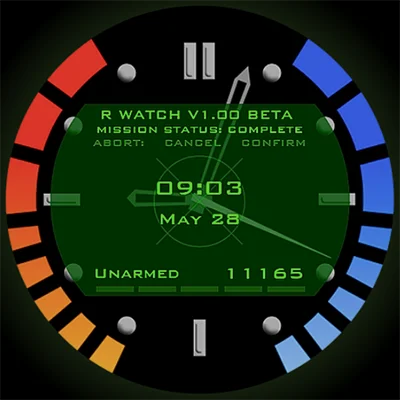
In the world of smartwatch customization, few designs capture the imagination quite like those inspired by elite tactical operations and secret service aesthetics. The Secret Service Watch Face brings this sophisticated, mission-ready style to your wrist, transforming your everyday smartwatch into a device that looks like it belongs to a covert operative. Whether you’re a fan of spy thrillers, appreciate functional design, or simply want a watch face that stands out from generic options, this comprehensive guide explores everything you need to know about this compelling timepiece design.
Table of Contents
What Is Secret Service Watch Face?
Secret Service Watch Face is a premium smartwatch face design inspired by the tactical, professional aesthetic associated with elite security and intelligence operations. Available for Wear OS devices, this watch face combines sophisticated styling with practical functionality, creating an interface that’s both visually striking and genuinely useful for everyday wear.
The design philosophy draws from the clean, purpose-driven displays found in tactical equipment and professional security operations. Rather than cluttering the screen with unnecessary flourishes, the Secret Service Watch Face prioritizes information hierarchy, readability, and that unmistakable “operator” aesthetic that appeals to users who appreciate functional design with character.
You can download this exceptional watch face from the Google Play Store, where it’s optimized for various Wear OS smartwatches including Samsung Galaxy Watch, TicWatch, Fossil smartwatches, and other compatible devices.
The Appeal of Tactical Watch Face Designs
Tactical and mission-inspired watch faces have grown tremendously popular among smartwatch users, and for good reason. These designs tap into several psychological and practical appeals:
Professional Aesthetic
There’s something inherently compelling about the clean, purposeful design language of tactical equipment. The Secret Service Watch Face captures this aesthetic perfectly, offering a sophisticated appearance that works equally well in professional settings and casual environments.
Functional Clarity
Tactical designs prioritize function over form, meaning information is presented clearly and accessibly. This design philosophy translates to better usability in real-world situations where quick glance-ability matters.
Distinctive Style
In a sea of generic or overly decorative watch faces, tactical designs like Secret Service offer a distinctive alternative that helps your smartwatch stand out while maintaining sophistication.
Key Features That Define Secret Service Watch Face
Comprehensive Information Display
The Secret Service Watch Face excels at presenting multiple data points without creating visual clutter. Typical features include:
- Time Display: Clear, easily readable time in various formats
- Date Information: Day, date, and sometimes week number
- Battery Indicator: Visual representation of remaining battery life
- Heart Rate Monitoring: Real-time heart rate display for health tracking
- Step Counter: Daily activity tracking prominently displayed
- Weather Information: Current conditions and temperature at a glance
- Customizable Complications: Multiple slots for additional data
Multiple Color Schemes
Understanding that personal preference varies, Secret Service typically offers several color variations that maintain the tactical aesthetic while allowing personalization. Common options include:
- Classic black and white for maximum readability
- Military-inspired green displays
- Stealth-mode dark themes
- High-contrast options for outdoor visibility
Always-On Display Optimization
Quality watch faces like Secret Service Watch Face include optimized always-on display modes that maintain the design’s character while preserving battery life. The dimmed version retains essential information without unnecessary battery drain.
Ambient Mode Efficiency
The watch face intelligently transitions between active and ambient modes, ensuring you always have access to crucial information while maximizing your device’s battery performance throughout the day.
Installation and Setup: Getting Started
Setting up the Secret Service Watch Face is straightforward, though the process varies slightly depending on your specific smartwatch model:
Step-by-Step Installation Guide
- Download from Play Store: Visit the Google Play Store on your smartphone or directly on your Wear OS watch and search for Secret Service Watch Face
- Install the App: Download and install the watch face application
- Sync to Your Watch: If downloading via phone, ensure your smartwatch is connected and allow the face to sync
- Activate the Design: Long-press your current watch face and swipe to find your newly installed Secret Service face
- Customize Settings: Tap the settings gear icon to access customization options
Customization Options
The Secret Service Watch Face typically offers various customization parameters:
- Color Scheme Selection: Choose your preferred color palette
- Complication Configuration: Select which data points appear in available slots
- Information Priority: Adjust which metrics receive prominence
- Battery Saving Options: Enable features that extend battery life
Comparing Secret Service with Other Tactical Watch Faces
The Wear OS ecosystem offers numerous tactical and military-inspired watch face options, each with distinct characteristics. Understanding how Secret Service Watch Face compares helps you make an informed choice.
Design Philosophy Comparison
| Feature | Secret Service | Military Themed | Tech-Focused | Classic Digital |
|---|---|---|---|---|
| Aesthetic Style | Elite tactical | Military operations | Futuristic tech | Retro digital |
| Information Density | High | Very high | Medium | Low to medium |
| Customization | Extensive | Moderate | High | Limited |
| Battery Efficiency | Optimized | Variable | Moderate | Excellent |
| Professional Appearance | Very high | Medium | Medium | Low |
For users exploring alternative tactical aesthetics, the Military ZULU Tactical watch offers a different interpretation of military-inspired design with its own unique characteristics and features that appeal to fans of robust, field-ready displays.
Optimizing Your Secret Service Watch Face Experience
To maximize satisfaction with your Secret Service Watch Face, consider these expert optimization strategies:
Complication Selection Strategy
Your choice of complications dramatically affects both functionality and battery life. Consider these recommendations:
For Fitness Enthusiasts:
- Heart rate monitor
- Step counter
- Active minutes
- Calories burned
For Productivity Focus:
- Next calendar event
- Unread notifications count
- Weather forecast
- Battery percentage
For Balanced Daily Use:
- Date and day
- Weather conditions
- Battery indicator
- Step counter
Battery Life Optimization
Tactical watch faces with rich information displays can impact battery life. Implement these strategies to extend usage:
- Adjust Brightness: Lower screen brightness to comfortable levels, especially for always-on mode
- Limit Complications: Each active complication requires processing power—choose essential ones
- Use Ambient Mode Wisely: Ensure ambient mode uses simplified graphics to conserve energy
- Disable Unnecessary Animations: While attractive, animations consume additional battery
Display Visibility Tips
Tactical displays are designed for quick readability, but environmental conditions affect visibility:
- High Contrast Settings: Use high-contrast color schemes for outdoor activities
- Adjust Tilt-to-Wake Sensitivity: Fine-tune how your watch responds to wrist movements
- Screen Timeout Duration: Balance between convenience and battery conservation
The Psychology Behind Tactical Watch Face Appeal
Understanding why tactical watch faces like Secret Service Watch Face resonate with users reveals interesting insights about modern smartwatch customization:
The Operator Fantasy
Many users enjoy the aspirational aspect of wearing a watch face that suggests capability, readiness, and professional competence. This psychological appeal isn’t about deception—it’s about expressing an appreciation for functional excellence and tactical aesthetics.
Information Mastery
Dense information displays appeal to users who value being informed and prepared. The Secret Service Watch Face satisfies this desire by presenting comprehensive data in an organized, accessible format.
Distinctive Identity
In an era where many people own similar smartwatches, watch face selection becomes a form of personal expression. Tactical designs signal appreciation for functionality, preparedness, and distinctive style.
Pairing Secret Service with Complementary Watch Faces
While you might love the Secret Service Watch Face for everyday wear, consider maintaining a collection of watch faces for different contexts and moods. For users who appreciate variety in their smartwatch aesthetics, exploring other design categories can enhance your overall experience.
Building a Versatile Watch Face Collection
Smart collectors maintain several watch face styles for different situations:
Tactical/Professional: Secret Service for work and active days
Elegant/Classic: Traditional analog designs for formal occasions—The Aristocrat Watch face offers sophisticated elegance perfect for dressier situations
Futuristic/Tech: Digital displays with cutting-edge aesthetics—Cyberpunk Watch Face delivers bold, futuristic styling for those who enjoy sci-fi inspired designs
Themed/Specialized: Character or franchise-inspired faces for casual wear—Fallout Pip-Boy Watch Face brings post-apocalyptic gaming aesthetics to your wrist
Data-Rich/Athletic: Performance-focused displays for workouts and training
Customization Beyond the Watch Face
The Secret Service Watch Face represents just one element of comprehensive smartwatch customization. To create a truly cohesive tactical aesthetic, consider these additional elements:
Watch Band Selection
Your watch band significantly impacts overall appearance. For tactical aesthetics, consider:
- Nylon NATO Straps: Military-inspired fabric bands in black, olive, or grey
- Tactical Silicone: Rugged, durable silicone in tactical colors
- Metal Bracelet: Stainless steel for a more refined tactical look
- Leather with Contrast Stitching: Tactical elegance for professional settings
Notification Style
Customize how notifications appear to maintain your tactical aesthetic. Many Wear OS devices allow notification customization that can complement your watch face design.
Widget and Tile Organization
Organize your quick-access tiles and widgets to prioritize information that aligns with the tactical, mission-ready mindset of your Secret Service watch face.
Technical Specifications and Compatibility
Understanding technical requirements ensures optimal performance of your Secret Service Watch Face:
Device Compatibility
The watch face typically supports:
- Wear OS 2.0 and higher
- Samsung Galaxy Watch series (with Wear OS)
- TicWatch Pro and other TicWatch models
- Fossil Gen 5 and newer
- Suunto 7
- Mobvoi and other Wear OS manufacturers
Performance Requirements
For optimal operation:
- Memory: Minimal RAM impact, typically under 50MB
- Battery Usage: Comparable to other full-featured watch faces
- Processor: Works smoothly on all modern Wear OS processors
- Screen Resolution: Adapts to various screen sizes and resolutions
Troubleshooting Common Issues
Even with polished watch faces, users occasionally encounter challenges. Here are solutions to frequent concerns:
Watch Face Not Appearing After Installation
If Secret Service doesn’t appear in your watch face selection:
- Ensure complete installation on both phone and watch
- Restart your smartwatch
- Check Play Store for pending updates
- Verify Wear OS app has proper permissions
Battery Draining Faster Than Expected
If experiencing battery issues:
- Reduce screen brightness, especially in always-on mode
- Limit active complications to essential ones
- Ensure watch face is updated to the latest version
- Check for conflicting apps running in background
Complications Not Updating
When data complications show outdated information:
- Verify relevant apps have necessary permissions
- Ensure data sync is enabled for health and fitness apps
- Restart both watch and phone
- Reconfigure complications through settings
The Evolution of Tactical Watch Face Design
The Secret Service Watch Face represents current trends in tactical smartwatch customization, but understanding the evolution of this design category provides valuable context:
From Traditional to Digital
Tactical watch design has its roots in military and field watches—instruments designed for actual operational use. These watches prioritized:
- Extreme legibility in adverse conditions
- Robust construction and reliability
- Useful complications like chronographs and bezels
- No-nonsense aesthetic that conveyed purpose
Modern digital interpretations like Secret Service translate these principles into smartwatch format, maintaining the core philosophy while leveraging digital capabilities.
The Future of Tactical Watch Faces
Emerging trends suggest tactical watch face design will continue evolving:
- Enhanced Customization: More granular control over every element
- Context-Aware Displays: Automatic adjustment based on activity or location
- AR Integration: Augmented reality elements for enhanced functionality
- Biometric Optimization: Better integration with health monitoring sensors
- Adaptive Intelligence: Learning user preferences and adjusting accordingly
Creating a Complete Tactical Smartwatch Experience
While the Secret Service Watch Face dramatically enhances your visual experience, consider additional applications that complement the tactical aesthetic. Beyond visual customization, optimizing your smartwatch’s functionality creates a more cohesive experience.
For users interested in comprehensive data displays that complement tactical watch faces, DADAM109: Pro Data Watch Face offers extensive information visualization with a professional aesthetic that pairs well with tactical themes. The combination of Secret Service’s mission-ready style with complementary apps that prioritize function creates a truly optimized smartwatch experience.
Additional Apps to Consider
Tactical Calculator: Quick access to unit conversions and calculations
Weather Radar: Detailed meteorological information for planning
Compass and Navigation: Essential tools for outdoor activities
Fitness Tracking: Detailed workout monitoring and analysis
Security Apps: Password managers and authentication tools
Frequently Asked Questions About Secret Service Watch Face
Q: Does the Secret Service Watch Face drain my smartwatch battery faster than stock watch faces?
A: The battery impact of Secret Service Watch Face is comparable to other feature-rich watch faces. While any always-on display with multiple complications uses more power than a completely blank screen, the face is optimized for efficiency. Battery life depends more on factors like screen brightness, always-on display settings, and the number of active complications you enable. Most users report full-day battery life with normal settings. To maximize battery, reduce screen brightness in always-on mode and limit active complications to essential data.
Q: Can I customize which information displays on the Secret Service Watch Face?
A: Yes, the Secret Service Watch Face typically offers extensive customization options. You can usually adjust color schemes, select which complications appear in available slots (such as heart rate, steps, weather, calendar events), and sometimes modify the layout or information hierarchy. Access these settings by long-pressing the watch face and tapping the settings/gear icon. The exact customization options may vary depending on the specific version and your watch model, but most tactical watch faces prioritize user personalization to meet individual needs and preferences.
Q: Is the Secret Service Watch Face compatible with all Wear OS smartwatches?
A: The Secret Service Watch Face is designed for Wear OS devices and is compatible with most modern Wear OS smartwatches including Samsung Galaxy Watch (Wear OS models), TicWatch series, Fossil Gen 5 and newer, Suunto 7, and other brands running Wear OS 2.0 or higher. However, compatibility with specific features may vary depending on your watch’s hardware capabilities, screen resolution, and software version. Before purchasing, verify your specific watch model’s compatibility by checking the Google Play Store listing or the developer’s compatibility information. Note that it won’t work with watches running proprietary operating systems like Apple watchOS, Samsung’s Tizen OS, or Fitbit OS.
Conclusion: Is Secret Service Watch Face Right for You?
The Secret Service Watch Face offers a compelling combination of tactical aesthetics, comprehensive functionality, and professional polish that appeals to a broad audience. Whether you’re drawn to the mission-ready visual style, appreciate the information-dense display, or simply want a distinctive alternative to generic watch faces, this design delivers impressive value.
The watch face particularly excels for users who:
- Appreciate functional, purpose-driven design aesthetics
- Want comprehensive information display on their wrist
- Value distinctive style that stands out professionally
- Enjoy the aspirational appeal of tactical equipment
- Seek customizable options that adapt to their needs
- Desire a watch face suitable for both work and casual settings
While tactical watch faces aren’t for everyone—some prefer minimalist designs or traditional analog aesthetics—the Secret Service Watch Face represents one of the finest examples of this design category. Its combination of visual impact, practical functionality, and customization options make it worthy of serious consideration for anyone interested in smartwatch personalization.
In a market saturated with countless watch face options ranging from whimsical to conventional, Secret Service carves out a distinctive niche that balances sophistication with functionality. The transformation it brings extends beyond mere appearance—it changes how you interact with your smartwatch, making information access more intuitive while expressing a distinctive aesthetic sensibility.
If you’re ready to elevate your smartwatch experience beyond factory-default options and embrace a design that combines tactical sophistication with everyday usability, the Secret Service Watch Face delivers exceptional results. Download it today and discover how the right watch face can transform your daily wrist experience into something truly special—mission-ready style meets practical functionality in a package that looks as good as it performs.
📥 Download Secret Service Watch Face APK Latest Version (Premium Unlocked)
Note: This version is safe. You can scan it yourself via VirusTotal.