S4U Assen Hybrid APK: Premium Analog-LCD Design with Themes, Complications & AOD
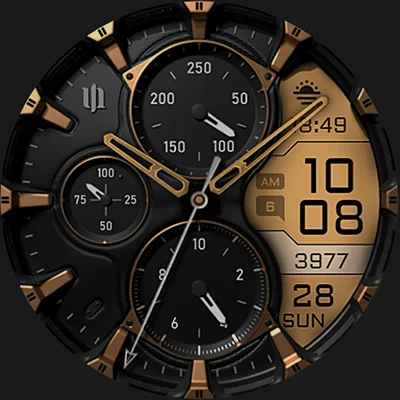
Transform your Wear OS smartwatch into a sophisticated timepiece with S4U Assen – Hybrid watch face, a perfectly balanced design that merges classic analog elegance with modern digital functionality. This premium watch face brings the best of both worlds to your wrist, featuring realistic analog hands paired with an LCD screen that displays essential information at a glance. Whether you’re using a Samsung Galaxy Watch or Google Pixel Watch, the S4U Assen – Hybrid watch face delivers unmatched customization and style.
Table of Contents
What Makes S4U Assen – Hybrid Watch Face Stand Out?
The S4U Assen – Hybrid watch face isn’t just another dial for your smartwatch—it’s a comprehensive personalization platform that adapts to your unique style and information needs. Unlike purely analog or digital designs, this hybrid approach gives you the timeless appeal of traditional watch hands combined with the practical benefits of digital data display.
The Perfect Blend of Form and Function
Realistic Hybrid Design
At its core, this watch face features authentic analog components that mimic the look and feel of premium mechanical watches. The hour and minute hands sweep across a beautifully rendered dial, while the integrated LCD screen provides instant access to vital metrics without cluttering the aesthetic.
Smart Information Display
The LCD section intelligently presents:
- Current step count for fitness tracking
- Real-time heart rate monitoring
- Day of the week and date
- Unread message notifications
- Two additional custom complications for your preferred data
This thoughtful layout ensures you’re never more than a glance away from the information that matters most to your daily routine.
Extensive Customization Options
One of the standout features of S4U Assen – Hybrid watch face is its remarkable flexibility. With over 30 color themes and multiple component styles, you can create a truly personalized timepiece.
| Customization Element | Available Options | Purpose |
|---|---|---|
| LCD Colors | 13 unique colors | Match your style or outfit |
| Index Colors | 10 color choices | Customize hour markers |
| Ring Colors | 10 variations | Accent the dial perimeter |
| Clock Hands | 4 distinct styles | Change the analog aesthetic |
| Small Hands | 2 style options | Adjust subdial appearance |
| Complications | 4 custom slots | Display your essential apps |
| Shortcuts | 3 quick-access widgets | Launch favorite functions |
| AOD Brightness | 3 intensity levels | Optimize battery and visibility |
How to Customize Your Watch Face
Getting started with personalization is intuitive:
- Press and hold the center of your watch display
- Tap the customize button that appears
- Swipe left or right to navigate between customizable elements
- Swipe up or down to cycle through available options and colors
- Confirm your selection and enjoy your unique design
The beauty of this system is its simplicity—you can completely transform your watch face in under a minute, making it easy to match different occasions or moods throughout your day.
Advanced Features for Power Users
Complications and Shortcuts: Your Data, Your Way
The S4U Assen – Hybrid watch face supports four custom complications and three app shortcuts, giving you unprecedented control over the information displayed on your wrist. Complications are dynamic data fields that update automatically, while shortcuts provide one-tap access to frequently used apps or functions.
Setting Up Complications:
- Press and hold the watch display
- Navigate to the complications section
- Tap each highlighted complication slot
- Select your preferred data source (weather, calendar, fitness metrics, etc.)
- Repeat for all four slots
Popular Complication Combinations:
- Fitness Focus: Steps, calories burned, active minutes, distance traveled
- Productivity Setup: Next calendar event, current weather, battery percentage, unread emails
- Health Monitor: Heart rate, stress level, sleep quality, oxygen saturation
- Communication Hub: Unread messages, missed calls, social media notifications, email count
Always-On Display (AOD) Intelligence
Battery life remains a critical consideration for smartwatch users, and the S4U Assen – Hybrid watch face addresses this with a smart Always-On Display feature. The AOD maintains visibility while conserving power through optimized brightness levels and simplified graphics.
Three AOD Brightness Levels:
- Low: Maximum battery conservation for extended use
- Medium: Balanced visibility and efficiency for daily wear
- High: Maximum readability in bright outdoor conditions
The new minimal AOD layout option strips away non-essential elements during standby, reducing power consumption while maintaining time readability. Colors synchronize automatically with your normal view settings, ensuring design consistency.
Pro Tip: Some smartwatches automatically adjust AOD brightness based on ambient light sensors. Check your watch settings to ensure this feature works in harmony with your S4U Assen configuration.
If you’re exploring other hybrid designs, the MD242 Hybrid watch face provides an alternative aesthetic with its own unique blend of analog and digital components.
Compatibility and Technical Requirements
Supported Devices
The S4U Assen – Hybrid watch face requires Wear OS 4 or higher (API level 33+), ensuring optimal performance and access to the latest platform features. Compatible smartwatches include:
Samsung Galaxy Watch Series:
- Galaxy Watch 4 (all sizes)
- Galaxy Watch 5 and 5 Pro
- Galaxy Watch 6 and 6 Classic
- Galaxy Watch 7 and 7 Ultra
Google Pixel Watch Series:
- Pixel Watch (1st generation)
- Pixel Watch 2
- Pixel Watch 3
Other Wear OS 4+ Smartwatches:
- Various third-party Wear OS devices running the compatible operating system
Troubleshooting Installation Issues
Occasionally, users may encounter download or installation challenges even on compatible devices. If you experience problems:
- Open the companion app included with your purchase
- Navigate to the Install/Issues section for device-specific guidance
- Follow the step-by-step instructions provided
- Contact support at [email protected] if issues persist
The developer maintains active support channels and typically responds quickly to user inquiries, ensuring you can enjoy your purchase without technical frustration.
Design Philosophy and Aesthetic Appeal
Why Hybrid Watch Faces Matter
The rise of hybrid watch face designs reflects a broader trend in wearable technology—users want smartwatch capabilities without sacrificing traditional watch aesthetics. The S4U Assen – Hybrid watch face exemplifies this philosophy by:
Respecting Watchmaking Heritage: The analog components draw inspiration from classic timepiece design, with proportions and styling that honor traditional horology.
Embracing Modern Functionality: The LCD display integrates seamlessly, providing digital convenience without overwhelming the analog charm.
Offering Personal Expression: With 30 theme variations and multiple component styles, every user can create a watch face that reflects their personality.
For those who prefer purely digital aesthetics with contemporary flair, the MD307 Digital watch face delivers a modern interpretation of digital time display with extensive customization options.
Practical Use Cases
Daily Versatility
Professional Settings Configure the watch face with subtle colors (black, navy, or grey LCD) and classic hands for business meetings. Set complications to display calendar events, unread emails, and battery status.
Fitness Activities Switch to vibrant colors (red, green, or cyan LCD) and configure complications for steps, heart rate, calories, and active time. The always-on display keeps metrics visible during workouts.
Casual Weekend Wear Experiment with bold color combinations and set shortcuts to music controls, weather, and messaging apps for leisure activities.
Evening Events Lower the AOD brightness to minimal, choose elegant color schemes, and simplify complications to time and date only for formal occasions.
Battery Life Optimization Strategies
While the always-on display feature enhances usability, conscious users can maximize battery life through smart configuration:
- Use medium or low AOD brightness unless outdoor visibility demands high intensity
- Enable minimal AOD layout during extended periods away from chargers
- Reduce complication refresh frequency by selecting less data-intensive sources
- Match LCD colors to darker themes as lighter colors consume more power
The hybrid design inherently uses less power than fully digital watch faces due to the static analog elements, making it an excellent choice for all-day wear.
The S4U Watches Ecosystem
The S4U Assen – Hybrid watch face comes from S4U Watches, a developer dedicated to creating premium Wear OS watch faces. The extensive catalog includes various styles, from retro digital designs to modern minimalist faces, ensuring there’s something for every preference.
Staying Connected:
- Official website: https://www.s4u-watches.com
- Instagram: @matze_styles4you for design previews
- Facebook: /styles4you for community updates
- YouTube: styles4you-watches for tutorials and showcases
Following these channels keeps you informed about new releases, updates, and special promotions on the entire S4U Watches collection.
If you appreciate botanical-inspired designs, the Simple Floral Watch Face offers an elegant alternative with nature-themed aesthetics that change with the seasons.
Installation and Getting Started
Quick Start Guide
- Purchase and download S4U Assen – Hybrid watch face from Google Play Store
- Wait for automatic installation on your paired Wear OS smartwatch
- Access watch face picker by long-pressing your current watch face
- Select S4U Assen from your available options
- Begin customization using the methods outlined above
The entire process typically takes less than five minutes, and you can start experimenting with different color combinations and complications immediately.
First-Time Setup Recommendations
Start with a preset: The default configuration provides a balanced starting point. Use it for a day to understand the layout before diving into deep customization.
Test complication visibility: Ensure your selected complications provide clear, readable information at various angles and lighting conditions.
Experiment with hand styles: Different hand designs can dramatically change the watch face character. Try each option to find your preferred aesthetic.
Adjust AOD settings gradually: Begin with medium brightness and adjust based on your actual battery consumption and visibility needs.
Value Proposition
The S4U Assen – Hybrid watch face represents excellent value for Wear OS users seeking premium customization without subscription fees. The one-time purchase provides:
- Unlimited customization options
- Regular updates and bug fixes
- Active developer support
- No advertisements or in-app purchases
- Compatibility with future Wear OS updates
Compared to many watch faces that offer limited customization or require ongoing payments, S4U Assen delivers comprehensive features at a fair price point.
Community Feedback and Reviews
Users consistently praise the watch face for its clean execution, extensive customization, and reliable performance. The developer actively incorporates user feedback into updates, demonstrating commitment to continuous improvement.
Common positive themes in reviews include:
- Exceptional variety of customization options
- Smooth performance without lag or stuttering
- Responsive customer support when issues arise
- Regular updates that add features and fix bugs
- Good battery life compared to fully digital alternatives
The active development and support distinguish S4U Assen from abandoned or poorly maintained watch faces that clutter the Wear OS ecosystem.
Making Your Decision
The S4U Assen – Hybrid watch face excels as a versatile choice for users who value both aesthetics and functionality. Its hybrid design philosophy successfully bridges traditional and modern watchmaking sensibilities, while the extensive customization ensures it adapts to any style or use case.
Is This Watch Face Right for You?
Consider S4U Assen if you:
- Appreciate classic analog watch design but need digital information
- Want extensive customization without complexity
- Use a compatible Samsung Galaxy Watch, Google Pixel Watch, or other Wear OS 4+ device
- Value developer support and regular updates
- Prefer one-time purchases over subscription models
- Need versatile complications for fitness, productivity, or communication
- Desire always-on display functionality with battery efficiency
Download the S4U Assen – Hybrid watch face today and transform your smartwatch into a personalized timepiece that reflects your unique style while delivering the information you need, exactly when you need it.
Frequently Asked Questions
Q: Can I use S4U Assen – Hybrid watch face on my Samsung Galaxy Watch 3 or older model?
A: Unfortunately, no. The S4U Assen watch face requires Wear OS 4 or higher (API level 33+), which means it only supports Galaxy Watch 4 and newer models. Older Galaxy watches run Tizen OS or earlier Wear OS versions that aren’t compatible with this watch face. If you have a Galaxy Watch 4, 5, 6, or 7 series device, you’re all set to enjoy S4U Assen.
Q: How do complications affect battery life on the S4U Assen – Hybrid watch face?
A: Complications do impact battery consumption, but the effect varies based on which data sources you select. Simple complications like date or battery percentage use minimal power, while those that update frequently (like weather or heart rate) consume more energy. The hybrid design of S4U Assen is inherently more efficient than fully digital watch faces because the analog hands don’t require constant screen refreshes. For optimal battery life, choose 2-3 essential complications rather than filling all four slots, and use the medium or low AOD brightness setting.
Q: Can I change the complications and customization settings directly from my phone?
A: No, all customization for the S4U Assen – Hybrid watch face must be done directly on your smartwatch. Press and hold the center of the watch display, tap the customize button, then swipe to navigate between options. This design is standard for Wear OS watch faces and ensures you see exactly how your changes look in real-time. However, you can install the watch face from your phone through the Google Play Store, and it will automatically sync to your paired smartwatch.
📥 Download S4U Assen – Hybrid watch face APK Latest Version (Premium Unlocked)
Note: This version is safe. You can scan it yourself via VirusTotal.