ILLUMINATOR Digital Watch Face APK: Retro Wear OS Customization
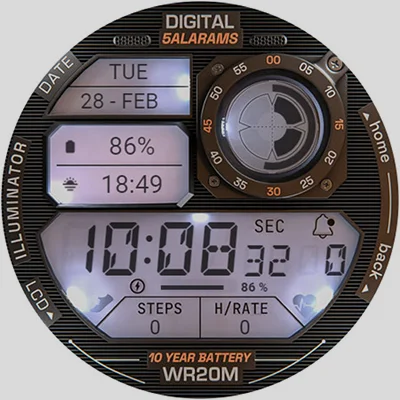
If you’re a smartwatch enthusiast searching for that perfect blend of nostalgic design and modern functionality, the ILLUMINATOR Digital Watch face deserves your attention. This meticulously crafted Wear OS watch face captures the essence of classic 1980s digital timepieces while delivering contemporary features that today’s users demand. Whether you’re drawn to retro aesthetics or simply want a highly readable, customizable watch face, this comprehensive guide will help you understand everything the ILLUMINATOR Digital Watch face offers and how to maximize its potential on your wrist.
Table of Contents
What Makes ILLUMINATOR Digital Watch Face Special?
The ILLUMINATOR Digital Watch face stands out in the crowded Wear OS marketplace by recreating authentic retro digital watch aesthetics with remarkable attention to detail. Developed by WatchBase, this watch face doesn’t just mimic vintage designs—it captures the entire experience, from the LCD-style displays to the illuminated night modes that recall the glow of classic Casio and Timex watches from decades past.
Core Features That Define the Experience
| Feature | Description |
|---|---|
| Realistic Retro Design | Authentic recreation of 1980s digital watch aesthetics |
| 3 Custom MFD Complications | Multi-function displays for personalized information |
| Animated Elements | Smooth transitions and visual feedback |
| Auto 12h/24h Mode | Automatic time format based on system settings |
| Multiple Night Modes | Various illumination colors for low-light visibility |
| Battery Indicator | Visual power level monitoring |
| Notification Counter | Quick glance at unread notifications |
| Custom Always-On Display | Choose between day or night AOD appearances |
| Heart Rate Integration | Health sensor data display (when available) |
The watch face achieves something remarkably difficult: balancing nostalgic design with modern utility. While it looks like it belongs on a 1985 wrist, it functions with the sophistication expected from contemporary Wear OS devices.
Understanding the Design Philosophy
Retro-Futurism at Its Best
The ILLUMINATOR Digital Watch face embraces retro-futurism—the aesthetic movement that imagines how people in the past envisioned the future. The design incorporates decorative elements like “5 ALARMS,” “10 YEAR BATTERY,” and “WR20M” labels that, while purely cosmetic, transport users back to an era when digital watches represented cutting-edge technology.
This attention to period-accurate detail creates an immersive experience. The segmented LCD-style numbers, the angular display modules, and the overall layout all reference specific design choices from vintage digital watches, particularly those that dominated the market during the early digital watch revolution.
Readability Meets Style
Beyond nostalgia, the watch face prioritizes readability—a crucial feature often sacrificed in overly artistic watch designs. The large, high-contrast digits ensure you can tell time at a glance, even in challenging lighting conditions or during motion. This practical consideration makes the ILLUMINATOR Digital Watch face suitable for everyday wear, not just as a novelty for retro enthusiasts.
For users seeking similar vintage-inspired timepiece designs, options like the Cyberpunk Watch Face offer alternative futuristic aesthetics, while the ULTRA Digital Retro watch face provides another take on classic digital watch styling.
Installation and Setup Guide
Getting the ILLUMINATOR Digital Watch face running on your Wear OS device requires understanding a few key steps that differ from simple app installations.
Prerequisites and Compatibility
Before purchasing, ensure your setup meets these requirements:
- Wear OS Device: Compatible with Wear OS 2.0 and later
- Google Account: Same account on phone and watch for synchronization
- Companion App: Phone app facilitates installation (automatically installed)
- Internet Connection: Required for initial download and installation
Step-by-Step Installation Process
1. Purchase and Download
- Visit the Google Play Store listing
- Complete purchase on your phone
- Wait for automatic installation to begin
2. Installation via Companion App
- Open the ILLUMINATOR companion app on your phone
- Tap the “Install” button
- Check your watch for installation prompt
- Tap “Install” again on the watch screen
- Wait for installation to complete (may take several minutes)
3. Alternative Installation Method If the companion app method doesn’t work:
- Open a web browser on your computer
- Log in with your Google Play account (same account used on watch)
- Navigate to the watch face listing
- Install from browser—it will push to your watch
4. Applying the Watch Face
- Touch and hold your current watch face
- Swipe left through available watch faces
- If you don’t see ILLUMINATOR, tap the “+” sign
- Locate ILLUMINATOR in the list and select it
Troubleshooting Common Installation Issues
Issue: “Can’t find the watch face after purchase” Solution: Wait 5-10 minutes for synchronization, then restart your watch. The watch face should appear in the selection menu.
Issue: “Asked to purchase again on watch” Solution: This is a common sync problem. You won’t be charged twice. Wait a few minutes or restart your watch to resolve the synchronization.
Issue: “Installation fails repeatedly” Solution: Ensure both phone and watch have stable internet connections. Try the browser installation method as an alternative.
Customization: Making It Your Own
The true power of the ILLUMINATOR Digital Watch face emerges through its customization options, allowing you to tailor the appearance and functionality to your preferences.
Hand Color Customization
While seemingly contradictory for a digital watch face, “hands color” in this context refers to accent colors and display elements:
- Long press (touch and hold) the watch face screen
- Access the customization menu
- Select your preferred accent colors
- Apply changes and preview immediately
Configuring the Three MFD (Multi-Function Displays)
The three MFD complications are the watch face’s standout feature, providing customizable information displays:
MFD Positions:
- Top Left: Typically date, weather, or fitness data
- Top Center: Secondary information (steps, heart rate, etc.)
- Top Right (Circle): Can display various metrics but has limitations with color customization
Critical Setup Note: If you enable an MFD display, you MUST choose and customize it with actual complication data. If you turn off an MFD, select “Empty” as the complication option to prevent residual text from displaying over the LCD area.
Complication Options
Wear OS complications allow third-party apps to feed data into watch faces. The ILLUMINATOR Digital Watch face supports numerous complication types:
- Weather: Temperature, conditions, forecasts
- Fitness: Steps, calories, distance, active minutes
- Health: Heart rate, breathing rate
- Calendar: Next appointment, event countdown
- Communication: Unread messages, missed calls
- System: Battery percentage (additional to built-in indicator), storage
- Custom: App-specific data from compatible applications
Selecting appropriate complications transforms the watch face from a simple timepiece into a comprehensive information hub on your wrist.
Night Mode Configuration
One of the ILLUMINATOR Digital Watch face‘s most beloved features is its night mode, which recreates the iconic “indiglo” style illumination of vintage digital watches:
Available Night Mode Colors:
- Purple/Blue (most authentic to classic watches)
- Yellow/Amber
- Red
- Orange
- Green (though some users report it appears closer to white)
Setting Night Mode:
- Access watch face settings
- Navigate to night mode options
- Select your preferred illumination color
- Configure automatic switching (if available)
User Note: Some reviewers report the auto day/night switching doesn’t work consistently. You may need to manually toggle between modes. The green illumination has also been noted as appearing less vibrant than expected.
Always-On Display (AOD) Customization
The custom AOD feature lets you choose how the watch appears when not actively in use:
- Day AOD: Uses lighter, more visible elements
- Night AOD: Employs illuminated styling with limited color options (primarily purple)
Important Limitation: Users report that selecting “day” for AOD mode sometimes defaults to standard day face rather than your customized version—a known issue that hopefully future updates will address.
Similar AOD customization capabilities can be found in other premium watch faces like WB DIGITAL BASE Hybrid, which offers different approaches to power-saving display modes.
Advanced Features and Functionality
Beyond basic time display, the ILLUMINATOR Digital Watch face incorporates several advanced features that enhance daily usability.
Heart Rate Monitoring Integration
The watch face can display heart rate data from your device’s sensors, though setup requires specific steps:
Initial Setup:
- Ensure health sensors are permitted in watch settings
- Apply the watch face
- If you see “-” or “E” for heart rate, tap the display to trigger measurement
Understanding HR Indicators:
- “M”: Heart rate is actively being measured
- “E”: Measurement unsuccessful (clean sensor and retry)
- Numeric Value: Current beats per minute
Important Note: Heart rate isn’t always automatically available. Wear OS manages sensor access to preserve battery life, so you may need to manually trigger measurements by tapping the heart rate complication.
Notification Counter
The built-in notification counter provides at-a-glance awareness of pending alerts without cluttering the display. This subtle feature helps you stay informed while maintaining the clean, retro aesthetic.
Battery Indicator
Unlike many watch faces that rely solely on complications for battery information, the ILLUMINATOR Digital Watch face includes an integrated battery indicator that seamlessly fits the retro design language, often appearing as a segmented bar reminiscent of vintage device power displays.
Time Format Automation
The watch face automatically detects your system’s time format preference (12-hour or 24-hour) and adjusts accordingly. This smart feature eliminates manual configuration when traveling between regions with different time format conventions.
Design Comparisons and Alternatives
Understanding how the ILLUMINATOR Digital Watch face compares to alternatives helps determine if it’s the right choice for your needs.
ILLUMINATOR Digital vs. ILLUMINATOR Hybrid
WatchBase also offers the ILLUMINATOR Hybrid-LCD version, which combines digital and analog elements. Key differences:
ILLUMINATOR Digital:
- Pure digital display
- More authentic to 1980s digital watches
- Maximum readability
- Straightforward interface
ILLUMINATOR Hybrid-LCD:
- Combines analog hands with digital displays
- Offers middle ground between classic and digital
- More complex visual composition
- Additional customization layers
For users interested in the hybrid approach, checking out ILLUMINATOR Hybrid-LCD provides insight into this alternative design philosophy.
Comparing to Other Retro Watch Faces
vs. Traditional Analog Watch Faces:
- ✓ Superior readability in all lighting conditions
- ✓ More data displayed simultaneously
- ✓ Distinctive, conversation-starting aesthetic
- ✗ Less “formal” appearance for professional settings
- ✗ May not appeal to traditional watch enthusiasts
vs. Modern Minimalist Digital Faces:
- ✓ Unique personality and character
- ✓ Nostalgia factor for certain demographics
- ✓ Clear information hierarchy
- ✗ More visually busy
- ✗ Decorative elements consume screen space
vs. Other Retro-Themed Faces: The ILLUMINATOR Digital Watch face distinguishes itself through authenticity. While many watch faces incorporate retro “vibes,” ILLUMINATOR commits fully to recreating specific vintage watch characteristics rather than just applying retro-style fonts to modern layouts.
User Experience Insights from the Community
Real-world usage reveals both strengths and areas for improvement in the ILLUMINATOR Digital Watch face.
What Users Love
Based on reviews and community feedback:
Aesthetic Excellence: Users consistently praise the authentic retro appearance, with many noting it’s their “go-to” watch face and the one they use most frequently.
Dimmed Night Mode: The illuminated night mode receives particular acclaim for its visual appeal and practical utility in dark environments.
Utility Balance: Users appreciate how the watch face combines form with function, looking great while displaying necessary information clearly.
Readability: The large, high-contrast digits get frequent mentions as superior to more artistic but less legible alternatives.
Reported Issues and Limitations
Auto Day/Night Switching: Multiple users report that automatic switching between day and night modes doesn’t function reliably—a significant inconvenience requiring manual mode changes.
AOD Mode Inconsistencies: When selecting day mode for Always-On Display, the watch reportedly uses the default day face rather than custom settings. This also affects regular day mode in some cases.
Inconsistent Illumination: The two left MFD displays appear much brighter than others, especially in AOD mode, creating visual imbalance.
MFD3 (Circle) Limitations: The circular third MFD can’t function as a seconds display when custom colors are selected, and complications don’t always align properly within the circular frame.
Limited AOD Color Options: AOD mode only supports purple illumination, with no yellow, red, orange, or green options available.
Green Illumination Color: The green night mode color appears closer to white than expected, disappointing users seeking true green illumination.
Customization UI Complexity: Some users find the settings interface somewhat messy and confusing initially, though most report figuring it out with experimentation.
Feature Requests from the Community
Users have suggested several improvements that would enhance the ILLUMINATOR Digital Watch face experience:
- Proper auto day/night mode switching
- More AOD illumination color options
- Ability to use MFD3 as seconds display with custom colors
- More vibrant green illumination
- Color swapping for different lighting elements
- Samsung compass complication support for MFD3
- Simplified, more intuitive customization interface
Performance and Battery Considerations
Watch face efficiency directly impacts wearable device battery life, making performance analysis crucial for potential buyers.
Battery Impact Assessment
Digital watch faces generally consume more power than simple analog designs due to:
- More frequent screen updates (especially with seconds display)
- Multiple complication data refreshes
- Animated elements
- Always-On Display complexity
However, the ILLUMINATOR Digital Watch face implements several optimization strategies:
Power-Saving Features:
- Simplified AOD mode with reduced elements
- Optimized refresh rates for static elements
- Efficient complication update scheduling
- Smart sensor activation (heart rate only when needed)
Expected Battery Performance: Users report the watch face’s battery impact as moderate, typically allowing full-day use (16-18 hours) on most Wear OS devices when combined with normal smartphone connectivity and notification levels. Heavy users with constant heart rate monitoring, numerous complications, and frequent interactions may see reduced longevity.
Battery Optimization Tips:
- Disable unnecessary complications
- Use simpler AOD mode
- Reduce heart rate measurement frequency
- Limit animated elements if offered
- Adjust notification sync frequency
For users prioritizing maximum battery efficiency while maintaining vintage aesthetics, exploring alternatives like MD241 Digital watch face might reveal different power consumption profiles.
Styling Tips and Best Practices
Maximizing your experience with the ILLUMINATOR Digital Watch face involves understanding how to style and configure it optimally.
Complication Selection Strategy
Information Priority Approach: Place your most frequently needed information in the most visible MFD positions:
- Top Left: Weather (most glanced-at information for many users)
- Top Center: Steps or activity progress (motivation throughout day)
- Top Right: Heart rate or next calendar event
Aesthetic Balance Approach: Consider visual harmony when selecting complications:
- Match complication visual styles when possible
- Avoid mixing too many color schemes
- Ensure text-based complications use readable fonts
- Test readability in both bright sunlight and darkness
Theme Coordination
While the ILLUMINATOR Digital Watch face has a strong visual identity, coordinating with other device elements enhances the overall experience:
Watch Band Selection:
- Black silicone or rubber bands complement the tech aesthetic
- Stainless steel mesh bands add sophistication while maintaining modernity
- NATO-style straps in solid colors provide casual sportiness
- Avoid traditional leather bands that clash with digital styling
Phone Integration: Consider matching your phone’s theme to create cohesive ecosystem styling:
- Use retro-inspired wallpapers
- Select icon packs with similar aesthetic
- Apply dark themes to complement night mode usage
Situation-Specific Configurations
Create mental presets for different scenarios:
Professional/Formal Settings:
- Day mode with minimal complications
- Conservative accent colors
- Calendar complication prominent
- Notification counter active
Fitness/Active Use:
- Bright, high-contrast settings
- Steps, heart rate, and calories complications
- Quick-glance optimization
- Durable night mode for outdoor activities
Evening/Casual:
- Night mode enabled for ambiance
- Aesthetic-focused complication choices
- Relaxed information priorities
- Experimental color schemes
Connecting with the WatchBase Community
The developer maintains active community channels where users share tips, request features, and troubleshoot issues.
Official Support Channels
Facebook Presence:
- Official WatchBase Facebook page for announcements
- General watch faces Facebook group for community discussion and inspiration
- Direct developer engagement on both platforms
YouTube Resources:
- WatchBase YouTube channel with tutorials and showcases
- Installation guides and feature demonstrations
- Community watch face reviews and comparisons
Google Play Communication:
- Reviews section for bug reports and feedback
- Developer responses to common issues
- Update changelogs documenting improvements
Community Tips and Tricks
Experienced users have discovered various optimization techniques:
Force Complication Updates:
- Tap complications to manually refresh data
- Useful when weather or calendar information seems stale
Reset to Defaults:
- Uninstall and reinstall if settings become corrupted
- Clear watch cache before reinstalling for cleanest setup
Maximize Readability:
- Test different accent colors in your typical lighting conditions
- Some color combinations work better in bright sunlight vs. indoor lighting
Pairing Recommendations:
- Works excellently with Nova Launcher or similar custom launchers
- Pairs well with retro-themed phone icon packs
- Complements vintage calculator and widget apps
The Future of Retro Watch Face Design
The ILLUMINATOR Digital Watch face represents a broader trend in wearable technology—the embrace of nostalgic design languages applied to modern devices.
Why Retro Aesthetics Resonate
Emotional Connection: For many users born in the 1970s-1990s, digital watches represent childhood and adolescence, creating powerful nostalgic associations.
Simplicity Reaction: As technology grows increasingly complex, retro designs offer psychological comfort through their straightforward, understandable interfaces.
Aesthetic Diversity: The smartwatch market was initially dominated by skeuomorphic analog watch face designs. Retro digital faces provide refreshing alternatives that embrace the device’s digital nature rather than disguising it.
Conversation Starters: Distinctive retro watch faces often prompt comments and discussions, adding social value beyond mere functionality.
Evolution and Updates
WatchBase regularly updates its watch face collection, suggesting the ILLUMINATOR Digital Watch face will likely receive:
- Bug fixes addressing reported issues (auto day/night switching, AOD problems)
- Additional customization options based on user feedback
- Performance optimizations as Wear OS evolves
- New complication support as apps expand capabilities
- Possible additional color schemes and layout variants
Users interested in WatchBase’s design evolution might explore their companion offering, Luna Benedicta, to see the developer’s range and commitment to quality.
Making Your Purchase Decision
With numerous watch faces available, determining if the ILLUMINATOR Digital Watch face justifies its price requires honest assessment.
Value Proposition Analysis
Price Point: Check current Google Play Store pricing (varies by region)
What You Receive:
- One-time purchase, lifetime access
- Regular updates with improvements
- Multiple customization options
- Active developer support
- Community resources and tips
Comparable Alternatives:
- Free Wear OS watch faces: Limited customization, generic designs
- Premium analog faces: Different aesthetic, traditional appeal
- Other retro digital faces: Varying quality and authenticity levels
Who Should Buy ILLUMINATOR Digital Watch Face?
Ideal Users:
- 1980s nostalgia enthusiasts
- Users prioritizing readability over traditional elegance
- Tech-forward individuals embracing digital aesthetics
- Collectors building diverse watch face libraries
- Anyone seeking conversation-starting wrist candy
Consider Alternatives If:
- You prefer classic analog watch styling
- You need flawless auto day/night switching immediately
- You want extensive AOD color options
- You’re completely satisfied with free alternatives
- You rarely change watch faces and want maximum versatility
Conclusion: Illuminating Your Wrist Experience
The ILLUMINATOR Digital Watch face successfully achieves its primary goal: delivering an authentic retro digital watch experience on modern Wear OS devices. Despite some reported issues with auto-switching and AOD functionality, the core experience—readable, nostalgic, and distinctive—resonates strongly with its target audience.
For users drawn to 1980s digital watch aesthetics, this watch face represents one of the most carefully crafted options available. The attention to period-accurate details, from the LCD-style segmented displays to the illuminated night modes, creates genuine nostalgic appeal that goes beyond superficial retro styling.
The three customizable MFD complications transform the watch face from simple novelty into a functional daily driver capable of displaying the information modern users demand. When properly configured, it balances the past’s visual charm with the present’s technological capabilities.
Is it perfect? No. The reported issues with automatic mode switching and some AOD limitations represent clear areas for improvement. However, for users willing to manually adjust settings and who value distinctive design, these drawbacks are manageable trade-offs for the unique aesthetic experience the ILLUMINATOR Digital Watch face provides.
Ready to bring 1980s digital watch charm to your Wear OS device? Download the ILLUMINATOR Digital Watch face from the Google Play Store and transform your smartwatch into a nostalgic yet functional timepiece that celebrates the golden age of digital watches. Your wrist deserves the retro-futuristic experience that only ILLUMINATOR can deliver.
Frequently Asked Questions About ILLUMINATOR Digital Watch Face
Q1: Does the ILLUMINATOR Digital Watch face drain battery faster than simple watch faces?
The ILLUMINATOR Digital Watch face has moderate battery impact compared to ultra-minimal faces but remains reasonable for full-day use. Digital watch faces generally consume more power than simple analog designs due to more frequent screen updates, multiple complication refreshes, and animated elements. However, WatchBase has implemented optimization strategies including simplified AOD mode, efficient refresh rates, and smart sensor activation. Most users report achieving 16-18 hours of battery life with normal use—sufficient for daily wear. To maximize battery performance, limit active complications to only essential data, use the simpler AOD mode option, and reduce heart rate measurement frequency. If you’re particularly concerned about battery life, disable unnecessary animated elements and limit notification syncing frequency.
Q2: Why can’t I find the ILLUMINATOR Digital Watch face after purchasing and installing it?
This is the most commonly reported issue and typically results from synchronization delays between your phone and watch. After purchase, wait 5-10 minutes for the watch face to sync to your watch, then restart your watch if it doesn’t appear. To locate it, touch and hold your current watch face, then swipe left through available faces. If you still don’t see ILLUMINATOR, tap the “+” sign at the end to add a new watch face—it should appear in that list. If the watch asks you to purchase again, don’t worry—you won’t be charged twice; this is a common sync problem that resolves with time or a watch restart. Alternatively, try installing from a web browser while logged into your Google Play account, which will push the installation directly to your watch. The companion app installation method also helps streamline this process.
Q3: Can I use the third MFD (circle display) to show seconds with custom colors?
Unfortunately, no—this is a current limitation of the ILLUMINATOR Digital Watch face reported by multiple users. The circular third MFD (top right position) cannot function as a seconds display when you’ve selected custom colors for it. Additionally, some complications placed in this circular MFD don’t align properly or fit as expected within the circular frame, which can create visual inconsistencies. This is one of the watch face’s known limitations that users hope future updates will address. For now, if you need a seconds display, you’ll need to use the default color scheme for MFD3, or use one of the other MFD positions for alternative information. Consider using MFD3 for data that updates less frequently, such as weather conditions or battery percentage, where perfect alignment matters less than constantly changing information like seconds.
📥 Download ILLUMINATOR Digital Watch face APK Latest Version (Premium Unlocked)
Note: This version is safe. You can scan it yourself via VirusTotal.