ILLUMINATOR Hybrid-LCD APK: Realistic Analog-LCD Design with Themes & Complications
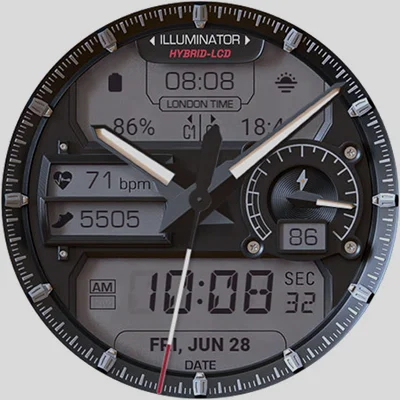
If you’re searching for a watch face that seamlessly blends classic analog aesthetics with modern digital functionality, the ILLUMINATOR Hybrid-LCD might just be your perfect match. This ultra-realistic Wear OS watch face has been making waves in the smartwatch community, and for good reason. With its impressive customization options and stunning visual design, the ILLUMINATOR Hybrid-LCD transforms your wearable into a sophisticated timepiece that rivals traditional luxury watches.
Table of Contents
What Makes ILLUMINATOR Hybrid-LCD Stand Out?
The ILLUMINATOR Hybrid-LCD is more than just another watch face app—it’s a complete aesthetic transformation for your Wear OS device. Designed with meticulous attention to detail, this hybrid-style watch face combines the timeless appeal of analog watch hands with modern LCD displays, creating a unique visual experience that’s both functional and beautiful.
Key Features That Define Excellence
When you explore the capabilities of the ILLUMINATOR Hybrid-LCD, you’ll quickly discover why it has become a favorite among smartwatch enthusiasts:
Design & Aesthetics:
- Ultra-realistic hybrid-LCD watch design
- 9 different day themes to match your style
- 8 distinct night themes for optimal visibility
- 5 customizable hand styles for day mode
- Three color themes for Always On Display (AOD)
- Three AOD hand color options
Functional Elements:
- 4 custom complications for quick information access
- Automatic 12h/24h time format switching
- Heart rate indicator displayed on LCD
- Steps counter with LCD integration
- London time display for international travelers
- Battery level indicator
- AM/PM indicator for 12-hour format
- Always On Display functionality
The attention to detail in the ILLUMINATOR Hybrid-LCD design philosophy is evident in every pixel. Each theme has been crafted to provide optimal readability while maintaining that premium watch aesthetic that makes people do a double-take when they see your wrist.
Deep Dive: Customization Possibilities
One of the standout features of ILLUMINATOR Hybrid-LCD is its exceptional customization capability. Unlike many watch faces that offer limited personalization, this app gives you complete control over your smartwatch’s appearance.
Theme Selection and Day-to-Night Transitions
The nine day themes offer versatility for different occasions—from professional business meetings to casual weekend outings. Each theme maintains the core hybrid-LCD design while offering unique color schemes and visual elements. Whether you prefer a classic black-and-white aesthetic or something more vibrant, there’s a theme that matches your personality.
The eight night themes deserve special mention. These aren’t just darker versions of the day themes; they’re carefully designed alternatives that reduce eye strain in low-light conditions while maintaining readability. The night theme overlay system means you can activate them when needed and seamlessly switch back to your preferred day theme.
Pro Tip: To switch from night back to day mode, access the customization menu and select the first option under “Night Color Themes” to deactivate the overlay.
Complications: Your Information Hub
The ILLUMINATOR Hybrid-LCD features four strategically positioned complications that turn your watch face into an information powerhouse. Understanding how these work is crucial to maximizing your experience.
Upper LCD Complications
The two complications on the upper LCD screen (left and right sides) are your primary customizable information sources. You can configure these to display:
- Weather conditions
- Calendar events
- Fitness statistics
- App shortcuts
- And dozens of other data points
To customize these, simply long-press the watch face, tap “Customize,” and scroll to find the complication settings.
Hidden Lower LCD Shortcuts
The two lower LCD complications are ingeniously designed as hidden shortcuts. Set to shortcut mode by default, these provide quick access to your most-used apps without cluttering the visual design. When you tap these areas, they launch your chosen applications instantly—perfect for accessing your fitness tracker, music player, or messaging apps.
For users who appreciate functional design combined with aesthetics, the ILLUMINATOR Digital Watch face offers a similar philosophy with an even more LCD-focused approach.
Installation and Setup: What You Need to Know
Getting started with ILLUMINATOR Hybrid-LCD is straightforward, though there are a few important details to ensure a smooth installation process:
| Step | Action | Details |
|---|---|---|
| 1 | Purchase | Buy the watch face from Google Play Store |
| 2 | Install Companion App | The phone app facilitates easier installation |
| 3 | Watch Installation | Check your watch for installation prompt |
| 4 | Sync Wait | Allow time for synchronization between devices |
| 5 | Activate | Long-press your current watch face and swipe to find ILLUMINATOR Hybrid-LCD |
Common Installation Considerations
- Double Purchase Prompt: If the watch asks you to purchase again after you’ve already bought it, don’t worry—you won’t be charged twice. This is a synchronization issue that typically resolves itself after a few minutes or a watch restart.
- Finding Your Watch Face: If you can’t immediately see the watch face after installation, tap the “+” sign to add a new watch face and locate it in the list.
- Companion App Function: The phone companion app streamlines the installation process and should be your first stop after purchase.
Performance and Battery Considerations
When evaluating any watch face, battery performance is a critical factor. The ILLUMINATOR Hybrid-LCD has been optimized to balance visual richness with power efficiency. The Always On Display feature uses minimal power thanks to its thoughtful design, with three color themes specifically crafted for AOD mode that reduce battery drain.
Users report that battery performance remains comparable to default watch faces, especially when using the AOD optimized themes. The LCD-style elements are particularly efficient since they use simple geometric shapes rather than complex animations.
For those who prioritize different styles, the MD326 3D Modern Watch Face offers a more dimensional approach, while the Cyberpunk Watch Face delivers a futuristic aesthetic—both excellent alternatives depending on your preference.
User Experience: Real-World Usage Insights
After extensive testing, the ILLUMINATOR Hybrid-LCD proves itself as a daily driver watch face. The readability is exceptional in all lighting conditions, thanks to the thoughtful theme design. The hybrid approach—combining analog hands with LCD displays—provides the best of both worlds: quick time reading at a glance and detailed information when needed.
Practical Benefits
Professional Settings: The sophisticated design works perfectly in business environments. The classic analog appearance gives off a professional vibe, while the complications provide discreet access to important information.
Fitness Activities: Heart rate and step counters are prominently displayed on the LCD screens, making it easy to track your progress during workouts without navigating through multiple screens.
Travel: The London time display is particularly useful for international travelers or those who frequently communicate across time zones. This feature sets ILLUMINATOR Hybrid-LCD apart from many competitors.
Everyday Life: The automatic 12h/24h switching means one less setting to worry about. The watch face adapts to your device’s system settings automatically.
Customization Workflow: Maximizing Your Experience
To truly unlock the potential of ILLUMINATOR Hybrid-LCD, understanding the customization workflow is essential:
- Initial Setup: Start by exploring all nine day themes to find your baseline preference
- Complication Configuration: Set up your four complications based on your daily information needs
- Hand Style Selection: Choose from five hand styles for day mode to match your aesthetic preference
- Night Theme Testing: Experiment with different night themes to find what works best for your evening routine
- AOD Optimization: Select your preferred AOD theme and hand color for when your watch is in standby
Advanced Tip: Create different “modes” by remembering specific theme combinations. For example, Theme 3 with white hands for work, Theme 7 with blue hands for weekends, and a specific night theme for evening activities.
Value Proposition: Is It Worth It?
The ILLUMINATOR Hybrid-LCD represents excellent value for Wear OS users seeking a premium watch face experience. When compared to purchasing an actual luxury watch, this app provides similar aesthetic appeal at a fraction of the cost. The level of customization ensures that your investment continues to feel fresh as you adapt the watch face to different occasions and preferences.
What You’re Getting
- Longevity: Unlike trend-focused watch faces, the classic hybrid design remains timeless
- Versatility: Multiple themes mean you’re essentially getting numerous watch faces in one
- Functionality: Four complications provide serious utility beyond aesthetics
- Regular Updates: The developers maintain active support and improvements
- Professional Support: Direct support channel at [email protected] for any issues
Comparison: ILLUMINATOR Hybrid-LCD vs. Alternatives
While there are countless watch faces available for Wear OS, few offer the balanced approach of ILLUMINATOR Hybrid-LCD. Pure digital watch faces might offer more information density, but they lack the classic appeal. Traditional analog watch faces look elegant but often sacrifice functionality. This hybrid approach strikes the perfect middle ground.
The LCD elements add a nostalgic touch reminiscent of classic digital watches from the 1980s and 1990s, updated with modern smartwatch capabilities. It’s this blend of retro aesthetics and contemporary functionality that makes the watch face special.
Technical Specifications Summary
| Specification | Details |
|---|---|
| Platform | Wear OS |
| Day Themes | 9 options |
| Night Themes | 8 options |
| Complications | 4 customizable positions |
| Hand Styles | 5 variants |
| AOD Support | Yes, with 3 themes |
| Time Format | Auto 12h/24h |
| Special Displays | Heart rate, steps, battery, London time |
Tips for New Users
If you’re just getting started with ILLUMINATOR Hybrid-LCD, here are some insider tips to enhance your experience:
- Start Simple: Begin with one of the neutral themes and gradually experiment with more distinctive options
- Complication Strategy: Place your most-used information in the upper complications where they’re most visible
- Night Mode Timing: If you’re active in low-light environments, pre-set your preferred night theme for quick activation
- AOD Testing: Try each AOD theme for a full day to see which works best with your usage patterns
- Shortcut Power: Take full advantage of the lower LCD shortcuts—they’re incredibly useful for quick app access
The Community Perspective
The WATCHBASE developer community has built a solid reputation for creating high-quality watch faces, and ILLUMINATOR Hybrid-LCD is a prime example of their craftsmanship. By subscribing to their YouTube channel, users gain access to tutorials, updates, and community insights that enhance the overall experience.
The active support and regular updates demonstrate the developers’ commitment to maintaining and improving their products. This isn’t a “release and forget” app—it’s a continually evolving product that responds to user feedback.
Final Verdict: Should You Download ILLUMINATOR Hybrid-LCD?
For Wear OS users who value customization, aesthetic appeal, and functionality, the ILLUMINATOR Hybrid-LCD is an outstanding choice. It successfully bridges the gap between traditional watch design and modern smartwatch capabilities, offering a sophisticated appearance without sacrificing the information access that makes smartwatches valuable.
The extensive theme selection ensures longevity—you’ll find new combinations to enjoy months after your initial purchase. The complication system provides genuine utility, and the Always On Display implementation is among the best you’ll find in third-party watch faces.
Whether you’re dressing for a business meeting, heading to the gym, or simply going about your daily routine, ILLUMINATOR Hybrid-LCD adapts to your needs while maintaining that premium watch aesthetic. It’s a watch face that respects both form and function, delivering a complete package that justifies its place on your wrist.
Bottom Line: If you’re tired of generic watch faces and want something that combines classic elegance with modern functionality, the ILLUMINATOR Hybrid-LCD deserves a spot in your Wear OS collection. It’s not just a watch face—it’s a comprehensive smartwatch experience that elevates your device to new heights.
Frequently Asked Questions About ILLUMINATOR Hybrid-LCD
Q: How do I switch between day and night themes on ILLUMINATOR Hybrid-LCD?
A: To activate night themes, touch and hold your watch face, tap “Customize,” and navigate to the “Night Color Themes” section to select your preferred night mode. When you want to return to day themes, go back to the same customization menu and select the first option under “Night Color Themes” to turn off the night overlay. Remember that night themes overlay day themes when activated, so deactivating them reveals your original day theme selection.
Q: Can I customize all four complications on ILLUMINATOR Hybrid-LCD independently?
A: Yes, all four complications are independently customizable. The two upper LCD complications (left and right) are your primary information displays and can be configured through the standard customization menu. The two lower LCD complications are set to shortcut mode by default and function as hidden app launchers. You can change these to other complication types, though they’ll primarily function as shortcuts regardless of the selected complication type (if supported by that complication).
Q: Does ILLUMINATOR Hybrid-LCD significantly impact battery life on my Wear OS watch?
A: The ILLUMINATOR Hybrid-LCD has been optimized for battery efficiency. Users typically report battery performance comparable to default watch faces, especially when using the dedicated Always On Display themes. The three AOD color themes and hand color options are specifically designed to minimize power consumption during standby mode. The LCD-style elements use simple geometric rendering, which is more efficient than complex animations. For best battery performance, use the AOD-optimized themes and avoid frequently switching between themes throughout the day.
📥 Download ILLUMINATOR Hybrid-LCD APK Latest Version (Premium Unlocked)
Note: This version is safe. You can scan it yourself via VirusTotal.