MD307 Digital Watch Face APK: Customization for Wear OS
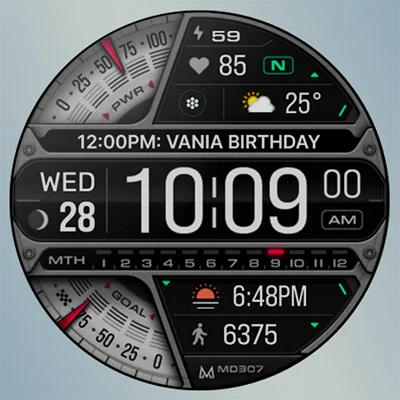
Your smartwatch isn’t just a timepiece—it’s a personal statement, a fitness companion, and an information hub all wrapped around your wrist. The MD307 Digital watch face by Matteo Dini MD transforms your Wear OS device into a sophisticated, highly customizable display that balances aesthetic appeal with functional excellence. Whether you’re rocking a Samsung Galaxy Watch, Pixel Watch, or any Wear OS 4+ device, this premium watch face delivers the perfect blend of style and substance.
In this comprehensive guide, we’ll explore everything the MD307 Digital watch face offers, from its extensive customization options and health tracking features to troubleshooting tips and optimization strategies. By the end, you’ll know exactly how to make this versatile timepiece work perfectly for your lifestyle and preferences.
Table of Contents
Understanding the MD307 Digital Watch Face: More Than Meets the Eye
The MD307 Digital watch face represents a culmination of award-winning design expertise from Matteo Dini MD, a recognized top seller and celebrated designer who earned accolades at SDC USA for best developer achievements. This isn’t just another watch face—it’s a carefully crafted digital experience designed to provide maximum information density without sacrificing readability or aesthetics.
What Makes MD307 Stand Out?
At its core, this digital timepiece offers a modern, clean interface packed with practical features that serious smartwatch users demand. The design philosophy centers on delivering critical information at a glance while maintaining visual harmony and customization flexibility that lets each user create a truly personal experience.
Key Specifications at a Glance:
| Feature | Details |
|---|---|
| Compatibility | Wear OS 4+ (API Level 33+) |
| Supported Devices | Samsung Galaxy Watch 4-8, Ultra, Pixel Watch, and more |
| Price | $1.99 (one-time purchase) |
| Rating | 4.5/5 stars with 12K+ reviews |
| Downloads | 100K+ installations |
| Developer | Matteo Dini MD ® Watch Faces |
| Last Updated | 2025 (actively maintained) |
Core Features That Define the Experience
The MD307 packs an impressive array of features into its digital interface:
Time & Date Display
- 12/24-hour format: Switch between time formats based on regional preference or personal style
- Date information: Always know what day it is with prominent date display
- Day of the week: Clear indication of the current weekday
Health & Fitness Tracking
- Heart rate monitoring: Real-time heart rate display with interval tracking
- Heart rate zones: Visual indicators showing L (Low), N (Normal), or H (High) levels
- Step counter: Track your daily movement with accurate step counting
- Daily step goals: Set and monitor progress toward your 8,500 steps/day target (customizable)
- Goal gauges: Visual fuel-style bars showing completion percentage
Environmental Data
- Moon phase display: Track lunar cycles with elegant graphical representation
- Battery indicator: Never be caught off-guard with clear battery level display
- Three customizable complications: Weather, barometer, sunrise/sunset, time zones, and more
Quick Access Shortcuts
- Three preset shortcuts: Calendar, Battery stats, Manual HR measurement
- One customizable shortcut: Assign your most-used app for instant access
Visual Customization
- Comprehensive color control: Customize time, date, day, seconds, foreground, bars, gauges, and general colors
- Always-On Display (AOD): Minimal, battery-efficient design with customizable colors
- Multiple color themes: Create different looks for different occasions
Similar to other popular options like the MD339 Digital watch face and MD327 Digital Watch Face, the MD307 provides extensive personalization while maintaining excellent readability and performance.
Installation and Initial Setup: Getting Started Right
Getting the MD307 up and running on your smartwatch is straightforward, but following best practices ensures optimal performance from the start.
Step-by-Step Installation Guide
1. Purchase and Download Visit the Google Play Store page for MD307 Digital watch face on your paired smartphone. Purchase the app for $1.99 and download it to your device.
2. Sync to Your Watch The watch face should automatically sync to your Wear OS device within minutes. If it doesn’t appear:
- Ensure your watch and phone are connected via Bluetooth
- Connect both devices to the same Wi-Fi network
- Open the Wear OS app on your phone and manually trigger sync
- Restart both devices if synchronization stalls
3. Apply the Watch Face On your smartwatch:
- Long press the current watch face
- Swipe through available faces until you find MD307
- Tap to select and apply it
4. Begin Customization Immediately after applying, you can start personalizing:
- Long press on the watch face again
- Select “Customize” option
- Begin modifying colors, complications, and settings
Important Note for Galaxy Watch Users
Samsung Galaxy Watch owners should be aware of a known limitation: The watch face editor in the Samsung Wearable app frequently fails to load complex watch faces like MD307. This isn’t a flaw in the watch face itself but rather a Samsung app limitation.
Workaround: Always customize directly on your watch by tapping and holding the screen, then selecting “Customize.” This method provides reliable access to all customization options without the Samsung app’s interference.
Mastering Customization: Creating Your Perfect Look
The true power of the MD307 lies in its extensive customization capabilities. Let’s explore how to make this watch face uniquely yours.
Color Customization Strategy
The MD307 allows independent color control for virtually every element, giving you unprecedented design freedom:
Primary Elements
- Time digits: Your most prominent visual element—choose high-contrast colors for readability
- Date display: Coordinate with or contrast against the time color
- Day of week: Add subtle variation or match your overall color scheme
Accent Elements
- Seconds indicator: Create visual interest with a complementary color
- Foreground elements: Icons, symbols, and graphical elements
- Progress bars: Steps and battery gauges can have distinct colors
Background & Structural Elements
- General colors: Overall theme and background tones
- Bar colors: Structural elements and dividers
- Goal gauge colors: Visual representation of fitness progress
Best Practices for Color Selection
High Contrast for Readability Choose color combinations that ensure excellent legibility in various lighting conditions. White or bright cyan time digits on dark backgrounds work exceptionally well for most users.
Mood-Based Themes Create different color profiles for different contexts:
- Professional/Work: Conservative blues, grays, whites
- Athletic/Active: Energetic oranges, reds, bright greens
- Evening/Relaxation: Warm ambers, golds, muted tones
- Tech/Futuristic: Cyans, magentas, neon accents
Seasonal Variations Adjust your watch face to reflect seasonal aesthetics:
- Spring: Fresh greens and pastels
- Summer: Vibrant yellows and sky blues
- Autumn: Rich oranges, browns, and burgundy
- Winter: Cool blues, silvers, and white
Configuring Complications for Maximum Utility
The three customizable complication slots represent prime real estate for information you check frequently. Strategic configuration maximizes the MD307’s utility.
Complication Options Include:
- Weather data: Temperature, conditions, forecast
- Secondary time zones: Perfect for remote workers or frequent travelers
- Sunrise/sunset times: Helpful for photographers and outdoor enthusiasts
- Barometric pressure: Useful for weather prediction and altitude tracking
- Calendar events: Upcoming appointments at a glance
- Activity tracking: Calories, distance, active minutes
- Custom app data: Integration with third-party fitness and productivity apps
Recommended Complication Setups:
Fitness-Focused Configuration
- Current weather (plan outdoor workouts)
- Calories burned (track energy expenditure)
- Active minutes (monitor daily activity goals)
Professional/Productivity Setup
- Next calendar event (never miss meetings)
- Weather forecast (plan your commute)
- Secondary time zone (coordinate with remote teams)
Travel Configuration
- Home time zone
- Local weather
- Sunrise/sunset (adjust to new schedules)
Just as MD326 3D Modern Watch Face offers complication flexibility, the MD307 lets you tailor information display to your specific needs.
Health Tracking Features: Your Fitness Companion
The MD307 isn’t just about telling time—it’s a comprehensive health monitoring tool that integrates seamlessly with your Wear OS device’s sensors.
Heart Rate Monitoring Deep Dive
Manual Measurement The preset “Measure HR” shortcut provides instant access to manual heart rate readings. Simply tap the icon, wait for the sensor to capture your pulse, and view real-time results.
Automatic Monitoring After the initial manual measurement, MD307 can automatically track your heart rate every 10 minutes throughout the day, building a comprehensive cardiovascular profile without constant user intervention.
Heart Rate Zones Explained The watch face displays your current heart rate zone using simple letter indicators:
- L (Low): Below your typical resting heart rate—may indicate excellent cardiovascular fitness or insufficient activity
- N (Normal): Within healthy resting range—ideal for daily activities
- H (High): Elevated heart rate—indicates exercise, stress, or potential health concerns requiring attention
Interval Tracking The interval feature monitors heart rate fluctuations throughout the day, helping identify patterns related to activity, stress, rest, and recovery.
Step Tracking and Daily Goals
Default Configuration The MD307 comes preset with an 8,500 steps per day goal, slightly above the commonly recommended 8,000-10,000 range. This target provides a realistic yet challenging benchmark for most users.
Visual Progress Indicators The step counter integrates with visual fuel-gauge bars that fill as you progress toward your daily goal. This gamification element provides psychological motivation to complete your target.
Customization Options While 8,500 steps is the default, users can adjust goals based on personal fitness levels, health conditions, or specific training objectives. More sedentary individuals might start with 5,000 steps, while active users might target 12,000-15,000.
Syncing with Health Apps Recent updates have improved integration with Google Health and other fitness platforms, ensuring your MD307 step counts align with other health tracking systems you use.
Optimizing Always-On Display: Battery vs. Visibility
The Always-On Display (AOD) feature keeps critical information visible even when your watch enters low-power mode. However, balancing information visibility with battery conservation requires thoughtful configuration.
AOD Design Philosophy
The MD307’s AOD utilizes a minimal style that significantly reduces power consumption while maintaining essential information visibility:
- Time remains clearly visible
- Date information persists
- Battery and step indicators may appear in simplified form
- Seconds counter typically disappears to save power
- Customizable colors allow brightness adjustment
Common AOD Challenges and Solutions
Issue: AOD Too Bright at Night Many users report that even at minimum brightness, the AOD can be uncomfortably bright in dark environments, disturbing sleep or partners.
Solutions:
- Use darker color schemes: Black or very dark gray backgrounds minimize light emission
- Reduce foreground colors: Opt for dim reds or low-intensity colors rather than bright whites
- Consider a bedtime watch face: Switch to an ultra-minimal face specifically for sleeping
- Use theater mode: Enable theater mode during sleep to completely disable display
- Adjust Wear OS brightness: Reduce system-wide brightness in addition to watch face settings
Issue: AOD Looks Too Similar to Active Display Some users note that both AOD options appear nearly identical, with only minor differences like hiding seconds or day.
Developer Response: This represents a current limitation. Users seeking more dramatic AOD variations might explore companion watch faces like MD242 Hybrid watch face or MD241 Digital watch face, which offer alternative AOD designs.
Battery Impact Considerations
Factors Affecting Battery Life:
- Color choices: Bright whites and saturated colors consume more power than dark tones
- AOD brightness: Higher brightness settings significantly increase battery drain
- Complication refresh rates: Weather and calendar complications that update frequently use more power
- Heart rate monitoring frequency: Automatic 10-minute intervals moderately impact battery
- OLED optimization: Black pixels on OLED displays consume virtually no power—use black backgrounds for maximum efficiency
Optimization Tips:
- Use predominantly black backgrounds with minimal colored accents
- Disable AOD during extended periods when you won’t check the time
- Reduce heart rate monitoring frequency if battery life is paramount
- Select complications with less frequent update requirements
- Keep watch face updated—developers continuously improve efficiency
Troubleshooting Common Issues: Solutions and Workarounds
Even well-designed watch faces occasionally present challenges. Here’s how to resolve the most commonly reported MD307 issues.
Customization and Configuration Problems
Problem: Companion App Won’t Load or Crashes Multiple users report the companion app on their phones crashes or fails to respond when attempting customization.
Solutions:
- Bypass the companion app entirely: Customize directly on the watch (long press face → customize)
- Update the Wear OS app: Ensure you’re running the latest version
- Clear Wear OS app cache: Settings → Apps → Wear OS → Clear Cache
- Reinstall companion app: Uninstall and reinstall from your phone
- Use the Samsung workaround: For Galaxy Watch users, always customize on-device
Problem: Settings Don’t Save or Revert Changes made through customization sometimes fail to persist after exiting.
Solutions:
- Make changes slowly, allowing each to fully apply before proceeding
- Exit customization mode properly rather than pressing back/home buttons
- Restart watch after major customization sessions to ensure changes stick
- Ensure watch has adequate battery (low power can cause sync issues)
Data Display Issues
Problem: Step Counter Shows Incorrect Data or Freezes The step counter occasionally displays wrong numbers or stops updating.
Solutions:
- Force restart the watch: Simultaneously press both buttons until device restarts
- Resync with phone: Disconnect and reconnect Bluetooth pairing
- Clear watch face data: Uninstall and reinstall MD307
- Check sensor permissions: Ensure MD307 has all necessary permissions granted
- Update to latest version: Developers frequently fix data tracking bugs
Problem: Calendar Events Don’t Update Users with Outlook or other calendar apps report events fail to sync to complications.
Solutions:
- Verify calendar app is installed and updated on watch
- Grant MD307 calendar permissions explicitly
- Use Google Calendar as default (better Wear OS integration)
- Select “Next Event” complication rather than app-specific calendar complications
- Manually refresh complications by exiting and reopening watch face
Performance and Stability Concerns
Problem: Watch Face Lags or Stutters Some users experience reduced responsiveness or choppy animations.
Solutions:
- Reduce active complications: Fewer data sources = better performance
- Disable automatic heart rate monitoring: Manual-only measurement reduces processor load
- Clear watch cache: Settings → Apps → MD307 → Clear Cache
- Restart watch regularly: Weekly restarts prevent memory accumulation
- Check for OS updates: Wear OS improvements often enhance performance
Comparing MD307 with Alternative Watch Faces
Understanding how MD307 stacks up against alternatives helps determine if it’s the right choice for your needs.
Feature Comparison Table
| Feature | MD307 Digital | MD326 3D Modern | MD339 Digital | MD241 Digital | MD242 Hybrid |
|---|---|---|---|---|---|
| Display Style | Pure digital | 3D digital | Pure digital | Pure digital | Analog + Digital |
| Complications | 3 customizable | 3 customizable | 3 customizable | 3 customizable | 2 customizable |
| App Shortcuts | 4 total (3 preset + 1 custom) | 4 total | 4 total | 4 total | 7 total |
| Heart Rate Zones | ✓ Yes | ✓ Yes | ✓ Yes | ✓ Yes | ✓ Yes |
| Moon Phase | ✓ Yes | ✓ Yes | ✓ Yes | ✓ Yes | ✓ Yes |
| Price | $1.99 | $1.99 | $1.99 | $1.99 | $1.99 |
| Best For | Balanced info display | Modern aesthetics | Maximum data density | Simplicity | Analog lovers with data needs |
When to Choose MD307
MD307 Excels For:
- Users who prefer pure digital time display over analog hands
- Those who want balanced information density without overwhelming complexity
- People who value quick app shortcuts alongside complications
- Users seeking excellent customization without excessive options
- Anyone wanting proven reliability with 100K+ downloads and strong reviews
Consider Alternatives If:
- You prefer analog hands with digital accents (try MD242 Hybrid)
- You want more dramatic visual effects (explore MD326 3D Modern)
- You need more than three complications (some faces offer four or five)
- You want specialized designs (sports-focused, minimalist, etc.)
Advanced Tips for Power Users
Take your MD307 experience to the next level with these expert optimization strategies.
Creating Contextual Profiles
While MD307 doesn’t support multiple saved profiles, you can manually create different configurations for different contexts and switch between them as needed.
Work Profile
- Conservative blue or gray color scheme
- Calendar event complication
- Weather for commute planning
- Minimized fitness data (professional appearance)
Workout Profile
- High-visibility color scheme (bright yellows, oranges)
- Heart rate prominently displayed
- Calorie and active minute complications
- Simplified time display (fewer distractions)
Evening/Casual Profile
- Warm, relaxed colors (ambers, soft greens)
- Minimal complication data
- Enhanced moon phase visibility
- Dimmed brightness settings
Document Your Configurations Take screenshots of each color scheme’s settings, making it easier to recreate your favorite looks after changes.
Maximizing Complication Value
Strategic Data Selection Choose complications based on when you actually need that information. If you never check barometric pressure, don’t waste a slot on it.
Rotation Strategy Change complications based on seasonal needs:
- Summer: UV index, pollen count, hydration tracking
- Winter: Sunset time, indoor temperature, cold weather alerts
- Travel periods: Multiple time zones, flight tracking, local weather
Third-Party App Integration Explore Wear OS apps that provide rich complication data:
- Fitness apps (Strava, MyFitnessPal)
- Weather services (AccuWeather, Weather Underground)
- Productivity tools (Todoist, Microsoft To Do)
- Finance trackers (coin prices, stock tickers)
Keyboard Shortcut Optimization
The customizable shortcut represents valuable functionality. Choose wisely based on your most frequent actions:
Popular Shortcut Choices:
- Google Fit/Samsung Health: Quick access to detailed fitness data
- Music player: Control playback without navigating menus
- Messages: Respond to texts immediately
- Voice assistant: Activate Google Assistant for hands-free control
- Stopwatch/Timer: Essential for workouts and cooking
The Developer’s Vision: Matteo Dini MD’s Design Philosophy
Understanding the creator’s approach helps appreciate the MD307’s thoughtful design choices.
Award-Winning Pedigree
Matteo Dini MD has established himself as a premier Wear OS watch face designer, earning recognition including:
- SDC USA Best Developer award: Industry acknowledgment of excellence
- Top Seller status: Consistent commercial success across multiple designs
- Premium Design reputation: Known for quality over quantity
- Registered Trademark: Official recognition of the MD brand
Design Principles
Information Density vs. Clarity The MD307 represents careful balance—providing substantial data without creating visual chaos. Each element serves a purpose and occupies intentionally allocated space.
Customization Philosophy Rather than offering endless options that overwhelm users, MD307 provides meaningful customization points that significantly impact appearance and functionality without complexity paralysis.
Cross-Device Compatibility The face is engineered for consistent performance across diverse Wear OS hardware, from Samsung’s Tizen-based watches to Pixel devices, ensuring reliable functionality regardless of your specific smartwatch model.
Active Development and Support
The Matteo Dini team maintains active development with regular updates addressing:
- Bug fixes and performance improvements
- Compatibility with new Wear OS versions
- Integration with evolving health tracking APIs
- User-requested feature implementations
- Security and privacy enhancements
Users can stay connected through multiple channels:
- Newsletter: Regular updates on new faces and promotions
- Facebook: Community engagement and support
- Instagram: Visual showcases and design inspiration
- Telegram: Direct communication with developers
- Official website: Comprehensive resources and documentation
Privacy and Data Security Considerations
As with any app that collects health and usage data, understanding privacy implications is essential.
What Data Does MD307 Collect?
Health Metrics
- Heart rate measurements and intervals
- Step counts and activity data
- Daily goal progress
Usage Information
- Customization preferences
- Complication configurations
- Shortcut selections
Technical Data
- Device model and OS version
- Performance metrics and crash reports
- Installation and update information
Data Protection Practices
Local Processing Most MD307 functionality operates locally on your watch, meaning sensitive health data doesn’t leave your device unless you explicitly sync it with cloud services.
Third-Party Integration When using complications from other apps (weather services, calendar apps), those services’ privacy policies apply to data they collect and process.
Best Privacy Practices
- Review permissions granted to MD307 in Wear OS settings
- Understand which complications share data with external services
- Regularly review connected accounts and app permissions
- Keep watch face updated for latest security patches
- Use strong authentication on your Google account
Future Developments and Community Feedback
The MD307 continues evolving based on user feedback and technological advancement.
Requested Features from the Community
Enhanced AOD Customization Users consistently request more dramatic differences between active and always-on displays, with options for simplified ultra-minimal AOD designs.
Profile Saving The ability to save and quickly switch between complete customization profiles would dramatically improve user experience for those who modify appearances based on context.
Interactive Goal Gauges Community members have suggested making the goal fuel gauge function as a shortcut to fitness apps, providing one-tap access to detailed statistics.
Improved Calendar Integration Better syncing with Outlook and other third-party calendar apps remains a frequently requested enhancement.
What’s Coming Next
While specific roadmap details aren’t public, the developer’s pattern suggests:
- Continued compatibility updates for new Wear OS releases
- Incremental feature additions based on user feedback
- Performance optimizations for newer watch models
- Enhanced integration with Google Health ecosystem
- Potential new complications as Wear OS APIs expand
Frequently Asked Questions About MD307 Digital Watch Face
Is MD307 compatible with my smartwatch?
The MD307 Digital watch face works with all Wear OS devices running API Level 33 or higher, which corresponds to Wear OS 4 and later versions. This includes Samsung Galaxy Watch 4, 5, 6, 7, and 8 series, Galaxy Watch Ultra, Google Pixel Watch (all generations), and other Wear OS 4+ compatible devices from various manufacturers. If your watch runs an older version of Wear OS or uses a different operating system (like Fitbit OS or Apple WatchOS), it won’t be compatible.
Why can’t I customize the watch face through the phone app?
This is a known limitation, particularly affecting Samsung Galaxy Watch users. The watch face editor in the Samsung Wearable companion app frequently fails to load complex watch faces like MD307 due to Samsung app limitations rather than issues with the watch face itself. The reliable workaround is simple: customize directly on your watch by long-pressing the watch face and selecting “Customize.” This method provides full access to all customization options and works consistently across all compatible devices.
How do I make the Always-On Display dimmer at night?
If the AOD remains too bright even at minimum brightness settings, try these solutions: First, choose darker color schemes with black or very dark gray backgrounds and dim foreground colors like dark red instead of bright white. Second, adjust your Wear OS system brightness to the lowest comfortable level. Third, consider enabling Theater Mode during sleep hours to completely disable the display. Finally, you might switch to a simpler watch face specifically designed for nighttime use if brightness remains problematic.
What does the “N” or “L” next to my heart rate mean?
These letters indicate your current heart rate zone: “L” means Low (below your typical resting heart rate), “N” means Normal (within healthy resting range), and “H” means High (elevated heart rate from exercise, stress, or other factors). The watch face analyzes your heart rate against established healthy ranges to provide this quick visual reference, helping you understand your cardiovascular state at a glance without needing to interpret raw BPM numbers.
Will this watch face significantly drain my battery?
The MD307 is optimized for battery efficiency, but actual impact depends on your configuration choices. Using predominantly black backgrounds (which consume virtually no power on OLED displays), reducing AOD brightness, selecting complications with less frequent updates, and using manual heart rate measurements instead of automatic 10-minute intervals will all maximize battery life. Most users report the watch face has minimal impact compared to other features like GPS tracking or continuous workout monitoring.
Conclusion: Is MD307 Digital Watch Face Right for You?
The MD307 Digital watch face represents an excellent balance of form and function, delivering professional aesthetics with practical utility. Its extensive customization options let you create a truly personal timepiece, while robust health tracking features and strategic complications keep essential information readily accessible.
For $1.99, you’re getting an award-winning design from a respected developer with proven track record, 100,000+ satisfied users, and active ongoing support. The learning curve is minimal, customization is straightforward (once you know to do it on-device), and the visual results are consistently impressive.
Whether you’re a fitness enthusiast monitoring health metrics, a professional maintaining a polished appearance, or simply someone who appreciates well-designed digital experiences, the MD307 delivers compelling value that justifies its modest price.
Ready to transform your smartwatch into a personalized information hub? Head to the Google Play Store, grab the MD307 Digital watch face, and start creating your perfect wrist companion today.
📥 Download MD307 Digital watch face APK Latest Version (Premium Unlocked)
Note: This version is safe. You can scan it yourself via VirusTotal.