Network Cell Info & Wifi APK: Real-Time Signal & Speed Monitoring
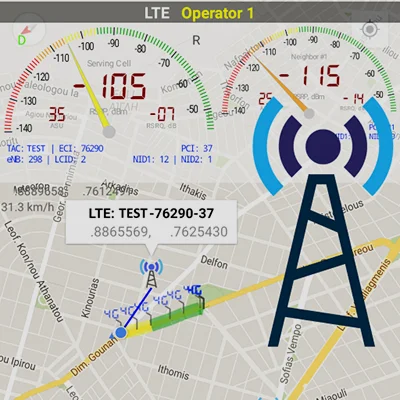
Have you ever wondered why your mobile connection drops in certain areas, or which cellular tower you’re connected to right now? Understanding your network signal strength isn’t just for tech enthusiasts anymore—it’s essential for anyone who relies on consistent mobile connectivity for work, emergencies, or everyday communication. Network Cell Info & Wifi transforms your Android device into a powerful diagnostic tool that provides real-time monitoring of cellular and WiFi signals, comprehensive network analysis, and actionable insights to optimize your connectivity. Developed by M2Catalyst, LLC., this extensive mobile network monitoring application supports everything from 5G and LTE to older technologies like GSM and CDMA, making it the ultimate companion for troubleshooting reception issues and maximizing your connection performance.
Table of Contents
Whether you’re a network engineer diagnosing coverage problems, a frequent traveler seeking reliable connections, or simply someone frustrated with dropped calls and slow data speeds, Network Cell Info & Wifi delivers the detailed information you need to understand and improve your mobile experience.
What Makes Network Cell Info & Wifi Essential?
Network Cell Info & Wifi is far more than a simple signal meter—it’s a comprehensive network diagnostics suite that provides almost real-time monitoring (updating every second) of cellular carrier and WiFi signals. This powerful application gives users unprecedented visibility into their mobile connectivity, revealing the technical details that determine whether you’ll enjoy seamless 5G streaming or suffer through frustrating connection drops.
Core Capabilities at a Glance
The paid version of this network monitoring tool stands out with its professional-grade features designed for both casual users and technical professionals:
| Feature Category | Capability | User Benefit |
|---|---|---|
| Real-Time Monitoring | 1-second update intervals in Gauge/Raw tabs | Instant visibility into signal changes |
| Network Support | 5G, LTE+, LTE, IWLAN, UMTS, GSM, CDMA | Works with all cellular technologies |
| Speed Testing | One-tap WiFi/mobile internet performance tests | Measure download, upload, ping, jitter |
| Dual-SIM Support | Monitor both SIM cards simultaneously | Perfect for international travelers |
| Signal Gauges | 5-6 signal-meter gauges for SIMs and WiFi | Visual representation of connection quality |
| Map Integration | Network cellular info with signal-meter overlays | Geographic visualization of coverage |
| History Tracking | Signal strength logs and measurements | Identify patterns and problem areas |
For users seeking comprehensive network analysis, apps like Network Analyzer Pro provide complementary diagnostic capabilities that can enhance your understanding of network performance and connectivity issues.
Understanding the Three Versions: Lite, Paid, and Pro
Network Cell Info & Wifi is available in three distinct versions, each tailored to different user needs and budgets. Understanding these differences helps you choose the right version for your requirements.
Network Cell Info Lite (Free)
The Lite version serves as an excellent introduction to network monitoring, offering core functionality with some limitations:
Included Features:
- 2-3 signal-meter gauges for both SIMs and WiFi
- Signal plots for up to 2 cells
- Basic map functionality with network info
- History logs and measurements
- Bad signal reporting via Readings Tab
- Personal Best Signal Finder
- Connection statistics (2G/3G/4G/5G)
- SIM and device information
Limitations:
- Advertisement-supported (can be intrusive according to some users)
- Fewer simultaneous gauges compared to paid versions
- Limited to 2 cell signal plots instead of 6
The Lite version has been downloaded over 10 million times, demonstrating its popularity as a reliable free option for basic network monitoring needs.
Network Cell Info (Paid Version – $1.99)
Available on Google Play for a one-time $1.99 purchase, the paid version eliminates advertisements and unlocks enhanced capabilities:
Enhanced Features:
- Ad-free experience for uninterrupted monitoring
- 5-6 signal-meter gauges for comprehensive visibility
- Signal plots for up to 6 cells simultaneously
- All Lite features without interruptions
- Priority support from developers
User testimonials consistently praise the paid version, with one professional noting: “I have probably downloaded 10 different apps and tested them. This app, by far, sets the bar so high the other ones fall short of what this one does. If this app doesn’t show you what you need, you won’t find it anywhere. I give this app an A++++. I have worked in the cell tower industry for AT&T.”
Network Cell Info Pro (Subscription)
The Pro subscription offers the ultimate feature set for professional users and network enthusiasts who need maximum functionality and data export capabilities. While specific pricing varies, it provides additional advanced features beyond the standard paid version.
For users interested in other premium network utilities, TeamViewer Remote Control offers complementary remote access capabilities that can enhance troubleshooting efforts when combined with detailed network information.
Comprehensive Feature Breakdown
The depth of functionality in Network Cell Info & Wifi truly sets it apart from basic signal meter apps. Let’s explore the key features that make this tool indispensable for network monitoring.
Real-Time Signal Monitoring
The app provides almost real-time monitoring with 1-second update intervals in both Gauge and Raw tabs, allowing users to observe signal fluctuations as they happen. This immediate feedback is invaluable when:
- Walking through buildings to find the strongest signal zones
- Troubleshooting connectivity issues by correlating signal drops with physical locations
- Optimizing router placement for home WiFi networks
- Testing different carrier performance in your frequent locations
The visual gauges display signal strength in an intuitive format, showing metrics like:
- RSSI (Received Signal Strength Indicator) in dBm
- RSRP (Reference Signal Received Power) for LTE/5G
- RSRQ (Reference Signal Received Quality) indicating signal quality
- SNR (Signal-to-Noise Ratio) revealing interference levels
- Band number showing which frequency band you’re connected to
One-Tap Speed Testing
Unlike standalone speed test apps, Network Cell Info & Wifi integrates comprehensive performance testing directly into the monitoring interface. With a single tap, you can measure:
WiFi Performance:
- Download speeds in Mbps
- Upload speeds in Mbps
- Ping latency in milliseconds
- Jitter (connection stability)
Mobile Internet Performance:
- 5G/LTE/4G/3G speed testing
- Comparison across different carriers (if using dual-SIM)
- Historical speed data to track performance trends
- Network quality metrics
This integrated approach means you don’t need separate apps cluttering your device—everything you need for network diagnostics lives in one powerful tool.
Map Visualization and Tower Location
One of the most powerful features is the integrated map functionality showing network cellular information overlaid with signal-meter gauges. The map displays:
Cell Location Indicators: The app shows cell locations (not carrier cell towers themselves) using data from Mozilla Location Service (MLS), excluding CDMA networks. While this doesn’t pinpoint exact tower positions, it provides valuable information about the general direction and proximity of cellular sites serving your area.
Personal Best Signal Finder: This feature creates a map layer showing your signal strength history by location, helping you identify:
- Dead zones in your regular routes
- Optimal locations for important calls or data transfers
- Areas where specific carriers perform best
- Signal trends over time and geographic areas
Crowdsourced Best Signal Finder: The crowdsourced component shows your carrier’s nearest best signals based on data from other users who’ve consented to share their measurements. This community-driven approach helps everyone find better connectivity by leveraging collective experience.
Route Coloring: When viewing your movement history, the map colors your route according to signal strength, making it easy to visualize coverage quality along your travels. Map markers provide specific location and signal information for detailed analysis.
For those who appreciate map-based navigation and location features, Waze Navigation & Live Traffic demonstrates how GPS and mapping technologies enhance mobile experiences—principles that apply equally to network signal mapping.
Signal History and Analytics
Network Cell Info & Wifi doesn’t just show you current signal strength—it maintains comprehensive history logs that reveal patterns and trends over time:
History Logs:
- Measurements of cellular signals recorded during map usage
- Timestamp data for all readings
- Location information (GPS coordinates)
- Signal strength values across all monitored parameters
- Connection type changes (2G/3G/4G/5G transitions)
Personal Best Signal Finder History: This feature graphs your signal strength over time, allowing you to:
- Identify optimal times for data-intensive activities
- Recognize recurring connectivity issues
- Compare different locations’ performance
- Track improvements after network upgrades
Database Export: Professional users and analysts can export measurement data in multiple formats including KML 2.2, MLS Geosubmit v.2, CLF v.3, OpenCellID csv, and CMWF database types. This export capability enables:
- Third-party analysis using specialized tools
- Documentation for carrier complaints or technical support
- Research and academic studies
- Integration with other network planning software
Bad Signal Reporting: Contributing to Better Networks
One of Network Cell Info & Wifi’s most innovative features is its crowdsourced bad signal reporting system. Here’s how it works and why it matters:
Automatic Bad Signal Detection: The app collects bad signal data (either no signal or fringe coverage) from users who’ve consented to such collection. This information is compiled into comprehensive Bad Signal Reports that M2Catalyst makes available for FREE to every Mobile Network Operator (MNO) worldwide.
Why This Matters: Imagine if every frustrating connectivity experience you’ve had was automatically reported to your carrier. Network operators could use this real-world data to:
- Identify coverage gaps requiring new towers or equipment
- Prioritize network improvement projects
- Optimize existing infrastructure for better performance
- Respond to actual customer experience rather than theoretical coverage models
The Readings Tab: This dedicated tab reports the number of bad signals detected, giving you insight into how frequently you experience subpar connectivity and contributing to collective network improvement efforts.
Users appreciate that this feature operates transparently with consent, ensuring privacy while contributing to better mobile networks for everyone. As one user perspective notes, “Wouldn’t it be terrific if every bad mobile signal you encountered was automatically reported to your mobile network operator? How much better would our mobile networks be if the operators had access to this information and then acted upon it?”
Advanced Technical Features
Beyond the user-friendly interface, Network Cell Info & Wifi provides deep technical information that professionals and enthusiasts appreciate:
Dual-SIM Support and Management
For devices with dual-SIM capability, the app offers comprehensive monitoring of both SIM cards simultaneously:
- Independent signal gauges for SIM 1 and SIM 2
- SIM# preference option for tabs other than Gauge
- Comparative analysis showing which carrier/SIM performs better in different locations
- Connection statistics for each SIM independently
This functionality is particularly valuable for:
- International travelers using local SIM cards alongside their home carrier
- Business users separating work and personal lines
- Network comparison when considering switching carriers
- Optimization of which SIM to use for data versus voice
Raw Network Information Display
The Raw tab provides unfiltered access to carrier network cellular information, displaying technical parameters that most consumer apps hide:
Detailed Metrics Include:
- Cell ID and tracking area code
- Physical cell ID (PCI)
- EARFCN (E-UTRA Absolute Radio Frequency Channel Number)
- Band information (Band 2, Band 4, Band 12, etc.)
- Bandwidth allocation
- Timing advance
- Registered network operator details
- Neighboring cell information
This raw data is invaluable for:
- Network engineers troubleshooting specific technical issues
- RF optimization specialists analyzing network performance
- Tech enthusiasts understanding the intricacies of cellular technology
- Coverage verification confirming which specific cell sites serve an area
Connection Statistics and Network Type Tracking
The app maintains detailed statistics showing the proportion of time spent on different network technologies:
- 5G connection percentage and duration
- 4G/LTE usage statistics
- 3G fallback occurrences
- 2G connection frequency (indicating coverage gaps)
- WiFi connection time when available
These statistics help identify whether your device frequently falls back to slower networks, suggesting coverage issues or device compatibility problems with newer technologies.
Status Bar Network Information
For at-a-glance monitoring without opening the app, Network Cell Info & Wifi can display network information directly in your device’s status bar, showing current signal strength and connection type without requiring constant app access.
For users who appreciate system-level monitoring and customization, MacroDroid offers automation capabilities that can trigger actions based on network conditions—complementing the monitoring provided by Network Cell Info & Wifi.
Real-World Use Cases and Applications
Understanding how different users leverage Network Cell Info & Wifi helps illustrate its practical value beyond technical specifications:
For Homeowners and Renters
Finding Optimal Router Placement: Use the WiFi signal monitoring to identify the best location for your wireless router, ensuring maximum coverage throughout your home. The real-time gauges show how walls, furniture, and distance affect signal strength.
Troubleshooting Dead Zones: Map your home’s WiFi and cellular coverage to identify areas with poor connectivity. This information helps when deciding where to place WiFi extenders or whether to switch cellular carriers.
Verifying Carrier Claims: Carriers advertise extensive coverage, but Network Cell Info & Wifi lets you verify actual performance in your specific location before committing to a contract or purchasing a device.
For Professionals and Remote Workers
Ensuring Reliable Work-From-Home Connectivity: Monitor both WiFi and cellular backup connections to ensure you maintain reliable internet access for video conferences, VoIP calls, and cloud application access.
Optimizing Field Work Locations: Sales professionals, real estate agents, and field service technicians can use the map features to identify locations with strong connectivity before important client calls or data uploads.
Documentation for IT Support: When experiencing connectivity issues, the detailed metrics and export capabilities provide concrete data to share with IT support teams or internet service providers.
For Travelers and Mobile Professionals
Comparing International Carriers: When traveling abroad, use dual-SIM monitoring to compare performance between your home carrier (roaming) and local SIM cards, making informed decisions about which to use for different activities.
Finding Reliable Connectivity in New Areas: The crowdsourced Best Signal Finder helps identify areas with strong connectivity when arriving in unfamiliar locations, whether you’re working from a coffee shop or staying in a hotel.
Avoiding Roaming Surprises: Monitor which network you’re actually connected to, preventing unexpected roaming charges by ensuring you’re on the correct carrier when near borders or in areas with overlapping coverage.
For Technical Professionals and Enthusiasts
Network Engineering and Troubleshooting: RF engineers and network technicians use the detailed technical data for coverage analysis, interference identification, and optimization projects.
Cell Tower Industry Professionals: As one AT&T industry professional noted, the app sets the bar high for network monitoring, providing the comprehensive data needed for tower site analysis and coverage verification.
Education and Learning: Students studying telecommunications, networking, or RF engineering benefit from visualizing concepts like signal propagation, frequency bands, and network handovers in real-world scenarios.
User Experience: The Good, The Bad, and The Technical
Understanding real user experiences provides valuable insight into Network Cell Info & Wifi’s strengths and limitations:
Positive User Feedback
Users consistently praise several aspects of the application:
Accuracy and Reliability: “Easy to use, nice big signal strength displays. The only addition I would ask for is showing the frequencies of each cell in addition to the band number.”
Comprehensive Information: “That is a real network signal checker. Love this super amazing class app to measure network cell parameters, Wi-Fi and system information.”
Long-Term Satisfaction: Multiple users report using the app for 7-10 years, with one noting: “This cell app has been a valuable tool for the last 10 years for me.”
Professional Endorsement: The AT&T cell tower industry professional’s A++++ rating and detailed comparison testing validates the app’s technical accuracy and professional utility.
Common Concerns and Limitations
Being informed about potential issues helps set appropriate expectations:
Recent Version Issues: Some long-time users report that recent updates have introduced problems not present in earlier versions. One user who purchased the pro version and used it successfully for years notes: “This new update just doesn’t work as well, and when I changed the location setting to all the time and precise, my phone warned that the app using too much power and repeatedly crashing even when the app wasn’t running.”
Device-Specific Compatibility: “Although used this for many years on a Galaxy A52s 5g successfully, when installed on my new Galaxy S25fe it does not work fully.” This suggests potential compatibility issues with newer devices or Android versions.
Map Functionality Problems: Several users report issues with the map feature, particularly cell location display: “I have used both paid and free options since 2017. It started out as a five-star app, but the latest version is lacking in services and basic features. I have tested on at least two phones and the results are the same. It does not find my cell location, which means the databases are useles – ZERO byte files.”
Complexity for Average Users: “The app itself is ok. its not great. this app is difficult to figure out and some of the pages are just unknown figures and numbers and really dont mean much to the average person.”
Default Annoyances: “However, you have to specifically configure it to not be annoying. It has useless notifications and (unless you turn it off) nags you for background permission. I don’t want this chewing up my battery when I’m not looking for a tower. And it nags you to rate it. So it’s a good app, but it should be not annoying by default.”
Developer Response and Support
M2Catalyst demonstrates commitment to user satisfaction, though responses to technical issues appear inconsistent. The company encourages users experiencing problems to contact their support team, though some users report limited responses to their inquiries.
For professionals seeking reliable monitoring tools with strong support, exploring established apps like NordVPN demonstrates how responsive development teams enhance user experience—a principle that applies to network monitoring utilities as well.
Privacy, Permissions, and Data Collection
Understanding how Network Cell Info & Wifi handles your data is crucial, especially given the sensitive nature of location and network information:
Data Collection Practices
According to the developer, data privacy and security practices may vary based on use, region, and age. The app may share certain data types with third parties, though specific details depend on which features you enable.
Bad Signal Reporting: The crowdsourced bad signal data collection operates on an opt-in basis—you consent to sharing anonymous signal quality information that contributes to the free reports provided to mobile network operators. This data doesn’t include personally identifiable information but does include location and signal strength measurements.
Permission Requirements
The paid version of Network Cell Info & Wifi requests 24 permissions and uses 43 libraries, while the Lite version requests 25 permissions and uses 45 libraries. These permissions enable:
Location Access: Required for mapping cellular coverage and correlating signal strength with geographic positions. The app offers options for “while using the app” or “all the time” location access.
Phone State: Necessary to read cellular network information, SIM card details, and connection status.
Storage Access: Enables database export of measurement history and screenshot capabilities.
Network State: Required to monitor WiFi connections and cellular data usage.
Some users express concern about the extensive permissions, particularly those requesting access to sensitive device functions. One security-conscious user notes concerns about potential information access, though these concerns may reflect general Android permission requirements rather than specific app vulnerabilities.
Battery and Performance Impact
The comprehensive monitoring capabilities naturally impact battery life and device performance:
- Background monitoring continuously tracks signal strength even when the app isn’t actively displayed
- Location services consume additional battery for GPS-based mapping
- Constant data logging requires processing power and storage
Users can mitigate battery drain by:
- Limiting background permission to “while using app”
- Disabling continuous logging when not needed
- Turning off map features during routine use
- Closing the app when active monitoring isn’t necessary
The developer acknowledges these considerations, offering configuration options to balance functionality with performance impact based on user preferences.
Pricing Analysis and Value Proposition
With three versions available, understanding which option provides the best value for your specific needs helps make an informed decision:
Cost Breakdown
| Version | Price | Key Benefits | Best For |
|---|---|---|---|
| Lite | Free | Basic monitoring, 2-3 gauges, advertisements | Casual users, occasional monitoring |
| Paid | $1.99 one-time | Ad-free, 5-6 gauges, 6 cell plots | Regular users, professionals |
| Pro | Subscription | Maximum features, advanced exports | Network engineers, researchers |
Is It Worth the Investment?
For the Average User: The $1.99 paid version represents excellent value if you frequently:
- Experience connectivity issues requiring troubleshooting
- Travel and need to optimize carrier selection
- Work remotely and depend on reliable connections
- Want to verify coverage before switching carriers
The one-time payment (no subscription) provides lifetime access to enhanced features without recurring costs—particularly attractive compared to subscription-based alternatives.
For Technical Professionals: Network engineers and RF specialists will find the Pro subscription justified by:
- Advanced data export capabilities for analysis
- Comprehensive technical metrics unavailable elsewhere
- Professional-grade mapping and visualization
- Database integration with third-party tools
Compared to Alternatives: While free signal monitoring apps exist, few match the comprehensiveness of Network Cell Info & Wifi. The combination of real-time monitoring, historical tracking, map integration, speed testing, and crowdsourced data creates a complete ecosystem that standalone tools can’t replicate.
Trial Approach
M2Catalyst encourages potential buyers to start with Network Cell Info Lite before committing to the paid version. This risk-free approach lets you:
- Evaluate whether the app meets your needs
- Test compatibility with your device
- Experience the core functionality
- Determine if ad-free operation justifies the $1.99 investment
Installation, Setup, and Configuration Tips
Getting the most from Network Cell Info & Wifi requires proper initial setup and understanding key configuration options:
Installation Process
- Download from Google Play: Visit the official Google Play listing
- Grant Permissions: Accept location, phone state, and network access permissions
- Initial Configuration: Complete the setup wizard introducing key features
- Customize Settings: Adjust notification preferences and data collection options
Essential Configuration Settings
Location Permissions:
- “While using app”: Recommended for most users; conserves battery while enabling mapping features during active use
- “All the time”: Necessary for continuous bad signal reporting and comprehensive history logging; increases battery usage
Measurement Settings: Configure thresholds for data collection:
- Minimum distance: How far you must move before recording new measurements
- Minimum accuracy: GPS accuracy threshold for reliable location data
- Motion sensor: Use accelerometer to detect movement and trigger measurements
Notification Preferences: Disable annoying notifications while keeping useful alerts:
- Turn off rate prompts (appears as nagging to some users)
- Disable background permission reminders if you’ve made your decision
- Keep signal quality alerts if you want notifications about poor connectivity
Display Options:
- Status bar information: Show network details in status bar
- Gauge preferences: Choose which metrics to display prominently
- Map appearance: Configure marker styles and route coloring
Optimization for Different Use Cases
For Battery Conservation:
- Limit location permission to “while using”
- Disable continuous measurement logging
- Use the app on-demand rather than keeping it running
- Turn off status bar network information
For Maximum Data Collection:
- Enable “all the time” location access
- Set aggressive measurement settings (minimal distance/accuracy thresholds)
- Activate bad signal reporting to contribute to crowdsourced data
- Keep the app running in the background
For Professional Analysis:
- Configure database export format preferences
- Set up regular measurement intervals
- Enable all technical data displays in Raw view
- Activate map logging for comprehensive coverage documentation
Frequently Asked Questions About Network Cell Info & Wifi
What’s the difference between Network Cell Info Lite and the paid version?
The primary differences between Network Cell Info Lite (free) and the paid version ($1.99) center on advertising, gauge quantity, and signal plot capacity. The Lite version displays advertisements that some users find intrusive, particularly noting they can cover important parts of the screen during use. It provides 2-3 signal-meter gauges for monitoring your SIMs and WiFi connections, with signal plots for up to 2 cells. In contrast, the paid version completely eliminates all advertisements for an uninterrupted monitoring experience, increases the gauge count to 5-6 simultaneous signal-meter displays, and extends signal plot capacity to up to 6 cells. Both versions include core features like map visualization, history logging, speed testing, bad signal reporting, dual-SIM support, and connection statistics. For users who monitor network signals frequently or professionally, the ad-free experience and expanded monitoring capacity justify the modest $1.99 one-time purchase. The developer encourages trying the Lite version first to ensure the app meets your needs before investing in the paid version.
Does Network Cell Info & Wifi work with 5G networks?
Yes, Network Cell Info & Wifi fully supports 5G networks along with earlier cellular technologies including LTE+ (LTE Advanced), standard LTE/4G, IWLAN (WiFi calling), UMTS/3G, GSM/2G, and CDMA networks. The app provides comprehensive 5G monitoring capabilities including signal strength measurements specific to 5G bands, connection statistics showing how much time you spend on 5G versus other network types, and support for both standalone (SA) and non-standalone (NSA) 5G implementations. When connected to 5G, you’ll see detailed metrics like signal strength in dBm, reference signal received power (RSRP), reference signal received quality (RSRQ), signal-to-noise ratio (SNR), and the specific 5G band number you’re connected to. The app automatically detects which network technology your device is using and adjusts the displayed information accordingly. However, your ability to monitor 5G signals depends on your device supporting 5G connectivity and having a 5G-capable plan with your carrier—the app can only display information about networks your device can actually access.
Why does Network Cell Info & Wifi use so many permissions and drain my battery?
Network Cell Info & Wifi requests approximately 24-25 permissions to access the various sensors and system information necessary for comprehensive network monitoring. The most significant permissions include location access (required to map signal strength geographically and identify which cellular towers serve different areas), phone state access (necessary to read cellular network details, SIM card information, and connection status), storage permissions (enabling database export of measurement history), and network state access (for monitoring WiFi and cellular data connections). Battery drain occurs primarily when you enable “all the time” location permission combined with continuous background monitoring and measurement logging. The app constantly tracks your location, records signal strength measurements, maintains connection to GPS satellites, and logs data to its database—all power-intensive operations. To minimize battery impact, configure location permission to “while using app” rather than “all the time,” disable continuous measurement logging when not needed, turn off status bar network information displays, and close the app completely when you’re not actively monitoring signals. The comprehensive monitoring capabilities naturally consume more resources than simpler apps, but the configuration options let you balance functionality against performance impact based on your specific monitoring needs and usage patterns.
Conclusion: Is Network Cell Info & Wifi Right for You?
Network Cell Info & Wifi stands as one of the most comprehensive mobile network monitoring applications available for Android, offering an impressive array of features from real-time signal gauges and speed testing to detailed mapping and historical analysis. With support for all modern cellular technologies including 5G, dual-SIM monitoring, and innovative crowdsourced bad signal reporting, the app provides valuable insights that help users understand and optimize their mobile connectivity.
Ideal For:
- Network professionals requiring detailed technical data and export capabilities
- Remote workers who depend on reliable connectivity for their livelihood
- Travelers comparing carriers and optimizing international roaming
- Tech enthusiasts fascinated by cellular network technology and coverage analysis
- Homeowners troubleshooting WiFi and cellular dead zones
- Anyone experiencing frequent connectivity issues seeking to identify and resolve problems
Consider Alternatives If:
- You only need basic signal strength indication without detailed analysis
- Recent updates have caused compatibility issues with your specific device
- You’re extremely privacy-conscious about location and network data collection
- Battery conservation is your absolute priority
- You prefer simpler interfaces without technical complexity
The $1.99 one-time investment in the paid version provides excellent value for users who frequently monitor network connectivity, eliminating advertisements while unlocking enhanced gauge displays and expanded signal plotting. Starting with the free Lite version allows risk-free evaluation before committing to the purchase.
While recent updates have introduced some stability issues on certain devices and the interface can feel overwhelming for non-technical users, the core functionality remains valuable for those willing to invest time in configuration and learning. The developer’s commitment to continuous improvement and responsiveness to user feedback (when contacted directly) offers hope for ongoing refinement.
Download Network Cell Info & Wifi from Google Play and take control of your mobile connectivity. Whether you’re troubleshooting frustrating signal drops, optimizing your home network, comparing carriers, or simply satisfying technical curiosity, this powerful monitoring tool provides the detailed information you need to understand and improve your wireless experience. Your phone’s connectivity is too important to leave to chance—arm yourself with the data to make informed decisions about your mobile network.
📥 Download Network Cell Info & Wifi APK Latest Version (Premium Unlocked)
Note: This version is safe. You can scan it yourself via VirusTotal.