WAW015 Weather Classy Face APK: Analog Elegance with Live Weather, Fitness Stats & Shortcuts
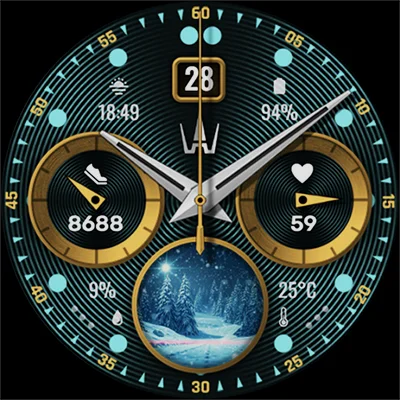
If you’re on the hunt for a sophisticated, feature-packed watch face that seamlessly blends classic aesthetics with modern functionality, look no further than the WAW015 Weather Classy Face. This exceptional analog watch face for Wear OS devices has been turning heads in the smartwatch community, and for good reason. It’s not just about telling time—it’s about experiencing your day at a glance with elegance and precision.
Table of Contents
In today’s fast-paced world, your smartwatch needs to do more than just display the time. It should be your personal assistant, weather forecaster, fitness tracker, and style statement all rolled into one. The WAW015 Weather Classy Face delivers on all these fronts while maintaining a refined, classic look that works equally well in the boardroom or on the hiking trail.
What Makes WAW015 Weather Classy Face Stand Out?
At its core, this watch face is designed for users who appreciate the timeless appeal of analog timepieces but refuse to sacrifice the smart features that make Wear OS devices so valuable. Let’s dive into what makes this watch face a must-have for your wearable.
Stunning Weather Integration with 30+ Conditions
One of the most impressive features of the WAW015 Weather Classy Face is its dynamic weather visualization system. Unlike basic watch faces that simply show a temperature number, this face displays almost 30 different weather pictures that change based on:
- Current weather conditions
- Time of day (day/night variations)
- Actual temperature readings
- Precipitation probability percentages
Whether it’s a sunny morning, a rainy afternoon, or a starry night, your watch face adapts in real-time to reflect what’s happening outside. This visual approach to weather information means you can glance at your wrist and instantly know whether you need an umbrella or sunglasses.
Comprehensive Health and Fitness Tracking
Health monitoring is seamlessly integrated into the WAW015 Weather Classy Face design. The watch face displays:
| Health Metric | Display Feature |
|---|---|
| Step Count | Real-time step tracking throughout your day |
| Step Progress | Visual progress indicator toward your daily goal |
| Heart Rate | Continuous heart beat monitoring |
| Activity Rings | Quick visual reference for daily activity levels |
This health data integration means you don’t need to navigate through multiple apps to check your fitness progress. Everything you need is right there on your main watch face, encouraging you to stay active throughout the day.
Essential Information at Your Fingertips
Beyond weather and health metrics, this analog watch face packs in crucial information without feeling cluttered:
- Date Display: Day of the month prominently shown
- Analog Time: Classic analog hands for traditional time reading
- Two Customizable Complications: Battery level and sunset/sunrise come pre-configured, but you can choose from many other options to suit your needs
- Two Customizable Shortcuts: Launch your favorite apps directly from the watch face with a single tap
The ability to customize shortcuts is particularly useful. Whether you want quick access to your music player, fitness app, or messaging service, you can set it up exactly how you want it.
Design Philosophy: Where Classic Meets Contemporary
The beauty of the WAW015 Weather Classy Face lies in its design philosophy. The developers understood that many users prefer the sophisticated look of traditional analog watches but don’t want to give up the smart features that make Wear OS devices indispensable.
Extensive Color Customization Options
One size doesn’t fit all when it comes to personal style, which is why this watch face offers a great spectrum of color combinations. You can:
- Match your watch face to your outfit
- Choose colors that align with your personal brand
- Adjust themes based on different occasions
- Create high-contrast combinations for better visibility in bright sunlight
- Opt for subtle tones for professional environments
This level of customization ensures that your watch face always feels fresh and aligned with your current mood or style preference.
Practical Applications for Different Users
For the Fitness Enthusiast
If you’re tracking your daily workouts and trying to hit those step goals, having immediate access to your health metrics makes a significant difference. The WAW015 Weather Classy Face keeps you motivated by displaying your progress throughout the day. Combined with weather information, you’ll know exactly when it’s the perfect time for that outdoor run.
For those who appreciate a more minimalist aesthetic in their fitness tracking, the Mono: Watch Face offers a sleek alternative that focuses on clean lines and essential information.
For the Busy Professional
Time management is crucial in professional settings, and this watch face helps you stay on top of your schedule. The combination of precise time display, date information, and customizable complications (like calendar events or task reminders) means you’re always prepared for your next meeting.
The battery level complication is particularly useful during long workdays—you’ll never be caught off guard by a dying smartwatch during an important presentation.
For the Outdoor Adventurer
Whether you’re hiking, cycling, or just enjoying nature, knowing the weather conditions is critical. The WAW015 Weather Classy Face provides real-time weather updates with visual indicators that are easy to read even in challenging outdoor lighting conditions. The sunset/sunrise complication helps you plan your adventures around daylight hours.
Setting Up Your WAW015 Weather Classy Face
Getting started with this watch face is straightforward:
- Download and Install: Get the WAW015 Weather Classy Face from Google Play
- Select as Active Face: Choose it from your Wear OS watch face selection menu
- Customize Complications: Long-press the watch face to enter customization mode
- Adjust Colors: Browse through the color palette and select your preferred combination
- Set Shortcuts: Assign your two favorite apps for quick access
- Enable Permissions: Grant weather and health permissions for full functionality
The interface is intuitive, making it easy even for users who are new to Wear OS customization.
Performance and Battery Considerations
A common concern with feature-rich watch faces is their impact on battery life. The WAW015 Weather Classy Face is optimized to provide all these features without dramatically reducing your smartwatch’s battery performance. The developers have struck a careful balance between functionality and efficiency.
That said, features like continuous heart rate monitoring and frequent weather updates do consume power. If battery life is your primary concern, you might want to explore options like the MD241 Digital watch face, which offers a different feature set with various power-saving options.
Comparing Watch Face Options
The Wear OS ecosystem offers countless watch face choices, but few combine classical analog design with comprehensive smart features as effectively as the WAW015 Weather Classy Face. Here’s how it positions itself in the market:
Strengths:
- Exceptional weather visualization with 30+ conditions
- Perfect balance of analog aesthetics and digital information
- Extensive customization options
- Comprehensive health data display
- User-friendly interface
Ideal For:
- Users who prefer analog watch faces with smart features
- Weather-conscious individuals
- Fitness trackers who want health data always visible
- Professionals who need quick information access
- Anyone seeking a highly customizable Wear OS experience
The Future of Smartwatch Personalization
The WAW015 Weather Classy Face represents the evolution of smartwatch interfaces—moving beyond simple time displays to become true information hubs on your wrist. As wearable technology continues to advance, watch faces like this set the standard for what users should expect: beauty, functionality, and personalization working in harmony.
If you’re exploring different watch face styles, the ILLUMINATOR Digital Watch face offers a completely different digital approach that might complement your collection for different occasions.
Making the Most of Your Experience
To truly maximize your WAW015 Weather Classy Face experience:
- Experiment with color combinations until you find your perfect match
- Regularly update your complications based on your current priorities
- Take advantage of shortcuts for your most-used apps
- Check weather visualizations to better understand the conditions
- Monitor your health metrics to stay motivated and active
- Adjust settings based on your daily schedule and needs
Final Thoughts
The WAW015 Weather Classy Face isn’t just another watch face—it’s a complete reimagining of how we interact with our smartwatches. By combining the elegance of traditional analog design with cutting-edge smart features, it offers the best of both worlds. Whether you’re checking the weather, tracking your fitness, managing your time, or simply appreciating beautiful design, this watch face delivers.
For Wear OS users who refuse to compromise between style and substance, the WAW015 Weather Classy Face is an investment in both form and function. It transforms your smartwatch into a sophisticated timepiece that works as hard as you do, keeping you informed, motivated, and on schedule—all while looking absolutely stunning on your wrist.
Frequently Asked Questions
How do I customize the complications on WAW015 Weather Classy Face?
To customize complications on the WAW015 Weather Classy Face, long-press on the watch face until you enter edit mode. You’ll see highlighted areas that represent customizable complications. Tap on each complication area to browse through available options, which include battery level, sunset/sunrise times, calendar events, alarm information, and many more depending on your installed apps. The watch face comes with battery level and sunset/sunrise pre-configured, but you have complete freedom to change these to suit your needs. Simply select your preferred complication and tap to confirm. The changes take effect immediately, allowing you to see which combinations work best for your daily routine.
Does WAW015 Weather Classy Face drain battery quickly on Wear OS devices?
The WAW015 Weather Classy Face is optimized for reasonable battery performance while delivering comprehensive features. While any feature-rich watch face will consume more battery than a basic static design, the developers have implemented efficient coding practices to minimize power drain. The main battery consumers are the continuous heart rate monitoring, frequent weather updates, and the dynamic visual changes based on conditions. In typical use, users report that the impact on battery life is noticeable but manageable—most can still achieve a full day of use on a single charge. To optimize battery life, you can adjust your Wear OS settings to reduce update frequency for certain features or disable always-on display mode when not needed. The actual battery impact will vary depending on your specific Wear OS device model and overall usage patterns.
Can I use WAW015 Weather Classy Face without an internet connection for weather updates?
The weather features on WAW015 Weather Classy Face require an internet connection to display current weather conditions, temperature, and precipitation probability. The watch face pulls real-time weather data through your Wear OS device’s connection (either directly via Wi-Fi/LTE or through your paired smartphone’s connection). Without internet access, you won’t see updated weather information or the dynamic weather visualizations that change based on conditions. However, all other features of the watch face—including analog time display, date, health metrics (steps, heart rate), and complications that don’t require internet—will continue to function normally. Once your device reconnects to the internet, the weather information will automatically update. For the best experience, ensure your Wear OS device maintains a stable connection throughout the day, either through Bluetooth pairing with your smartphone or direct Wi-Fi/cellular connectivity if your watch supports it.
📥 Download WAW015 Weather Classy Face APK Latest Version (Premium Unlocked)
Note: This version is safe. You can scan it yourself via VirusTotal.